
Crea
Affiliazione
Inizia Gratis Ora
AI Ad Design Workflow: Create Scroll-Stopping Visuals
Oct 13, 2026

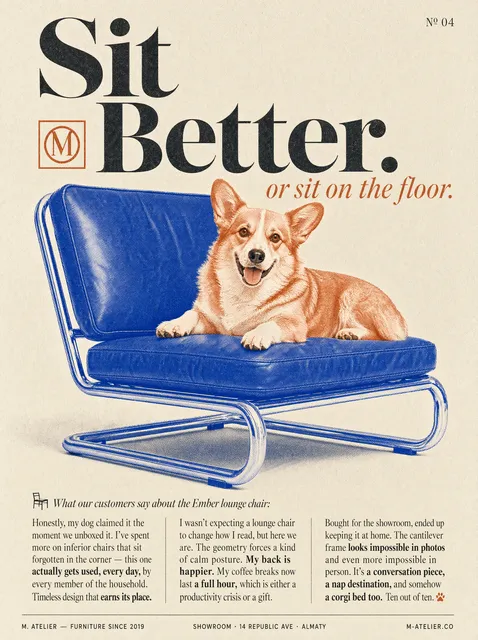
Ad creative is usually the fastest lever you can pull in a paid campaign. Budget changes take days to compound, landing page rewrites take weeks to ship, but a new visual can be live in an afternoon. That asymmetry is why so many marketing teams have quietly rebuilt their design process around AI-assisted tools: not because the tools are novel, but because the feedback loop between idea and published asset has collapsed from days to hours.
The catch is that generating an image has never been the hard part. Anyone can type a sentence and get a pretty picture back. The hard part is producing a visual that carries a specific message, survives a brand review, fits six different placements, and performs well enough to justify more spend. That is a workflow problem, not a prompt problem, and it is what this guide is about.
Why Ad Visuals Became an AI-First Discipline
Three shifts happened at roughly the same time. First, ad platforms made placements smaller and more numerous, so the number of distinct asset sizes a single campaign needs multiplied. Second, auction-based delivery systems reward novelty, meaning a creative that performed well for two weeks can quietly decay as audiences fatigue. Third, generative models crossed the threshold from interesting to usable for commercial imagery, particularly in categories like lifestyle scenes, backgrounds, textures, and abstract brand visuals.
Put those together and you get a structural mismatch. Traditional design pipelines are built for a small number of high-fidelity deliverables. Ad platforms want a large number of medium-fidelity variants, refreshed constantly. Humans cannot close that gap alone without either burning out or letting quality slide, so the sensible response is to automate the parts of the pipeline that are repetitive and keep humans on the parts that require judgment.
That division of labor is the single most useful mental model you can adopt. AI is very good at breadth: twenty background variations, twelve color treatments, five lifestyle contexts, three aspect ratios each. AI is still weak at intent: knowing which visual argument the ad is making, which claim is defensible, and what the brand would never say. Your job is to own intent and let the tools own breadth.
How the Modern Ad Visual Stack Fits Together
Before you touch any tool, it helps to separate the stack into layers. Most disappointment with AI design comes from expecting one tool to cover all of them.
Static image generation
This is the layer most people mean when they say AI design. Models like Midjourney, DALL·E, Stable Diffusion, Adobe Firefly, and the image modules inside larger creative suites excel at generating scenes, objects, textures, lighting conditions, and stylized compositions. They are strongest when you need a photographic context that would be expensive or slow to shoot: a product on a marble counter in morning light, a hand reaching for a device in a crowded café, a clean gradient backdrop for a headline.
Layout, typography, and composition
Generation produces raw material, not finished ads. A layout layer, whether that is Figma, Canva, Photoshop, or a templating system in your CMS, is where headlines, logos, legal lines, and buttons get placed. Keeping layout separate from generation is a deliberate choice: it means you can regenerate imagery without rebuilding typography, and swap copy without regenerating imagery.
Motion and video generation
Short-form video is now the default surface for many campaigns, and the video generation layer has matured quickly. Tools such as Runway, Kling, Pika, and similar systems can animate a still, generate b-roll from a prompt, or produce a short clip from a reference frame. For ad work, the most reliable pattern is still image-first: generate or shoot a strong frame, then animate it subtly. Fully generated motion tends to work best for abstract, atmospheric, and product-macro sequences rather than anything requiring precise human performance.
Asset management and versioning
This layer is unglamorous and often skipped, which is a mistake. Once you are producing forty variants a week, you need naming conventions, a source of truth for approved imagery, and a record of which variant ran where. Without it, you will regenerate an asset you already have, or worse, ship a visual that was retired for a reason nobody wrote down.
A Step-by-Step Workflow for Producing Ad Visuals with AI
What follows is a workflow that scales from a solo operator to a small team. Each step exists because skipping it creates a predictable failure downstream.
Step 1: Define the visual job to be done
Write one sentence describing what the image must accomplish. Not what it should look like, what it should do. Examples: show that the product fits in a coat pocket; make a boring financial service feel calm and trustworthy; imply speed without using a car; make a skincare bottle feel clinical rather than luxurious.
This sentence becomes the filter for every direction you generate. If you cannot articulate the job, you will generate attractive images that do not sell anything, which is the most common failure mode in AI-assisted design.
Step 2: Write a brief the model can actually use
A usable generation brief has six parts: subject, context, composition, lighting, mood, and technical constraints. Keep it in that order. For example: a matte ceramic coffee cup, on a wooden desk next to a folded newspaper, three-quarter view with the cup on the right third of the frame, soft window light from the left, quiet morning mood, plenty of negative space in the upper left for a headline.
That is a brief a model can partially satisfy and a designer can finish. Compare it to a prompt like 'beautiful coffee ad' and you can see the difference immediately.
Step 3: Generate a controlled set of directions
Generate in batches that correspond to hypotheses, not in chaotic bursts. A practical batch is eight to twelve images across three directions: literal product hero, contextual lifestyle, and abstract or graphic. Evaluate each direction as a whole rather than cherry-picking single images, because you are looking for a direction that can sustain a campaign, not one lucky frame.
Step 4: Composite, correct, and brand-lock
Now the human work begins. Remove artifacts, fix hands and edges, correct perspective, add the product accurately if it was not generated faithfully, apply brand colors with real hex values, and place typography. This is also where you confirm the image still communicates the job from step one after all the editing.
Step 5: Adapt to placements and aspect ratios
Produce your master at the largest size you need, then derive the rest. Square, vertical, and wide formats usually require recomposition rather than cropping, especially when text is involved. A common technique is to generate the same scene with a wide composition and a tall composition, then place the same headline in each. It looks intentional rather than cropped.
Step 6: Test, measure, and feed results back
Launch with a clear hypothesis per variant, keep everything else constant, and read results at the level of direction rather than individual image. If the contextual lifestyle direction beat the product hero direction by a wide margin, that is a signal you can act on for the next round of generation, and it is more durable than a single winning frame.
Prompt Patterns That Produce Usable Ad Imagery
Prompts are not spells, they are specifications. The patterns below are the ones that consistently produce material a designer can finish rather than material they must rebuild.
Product hero prompts
Anchor the product first, then describe the surface and the light. Specify the angle and how much of the frame the product should occupy. Ask for negative space explicitly, because models default to filling the frame.
Lifestyle and context prompts
Describe who is present, what they are doing, and how much of them is visible. Faces are the most common source of unusable output, so prefer over-the-shoulder, cropped, or partially obscured compositions unless you have a strong reason to show a full face.
Abstract and graphic prompts
These are the safest and often the most on-brand. Ask for materials, shapes, and color relationships rather than objects: liquid metal ribbons, layered translucent paper, soft gradients with grain, geometric forms in two brand colors. Abstract visuals age well, resize cleanly, and carry no unwanted cultural signals.
Negative prompts and guardrails
Every model has an aesthetic default, and it is usually glossy, symmetrical, and slightly over-lit. Counter it explicitly by asking for overcast light, natural imperfection, film grain, muted palettes, or documentary framing. If you are in a category where certain imagery is regulated or culturally sensitive, list those exclusions in the brief and review every output before it leaves the team.
Decision Criteria: Generate, Design, or Shoot
Not every visual should be generated. The decision comes down to four questions.
First, does the image need to prove something? If the claim depends on the product looking exactly as it does in reality, or on a real customer, shoot it. Generated imagery is fine for context and atmosphere, risky for evidence.
Second, how fast does it need to exist? If the answer is today, generation plus a layout pass is usually the only path that works.
Third, how many variants do you need? Above roughly ten variants per concept, generation becomes dramatically more efficient than any manual process.
Fourth, what is the cost of being wrong? A mislabeled ingredient or an implausible mechanical detail can create real problems. Regulated categories, medical claims, financial products, and anything involving children warrant conservative choices and human review at every stage.
A useful rule of thumb: generate the world around the product, design the message on top of it, and shoot the product itself when accuracy matters.
Common Mistakes That Kill Performance
Most AI ad creative underperforms for one of a handful of reasons.
Generating before briefing. Without the one-sentence job description, you optimize for attractiveness instead of persuasion, and attractive-but-nonspecific images are the most expensive mistake in the workflow.
Letting the model choose your palette. Default outputs drift toward high-contrast, saturated imagery that fights your brand colors and makes every ad look like every other ad.
Baking text into the image. Generated text is unreliable, uneditable, and impossible to localize. Keep type in your layout layer where you can fix a typo in seconds.
Ignoring aspect ratio logic. Cropping a wide scene into a vertical placement usually destroys the composition. Recompose instead.
Testing too many variables at once. If you change the image, the headline, and the call to action simultaneously, you learn nothing from the result.
Skipping the reviewer step. A second pair of eyes catches implausible shadows, impossible reflections, and details that read as strange to anyone outside your category.
Treating one win as a strategy. A single strong performer is a data point. A direction that wins across three consecutive rounds is a strategy.
A Pre-Launch Quality Checklist
Run every asset through this list before it goes live. It takes ninety seconds and prevents most embarrassing launches.
- Does the image still express the original job in one sentence?
- Is the product accurate in shape, color, label, and proportion?
- Are hands, eyes, teeth, and text free of artifacts?
- Is the logo placed, legible, and correctly sized for the smallest placement?
- Does the headline survive a squint test at thumbnail size?
- Is there a single clear focal point, or are multiple elements competing?
- Are the colors within the approved brand range?
- Does the asset meet platform file size, dimension, and safe-area requirements?
- Would a competitor be comfortable running this exact image? If yes, it is probably too generic.
- Has someone other than the creator reviewed it?
Scaling Campaigns Without Losing Brand Consistency
The tension in scaling creative is always the same: more variants means more chances to drift. Two mechanisms resolve it.
The first is a locked visual system. Define your typography scale, your layout grid, your color palette, your logo placement rules, and your photographic treatment, then build templates that enforce them. Generation feeds the templates; it does not replace them.
The second is a rotating core of recurring motifs. Choose three to five visual elements that appear across every campaign, whether that is a specific lighting condition, a repeated geometric shape, or a consistent framing device. Audiences recognize brands through repetition far more than through any single image, and recurring motifs let you generate freely without losing that recognition.
Once both are in place, you can delegate generation, keep review centralized, and grow output without a proportional increase in review time.
Frequently Asked Questions
Do AI-generated ad visuals perform as well as photography?
For backgrounds, textures, abstract graphics, and lifestyle context, well-executed generated imagery performs comparably, because the viewer is reading atmosphere rather than scrutinizing detail. For product accuracy, human faces, and evidence-based claims, photography still wins. The strongest campaigns usually combine both: real product, generated world.
How do I avoid the generic AI look?
Name the aesthetic you want instead of hoping the model guesses. Ask for specific lighting conditions, film references, lens characteristics, and imperfection. Reduce saturation, add texture, and avoid symmetrical hero framing. Most importantly, add a human layout pass with real typography, because the giveaway is usually the composition rather than the render.
Should I put text inside the generated image?
Almost never. Generated lettering is unreliable, hard to edit, and impossible to localize. Generate or shoot the background, then set type in your layout tool where you control font, hierarchy, spacing, and language variants.
How many variants should I test at once?
Start with three directions and three variants per direction. That is enough to detect whether a direction works without fragmenting your traffic so thinly that every result is noise. Once a direction wins, expand inside it rather than adding new directions.
Can I use generated visuals in regulated industries?
Yes, with process. Keep a human reviewer in the loop, document what was generated and what was shot, and never let a model invent a claim, a number, a certification, or a product attribute. If a visual could be read as evidence, it should be real.
What is the fastest path to a first usable ad set?
Pick one direction, write the six-part brief, generate twelve images, choose the best three, composite them into a locked template, produce square and vertical versions, and launch with a single clear hypothesis. That entire sequence can realistically be completed in a single working session, and it gives you a real result to iterate on rather than a folder of pretty maybes.
Do I need a dedicated AI design tool, or can I use what I already have?
Most teams already have enough. A generation tool, a layout tool, and a naming convention cover the majority of ad creative needs. Add specialized motion tooling when video becomes a significant part of your mix, not before. The workflow matters far more than the number of tools in it.
Getting Started Without Overbuilding
The temptation with a new capability is to build an elaborate system before you have produced anything. Resist it. Run the workflow once, end to end, on a real campaign with a real deadline. You will learn more from one published variant than from a week of tool evaluation.
Then iterate on the weakest link. If generation quality is fine but your assets look inconsistent, tighten the template. If everything looks consistent but performance is flat, revisit the brief and the direction-level hypotheses. If output is strong but slow, automate the resize and naming steps first, because those are the most repetitive parts of the pipeline.
The teams that get the most from AI-assisted ad design are rarely the ones with the most advanced tooling. They are the ones that treat generation as one step in a disciplined process, keep intent in human hands, and ship often enough to learn what actually works.

Alexander
More Blogs
Read MoreVidu Q4 Alternatives: 4K AI Video Models Compared (2026)
Vidu Q4 alternatives compared: Kling 4.0, Seedance 2.5, Wan 3.0, and Runway Gen-4 — 4K support, input modes, durations, audio, and what each costs in credits on Domer.
Top 4K AI Image Generators in 2026: 5 Models Compared on Real Costs
The top 4K AI image generators on Domer compared: Flux 3 Klein, Nano Banana 2.1, GPT Image 2.5, GPT Image 2, and Nano Banana Pro — 4K credit costs, reference limits, and speed.
Nano Banana 2.1 vs GPT Image 2.5: Which Image Model Should You Use? (2026)
Nano Banana 2.1 vs GPT Image 2.5 Flare compared: credit costs per resolution, aspect ratios, reference images, text rendering, and which tasks fit each model.