

Affiliazione
Inizia Gratis Ora
AI Image Generators for Gothic Portraits: A Practical Guide
Oct 14, 2026


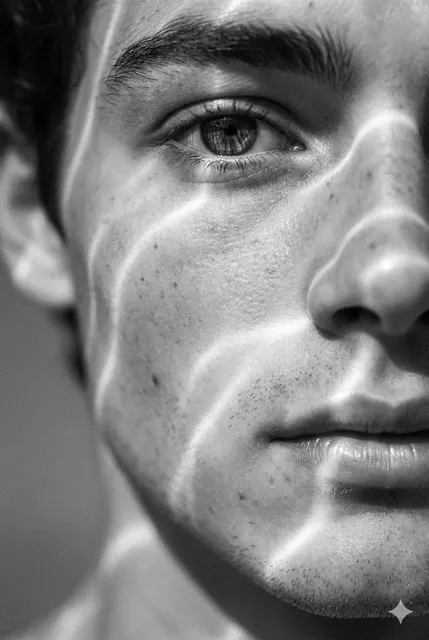
Why Gothic Portraits Are Harder Than They Look
Ask a general-purpose image model for a portrait and you will get something clean, bright, and commercial. Ask it for a gothic portrait and you will often get a costume party: plastic fangs, purple fog, and a vampire cape borrowed from a discount rack. The distance between those two results is the entire craft.
Gothic portraiture draws from Romanticism, Victorian mourning photography, symbolist painting, and a century of horror cinema. Its power comes from restraint — deep shadow, muted color, stillness, and the sense that something is being withheld. Image models are optimized to produce immediately legible, well-exposed images. Every default pushes against the mood you are trying to build.
The second difficulty is faces. Generative models are tuned extremely hard on human faces, so small deviations read as uncanny almost instantly. Gothic work actually wants a trace of the uncanny, but it needs to be deliberate: a slightly waxy pallor, eyes that catch too little light, a collar sitting a degree too high. Random artifacts just look like mistakes.
The third difficulty is continuity. One striking portrait is easy. Twelve portraits of the same character, in the same wardrobe, lit the same way, across different rooms and different decades, is a production problem — and that is where most tools and most casual workflows fall apart.
The Visual Grammar of Gothic Portraiture
Before comparing generators, it helps to name the ingredients. Gothic portraits are recognizable because of a small set of repeatable visual decisions. If you can describe them, you can prompt them.
Light and shadow
Low-key lighting is non-negotiable. One dominant light source, generous falloff into black, and no flat fill light. Think of a single window, a candle, or a sliver of moonlight entering from the side. Rim light should be a thin line that separates the subject from a dark background, not a second key. Useful vocabulary: chiaroscuro, low-key, candlelit, single-source, volumetric haze, deep negative fill, high contrast ratio.
Texture and wardrobe
Texture is what makes a gothic generation look expensive rather than generic. Lace, velvet, brocade, mourning crepe, tarnished silver, cracked porcelain, wet slate. Wardrobe specificity matters as much as style words: a high lace collar, a cameo brooch, a black veil, a mourning ring, a fitted waistcoat. Vague words like "gothic dress" produce vague results.
Symbolism and staging
Symbols should be chosen sparingly. A raven, a moth, a dead rose, a hand mirror, drifting fog — one or two motifs are enough. Stack five and the image becomes a cliché collage. Composition matters too: vertical framing, subject slightly off-center, a large area of empty dark space to let the mood breathe.
A Practical Workflow From Reference to Final Frame
Most disappointing gothic portraits come from skipping steps rather than from bad tools. This sequence works with almost any generator.
Build a reference board first
Collect ten to twenty images that describe the mood: lighting studies, garment details, paintings, film stills, photographs of architecture. Do not copy them — use them to write down specific, nameable qualities. "Wet cobblestone with a warm point light at camera left" is useful. "Gothic vibes" is not.
Lock the lighting before the face
Generate rough, low-detail compositions first. Ignore the face, the hair, and the wardrobe. You are only judging where the light falls and how much of the frame stays black. Once lighting is right, the rest of the work has a foundation.
Iterate in passes
Work in three passes: blocking (pose, light, framing), wardrobe (garments, hair, props), and detail (skin texture, eyes, jewelry, fabric weave). Change one category per round. Changing everything at once makes it impossible to know what improved the image.
Fix, don't re-roll
When ninety percent of an image is right and the hand is wrong, inpainting is faster and more controllable than a new generation. Mask the problem area, keep the prompt short, and let the rest of the frame stay frozen.
Finish with controlled grading
Treat the output as a raw file. A gentle curve, a slight desaturation of skin, a touch of grain, and a hand-painted shadow will do more for atmosphere than another hundred generations.
Choosing the Right Generator for the Job
Generators are not interchangeable, and the best choice depends on whether your bottleneck is idea exploration, texture quality, or series consistency.
Prompt-led hosted tools
Hosted generators are the fastest path to a striking single image. They excel at aesthetic coherence and drama, and their style controls respond well to mood language. Their weakness is repeatability: getting the same character twice can be difficult unless the platform supports reference images or character locking.
Open-weight pipelines with adapters
Running a model locally or on rented hardware gives you full control: seeds, schedulers, guidance scales, and lightweight style adapters trained on your own reference set. This is the strongest option for consistency, because you can train a small adapter on fifteen to thirty curated portraits of one character. The trade-off is learning curve and hardware cost.
Photorealism-first models
Some tools are optimized for photographic realism. They produce convincing skin, hair, and fabric, which is ideal for undead or vampiric subjects that must feel physically present. They tend to be less flexible stylistically, so pair them with strong art direction in the prompt.
Editing and inpainting suites
Dedicated editing tools — generative fill, expand, relight, and remove — are where a good portrait becomes a finished one. Choose a generator that either includes serious editing or exports cleanly into one that does.
Decision criteria that actually matter
- Reference image support and character consistency controls
- Reliable inpainting and outpainting at high resolution
- Seed control and batch generation for exploring variations
- Licensing terms that match commercial use, including for client work
- Local versus cloud execution, and what your hardware can handle
- Export formats, color profiles, and upscaling quality
- Learning curve relative to deadline pressure
Prompt Engineering for Dark Elegance
A reliable gothic prompt follows a stable order: subject, wardrobe, expression, lighting, camera, palette, texture, atmosphere, format. Order matters because most models weight early tokens more heavily.
A structured example:
portrait of a pale woman in her late twenties, high lace collar, black
velvet bodice, cameo brooch, calm unreadable expression, single candlelit
key light from camera left, deep shadow filling the right third, 85mm
lens, shallow depth of field, muted palette of charcoal and dried rose,
visible fabric weave and skin texture, faint haze, vertical composition
A negative prompt is just as important. Common words to exclude: oversaturated, neon, purple glow, plastic skin, HDR, smiling, bright background, symmetrical studio lighting, text, watermark, extra fingers.
Three habits separate strong prompters from weak ones. First, use lighting vocabulary instead of mood vocabulary — "single-source low-key light" outperforms "creepy lighting" every time. Second, keep the guidance scale moderate; pushing it very high tends to produce hard, over-contrasted, artifact-heavy images. Third, describe texture explicitly, because that is where models tend to smooth everything into plastic.
Consistency Across a Series
If you are producing a set — a graphic novel, an album cover cycle, a character bible, a fashion lookbook — consistency is the real technical challenge.
Start by fixing variables you can control: same seed, same aspect ratio, same lighting description, same lens language. Then use whatever character reference feature your tool provides, feeding it the two or three strongest images from earlier passes.
For demanding projects, train a small style or character adapter on a curated set of fifteen to thirty images that share lighting, framing, and wardrobe. This locks identity more reliably than prompt wording alone, because the model learns the specific face rather than an average of faces.
Maintain a wardrobe sheet. Write down exact garment descriptions, colors, and accessories, and paste them verbatim into every prompt. Rename files with a consistent scheme — character, scene, take, pass — so you can find the reference image you need without scrolling.
Finally, review your series as a contact sheet, not one image at a time. Inconsistencies that are invisible in isolation — a changed collar height, a shifted light direction, a warmer skin tone — become obvious in a grid. Fix them before you finish any single frame.
Common Mistakes and How to Fix Them
The same handful of problems appear in almost every gothic portrait project.
Relying on the word "gothic" alone. The model has no shared definition of it. Replace the word with concrete instructions about light, garment, palette, and texture.
Over-prompting. Long prompts with contradictory lighting cancel each other out. If you describe both candlelight and moonlight, you get neither. Keep one light source and one mood.
Purple and blue color casts. Many models reach for cold neon tones when asked for dark images. Counter this by specifying a muted palette explicitly: charcoal, bone, deep umber, dried rose, tarnished silver.
Symbol overload. One raven is eerie. Four ravens, a skull, a clock, and a dead rose is a novelty poster. Choose one motif and let the emptiness do the work.
Plastic skin. Over-smoothed faces kill the atmosphere. Ask for visible skin texture, pores, and slight unevenness, then add fine grain in post.
Ignoring hands and edges. Gothic poses often include hands holding objects, veils, or jewelry. Check hands, collars, and hair edges at full resolution before you commit to a direction. Inpaint anything broken rather than regenerating the whole image.
Upscaling before the anatomy is correct. Upscaling amplifies errors instead of hiding them. Fix the composition and the face at base resolution first, then upscale, then add a final grain pass.
Post-Processing for Atmosphere and Print
The last ten percent of the work happens outside the generator.
Start with tone. A gentle S-curve deepens shadows without crushing them, and a small reduction in saturation keeps skin from looking rosy. If your image feels flat, darken the background instead of brightening the subject.
Add imperfection. Fine grain, subtle halation around bright highlights, and a very slight vignette push the image toward analog photography. Keep the effect modest; heavy grain reads as a filter rather than a finish.
For print, work at 300 dpi at the intended dimensions, check that blacks are not clipped beyond what your printer can hold, and convert to CMYK for offset printing while keeping an sRGB master. Matte and textured papers suit gothic imagery far better than glossy stock, because they deepen blacks and reduce glare.
Rights, Likeness, and Style Ethics
Dark imagery does not exempt a project from ordinary legal and ethical care.
Do not name living artists in prompts as a style shortcut. Beyond the questionable ethics, it creates unclear provenance for commercial work. Describe techniques instead — brushwork, palette, lighting — and cite your influences in the project documentation rather than the prompt.
If your portrait is based on a real person, get permission. Generating recognizable likenesses of real people without consent is a legal risk in many jurisdictions and a reputational one everywhere. Keep records of which model, which prompt, and which references produced each final image, especially for client work. Check the license of every model and every adapter you use, because commercial terms vary widely between hosted and local options.
FAQ
Do I need an expensive tool to make good gothic portraits?
No. A hosted generator plus a solid prompt structure and twenty minutes of post-processing will outperform an advanced pipeline used carelessly. Tool choice matters far less than lighting control and iteration discipline.
Why do my gothic portraits look purple?
Models often associate darkness with cold neon tones. Counter it by naming a muted palette explicitly and adding oversaturated, neon, and purple glow to your negative prompt.
How do I keep the same character across many images?
Lock the seed and framing, reuse identical wardrobe text, supply reference images from your strongest takes, and for larger projects train a small adapter on a curated portrait set. Review everything on a contact sheet to catch drift.
Should I generate at high resolution from the start?
Generally no. Compose and correct at base resolution where iteration is fast, then upscale once the composition and anatomy are settled.
How many variations should I generate per concept?
Enough to see the range of lighting options, usually eight to twenty. Pick two directions, then refine rather than generating another large batch. Exploration is cheap; indecision is expensive.
Can AI gothic portraits be used commercially?
Often yes, but it depends on the model license and the references used. Avoid recognizable real people without consent, avoid prompting for living artists' names, and document your process so you can answer questions about origin later.

Alexander
More Blogs
Read MoreVidu Q4 Alternatives: 4K AI Video Models Compared (2026)
Vidu Q4 alternatives compared: Kling 4.0, Seedance 2.5, Wan 3.0, and Runway Gen-4 — 4K support, input modes, durations, audio, and what each costs in credits on Domer.
Top 4K AI Image Generators in 2026: 5 Models Compared on Real Costs
The top 4K AI image generators on Domer compared: Flux 3 Klein, Nano Banana 2.1, GPT Image 2.5, GPT Image 2, and Nano Banana Pro — 4K credit costs, reference limits, and speed.
Nano Banana 2.1 vs GPT Image 2.5: Which Image Model Should You Use? (2026)
Nano Banana 2.1 vs GPT Image 2.5 Flare compared: credit costs per resolution, aspect ratios, reference images, text rendering, and which tasks fit each model.