

Affiliazione
Inizia Gratis Ora
AI Music Promotion: Tools and Workflows for Artists
Oct 15, 2026
Why AI Changed the Music Promotion Playbook
The hardest part of promoting music has never been the music itself. It is the sheer volume of supporting work: the clips, the covers, the captions, the pitch emails, the teaser edits, the snippets, the thumbnails, the follow-up posts. A single release can easily require forty to eighty separate assets if you want to show up consistently on short-form video, streaming profiles, and social feeds. That workload is what breaks independent artists, not a lack of songs.
AI changes the math on asset production. It compresses the distance between an idea and a usable file. A lyric concept that used to sit in a notes app for three weeks can become a finished vertical clip in an afternoon. A photo shoot you cannot afford can be replaced, at least in part, by a generated visual world that matches your record's mood.
What AI does not change is taste. Algorithms reward watch time, replays, saves, and shares, and none of those metrics care whether a human or a model rendered the background plate in your clip. They care whether the first two seconds are interesting and whether the payoff justified the attention. AI gives you more shots at that payoff. It does not decide what the payoff is.
The practical framing, then, is not "AI versus human creativity." It is "AI as a production multiplier for people who already have a point of view." Everything below assumes you have a song, a mood, and something to say.
Build a Promotion Asset Map Before You Generate Anything
Most artists start with the tool and end with a folder of unrelated files. A better approach is to map the campaign before opening a single app. Decide what each asset is for, where it will live, and what format it must be, then generate to spec.
| Asset | Job | Format | Typical Quantity |
|---|---|---|---|
| Teaser clip | Announce the release | 9:16, 7–15s | 3–5 |
| Hook loop | Drive replays | 9:16, 5–10s | 4–8 |
| Lyric video | Hold attention, aid singalongs | 16:9 and 9:16 | 1 + 3 cutdowns |
| Cover art | Identify the record everywhere | 3000×3000 | 1 + 2 alternates |
| Canvas / loop | Streaming profile motion | 9:16 short loop | 1 |
| Photo set | Press, playlist pitches | 2000px+ stills | 6–12 |
| Story frames | Daily engagement | 9:16 | 10–20 |
The map matters because it prevents the classic failure mode: generating thirty beautiful clips that all say the same thing and none of which answer a fan's question. A teaser should create curiosity. A hook loop should deliver the best six seconds of the song. A lyric clip should make the words readable on a phone screen at arm's length. Same song, three different jobs.
Write the map in a simple document and keep it open while you work. Every generated file gets a name that ties it to a row in the table. This one habit saves more time than any single AI tool will.
AI Video: From Treatment to Finished Clip
Video is where AI has moved fastest, and where the biggest quality gains are available to artists with small budgets. The workflow below is deliberately boring: it produces consistent results instead of lucky accidents.
Writing a treatment you can actually generate from
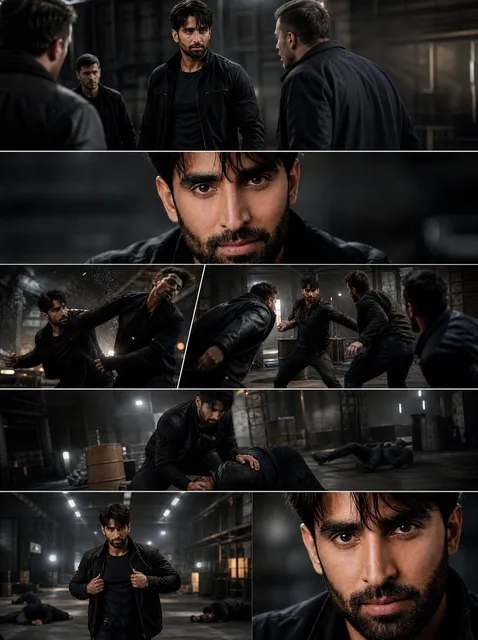
A treatment is one paragraph: setting, subject, movement, light, and emotional temperature. "A lone figure walks through a rain-slicked alley at night, sodium streetlights, camera drifts alongside, everything slightly slow." That is enough for a text-to-video model to work with, and it is specific enough to repeat across many shots.
Avoid prompts built from adjectives alone. "Cinematic, moody, 4K, masterpiece" tells a model nothing about what should be on screen. Describe physical things: surfaces, weather, fabric, direction of movement, whether the camera is handheld or locked off.
Keyframes, characters, and style consistency
Consistency is the hardest part of AI video. A person who looks right in shot one can look like a different human in shot four. Three techniques reduce that problem:
- Start from a still. Generate or photograph a reference image first, then animate from it. Image-to-video output is far more controllable than pure text-to-video.
- Lock a style string. Pick a small set of descriptors (film stock, lens, palette, grain) and paste the same wording into every prompt for that project.
- Reuse the same seed when the tool supports it, so the model's internal randomness stays stable.
If a face is central to the video, shoot it for real. A phone camera and a $40 light will beat a generated face for anything longer than two seconds. Use AI for environments, textures, transitions, and abstract sequences where the audience is not inspecting anatomy.
Editing, captions, and platform-native cuts
Raw AI clips are ingredients, not meals. Assemble in a real editor, cut on the beat, and add burned-in captions, since a large share of viewers watch with sound off during the first few seconds. Tools like CapCut, Descript, and DaVinci Resolve all handle vertical timelines, auto-captions, and fast trimming.
Export at least three versions of every strong idea: a 6-second loop, a 15-second teaser, and a 45–60 second extended cut. The same footage supports all three, and each version fits a different placement in the campaign.
Visual Identity Beyond the Music Video
Cover art and press assets
Cover art is your thumbnail everywhere: streaming apps, playlist rows, social grid, press coverage. Generate wide, then crop tight. A useful technique is to produce five or six variations of the same concept and choose the one that reads best at 100 pixels wide, because that is how most people will first see it.
Upscale the chosen image properly rather than exporting a small file large. Most image tools include an upscaler; use it, then check for smeared textures at full size before uploading to distributors.
Lyric cards and quote clips
Lyric assets are the cheapest engagement you can make. Pull the line that hits hardest, set it on a still or a slow pan, and time the text reveal to the vocal. Ten of these take an hour once you have a template, and they give fans something to share that carries your words rather than just your face.
Motion design for loops
A three-second seamless loop for your streaming profile does more for perceived professionalism than most artists expect. Keep it simple: slow drift, gentle grain, or a light flicker synced to the intro. Test the loop point twice before exporting; a visible jump breaks the illusion instantly.
Audio-Side AI: Demos, Stems, and Sound Design
Promotion assets often need audio that is not the full master. AI helps in three specific places:
- Stem separation lets you build instrumentals, acapellas, and snippet versions from a finished mix without going back to the session. This is invaluable for teaser clips where the vocal should sit alone.
- Loudness matching keeps your clips from being quieter than everything else in a feed. Normalize to roughly -14 LUFS for social placements and check the result on a phone speaker, not just studio headphones.
- Sound design and texture fills gaps in B-roll, intros, and transitions. Small risers, room tone, and reversed tails make generated footage feel intentional rather than assembled.
Voice tools deserve a caution. Cloning your own voice for narration is low risk. Replicating another artist's voice, or a recognizable performer's tone, is a legal and reputational minefield that is not worth the short-term attention.
Audience Research, Segmentation, and Release Timing
Segments worth building
Treat your audience as three or four distinct groups rather than one mass. A workable starting segmentation for an independent artist looks like this:
- Core fans who stream on release day and buy merchandise. They want depth: studio footage, demos, process.
- Playlist listeners who discovered you through a curator. They want the song, cleanly presented, with minimal friction.
- Short-form scrollers who know one hook. They need the hook repeated in different visual contexts until a name sticks.
- Local or scene audiences who care about shows, venues, and collaborators. They need dates, cities, and faces.
Each segment gets different cuts of the same material. Core fans get the four-minute behind-the-scenes edit; scrollers get the six-second loop. This is not extra work; it is the same footage recombined.
Trend spotting and choosing a release window
Analytics tools can surface which sounds, tempos, and formats are rising in your genre, and reading those signals is genuinely useful for planning. The trap is chasing a trend that peaks before your master is finished.
A more reliable approach is to watch two or three signals over several weeks: what audio is being reused in your niche, what clip lengths hold attention, and which days your own posts historically overperform. Combine that with a realistic production timeline and pick a window you can actually hit. A well-executed release on a quiet week beats a rushed release during a spike you cannot compete in.
Personalization: Chatbots, Email, and Fan Moments
Personalization used to mean putting a first name in an email subject line. AI makes it possible to be specific at scale: recommending a song based on what someone already played, generating a personalized thank-you video for a superfan, or answering common questions instantly.
Practical uses that do not feel creepy:
- A simple bot on your site that answers "when is the next show," "where can I buy vinyl," and "what's the presave link."
- Email flows segmented by listening behavior, so heavy listeners get the deep-cut announcement and casual listeners get the single.
- Post-purchase messages that reference the specific item bought and the city it shipped to.
The line to respect is consent. Reach out to people who opted in, do not fake intimacy you have not earned, and keep the tone recognizably yours. Fans forgive automation; they do not forgive being deceived.
Distribution: One Song, Many Formats
Distribution is no longer a single upload. A release now spans streaming, short-form video, stories, direct messages, newsletters, and live. AI-assisted repurposing is what makes that manageable.
A practical pipeline: master the song, cut three lengths (6s, 15s, 45s), render each in three aspect ratios (9:16, 1:1, 16:9), write captions in two tones (informational and playful), and schedule across a two-week window with a clear arc from teaser to release to continuation. Every asset keeps the same recognizable visual signature so a viewer who sees three of them connects them to one artist.
Keep metadata clean and consistent across platforms. The artist name, track title, and artwork should be identical everywhere; inconsistency splits your identity in search and recommendation systems, which quietly costs you discovery.
Measuring What Moves the Needle
Vanity metrics are comfortable and useless. Saves, shares, profile visits, and completion rate tell you far more than raw view counts. A clip with 2,000 views and 180 saves outperformed a clip with 40,000 views and 12 saves, because saves indicate intent to return.
Build a simple weekly loop:
- Pick the three best and three worst performing assets of the week.
- Identify one variable that differed: hook timing, caption style, color, length, sound.
- Make next week's batch with more of the winning variable and none of the losing one.
That is the entire system. Run it for two months and you will know more about your audience than any dashboard report can tell you.
Mistakes that sabotage AI-assisted campaigns
- Generating before planning. A hundred files with no purpose is not progress.
- Uniform output. If every clip looks the same, the algorithm stops testing them and so do viewers.
- Ignoring sound-off viewing. No captions means no message for a large share of your audience.
- Over-polishing. Slightly rough, human-feeling content often outperforms flawless renders.
- Skipping rights checks. Model terms, sample clearance, and likeness rules all apply to promotional material.
- Publishing without listening on a phone. Half your audience hears your mix through a tiny speaker.
FAQ
Do I need expensive tools to start?
No. A phone, a free editor, one image generator, and one video generator cover the majority of a release campaign. Add specialized tools only when a specific bottleneck appears.
Will fans know the visuals are AI-generated?
Sometimes, and it rarely matters if the result is good and the song is the focus. What damages trust is presenting AI output as documentary truth, such as generated "live footage" or fabricated behind-the-scenes moments.
How much of a campaign should be AI?
A reasonable split is AI for volume and variation, human effort for the hero assets: the official video, the cover, the performance clips, and anything where your actual presence is the point.
What if my AI clips get low views?
Change one variable at a time. The most common culprits are a slow first second, an unclear subject, and a lack of text on screen. Fix the first frame before you fix anything else.
Can AI help with playlist pitching?
It can help you write and organize pitches and keep deadlines straight, but relationships with curators still run on human credibility. Use AI to prepare, not to mass-message.
How often should I post?
Consistency matters more than frequency. Three strong posts a week that you can sustain will outperform a burst of twenty followed by silence.
Is it worth generating my own video instead of hiring?
Hire for the pieces that define you visually. Generate for the pieces that fill the calendar. Most artists end up using both, and the balance shifts as their budget and audience grow.
A Sustainable Weekly Rhythm
Promotion fails from exhaustion more often than from bad strategy. A rhythm you can keep looks like this: one day for planning and prompt writing, one day for generating footage and images, one day for editing and captioning, and a short daily block for posting and replying. Batch the creative work so the publishing days stay light.
Keep a running file of hooks, phrases, and visual ideas that did not fit the current release. By the time the next single is ready, you will have a backlog of tested concepts instead of a blank page. That backlog, more than any specific tool, is what turns AI from a novelty into an actual promotional advantage.

Alexander
More Blogs
Read MoreVidu Q4 Alternatives: 4K AI Video Models Compared (2026)
Vidu Q4 alternatives compared: Kling 4.0, Seedance 2.5, Wan 3.0, and Runway Gen-4 — 4K support, input modes, durations, audio, and what each costs in credits on Domer.
Top 4K AI Image Generators in 2026: 5 Models Compared on Real Costs
The top 4K AI image generators on Domer compared: Flux 3 Klein, Nano Banana 2.1, GPT Image 2.5, GPT Image 2, and Nano Banana Pro — 4K credit costs, reference limits, and speed.
Nano Banana 2.1 vs GPT Image 2.5: Which Image Model Should You Use? (2026)
Nano Banana 2.1 vs GPT Image 2.5 Flare compared: credit costs per resolution, aspect ratios, reference images, text rendering, and which tasks fit each model.