

Affiliazione
Inizia Gratis Ora
AI Video Marketing Workflow: From Script to Personalized Ads
Oct 15, 2026
Why AI Belongs in the Video Marketing Stack
Video is the most persuasive format on the internet and also the most expensive one to produce. A single polished brand spot can consume weeks of scripting, shooting, editing, and revision cycles. That cost structure forces most teams into a predictable rhythm: a handful of hero videos per quarter, reused everywhere, slowly going stale.
Generative and assistive AI changes the economics rather than the craft. Instead of replacing the creative team, it removes the parts of the pipeline that were pure friction — rough cuts, aspect-ratio conversions, caption timing, variant production, and first-pass storyboards. The result is that the same team can ship ten times the volume without ten times the headcount.
That shift matters most in three places:
- Volume. Platforms reward freshness, and paid social burns through creative quickly. AI makes it realistic to test dozens of hooks instead of three.
- Speed. Trend-driven formats have a shelf life measured in days. A workflow that takes three weeks cannot respond to a moment that lasts four days.
- Localization. Subtitling, dubbing, and re-editing for multiple markets used to be a separate project. Now it is a button press plus review.
The goal of this guide is not to sell a specific platform. It is to lay out a repeatable workflow you can run with whatever toolset your team already has, and to be honest about where AI output still needs a human eye.
The End-to-End AI Video Workflow
Most teams fail with AI video because they start in the middle — generating pretty clips without a brief. The workflow below runs from strategy to delivery and can be compressed into a single day for a simple asset.
Briefing and script drafting
Start with the same document you would write for a traditional shoot: audience, single-minded message, proof points, tone, and the one action you want. Feed that into a language model and ask for five structurally different scripts rather than five variations of the same script. Structure variety (problem-solution, testimonial, demonstration, myth-busting, listicle) matters far more than word-level polish.
Write the first three seconds by hand. Opening frames decide retention, and generic AI openings are the most common reason a video dies at the two-second mark.
Storyboarding with generated keyframes
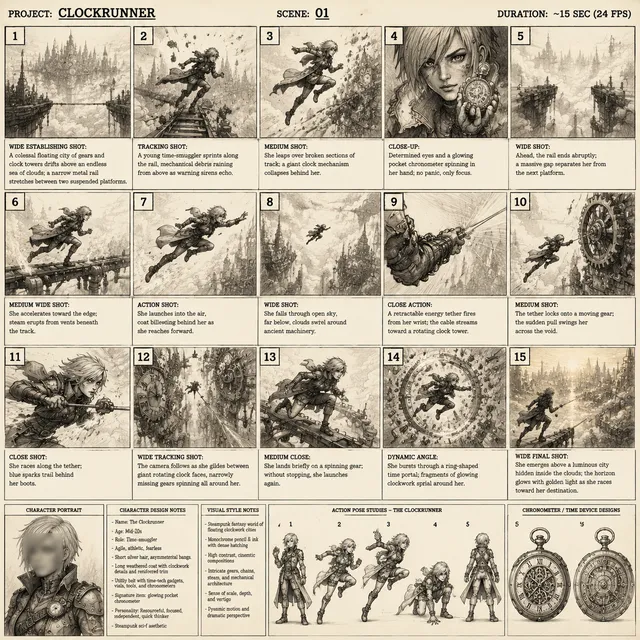
Before generating motion, generate stills. Keyframes are cheap, fast to review, and easy to discard. Approval on stills takes minutes; approval on finished video takes days. Build a board of six to twelve frames that establish character, setting, palette, and camera language.
This is also where you lock continuity. If your video features a recurring character, produce a small reference sheet — face, wardrobe, hair, and two or three signature poses — and reuse it across every prompt. Consistency is a prompting discipline, not a feature.
Generating and assembling shots
Generate in short clips, usually three to six seconds, and treat each as a shot rather than a scene. Short clips hide generation artifacts and give your editor real cutting material. Ask for a mix of shot sizes: wide establishing, medium dialogue, close-up detail, and insert shots of hands or objects. Editors cut on variety, and AI defaults to medium shots unless you ask otherwise.
Expect to generate three to five candidates per usable shot. Budget time for that ratio rather than treating it as failure.
Voice, music, and sound design
Synthetic voiceover is now good enough for narration, internal explainers, and localized versions, but it still struggles with irony, rapid dialogue, and emotional pivots. For brand films and testimonials, record a human.
Music is where AI saves the most tedious time. Generate or select a bed that matches tempo to your cut rhythm — roughly 100–120 BPM for energetic product content, 70–90 for calm explainers. Then do the part people skip: sound design. A whoosh, click, or room tone under a cut makes generated footage feel intentional instead of floaty.
Editing, captions, and versioning
Do the final assembly in a conventional editor. AI-assisted editors are useful for transcript-based cutting, silence removal, and automatic captioning, but the pacing decision should stay human. Once the master is locked, generate variants: 9:16, 1:1, 4:5, plus shortened 15-second and 6-second cuts. This is the single biggest time saving in the entire pipeline.
Personalization That Feels Helpful, Not Creepy
Personalized video used to mean swapping a first name into an intro card. Modern tools can change the entire creative based on audience data, which is powerful and easy to misuse.
A workable middle ground is segment-level personalization: build one master narrative and swap the elements that genuinely differ by audience.
- Opening hook — different pain points for different job roles.
- Proof point — the case study or statistic most relevant to the segment.
- Product shot — the configuration or use case that matches their industry.
- Call to action — demo request versus free trial versus newsletter, based on buying stage.
Keep the middle of the video stable so you are not rebuilding the whole asset for every audience. Three hooks times three proof points times two CTAs gives eighteen meaningful variants from one production cycle.
Two guardrails. First, only personalize on data you can explain if a customer asks — broad behavioral signals and declared preferences, not inferred sensitive attributes. Second, watch for the uncanny effect: if a viewer notices the video is targeting them, the illusion breaks and trust drops. Subtle swaps outperform obvious ones.
Quality Control: The Failure Modes to Hunt Down
AI video fails in predictable ways. Build a checklist and run it before anything ships.
- Hands and fine detail. Fingers, jewelry, cutlery, and tool use are still the most common breakdowns. Use close-ups sparingly or crop above the wrist.
- Text in frame. Signs, packaging, and screens almost always garble. Replace them with clean graphics in post rather than trying to prompt them into existence.
- Identity drift. Faces slowly morph across shots. Compare frame one and frame last side by side at full size.
- Physics and continuity. Liquid that does not pour, shadows that flip direction, props that teleport between cuts.
- Motion artifacts. Warping at frame edges, especially when a subject moves quickly or crosses another object.
- Audio mismatch. Lip-sync drift is usually a timing problem, not a model problem — nudge the audio by a few frames before regenerating.
Run a full-screen pass at 100% zoom, then watch the cut once on a phone with sound off. Most audience-facing errors surface in that second viewing.
Reading Analytics to Steer the Next Cut
Analytics should shape the next creative, not just score the last one. Focus on a small set of signals:
- Two-second hold rate. The purest measure of your hook. Underperformers rarely recover later.
- Retention curve shape. Note the exact timestamps where viewers drop. A cliff at eight seconds usually means a slow transition or a redundant line.
- Completion rate by length. Compare your 15-second and 45-second versions. Often the short cut has a higher completion rate but a lower click-through rate, and both numbers matter.
- Sound-off performance. If captions are doing the heavy lifting, your visuals need stronger text hierarchy.
Turn findings into rules. If close-up openings consistently beat wide shots, make that a briefing standard. If a specific proof point performs twice as well, promote it to the default. Rotate creative on a fixed cadence — roughly every ten to fourteen days in paid social — so fatigue never becomes the explanation for a drop.
Consistency Across a Campaign
A campaign looks professional when it looks like it came from one team. AI makes that harder because every generation is a fresh roll of the dice. Counter it with a written style guide that covers palette, camera language, typography, music genre, and pacing.
Three practical habits help:
- Build a reference library. Save approved keyframes, color grades, and sound beds so new work starts from something proven.
- Standardize prompts. Keep a shared prompt template with locked descriptors for light, lens, and mood, so output does not swing wildly between contributors.
- Lock the grade in post. Apply the same LUT or color treatment to every asset. A uniform grade does more for perceived quality than any single generation improvement.
Choosing Tools Without Locking Yourself In
Most teams end up with a small stack rather than one monolith. Evaluate each category separately, and prioritize export flexibility over feature lists.
| Category | What it does well | What to check before committing |
|---|---|---|
| Script and ideation | Volume and structure variety | Does it follow your brief or rewrite it? |
| Image and keyframe generation | Storyboards and reference frames | Character consistency and aspect-ratio control |
| Video generation | Short shot creation | Clip length, motion stability, resolution limits |
| Voice and dubbing | Narration and localization | Pronunciation controls and language coverage |
| Editing and captions | Assembly and versioning | Export options and transcript-based cutting |
| Analytics | Retention and creative comparison | Attribution clarity and segment-level reporting |
Two decision criteria matter more than anything else. First, can you export clean, watermark-free files in every aspect ratio you need? Second, does the tool let you reuse a character or style across sessions, or do you re-establish it every time? Portability and reuse are what separate a workflow from a novelty.
Common Mistakes That Undercut AI Video Campaigns
The failure patterns are consistent enough to list.
- Generating before briefing. Pretty clips with no message produce pretty, forgettable ads.
- Treating first output as final. The ratio of attempts to usable shots is a production reality, not a defect.
- Skipping sound design. Generated footage without layered audio reads as synthetic immediately.
- Over-personalizing. If the targeting is visible, it becomes unnerving.
- Ignoring the first frame. A weak opening wastes everything that follows.
- No version plan. If you only produce one aspect ratio, you will re-edit under deadline pressure.
- Chasing novelty. Viewers do not reward the fact that AI made it. They reward clarity and relevance.
A Practical 30-Day Rollout Plan
A staged rollout beats a big-bang switch.
Days 1–5 — Baseline. Pick one existing video and rebuild it with the AI workflow. Compare time spent and performance against the original. This gives you a real benchmark rather than a vendor claim.
Days 6–12 — Hook testing. Produce six opening variations of one narrative and run them against the same audience with identical targeting. Identify which structures hold attention.
Days 13–20 — Version factory. Take the winning narrative and generate your full aspect-ratio and length matrix, plus captions and localized subtitles for your top two markets.
Days 21–30 — Segment personalization. Build three audience variants with distinct hooks, proof points, and calls to action. Instrument the analytics before launch, not after, so you can attribute results to the right variable.
After the first month, the goal is a repeatable cadence: one new master narrative per cycle, and continuous variation around the winners.
Frequently Asked Questions
Will AI video hurt production quality? Only if you skip review. The output quality of a finished asset depends almost entirely on the editing, sound design, and color treatment layered on top of generated clips. A careful post pipeline makes generated footage indistinguishable in most social contexts.
How much of the process can realistically be automated? Storyboarding, versioning, captioning, and localization are close to fully automated today. Script approval, performance direction, and final pacing still need a human. Automation removes labor; it does not remove judgment.
Do I need a dedicated video team to run this? No, but you need one person who owns brand consistency. A single designer-editor with a strong style guide will outperform a distributed team generating assets independently.
How do I keep characters consistent across shots? Build a reference sheet with face, wardrobe, and two or three poses, then reuse the exact same descriptors in every prompt. Review stills before generating motion, and expect to regenerate roughly one shot in five.
What should I measure first? Two-second hold rate and the shape of the retention curve. Those two signals tell you whether the problem is your hook or your middle, and everything else is a refinement of that diagnosis.
Is personalized video worth the extra production effort? It is worth it when the segments differ on a variable that genuinely changes the pitch — role, industry, or buying stage. If the only difference is a name, the personalization is not earning its complexity.
How often should creative be refreshed? Treat creative like perishable inventory. In paid social, plan on a rotation every ten to fourteen days, and retire anything whose hold rate has dropped meaningfully from its own baseline rather than from a campaign average.
The teams getting the most from AI video are not the ones with the biggest tool budgets. They are the ones with a written brief, a locked style guide, a version plan, and the patience to review output frame by frame before it goes live. Everything else is speed on top of that foundation.

Alexander
More Blogs
Read MoreVidu Q4 Alternatives: 4K AI Video Models Compared (2026)
Vidu Q4 alternatives compared: Kling 4.0, Seedance 2.5, Wan 3.0, and Runway Gen-4 — 4K support, input modes, durations, audio, and what each costs in credits on Domer.
Top 4K AI Image Generators in 2026: 5 Models Compared on Real Costs
The top 4K AI image generators on Domer compared: Flux 3 Klein, Nano Banana 2.1, GPT Image 2.5, GPT Image 2, and Nano Banana Pro — 4K credit costs, reference limits, and speed.
Nano Banana 2.1 vs GPT Image 2.5: Which Image Model Should You Use? (2026)
Nano Banana 2.1 vs GPT Image 2.5 Flare compared: credit costs per resolution, aspect ratios, reference images, text rendering, and which tasks fit each model.