
Affiliazione
Inizia Gratis Ora
AI Video Workflow Guide: From Prompt to Polished Cut
Oct 14, 2026

Why a Repeatable Workflow Beats Chasing the Best Tool
Most creators do not have a video problem. They have a consistency problem. A single generation can look stunning: the light falls beautifully, the camera move feels cinematic, the subject's face holds together for four seconds. Then the next clip looks like it came from a different production entirely — different color science, different lens feel, a character whose jaw changes shape between cuts.
That gap between one impressive clip and a finished piece is where nearly all AI video projects die. The fix is not a better model. It is a workflow: a defined sequence of decisions that starts before you open a generator and ends after you have watched your export on a phone, a laptop, and a TV.
A good AI video workflow has four properties. It is repeatable, so two different projects feel like they belong to the same channel. It is inspectable, so when a shot fails you know which stage caused it. It is cheap to iterate, so a bad generation costs you minutes rather than an afternoon. And it is edit-aware, meaning it produces clips that actually cut together instead of a folder of unrelated beautiful moments.
This guide walks through that workflow stage by stage. It stays tool-neutral on purpose, because the tools change faster than the principles do. Along the way you will find decision criteria, failure modes, and small production habits that make the difference between a demo reel and work you can publish on a schedule.
The Five Stages of an AI Video Workflow
Think of AI video as a pipeline with five stages, each with its own deliverable and its own quality gate.
1. Pre-production. You produce a shot list, a style brief, and a reference board. The deliverable is a document a stranger could follow.
2. Asset generation. You create still images, motion clips, or both, working shot by shot. The deliverable is a named folder of candidate takes, not a single winner.
3. Selection and repair. You pick the best take per shot, then fix what you can with inpainting, extending, or a fresh generation with a tighter prompt. The deliverable is one usable clip per shot.
4. Assembly. You cut picture, add sound design, music, and voice, then color-match and stabilize. The deliverable is a locked sequence.
5. Delivery. You export multiple aspect ratios and lengths, check them on real devices, and archive the project files so you can revise later.
The most common mistake is skipping stage one and pretending stage three is free. Fixing a poorly specified shot during assembly costs ten times more attention than specifying it properly at the start. Every hour spent on a shot list saves several hours of regeneration.
A useful rule: never generate a shot you cannot describe in one sentence that includes subject, action, camera behavior, and lighting. If you cannot fill in those four slots, the model will fill them in for you, and you will not like its choices.
Pre-Production: Shot Lists, Prompts, and Reference Boards
Pre-production for AI video looks a lot like pre-production for animation. You are deciding what exists, how it moves, and how it should feel before a single frame is generated.
Write prompts that describe motion, not just subject
Most weak prompts are noun piles: "cyberpunk city, neon, rain, cinematic, 8k." That describes a photograph. Video models need verbs. Rewrite the same idea as: "Slow dolly forward through a rain-soaked alley at night, neon signs reflecting in puddles, camera passes a lone figure walking away from us, shallow depth of field."
Four slots keep prompts honest:
- Subject: who or what, with one distinguishing detail.
- Action: what changes between the first and last frame.
- Camera: static, pan, dolly, crane, handheld, orbit — pick one and commit.
- Light and mood: time of day, key light direction, color temperature, weather.
If a shot requires two camera moves, split it into two shots. Models handle one clear intention far better than two competing ones.
Build a reference board before you build anything else
Collect eight to twelve images that share a visual language: a color palette, a lens character, a level of contrast, a texture. This board does two jobs. It keeps you honest when a gorgeous generation drifts off-brief, and it gives you something to describe when writing style instructions or fine-tuning a small model on your own reference set.
Name files by shot, not by date: s03_alley_walk_hero.png, s03_alley_walk_alt_wide.png. When you are assembling at midnight, folder names are the only documentation you will actually read.
Generating Assets with Consistency Across Shots
Consistency is the hardest part of AI video and the part most tutorials skip. There are two broad approaches, and you should choose deliberately rather than by habit.
Image-first or text-to-video?
Image-first means you generate or photograph a still, approve it, then animate it. You get precise control over composition, casting, and color, and the still serves as a reusable anchor for the whole scene. The tradeoff is that motion can feel restrained, and some models add subtle morphing when pushed into large camera moves.
Text-to-video means the model invents composition and motion together. It is faster for abstract, environmental, or effects-driven shots — smoke, water, particles, crowds, landscapes. It is weaker when a specific face, product, or logo must stay identical across cuts.
A practical hybrid: use image-first for anything with a recurring character, product, or location; use text-to-video for atmosphere, inserts, and transitions. Label each clip by method so you know which lever to pull when a shot fails.
Locking characters, products, and places
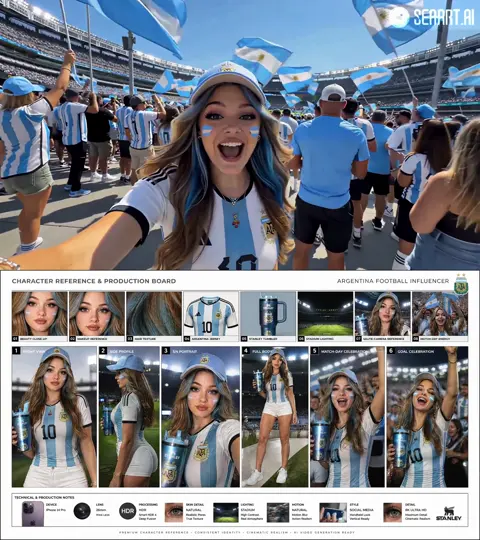
When the same subject appears in five shots, build a small identity kit: three to six approved stills from different angles, one close-up, one full-body or full-product frame, and a written description of immutable features (hairline, jacket color, logo placement, room layout). Reuse that kit for every generation in the sequence. If your tool supports reference-image conditioning, feed the same references every time rather than whatever looks good in the moment.
For locations, the equivalent is a layout sketch — even a rough top-down diagram of where the door, window, and table sit. Models drift less when the spatial relationships are described consistently in every prompt for that set.
Expect to generate three to six candidates per shot and keep one. Budget for that in your schedule instead of treating regeneration as a failure.
Style Control That Survives Multiple Shots
Style is not a filter you apply at the end. It is a set of constraints you enforce at every stage. The most reliable way to keep a channel looking coherent is a one-page style bible that travels with the project.
What belongs in a style bible
- Palette: three to five named colors with rough values, plus what to avoid.
- Lens and framing: preferred focal length feel, typical shot size, whether the camera is ever allowed to be handheld.
- Contrast and grain: clean digital, filmic, or heavily textured.
- Motion language: slow and deliberate, snappy and kinetic, or observational and still.
- Recurring elements: title treatment, transition type, lower-third style, sound signature.
Once written, the bible becomes reusable prompt fragments. Instead of retyping your aesthetic every time, keep a short style string — for example, "muted teal and amber palette, soft 35mm grain, shallow depth of field, slow deliberate camera" — and append it to every generation prompt. That single habit does more for visual consistency than swapping between models.
Fine-tuning versus prompt reuse
Fine-tuning a small personal model on your own reference set is worth it when you need a very specific recurring face, product, or illustration style that prompts cannot hold reliably. It is not worth it for a one-off project, for styles that are merely generic ("cinematic," "anime"), or when your reference set is inconsistent to begin with — a model trained on mixed references produces mixed results with more confidence.
Decision rule: if the same visual identity will appear in more than roughly ten shots or across more than two projects, invest in training. Otherwise, invest in better prompting and better reference conditioning.
Audio, Pacing, and the Assembly Edit
AI video gets assembled like any other footage, and the same rules apply: picture serves rhythm, and rhythm serves meaning.
Cut on motion, not on completion. A clip that ends with the subject coming to rest is harder to cut from than one that ends mid-gesture. Trim the last few frames of a drifting generation rather than letting it decay on screen.
Cover the joins. Generations rarely match perfectly. Use a cutaway insert, a whip transition, a light flash, or a sound accent at the seam. Editors have hidden mismatches this way for a century; the technique works just as well with synthetic footage.
Build sound before you polish picture. Lay down music, ambience, and any voiceover first, then cut picture to the audio. AI clips often have no usable sound, so the audio track is what makes the sequence feel intentional. Simple layers work: a bed of ambience, one music cue, and two or three diegetic accents (footsteps, a door, a whoosh) placed on the cuts.
Normalize and check dialogue first. If you use synthetic voice, verify pronunciation of names and numbers by listening at 1.5x speed, where mispronunciations jump out. Then normalize loudness so nothing clips when the video plays on a phone speaker.
Color-match as a group. Apply a single look across all clips rather than treating each one individually. Gentle contrast and saturation adjustments plus a shared grain pass will pull wildly different generations into one world faster than any per-clip correction.
Quality Control Before You Export
Watch every export at least twice: once at normal speed with sound, once at 2x speed with the sound off. The first pass catches story and audio problems. The second catches visual artifacts your brain was busy ignoring.
Build a checklist and use it every single time:
- Faces and hands. Pause on every frame where a character is prominent. Look for identity drift, melting fingers, or eyes that change direction between frames.
- Text. Any on-screen text generated by a model should be treated as suspect. Render titles and captions in your editor instead.
- Edges and backgrounds. Warping at the frame edge, objects that appear or vanish, architecture that changes shape during a camera move.
- Motion physics. Liquid that flows uphill, cloth with no weight, footsteps that do not match the surface.
- Continuity. Clothing, props, time of day, and screen direction across cuts.
- Technical delivery. Frame rate consistency, audio peaks, black frames at the head and tail, captions synced, and the safe area not covering a face.
When you find a defect, decide quickly between three responses: cut around it (cheapest), repair it (inpaint, reframe, or short re-generation), or regenerate the shot with a tighter prompt (most expensive but sometimes the only fix). Creators who waste hours are usually the ones who reflexively choose the third option for a problem the first option would have solved.
Common Mistakes and How to Avoid Them
Generating before specifying. If you cannot describe the shot in one sentence with subject, action, camera, and light, you are gambling. Write the line first.
Judging clips in isolation. A clip that looks great alone can be unusable next to its neighbors. Always review candidates in a timeline, side by side with the shots that come before and after.
Maximizing motion. New users push for dramatic camera moves because they look impressive in a single clip. Restrained movement cuts better, hides artifacts, and keeps the viewer focused on the subject.
Solving inconsistency with more generations. If five attempts all drift, the prompt is ambiguous, not unlucky. Rewrite the specification or add a stronger reference.
Ignoring aspect ratio until the end. Decide platforms up front. Crop-hostile compositions — wide establishing shots with small subjects — rarely survive a vertical reframe.
Skipping the sound pass. Silent AI video feels like a test render. Even minimal ambience and a music bed change how polished the result reads.
Never archiving. Keep project files, prompts, and reference boards. When a client asks for a revision, or when a new model arrives that could improve a shot, having the original specification saves the whole project.
Choosing Tools: Decision Criteria That Actually Matter
Tool comparisons age badly, so use criteria instead of rankings. Score any generator on these seven points and pick the one that fits your project rather than the one with the loudest launch.
- Motion control. Can you specify camera behavior, or only describe a scene and hope?
- Reference conditioning. Can you feed images to lock identity, style, or composition?
- Clip length and extendability. Does it give you enough duration to cut with, and can you lengthen a clip without melting the subject?
- Resolution and upscaling path. What does the raw output look like, and how does it survive a 2x upscale for a large screen?
- Reproducibility. Do repeated runs with the same input behave predictably? Deterministic-ish tools are easier to build a workflow around.
- Editing fit. Does the output arrive in a format and frame rate your editor handles without conversion gymnastics?
- Cost predictability. Understand what a finished minute of video costs in practice, including the failed takes. The cheapest per-generation price is often not the cheapest per finished shot.
Run the same three-shot test project through any tool you are considering: one dialogue-free character shot, one environmental shot, and one product or object shot. Compare the finished thirty seconds, not the marketing reel.
FAQ
How long should an AI-generated shot be? Two to five seconds covers most cuts. Longer generations accumulate drift and give you less control in the edit. Generate long, cut short.
Do I still need an editor? Yes. The assembly, sound, and color stages are where synthetic footage becomes a video. Editing is not optional overhead; it is the craft.
How do I keep a character consistent across a series? Build an identity kit of approved stills, reuse the same references every time, and describe immutable features in every prompt. Expect some drift and normalize it in the edit rather than chasing perfection in the generator.
Is image-first or text-to-video better? Image-first for control, text-to-video for speed and atmosphere. Most finished projects use both, chosen per shot.
What is the fastest way to improve output quality? Slow down pre-production. A clearer shot list, a written style bible, and consistent reference images will outperform any tool upgrade you can buy this month.
How many takes should I plan for? Three to six candidates per shot is a realistic working ratio for character and product shots. Environmental shots often need fewer.
Can I monetize AI video work? Yes, but the value comes from the workflow, not the generator: reliable delivery, consistent visuals, sound design, and the ability to revise on request are what clients and audiences actually pay attention to.
Putting It Together: A Practical Weekly Rhythm
A workflow only pays off if it becomes a habit. Try this cadence: Monday for specification — shot list, style bible, reference board. Tuesday and Wednesday for generation and selection, working shot by shot and keeping multiple candidates. Thursday for assembly — picture lock, sound, color. Friday for delivery and archive — exports in every aspect ratio you need, captions, thumbnails, and a clean project folder with prompts saved alongside the media.
After three or four cycles, patterns appear. You will know which shot types your tools handle badly and design around them. You will have a reusable style string and an identity kit you can pull into the next project in minutes. You will spend your time on decisions instead of regeneration lotteries.
That is the real advantage of a defined AI video workflow: it turns unpredictable technology into a dependable production line. The models will keep changing. The pipeline, the checklist, and the style bible stay with you.

Alexander
More Blogs
Read MoreVidu Q4 Alternatives: 4K AI Video Models Compared (2026)
Vidu Q4 alternatives compared: Kling 4.0, Seedance 2.5, Wan 3.0, and Runway Gen-4 — 4K support, input modes, durations, audio, and what each costs in credits on Domer.
Top 4K AI Image Generators in 2026: 5 Models Compared on Real Costs
The top 4K AI image generators on Domer compared: Flux 3 Klein, Nano Banana 2.1, GPT Image 2.5, GPT Image 2, and Nano Banana Pro — 4K credit costs, reference limits, and speed.
Nano Banana 2.1 vs GPT Image 2.5: Which Image Model Should You Use? (2026)
Nano Banana 2.1 vs GPT Image 2.5 Flare compared: credit costs per resolution, aspect ratios, reference images, text rendering, and which tasks fit each model.