
Crea
Affiliazione
Inizia Gratis Ora
AI Video Workflows: How Generative Editing Reshapes Production
Oct 13, 2026
Generative models have moved from novelty demos to daily production tools, and the practical question for most teams is no longer whether to use them but where in the pipeline they actually save time. Editors, marketers, and independent creators are all discovering the same thing: the tool that generates a clip is rarely the bottleneck. The bottleneck is orchestration — deciding what to generate, in what order, with which references, and how to judge the result quickly enough to keep momentum.
This guide treats generative video as a production system rather than a magic button. It covers pipeline design, model selection criteria, continuity control, agent-style direction, post-production integration, quality assurance, and the team practices that keep AI-assisted work reviewable and consistent.
Why generative editing changed the production equation
Traditional editing assumes footage exists. The creative work happens after capture: logging, selecting, trimming, cutting, grading, mixing. Generative workflows invert that assumption. A meaningful portion of the material can be authored on demand, which means the expensive step becomes decision-making rather than acquisition.
That shift has three practical consequences.
Iteration gets cheaper than shooting. A shot that would require a location, a permit, a lighting setup, and a talent call can be prototyped in a few minutes. You can pitch three visual interpretations of a scene before lunch and only commit resources to the one that survives review.
Rework gets cheaper than rescheduling. When a client asks for a different wardrobe color or a wider lens, you are changing parameters rather than booking a reshoot. This changes how contracts, timelines, and feedback loops are structured.
Taste becomes the scarce resource. When generation is abundant, the value moves to whoever can define a clear visual target, recognize a near-miss, and articulate the correction. Vague direction produces endless variations; precise direction produces a usable take in two or three passes.
The teams that struggle with generative video are usually not struggling with the tools. They are struggling with the absence of a defined pipeline and a shared standard for what "good" looks like at each stage.
The core pipeline: from idea to approved cut
A reliable generative pipeline has five stages. Skipping any of them tends to produce rework later — usually at the most expensive moment.
Stage one: the brief and shot list
Write the shot list before opening any generation tool. Each shot entry should include: what the camera sees, how it moves, how long it lasts, what the subject does, and what the emotional beat is. Shots described only as "cool city scene" will produce generic output because the model has nothing specific to optimize toward.
A useful format is a table with columns for shot number, duration, framing, motion, subject action, lighting, and continuity notes. This table becomes your generation queue and your review checklist.
Stage two: generation passes
Generate in layers rather than in one heroic prompt. A typical approach:
- Blocking pass: low-commitment drafts to test composition and timing.
- Performance pass: refine the subject's action, expression, and interaction.
- Polish pass: improve detail, texture, and lighting consistency.
- Extension pass: lengthen or bridge shots once the core read is locked.
Layering keeps you from burning effort polishing a shot that will be cut.
Stage three: assembly
Bring everything into a timeline as quickly as possible, even at low resolution. A rough assembly reveals rhythm problems that no individual clip can reveal. Generative material is especially prone to a subtle issue: each shot looks good alone but the sequence feels disjointed because pacing and eyelines were never considered together.
Stage four: finishing
Once the cut is approved, finish in a fixed order: conform resolution, stabilize motion, correct color, then composite any practical elements. Doing color before the cut is locked wastes work; doing stabilization before the cut is locked can introduce artifacts you then have to work around.
Stage five: delivery and archiving
Export multiple aspect ratios from the same timeline, and archive the prompt set alongside the project. Future-you will want to regenerate a shot after the client requests one small change, and reconstructing the prompt from memory is miserable.
Choosing models and tools: decision criteria that hold up
Model comparisons age quickly. Criteria do not. Evaluate candidates against these dimensions.
Fidelity versus controllability
Photorealistic models often trade away precise control. Highly controllable models often look stylized. Decide which matters for the shot at hand: a product hero shot may demand fidelity, while a stylized explainer may demand consistent motion control.
Motion realism and camera language
Ask specific questions during evaluation: Does the model handle parallax when the camera moves? Does it preserve object permanence when the subject exits and re-enters frame? Does it understand terms like dolly, pan, orbit, and rack focus, or does it ignore them? Test with the same short prompt across candidates so you can compare fairly.
Shot duration and extension behavior
Most models have a comfortable duration where quality stays stable, and a longer duration where details drift. Know that threshold for each tool. If your edit needs a twelve-second shot, plan to generate eight seconds and extend with a bridging shot or an interpolation pass.
Control surfaces
Look for inputs beyond text: reference images, depth or pose guides, motion transfer from a driving clip, masks, and region-specific edits. More control surfaces mean fewer rerolls and faster iteration.
Integration and output formats
Check resolution, frame rate options, alpha support, and how easily output moves into your editor. A slightly weaker model that exports cleanly into your timeline often beats a stronger model that requires a fragile conversion step.
Latency and batch behavior
If your workflow involves dozens of shots, queue time matters more than single-clip speed. Look for batch submission, asynchronous jobs, and the ability to keep working while renders complete.
Keeping characters, style, and continuity consistent
Consistency is the single hardest problem in generative video, and it is where most projects visibly fail. A character that changes face shape between cuts reads as amateur regardless of how beautiful each frame is.
Build a look bible
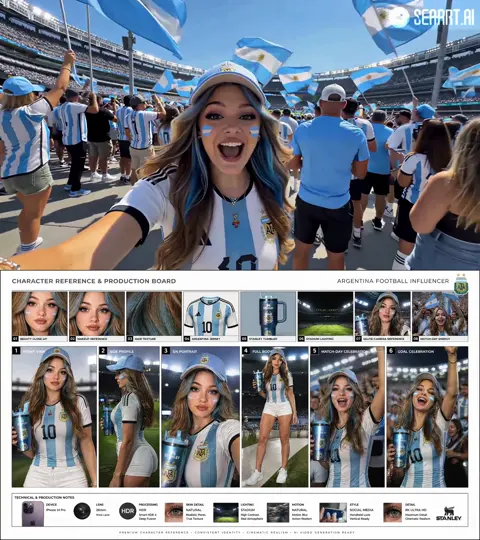
Before generating performance shots, lock a small reference set: a neutral portrait of each character, a full-body shot, a key prop, and two environment references. Store them with descriptive filenames and treat them as production assets, not throwaway uploads.
Use references deliberately
Attach the relevant references to every shot. When a model supports multiple reference slots, separate roles clearly: identity reference, wardrobe reference, lighting reference. Mixing them into one ambiguous input produces muddled output.
Control the variable you are not testing
If you are changing the camera angle, keep lighting and wardrobe constant. If you are changing wardrobe, keep angle and lighting constant. Changing everything at once makes it impossible to diagnose what caused a failure.
Handle drift proactively
Long sequences drift gradually: skin tone shifts warmer, jawlines soften, background details accumulate. Counter this by re-anchoring to your reference set at regular intervals and by inserting cutaways that reset the viewer's attention. A quick insert shot is often a better fix than a perfect regeneration.
Write continuity notes in plain language
"Same navy jacket, same overcast light, camera slightly lower than eye level, subject favors the left side of frame." A sentence like that prevents more errors than any advanced parameter setting.
Direction and control: from prompts to agents
Text prompts alone are a blunt instrument. The more mature pattern is to give a system a structured brief and let it produce and iterate on candidate shots, then review a curated set of options.
Storyboard before you prompt
A rough storyboard — even hand-drawn boxes — defines framing, screen direction, and eyeline before generation begins. This is the cheapest place to catch continuity errors, because changing a sketch costs nothing.
Separate intent from execution
Describe intent in the brief ("she realizes the letter is not from her sister") and execution in the shot spec ("close-up, shallow depth of field, slow push in"). Models respond better when both layers exist, because intent shapes micro-decisions like expression and timing.
Use agents for breadth, not final approval
Agent-style tools are good at generating options and applying consistent rules across many shots. They are not good at knowing when a take has the right emotional weight. Reserve final selection for a human, and define the selection criteria in advance so review sessions are fast.
Version your prompts
Keep prompts in a document or spreadsheet with a version number and a one-line description of what changed. When a shot regresses, you can identify the exact prompt edit that caused it.
AI-assisted editing, audio, and finishing
Generation is only one part of the job. The rest of post-production has its own AI-assisted practices.
Assembly and rough cut
Transcript-based editing lets you cut a talking-head piece by deleting text in a transcript. It is fast for interviews, podcasts, and explainers, but it produces literal cuts that still need manual trims and reactions for pacing.
Dialogue cleanup
Source separation, noise reduction, and re-timing tools rescue footage that would otherwise be unusable. Apply them early, before you judge the edit, because bad audio makes good cuts feel wrong.
Music and sound design
Generative music is useful for temp tracks and for content where a bespoke score is not feasible. For anything with a release plan, treat generated music as a placeholder until the licensing situation is clear.
Color and texture matching
Shot matching tools can pull wildly different generative clips toward a common look. This is often faster than per-clip grading, but be careful: aggressive matching can flatten exactly the tonal differences that make a sequence feel cinematic.
Upscaling and frame interpolation
Enhancement passes can rescue low-resolution drafts, but they amplify errors too. Never upscale a clip with unstable motion or visible face drift; fix the source first.
Quality control: common failure modes and how to fix them
A short troubleshooting guide will save more time than any new tool.
Morphing subjects. Faces and limbs blend between frames. Fix by reducing motion complexity, shortening the clip, or adding a motion reference. Sometimes the real fix is to cut sooner.
Identity drift. The character slowly becomes someone else. Re-apply references, split the shot into two shorter generations, and add an insert between them.
Flickering textures. Textures vibrate or shimmer. Reduce grain settings, avoid heavy post-sharpening, and check whether the model is struggling with fine detail like fabric weave or foliage.
Edge instability. Edges around hands, hair, or thin objects boil. Crop tighter or add a practical element in the foreground to distract the eye.
Nonsense text. Legible text in generated frames is still unreliable. Generate the plate without text and add typography in post.
Layout jitter with moving cameras. Backgrounds slide unnaturally during camera moves. Try a gentler move or split the shot into a static wide and a moving close-up.
Continuity gaps between shots. Colors, wardrobe, or light direction change. Fix in post with shot matching, or better, add a bridging shot that gives the audience a visual reset.
Team practices: versioning, review, and delivery
Generative work multiplies assets, and asset sprawl is what kills projects.
Name files for humans
A naming convention like scene04_shot07_v3_performance_refdesk tells a reviewer far more than a timestamp. Include scene, shot, version, and pass type.
Keep a prompt log
For each final shot, store the prompt, model name, key parameters, and reference images. This is your ability to reproduce and revise.
Run structured review cycles
Review against the shot list rather than against a vague impression. Each reviewer answers three questions: does it read clearly, does it match continuity, and is the performance right? Freeform feedback like "I don't love it" is not actionable.
Define what counts as locked
Decide in advance which shots are frozen once approved and which remain open until final delivery. Uncontrolled re-opening is the most common cause of generative projects running long.
Matching workflow to format and budget
Different formats reward different approaches.
Short-form vertical. Prioritize speed and hook strength. One strong subject, simple motion, bold captions. Generative tools excel here because shot count is low and consistency demands are modest.
Product and brand video. Prioritize fidelity and lighting control. Reference images matter enormously, and a locked look bible prevents the brand from drifting between shots.
Narrative short film. Prioritize continuity and performance. Expect to spend more time on references and continuity notes than on prompting.
Explainers and training content. Prioritize clarity and iteration speed. Generative b-roll and diagram animation reduce cost, while a human narration anchors the piece.
A useful budgeting rule: allocate roughly half your effort to pre-production definition, a quarter to generation and iteration, and a quarter to post and QA. Teams that invert this order spend most of their time fixing avoidable problems.
Frequently asked questions
Do generative tools replace editors?
No. They replace some acquisition and some repetitive cleanup. The judgment work — pacing, structure, performance selection — remains human. Editors who adopt these tools tend to take on more projects rather than fewer.
How many generation attempts should a shot take?
If a shot needs more than five or six serious attempts, the problem is usually the brief, not the model. Rewrite the shot description with more specificity before generating again.
What is the fastest way to improve consistency?
Lock references and reduce the number of variables changing per shot. Most consistency failures come from changing too many things simultaneously.
Can I use generated footage commercially?
That depends on the specific tool's terms and your jurisdiction. Check the current license for each model you use, keep records, and avoid generated trademarks, celebrity likenesses, and recognizable logos.
Should I generate in high resolution from the start?
Usually not. Draft at lower resolution and higher volume, then regenerate or upscale only the shots that survive the cut. This saves substantial time on projects with many discarded shots.
How do I handle audio for generated footage?
Treat audio separately. Generate or record dialogue, design sound effects, and build music as its own layer. Clips that arrive without audio are fine; clips that arrive with bad audio are a liability.
What is the biggest mistake beginners make?
Prompting for a finished shot in one attempt instead of building it in passes. Layering — blocking, performance, polish, extension — consistently produces better results with less total effort.
Getting started without overbuilding
Begin with a single scene and a single deliverable. Write a shot list of five to eight shots, build a small reference set, generate drafts, and assemble a rough cut before polishing anything. The goal of the first project is not perfection; it is discovering where your pipeline breaks.
Once you know your weak points — usually consistency, review speed, or asset organization — fix that one thing before adding new tools. Generative video rewards disciplined pipelines far more than it rewards tool hoarding, and the teams that treat it as a production system rather than a slot machine are the ones shipping work that holds up on a screen, not just in a demo reel.

Alexander
More Blogs
Read MoreVidu Q4 Alternatives: 4K AI Video Models Compared (2026)
Vidu Q4 alternatives compared: Kling 4.0, Seedance 2.5, Wan 3.0, and Runway Gen-4 — 4K support, input modes, durations, audio, and what each costs in credits on Domer.
Top 4K AI Image Generators in 2026: 5 Models Compared on Real Costs
The top 4K AI image generators on Domer compared: Flux 3 Klein, Nano Banana 2.1, GPT Image 2.5, GPT Image 2, and Nano Banana Pro — 4K credit costs, reference limits, and speed.
Nano Banana 2.1 vs GPT Image 2.5: Which Image Model Should You Use? (2026)
Nano Banana 2.1 vs GPT Image 2.5 Flare compared: credit costs per resolution, aspect ratios, reference images, text rendering, and which tasks fit each model.