
Crea
Affiliazione
Inizia Gratis Ora
Anime AI Generator Image Import: Turn Photos Into Anime Art
Oct 15, 2026

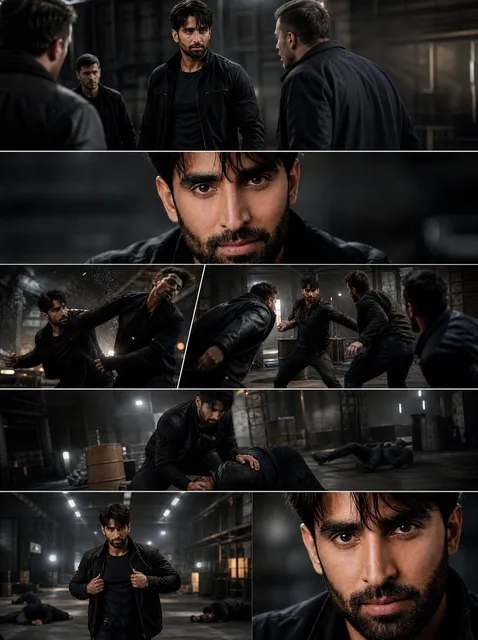
Why Image Import Beats Pure Text Prompting for Anime Art
Pure text-to-image generation is a lottery. You describe a character, hit generate, and hope the model's idea of "anime" matches yours. Sometimes you get something usable on the third attempt. Often you get a beautiful image of a completely different person, in a completely different pose, wearing clothes you never asked for.
Image import flips that relationship. Instead of describing what you want and praying, you hand the model a reference and let it keep the parts that matter — the pose, the silhouette, the composition, the exact tilt of a head — while replacing the parts you want stylized. For anime specifically, this is transformative, because anime art is defined less by subject matter than by a set of rendering conventions: clean line weight, simplified facial geometry, large expressive eyes, flat cel shading with deliberate highlight shapes, and backgrounds painted in soft, slightly desaturated gradients.
Those conventions are hard to describe in words and easy to demonstrate with a picture. That is the entire argument for image import. You are not teaching the model what anime is; you are showing it a source and letting it translate that source into the visual grammar of animation.
This guide covers the full workflow: what happens under the hood during image-to-image translation, how to prepare a source photo so the model has clean information to work with, how to tune style strength without destroying the original composition, how to fix the most common failure modes, and how to move from a single still into animated output without starting over.
How Image-to-Image Anime Generation Actually Works
The model is not tracing — it is denoising toward your reference
Most anime image import tools rely on a diffusion process. Your uploaded image is converted into a noisy, partially degraded version of itself, and the model then reconstructs it step by step. The strength setting controls how much noise is added at the start. Add a little noise and the model only nudges details — you get a lightly stylized photo. Add a lot and the model has enormous freedom, which is how you get a full anime character from a selfie but also how you lose the exact facial structure you liked.
Think of it as a dial between "preserve the photo" and "invent freely." Every other setting in your workflow is a refinement of that single decision.
Style transfer and structure guidance are two different jobs
Style transfer handles the look: line work, palette, shading language, eye rendering, hair strands. Structure guidance handles the geometry: where the eyes sit, how wide the shoulders are, where the arm crosses the body. When these are lumped into one setting, results feel inconsistent — you get the right face but the wrong style, or a gorgeous anime aesthetic locked onto a distorted pose.
Modern pipelines separate them. A style reference or LoRA controls the aesthetic. A control layer built from edges, depth, or pose skeleton locks the geometry. When someone complains that their imported image "looks nothing like them," it is almost always a structure guidance problem, not a style problem.
What the model actually sees in your photo
When you upload a portrait, the model parses it into layers of information: subject boundaries, depth ordering, facial landmarks, dominant colors, and texture statistics. It does not have human intuition about which details matter. A patterned shirt, a busy background, and a messy strand of hair all carry equal informational weight until you tell it otherwise.
This is why input preparation matters more than almost any prompt you can write. The cleaner the layers, the better the translation. A photo with a plain wall behind the subject gives the model a clean edge to work with. The same subject in front of a cluttered bookshelf forces the model to guess where the person ends and the room begins — and it will guess differently on every run.
Preparing Your Source Image: The Part Nobody Wants to Do
Resolution, aspect ratio, and format
Aim for the highest resolution you have that still shows a clear, single subject. Anything below roughly 1000 pixels on the short edge will produce mush in the eyes and hands, the two areas anime style punishes hardest. Above that, more resolution helps less than better clarity — a sharp 1500-pixel image beats a blurry 4000-pixel one every time.
Match the aspect ratio and orientation of your final output. If you want a vertical character portrait, crop vertically before importing rather than letting the tool pad or stretch. Padding produces invented content at the edges that rarely matches the rest of the frame.
Use PNG or high-quality JPEG. Screenshots from chat apps and social platforms arrive pre-compressed with visible artifacts that the model reads as texture and then reproduces as blotchy noise in the final art.
Lighting, background, and subject separation
Even, front-facing light is the easiest to translate. Harsh side lighting pushes half the face into shadow, and the model has to decide whether that is a mood or a mistake — often rendering it as a dramatic anime shadow you did not want.
Simple backgrounds win. If your subject is standing in front of a busy street, remove the street first with a background removal pass, or accept that the model will reinterpret the scene however it likes. Neither is wrong, but only one is predictable.
Finally, decide what you want changed. If you want the hair restyled, say so in the prompt and give the style reference permission to deviate. If you want the exact hairstyle preserved, keep your structure strength high. Being clear about this before you generate saves a dozen iterations.
Step-by-Step: From Photo to Finished Anime Frame
Step 1 — Choose a target style before you upload anything
Pick one reference style and commit. Collect three or four images that share a look: the same line weight, the same eye shape family, the same palette temperature. Vague goals like "anime style" pull the model in several directions at once and produce averaged mush. Specific goals like "late-night city drama, cool blues, thin confident line work" give it a target to hit.
Step 2 — Import and set structure preservation
Upload your prepared source, then set structure preservation high — roughly 70 to 85 percent if your tool exposes it on a zero-to-one-hundred scale. At this level the model keeps your pose, framing, and facial proportions while changing the rendering. You should still recognize the person or scene instantly in the output.
If your tool supports a pose or edge control layer derived from your photo, enable it. This is the single most effective way to stop an anime import from drifting into a generic character.
Step 3 — Describe the scene in language the model understands
Your prompt is not a wish list; it is a set of priorities. Lead with what must not change, then what should change, then atmosphere. Something like "same pose and composition, anime cel shading, thin ink line work, cool blue rim light, simplified facial features, detailed eyes, flat background gradient" communicates a strict hierarchy. Long poetic prompts dilute that hierarchy. Short, ordered prompts hold it.
Step 4 — Iterate in small increments, not big leaps
Change one variable per run. Drop the style strength by five points, or swap one style reference — never both. This sounds slow, but it converges faster than random exploration because you can actually attribute the change you see to a decision you made.
Keep a run log with the settings that produced your best frame. When you find a combination that works, that becomes your baseline for the next project rather than a lucky accident you cannot repeat.
Step 5 — Refine, upscale, and clean before delivery
AI output always needs a pass: fix stray line endings, correct fingers and hands, even out background gradients, and remove the faint watermark-like artifacts that sometimes survive in flat color areas. Then upscale to delivery resolution. Upscaling before cleanup makes every flaw crisper and harder to remove.
Controlling Style: Genre, Palette, and Line Work
Anime is not one style. Shonen action art leans on heavy shadows, dynamic angles, and saturated primaries. Slice-of-life illustration favors soft pastel palettes, thin line work, and generous negative space. Retro cel animation has visible grain and limited color counts. Applying the wrong genre convention to the right composition produces something that technically worked and still feels off.
Three levers get you most of the way:
- Line weight. Thin, uniform lines read as modern digital illustration. Thick, varied lines read as older broadcast animation. Style references carry this automatically; prompts can nudge it.
- Palette temperature. Warm highlights and cool shadows feel cinematic. Uniform saturation feels graphic and poster-like. Pick one and keep it consistent across a series so frames feel related.
- Shading model. Flat cel shading with hard shadow boundaries is the classic anime look. Soft gradient shading pushes toward painterly illustration. Mixing them in one project is the fastest way to make a set of images look like it came from different artists.
Lock these choices down early in a project, then reuse them across every import.
Troubleshooting the Most Common Anime Import Problems
The output does not look like the source. Structure preservation is too low, or no edge/pose control is active. Raise preservation, enable a control layer, and reduce style strength in small steps.
The face is fine but the hands are a disaster. Hands are low-information in most photos. Crop so hands are clearly visible and well lit, or add a pose control layer that specifies them. Remedial inpainting after generation is often faster than fighting the model.
Everything looks plastic and over-smoothed. Style strength is too high and fine texture was erased. Lower it slightly, and add language about line work and shading rather than adding more adjectives about beauty.
Backgrounds bleed into the character. The subject edge was ambiguous. Remove or replace the background before import, or add an explicit instruction describing the background separately from the subject.
Colors drift between runs. Nothing was fixed. Pick a style reference and keep it identical across runs, and set a seed if your tool allows it.
Detail concentrates in the corners. Usually a padding artifact from mismatched aspect ratios. Crop to the target ratio before importing.
From Still Frame to Motion
Once you have a final anime frame you love, the natural next step is animation — a subtle head turn, drifting hair, falling petals, a camera push. Doing this properly means animating from the finished frame rather than regenerating from the original photo, because regeneration will not reproduce the exact character you approved.
Use the still as the first frame, keep the motion description short and physical ("slow head turn, hair drifting left, camera slight push in"), and generate short clips. Two to four seconds is enough for social and gives you room to cut. Longer clips accumulate drift, where the character slowly morphs into someone else.
If you need a sequence, generate several short clips from related keyframes and cut between them. Consistency between clips comes from keeping the same style reference and the same character description in every prompt — not from hoping the model remembers.
Building a Reusable Style Library
The difference between people who get consistent anime results and people who get random ones is documentation. Build a small library of style references, each tagged with the genre conventions it carries, the palette it produces, and the structure-preservation range that works with it. Add your best prompts, verbatim, with notes on what each phrase actually changed.
Over time this becomes a personal style system. New projects start from a known baseline instead of a blank field, and the iteration count drops from twenty runs to three.
Mistakes That Waste the Most Time
- Chasing a style with prompt adjectives instead of a reference image.
- Uploading low-resolution screenshots and expecting clean line work.
- Changing five settings at once and then trying to reason backward from the result.
- Upscaling before cleanup.
- Generating twenty variations and choosing none, instead of setting a direction and iterating on it.
- Forgetting to save the settings that produced the good frame.
FAQ
Do I need artistic skill to get good anime imports?
No, but you need taste and discipline. The skill being tested is choosing a clear direction, changing one variable at a time, and knowing when a frame is finished rather than merely acceptable.
Can I use a photo of a real person?
Only with that person's consent, and be aware that stylized output does not automatically remove the ethical and legal questions around likeness. If the result is recognizably someone, treat it with the same care you would treat their photograph.
Why do my results look generic?
Usually because the prompt and style reference are both vague. "Anime style" averages every anime style ever labeled that way. Name a genre, a mood, and a palette, and attach a reference.
How many iterations should a single frame take?
With a good source and a locked style, three to six runs. If you are past fifteen, the problem is the input or the direction, not the settings.
Does image import work for landscapes and objects?
Yes. Backgrounds, props, and vehicles translate well because their structure is stable and anime background painting has strong, well-documented conventions. Character faces are harder simply because small proportional errors are more noticeable.
What is the best way to keep a character consistent across a series?
Fix the style reference, the seed, the structure preservation value, and the character description. Then only change the pose and composition between frames.
Should I fix AI artifacts manually?
Yes. Ten minutes of cleanup on the final frame produces a better result than another twenty generation runs, and it teaches you what the model consistently gets wrong so you can compensate at the input stage next time.
Where to Take This Next
Start with one photo, one style reference, and one clear intention. Import it, preserve structure aggressively, describe the scene in priority order, and change one setting per run until the frame matches what you pictured. Then save every setting that worked.
The broader shift here is not that AI can draw anime — it is that you can now direct it rather than gamble with it. Image import is what turns generation from a slot machine into a controllable instrument, and the people who learn to steer it early will produce consistent, recognizable work while everyone else is still rerolling prompts.

Alexander
More Blogs
Read MoreVidu Q4 Alternatives: 4K AI Video Models Compared (2026)
Vidu Q4 alternatives compared: Kling 4.0, Seedance 2.5, Wan 3.0, and Runway Gen-4 — 4K support, input modes, durations, audio, and what each costs in credits on Domer.
Top 4K AI Image Generators in 2026: 5 Models Compared on Real Costs
The top 4K AI image generators on Domer compared: Flux 3 Klein, Nano Banana 2.1, GPT Image 2.5, GPT Image 2, and Nano Banana Pro — 4K credit costs, reference limits, and speed.
Nano Banana 2.1 vs GPT Image 2.5: Which Image Model Should You Use? (2026)
Nano Banana 2.1 vs GPT Image 2.5 Flare compared: credit costs per resolution, aspect ratios, reference images, text rendering, and which tasks fit each model.