
Affiliazione
Inizia Gratis Ora
How to Choose the Best AI Video Generator for Your Workflow
Oct 13, 2026

Why AI Video Generation Became a Practical Production Option
A few years ago, generating video with a model meant accepting visible artifacts, warped faces, and motion that looked like a slideshow with extra steps. That trade-off has largely disappeared. Modern systems can hold a character's identity across shots, follow camera instructions, synchronize dialogue with lip movement, and output footage that survives a 4K monitor at arm's length.
The practical consequence is that AI video stopped being a demo category and became a production category. Teams now use it for ad variants, explainer sequences, social cutdowns, training modules, product teasers, and pre-visualization for shoots that will still be filmed conventionally. The value is not that a model replaces a director, a cinematographer, and an editor. The value is that it removes the friction between having an idea and seeing that idea move.
That shift changes what "best" means. The best AI video generator for a solo creator shipping daily shorts is rarely the best one for a marketing team producing a six-week campaign. Selection depends on control, consistency, iteration speed, export quality, and how the tool fits into an editing pipeline you already trust.
This guide walks through the technology, the tool categories, a repeatable workflow, the criteria that matter when you compare platforms, and the mistakes that waste the most time.
The Core Technologies Behind Modern Video Generators
Understanding the machinery helps you predict where a tool will succeed and where it will struggle. Most modern generators combine several distinct systems.
Diffusion and transformer backbones
Video generation inherited its visual quality from image diffusion models and its sense of sequence from transformer architectures. Diffusion handles the appearance of each frame; attention mechanisms across time handle how those frames relate. When a tool produces a beautiful first shot and then drifts into a different art style, the appearance model is fine but the temporal reasoning is weak.
Temporal consistency and motion control
Consistency is the hardest problem in the field. A model must remember what a jacket looked like, which direction a hand was moving, and how light fell across a face — all while generating new pixels. Techniques like optical-flow conditioning, latent interpolation, and reference-image anchoring are how tools keep a scene coherent. Motion control is the companion skill: some platforms accept camera language ("slow dolly in, shallow depth of field"), while others only respond to descriptive prose. The more explicit the motion interface, the more predictable your results.
Multimodal conditioning
Text is only one input now. Image-to-video, video-to-video, depth maps, pose skeletons, control masks, and audio tracks all act as conditioning signals. A tool that accepts a keyframe plus a text prompt plus a motion reference gives you three levers instead of one, which is exactly what you need when a client says "same shot, but make the product rotate faster."
Audio and synchronization
Dialogue, sound effects, and music are increasingly generated or synchronized inside the same pipeline. Lip-sync models map phonemes to mouth shapes, while audio-aware generation can cut on beats. If your output is destined for social feeds, native audio handling saves an entire post-production pass.
The Main Categories of AI Video Tools
Not every product labeled "AI video" does the same job. Sorting tools into categories prevents you from comparing apples to avatars.
Text-to-video generators. These turn a written prompt into a short clip, typically a few seconds per generation. They excel at b-roll, mood pieces, abstract transitions, and concept exploration. Runway, Pika, Kling, Luma Dream Machine, Veo, and Sora-class systems live here.
Image-to-video animators. You supply a still — a Midjourney render, a product photo, a storyboard frame — and the model adds motion. This is the most reliable path to visual consistency because you control the composition before animation begins. Stable Video Diffusion and similar open models are popular for this, especially inside ComfyUI workflows where you can chain upscalers and interpolators.
Avatar and presenter tools. These generate a talking human from a script, with lip-sync and often multilingual voice cloning. HeyGen and Synthesia are representative. They are excellent for training content and localized explainers, and a poor fit for anything requiring genuine performance.
Repurposing and editing assistants. These take existing long-form footage and produce shorts, captions, silence removal, and scene detection. Descript, Opus-style clippers, and CapCut's AI features sit here. They rarely generate new footage, but they multiply the value of footage you already own.
Generative post-production utilities. Upscaling, frame interpolation, relighting, background removal, object removal, and voice cleanup. Topaz-style tools and open-source nodes in Resolve or After Effects fall here. Individually unglamorous, collectively the difference between amateur and broadcast.
Most real workflows blend three or four of these categories. A single tool that claims all of them usually does one thing well and the rest adequately.
Building a Practical Workflow From Script to Final Cut
A repeatable pipeline beats tool-hopping. Here is a sequence that holds up whether you are making a fifteen-second ad or a four-minute explainer.
1. Lock the script and shot list first. AI video rewards specificity. Write the script, then break it into shots with a one-line intent each: "wide establishing shot of a city at dawn, slow push in." Roughly 60 to 80 percent of disappointing output traces back to vague planning, not weak models.
2. Generate stills before you generate motion. Produce keyframes as images. Iterate fast and cheap on composition, color, wardrobe, and lighting. Only animate frames you already like. This single habit cuts wasted generations dramatically.
3. Animate in short increments. Ask for three to eight seconds per clip. Longer requests increase the chance of drift. If you need a twelve-second shot, generate two clips and cut them together with a transition or a match on action.
4. Stabilize and upscale. Run generated clips through frame interpolation to smooth motion and an upscaler to reach delivery resolution. Models frequently output fewer frames per second than they claim; interpolation evens out the cadence.
5. Assemble in a real editor. Move everything into DaVinci Resolve, Premiere Pro, Final Cut, or CapCut. Trim on motion, not on the beat of a placeholder track. Add speed ramps where generation looks weakest.
6. Layer sound deliberately. Voiceover, room tone, and music hide a surprising amount of visual imperfection. Silence exposes every flaw.
7. Grade as a sequence. Apply a consistent LUT or grade across all generated clips. Individual clips from different models rarely match, but a uniform grade makes them feel intentional.
8. Version and archive. Keep prompt sheets alongside exports. When a client asks for a variation in three weeks, the prompt you used is the asset.
Prompting and Direction: Getting Consistent Results
Prompts are direction written down. Treat them the way you would treat a brief to a camera operator.
The shot description formula
A reliable structure is: subject + action + environment + lighting + camera + style. For example: "A ceramic coffee cup on a walnut desk, steam rising, morning window light from the left, slow dolly in, shallow depth of field, muted film grain." Every element narrows the space the model searches.
Style anchoring
If a project spans many clips, fix your style in a reusable string: lens type, color palette, film stock, grain level, aspect ratio. Paste it into every prompt unchanged. Change only the subject and action. This is the closest thing to a house style that generative video allows.
Motion and camera language
Use verbs the model understands: pan, tilt, dolly, crane, orbit, handheld, whip pan, rack focus. Avoid stacking three camera moves in one prompt; models tend to average them into mush. One dominant motion per clip is the rule.
Negative prompts and guardrails
Where supported, negative prompts remove text artifacts, extra limbs, watermarks, and jitter. Where not supported, achieve the same by removing ambiguity from the positive prompt — say "clean product shot on white seamless background" rather than "a product, no text please."
Reference images as the strongest lever
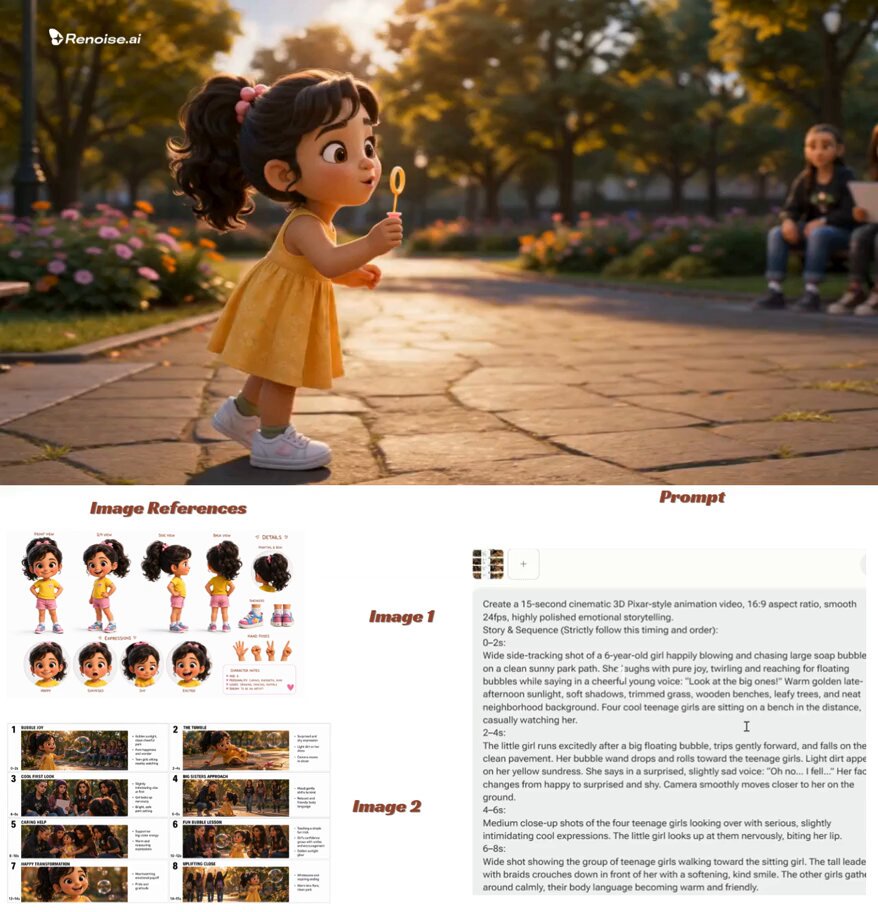
If consistency matters more than novelty, condition on an image. Character sheets, product renders, and previous frames constrain the latent space far more effectively than adjectives.
Decision Criteria That Actually Matter
When comparing platforms, resist the demo reel. Score tools against your own requirements.
Controllability. Can you specify camera motion, duration, seed, and aspect ratio? Can you lock a seed and reproduce a result? Reproducibility is underrated and often the deciding factor for client work.
Temporal consistency. Generate the same character across three prompts and watch for drift in face, clothing, and lighting. If it fails at three, it will fail at thirty.
Maximum clip length and resolution. Know the realistic ceiling, not the marketing ceiling. Then check whether the tool offers upscaling or interpolation natively.
Iteration speed. Slow queues kill creativity. A tool that returns a clip in forty seconds lets you explore fifteen directions; one that takes ten minutes lets you explore three.
Input flexibility. Text, image, video, audio, depth, and pose inputs each unlock different workflows. Match inputs to your existing assets.
Export and interoperability. Clean exports at standard codecs and resolutions, alpha channel support where needed, and metadata that survives a round trip into your editor.
Commercial licensing. Confirm what you may publish, monetize, and modify. Read the terms for the specific plan you are on, and keep records of generated assets.
Cost model and limits. Look at how usage is metered, whether unused capacity expires, and what happens at peak demand. Predictable limits matter more than the lowest headline number.
Team features. Shared workspaces, brand presets, review links, and comment threads turn a solo tool into a team tool.
Data and privacy posture. If you are handling unreleased products or personal data, understand retention and training policies before uploading anything.
Score each candidate one to five on these dimensions, weight them by your project type, and the shortlist usually picks itself.
Common Mistakes and How to Avoid Them
Generating before planning. Prompting without a shot list produces pretty clips that do not cut together. Fix: script first, then animate.
Chasing one long take. Models degrade over long durations. Fix: build sequences from short clips.
Mixing styles across clips. Five clips from five tools with five palettes look chaotic. Fix: generate keyframes in one style, grade the final sequence uniformly.
Ignoring frame rate mismatch. Clips at different cadences create judder. Fix: normalize everything to a single timeline frame rate and interpolate.
Over-relying on faces. Human faces remain the hardest subject. Fix: use profiles, distance shots, hands, and objects where possible, and reserve close-ups for the strongest tools.
Skipping audio. Silent AI footage feels synthetic. Fix: always add ambience and music, even at rough-cut stage.
No version control. You will need an earlier cut. Fix: name files with project, shot, and version, and keep prompt sheets with them.
Betting the campaign on one tool. Capabilities change monthly and availability fluctuates. Fix: keep a primary and a fallback generator in your stack.
Matching Tools to Use Cases
Different briefs reward different categories.
Social shorts. Prioritize speed and vertical formats. Text-to-video generators plus a clipper tool give you volume. Hook in the first second, keep clips under four seconds of generated footage, and let captions carry meaning.
Product marketing. Prioritize control and consistency. Generate stills from reference renders, animate with image-to-video, and finish in an editor where you can add real product footage alongside generated b-roll.
Explainers and training. Prioritize clarity over spectacle. Avatar tools with multilingual voice support produce consistent presenters, while simple motion graphics carry the information.
Agencies and studios. Prioritize reproducibility, licensing, and review workflows. You need seeds, prompt archives, and a shared library. Plan a hybrid pipeline where generated footage covers establishing shots and real footage carries the hero moments.
Pre-visualization. Prioritize iteration speed over final polish. Rough generated animatics let stakeholders approve blocking before anyone books a location.
Personal projects. Prioritize learning breadth. Rotate through three or four tools to build intuition about their quirks; that intuition transfers when you switch platforms later.
Quality Control and Review Before Publishing
The last ten percent determines whether viewers read a clip as professional.
Watch at full speed, then frame by frame. Full speed reveals rhythm problems; frame stepping reveals warped hands and flickering edges.
Check continuity across cuts. Clothing, light direction, and screen direction should hold from shot to shot. Reversed screen direction between two shots reads as a mistake even to viewers who cannot name it.
Verify text and logos. Generated signage and product labels are frequently garbled. Replace them with real overlays.
Inspect audio sync. Drift of even a few frames on lip movement is noticeable. Nudge clips rather than regenerating.
Run a legal sanity check. Confirm licensing for every asset — generated footage, music, and voice — and document it.
Screen on a phone. Most output will be watched on a small screen in bright light. If it reads clearly there, it will read anywhere.
Treat each generated clip as raw footage, not as a finished asset. Editors who expect to trim, speed-ramp, stabilize, and grade get far better results than those who expect the model to deliver a final cut.
FAQ
How long should I expect a generated clip to be?
Plan on three to eight seconds of dependable footage per generation. Longer outputs are possible but usually need trimming. Build scenes from several short clips rather than one long take.
Do I still need an editor and a colorist?
Yes. AI accelerates creation of footage, not the craft of structuring it. Editing, sound design, and grading remain where quality is decided.
How do I keep a character consistent across shots?
Condition on reference images, lock your style string, and keep framing similar between related shots. Consistency improves dramatically when lighting direction and lens choice stay constant.
Is generated video good enough for paid advertising?
Yes, for b-roll, product inserts, abstract sequences, and background plates. For hero shots featuring people speaking, hybrid approaches — real footage plus generated support — usually perform better.
What is the most common reason a generation fails?
Ambiguous prompts and unreasonable duration requests. Specific subject, clear action, one camera move, and a short clip length solve most failures.
Should I buy one tool or several?
One primary generator plus one upscaler and one editor covers most needs. Add a second generator only for redundancy or for a capability the first genuinely lacks.
How often should I re-evaluate my stack?
Every quarter, or whenever a project demands something your current tools cannot do. Rerun the same benchmark prompt across candidates so comparisons stay honest.
Can AI video replace filming entirely?
For some formats, yes. For anything dependent on real performance, physical products in-hand, or precise brand environments, filming remains faster and more reliable. The strongest results come from combining both.

Alexander
More Blogs
Read MoreVidu Q4 Alternatives: 4K AI Video Models Compared (2026)
Vidu Q4 alternatives compared: Kling 4.0, Seedance 2.5, Wan 3.0, and Runway Gen-4 — 4K support, input modes, durations, audio, and what each costs in credits on Domer.
Top 4K AI Image Generators in 2026: 5 Models Compared on Real Costs
The top 4K AI image generators on Domer compared: Flux 3 Klein, Nano Banana 2.1, GPT Image 2.5, GPT Image 2, and Nano Banana Pro — 4K credit costs, reference limits, and speed.
Nano Banana 2.1 vs GPT Image 2.5: Which Image Model Should You Use? (2026)
Nano Banana 2.1 vs GPT Image 2.5 Flare compared: credit costs per resolution, aspect ratios, reference images, text rendering, and which tasks fit each model.