
Affiliazione
Inizia Gratis Ora
Cinematography Tricks That Make a Character Look Big
Oct 15, 2026



Why Scale Reads as Power: Psychology and Story Function
When an audience meets a character, they form a size judgment long before a single line of dialogue lands. That judgment is rarely literal. Two performers of identical height can read as a titan and a child depending on where the camera sits, how much empty air is left above their head, and how the light wraps their shoulders. Cinematography controls those variables, and scale is one of its most reliable storytelling levers.
Scale carries meaning because people are wired to read size as capability. Taller, broader figures register as threats, protectors, leaders, or obstacles. Smaller figures register as vulnerable, comic, or sympathetic. Filmmakers lean on this constantly: a ruler who should feel immovable, an antagonist whose presence should feel like weather rolling in, a hero who has to look like they could carry the whole story on their back.
The essential nuance is that big is always relative. A character looks big because the frame around them feels small, because the environment feels indifferent to them, because the other performers feel diminished beside them. Nothing about scale is absolute. It is a relationship between subject, camera position, lens, light, and the space they occupy.
That is why the techniques in this article stack rather than replace one another. A low angle on its own is a cliché that audiences have seen ten thousand times. A low angle combined with a wide lens close to the body, a foreground element that swallows the bottom of the frame, and an uplight that stretches the shadow behind the figure becomes a statement. Each layer reinforces the same idea until the viewer feels the character's size in their body rather than merely noticing it.
Before you choose a single tool, decide what kind of big you want. There is intimidating big, mythic big, comic big, and tragic big. An oversized villain in a horror film needs different treatment than a legendary warrior in a period epic, and both need something different from a buffoon whose ego is the joke. Ask what the audience should feel in their chest when this character enters frame, then reverse-engineer the shot from that feeling. Everything that follows is a menu of options for answering that question.
Camera Angles That Make a Character Look Big
The low angle and when it stops working
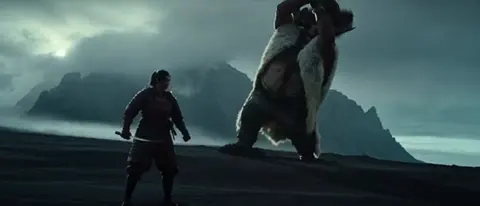
Placing the camera below the subject's eye level and tilting upward remains the most direct method for adding height and weight. The effect is optical and psychological at once: the character's legs stretch, the torso compresses slightly, the head tilts back and reads as confident, and the background becomes sky, ceiling, or architecture rather than neutral ground. The figure appears to lean toward the viewer, occupying more of the visual field.
It fails when it is overdone. A camera placed at ankle height with an extreme upward tilt turns menace into comedy, because the exaggeration becomes visible as technique. Interiors create practical problems too, since you may run out of floor before you run out of ceiling. Raising the performer on an apple box, a step, or a platform often solves this faster than finding a wider lens.
Eye level, high angle, and the Dutch tilt
An eye-level camera is neutral. It says the character is a peer of the audience, neither dominant nor diminished. High angles shrink and expose, which is why they are so useful for showing defeat, guilt, or helplessness. The Dutch tilt, where the horizon is rotated off level, adds unease and can make a figure feel monumental and unmoored at the same time, as though the laws of the world have bent around them.
Angle is a relationship, not a number
The single most common technical error is thinking of angle as a fixed height above the floor. Angle is a relationship to the character's eyeline, and that eyeline moves. A seated character requires a different camera height than a standing one. A character climbing stairs, lying on a stretcher, or sinking into a chair changes the geometry of every shot around them. Track the eyeline, not the ground.
A useful exercise: pick one scene and storyboard it three times, once at eye level, once at a moderate low angle, and once at an aggressive worm's-eye view. Cut them side by side without sound. What changes is usually not information but feeling, and that difference is the entire point of the craft.
Framing and Composition: Shrinking the World Around Them
If the camera angle sets the tone, framing decides the scale. A character who occupies most of the frame is big by default. A character surrounded by vast empty space is small no matter how tall the actor is in real life.
Control headroom deliberately. Generous space above a character's head pushes them down inside the frame and makes them feel small, exposed, or powerless. Cropping tight above the hair, or even clipping the top of the head, makes a figure feel as though they do not fit inside the world's borders. That sense of the frame struggling to contain them is one of the most efficient tools available.
Use the ground plane and horizon. Placing the camera low enough that a character's head rises above a horizon line, a doorway arch, or a mountain ridge gives them a visual pedestal. The opposite placement, where the horizon cuts across their chest, flattens them into the environment.
Treat negative space as pressure. A wide, empty sky above a lone figure suggests insignificance. A frame crowded with the character's silhouette, on the other hand, suggests that nothing else can compete for attention.
Build foreground occlusion. Columns, doorframes, windows, and the shoulders of other performers in the immediate foreground create a sense of tunnel vision. When the camera peers past large objects at a distant character, the viewer unconsciously assumes the subject is impressive enough to be observed from cover.
Include known-size references. Chairs, doors, vehicles, staircases, and other people all carry built-in measurements in the audience's mind. When a character dwarfs a standard doorway or stands taller than a seated companion, the comparison does the storytelling work for you. Without a reference object, scale is meaningless because the viewer has nothing to measure against.
Consider symmetry and centrality. Centered placement and balanced symmetry read as authority. A character planted in the exact middle of a symmetrical composition feels structurally inevitable, as though the architecture of the shot was built to hold them.
Lenses and Focal Length: Perspective as a Dial
Focal length is the most misunderstood part of this toolkit. Lenses do not simply zoom; they change the spatial relationship between subject, camera, and background, and that relationship is what creates perceived size.
Wide lenses, roughly in the 18mm to 35mm range on a full-frame sensor, exaggerate proximity. Objects near the lens appear disproportionately large, and lines converge sharply. Put the camera low and close to a character with a wide lens and their body stretches toward the viewer while their feet and head taper away. This is the classic monumental look, and it works because the physical closeness is what triggers the distortion, not the focal length alone.
Long lenses compress distance. A 100mm or 200mm shot stacks the background layers into an almost flat wall behind the subject. This is useful when you want a crowd, a building, or a horizon to press in behind a character, magnifying them visually against a dense backdrop. It is equally useful for the reverse effect: a long lens on a character standing alone in a crowd makes their isolation feel vast.
Camera height typically matters more than focal length, but the two interact. A low camera with a long lens keeps the face undistorted while still giving the figure height. A low camera with a very wide lens delivers maximum aggression at the cost of facial distortion, which is why directors who use it usually keep the subject near the center of frame where warping is least visible.
Practically, you can bake the same reasoning into a storyboard or a shot list by writing down three numbers for every setup: camera height relative to the character's eyeline, distance from the subject, and focal length. Those three numbers largely determine scale before lighting even enters the conversation.
Lighting That Sculpts Volume and Dominance
Flat frontal light makes a figure look like a cutout. Directional light gives them mass. If you want a character to feel physically large, the light has to describe their dimension.
Side light and hard light carve contours. A strong key from the side leaves deep shadow on the far cheek and shoulder, which the brain reads as depth. Broad, soft, frontal light fills those shadows in and flattens the silhouette, which is why corporate interview setups rarely make anyone look imposing.
Uplight from below is the classic dominance move. A light source lower than the subject's face throws shadows upward and makes the figure loom, because we rarely see people lit from below in natural conditions, and the inversion reads as unnatural power.
Rim and backlight separate a character from the background and thicken the edge of their silhouette. If you can only afford one extra light, put it behind them. A bright edge on a dark background adds apparent width to shoulders and height to the head.
Full silhouette is the mythic option. When a character exists only as a dark shape against a bright background, the viewer cannot measure them, and the imagination fills in something larger than any actor. Silhouettes are ideal for entrances and legends.
Cast shadows as proxies. A large shadow thrown across a wall behind a character communicates size without showing it directly. Shadows of the character falling across other performers are even more effective, because they imply dominance without any change in staging.
Finally, contrast placement matters. A dark figure against a bright environment gains visual weight; a bright figure against a dark environment gains focus. Choose based on whether you want them to feel heavy or attention-commanding.
Depth of Field, Focus, and Attention Control
Sharpness is a spotlight. When a character is the only element in critical focus, they dominate the frame regardless of actual size, because the eye goes where the detail is.
Shallow depth of field isolates. It also flatters, since a soft background removes scale references that might make a subject look ordinary. Deep focus does the opposite: it forces the character to compete with their surroundings, which can either prove their importance or expose their smallness depending on how you stage it.
Rack focus is a narrative device disguised as a technical one. Start on a character's face, then pull focus to reveal something much larger standing behind them. The reveal lands harder than a cut, because the background was already present and the audience simply had not been allowed to see it.
Two practical cautions. First, autofocus systems can hunt during slow pushes, so manual focus with a follow-focus rig is often safer when the shot matters. Second, extreme shallow focus combined with a low angle can make the performer look like they are floating, since the ground they stand on dissolves. Keep a little texture in the foreground floor to anchor them.
Camera Movement: Dolly, Crane, and the Slow Push
Movement carries its own grammar of scale. A slow push-in increases significance while the frame gets tighter, and audiences read it as the world narrowing around the character. A slow pull-back reduces them, revealing how much environment surrounds them and, by extension, how small they are within it.
A low tracking shot, with the camera at hip or knee height moving alongside a walking character, is one of the most durable techniques in cinema. The motion keeps the figure centered while the ground races past, which exaggerates stride and speed. Tilt-ups that begin at the feet and end on the face are the same idea in a single gesture, building a figure from the ground up.
Crane and drone moves can reveal scale in both directions. Rising away makes a character a dot in a landscape. Dropping down toward them makes them the anchor of a vast world. Handheld work adds intimacy and instability, which can weaken an imposing figure unless the shake is motivated by the scene.
Speed is a storytelling choice. Slow movement feels heavy, considered, and inevitable. Fast movement feels energetic and lightweight. If you want a character to feel like a mountain, move the camera slowly and let the frame breathe.
Blocking, Costume, and Set Design as Scale Cues
Everything in front of the lens is a scale cue, not just the lens itself.
Blocking does much of the work. Placing a character on a step, a platform, or a raised walkway makes them tower without any optical trickery. Having other performers sit, kneel, or turn away while the central figure stands changes the perceived hierarchy of a scene instantly.
Costume shapes silhouette. Broad shoulders, long coats, capes, high collars, heeled or platform boots, and headwear all add mass. A figure whose outline is wide and vertical reads as larger than one in tapered clothing, even at the same height.
Set design provides the ruler. Low ceilings shrink everyone. Oversized doors, cavernous halls, and furniture built slightly small make performers look substantial. Forced perspective sets, where the background is built at a smaller scale than the foreground, remain one of the most persuasive illusions available in physical production.
Testing Scale with AI-Assisted Previsualization
Modern AI image and video tools have become genuinely useful for previsualization, precisely because scale is cheap to test and expensive to get wrong on set.
The workflow is straightforward. Write a prompt that describes the character and then separately describes the camera: angle, height, lens, and lighting direction. Generate the same character in six or eight camera variations. Compare them side by side and note which combination produces the feeling you want. Then either shoot the chosen setup for real or carry it forward into your AI production.
A practical prompt vocabulary makes a measurable difference:
- Angle: low angle, worm's-eye view, eye level, high angle
- Height: camera at knee height, chest height, ground level
- Lens: 24mm wide angle, 35mm, 85mm telephoto, slight distortion
- Framing: tight headroom, full body, centered, silhouetted against bright sky
- Lighting: hard side light, uplight, strong rim light, backlit silhouette
Two limitations are worth knowing. First, many generative models default to a neutral eye-level look unless you explicitly demand otherwise, so describe the angle early in the prompt and repeat it. Second, fast motion can break a carefully built scale illusion, since generated frames may shift perspective mid-shot. If scale is the point of the shot, keep the camera slow and the framing stable.
Used this way, AI becomes a rehearsal space. You burn creative iterations instead of production days, and you arrive on set, or in your final render pipeline, already knowing which combination of angle, lens, and light tells the story you intended.
Common Mistakes, Quick Fixes, and FAQ
Mistakes that flatten a character
- Low angle, no lens change. Tilting up with a long lens from far away adds little. Get closer and go wider.
- Too much headroom. Space above the head shrinks the subject. Crop tighter than feels comfortable.
- Wide lens from a distance. Wide-angle distortion only appears when the camera is physically close. Distance cancels the effect.
- Flat frontal light. It erases volume. Move the key to the side or behind.
- No scale reference. Without a door, chair, or other person, the audience cannot judge size.
- Overused Dutch tilt. Rotating the horizon in every shot muddies the language. Save it for moments that matter.
- Cropping the feet. It removes the ground connection and can make a figure look like a floating head.
- Fast camera movement. Speed reads as lightness. Slow down when you want weight.
Does a low angle always make someone look powerful?
No. Pushed to an extreme, it becomes comedy, and paired with a very wide lens close to the face it can look grotesque rather than commanding. Moderation plus supporting cues from light and framing is what sells authority.
Which lens should I start with?
For most imposing-character shots, a 24mm to 35mm lens placed low and reasonably close is the most forgiving starting point. It stretches the body without badly warping the face. Switch to a longer lens when you want the background to compress behind the subject.
Can I fix scale in post-production?
Only to a limited degree. Cropping tighter, adjusting the horizon, and lifting shadows can help, but perspective distortion is baked in at the moment of capture. Getting the camera position right is always faster than repairing it later.
How do I make someone look small without a high angle?
Increase the space around them, add a longer lens, place them far from a large landmark, and use wide framing. High angles are the obvious answer; environment is often the more elegant one.
How do I keep scale consistent across a scene?
Record the camera height, distance, focal length, and key light direction for each setup. Consistency in those four numbers keeps a character feeling the same size from shot to shot, which is what makes an imposing entrance actually hold up across a sequence.
The takeaway is simple: size on screen is a constructed relationship, not a measurement. Decide what the audience should feel, then layer angle, lens, framing, light, movement, and environment until that feeling is undeniable.

Alexander
More Blogs
Read MoreVidu Q4 Alternatives: 4K AI Video Models Compared (2026)
Vidu Q4 alternatives compared: Kling 4.0, Seedance 2.5, Wan 3.0, and Runway Gen-4 — 4K support, input modes, durations, audio, and what each costs in credits on Domer.
Top 4K AI Image Generators in 2026: 5 Models Compared on Real Costs
The top 4K AI image generators on Domer compared: Flux 3 Klein, Nano Banana 2.1, GPT Image 2.5, GPT Image 2, and Nano Banana Pro — 4K credit costs, reference limits, and speed.
Nano Banana 2.1 vs GPT Image 2.5: Which Image Model Should You Use? (2026)
Nano Banana 2.1 vs GPT Image 2.5 Flare compared: credit costs per resolution, aspect ratios, reference images, text rendering, and which tasks fit each model.