
AI 90s Anime Art: Build a Retro Anime Style Workflow
Oct 15, 2026

Why the 90s Anime Look Still Commands Attention
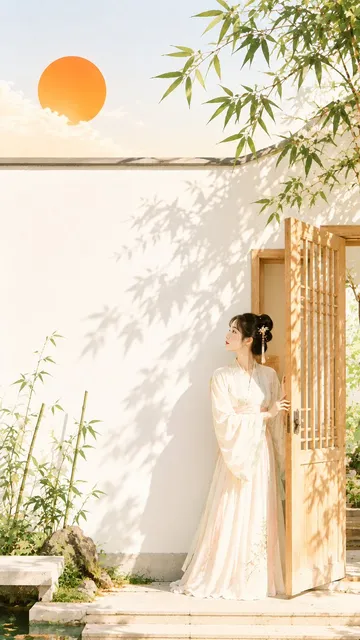
Nostalgia explains part of the revival, but not all of it. The visual language of late-80s and 90s anime — hand-painted backgrounds, limited cel animation, saturated shadows, and oversized expressive eyes — reads as craft to modern audiences. In a feed saturated with hyper-clean 3D renders and razor-sharp vector art, a slightly imperfect frame with visible grain and warm color shifts feels handmade. That imperfection is now a feature rather than a limitation.
There is also a practical reason the style keeps winning: it is unusually forgiving. Hard cel shading means fewer blended gradients to get wrong. Simplified anatomy means small errors disappear into the design language. Bold color blocking means a composition can survive at thumbnail size. For anyone learning image generation, retro anime is one of the friendliest styles to practice on because the rules are visible and repeatable.
AI tools have removed the biggest barrier. Reproducing this aesthetic by hand once required years of drawing practice, a working knowledge of animation pipelines, and a lot of patience with paint-on-glass backgrounds. Today a generator can produce a convincing frame in seconds. The skill has shifted from rendering lines to directing taste: choosing references, writing prompts, and knowing which outputs are worth keeping.
What Actually Defines the 90s Anime Aesthetic
Before you write a single prompt, it helps to name the ingredients. "90s anime" is not one look. It covers the soft pastel romance of the era, the gritty mecha productions, the neon-soaked cyberpunk OVAs, and the warm family dramas. What unifies them is a production method, and that method leaves fingerprints you can describe in words.
Linework, cel shading, and color separation
Classic cel animation used a limited number of painted layers per character. The result is flat fill areas separated by clean, confident outlines, with shadows that appear as distinct shapes rather than gradual gradients. Outlines are often slightly heavy and dark brown rather than pure black. Highlights are minimal — usually one warm spot on the hair and one on the cheek. When prompting, terms like "hand-drawn cel shading," "limited color palette," and "flat shadow shapes" push generators toward this structure.
Backgrounds, film grain, and analog artifacts
Backgrounds were frequently painted by hand with gouache or watercolor, then photographed onto film. That process introduced soft focus at the edges of the frame, gentle color bloom around bright sources, subtle vignetting, and consistent grain. These artifacts are the single easiest way to make a modern AI image read as authentically retro. Without them, even perfect linework looks like modern digital art wearing a costume.
Character design, faces, and framing
Era-specific faces tend to have wide-set eyes, a small nose indicated by a single shadow line, and hair rendered as large masses with a few inner strands. Composition often favors medium shots with generous headroom, dramatic backlighting at sunset, and a slightly lower camera angle for heroic moments. Naming the framing explicitly — "medium shot, headroom, sunset backlight" — does more for authenticity than stacking adjectives about quality.
How AI Models Pick Up a Retro Style
Diffusion models versus older architectures in plain language
Most current image generators are diffusion models. They learn by adding noise to training images and then learning to reverse that process, which lets them build images from random static step by step. Older approaches such as generative adversarial networks used two competing networks to refine output. In practice, diffusion models produce better prompt adherence and smoother composition, while some older or purpose-built anime models still have a distinctive, slightly rougher texture that suits retro work.
Why training data decides what you get
A model can only imitate what it has seen. If its training set is dominated by modern digital illustrations with soft gradient shading, it will default to that look even when you ask for cel shading. The fix is not to fight the model but to redirect it: supply strong style anchors, use reference images, or attach a lightweight style adapter trained on era-appropriate art.
Fine-tuning, adapters, and image references
A style adapter — often distributed as a small add-on file — teaches a model one specific look without retraining the whole thing. Reference-image features, where you supply a picture and let the model borrow its palette and rendering, are faster but less consistent across a batch. A practical division of labor: use reference images for exploration, then lock the result with an adapter or a saved prompt recipe once you find something that works.
Choosing the Right Tool for the Job
Different stages of a retro anime project need different tools, and mixing them badly is the most common cause of inconsistent results.
Text-to-image generation. Use this for key art, character sheets, and background plates. Prioritize models with strong prompt fidelity and support for reference images, since you will iterate heavily before committing to a look.
Style adapters and custom checkpoints. Use these when a project needs twenty images that all look like they came from the same studio. Consistency matters more than novelty here, so choose a narrower model over a general-purpose one.
Upscalers and detail restorers. Retro art lives at moderate resolution. Pushing a 90s-styled frame to billboard resolution tends to add unwanted sharpness and clean up grain you actually want. Upscale gently, then reintroduce texture.
Video generation. Motion adds the final layer of authenticity — but a badly animated shot destroys the illusion faster than a static image ever could. Start with subtle motion: drifting clouds, blinking, a slow camera push, hair moving in wind.
Compositing and grading. A basic editor with curves, grain overlays, and blend modes will do more for retro feel than any single generator setting.
Prompting for Authentic Retro Results
Style anchors that reliably work
Build a reusable core phrase and keep it constant across a project. Something like: retro anime still, cel-shaded, limited palette, hand-painted background, soft film grain, warm late-afternoon light. To that core, add only the variables: subject, action, framing, mood. Consistency comes from repetition of the anchor phrase, not from endlessly rewriting it.
Composing the shot: lenses, lighting, and era cues
Generators respond well to photographic language borrowed from animation production: "wide establishing shot," "low angle," "dutch tilt," "backlit silhouette," "golden hour," "fluorescent interior." Era cues help too — "CRT television broadcast look," "VHS color bleed," "70mm film grain." Be careful not to stack contradictory cues; choosing one delivery format per image keeps the result coherent.
Negative prompts and artifact control
Use negative prompts to suppress the most common failure modes: glossy 3D rendering, airbrushed gradients, extra fingers, watermark text, modern smartphone-shaped objects, and over-detailed eyes. Keep the negative list short and specific. A long negative list dilutes attention and can flatten the image.
A Practical Workflow: From Idea to Finished Frame
Step 1 — Build a compact reference board
Collect eight to twelve images that represent the exact look you want. Mix official-era production art, background paintings, and a few modern pieces that capture the same mood. The goal is not to copy any single frame but to give yourself a visual vocabulary you can describe in words.
Step 2 — Generate wide before you generate specific
Start with a batch of low-commitment variations using only the core style anchor and a simple subject. Do not chase a perfect face yet. You are looking for the palette, the shading structure, and the grain level. Save the two or three frames that feel closest to the target.
Step 3 — Lock the style with a reusable recipe
Once you have a winner, write down its full prompt, settings, model, and reference images. Treat it as a template. Every subsequent image in the project starts from that template, changing only the subject and framing variables. This single habit eliminates most consistency problems.
Step 4 — Solve faces and hands early
These are the highest-risk areas. Generate them at a slightly larger scale, inspect at full resolution, and fix them before you build a scene around them. It is far cheaper to regenerate a portrait than to rebuild a wide shot because the character's face does not hold up.
Step 5 — Post-process for grain, bloom, and color
Run finished frames through a short finishing pass: add fine grain, lift the blacks slightly, warm the highlights, and blur the outer edges of the frame just a touch. A vignette applied at low opacity sells the film-transfer look. Keep the pass identical across every image so the set feels unified.
Step 6 — Add motion only after the stills are locked
If you need animation, feed your approved frames into a video model and request restrained movement. Describe camera behavior rather than character action when you want reliability: "slow push in," "gentle parallax," "hair drifting in breeze." Longer clips accumulate artifacts, so keep shots short and cut them together in an editor.
Keeping Characters Consistent Across a Series
Consistency is the hardest part of any multi-image project. Three techniques help more than any others. First, give each character a written identity card: hair shape, eye color, clothing, silhouette, and one signature detail. Paste that card into every prompt, verbatim. Second, use image references alongside text — a face reference plus a locked style anchor beats a paragraph of description. Third, accept controlled variation. Real 90s productions had inconsistent character art across episodes because different animators handled different cuts. Slight variation is period-accurate; total uniformity can look synthetic.
Track your results in a simple spreadsheet: filename, prompt used, model, seed if available, and a one-word verdict. After twenty images you will see which phrase combinations reliably hit and which quietly pull you back toward modern rendering.
Common Mistakes and How to Fix Them
Mistake: cramming the prompt with quality buzzwords. "Masterpiece, ultra-detailed, 8K" pushes generators toward glossy modern rendering. Fix: describe the medium and the camera, not the resolution.
Mistake: skipping the analog artifacts. Clean output reads as contemporary digital art. Fix: always include grain, bloom, slight softness, and warm highlights in the finishing pass.
Mistake: chasing one perfect image instead of a repeatable recipe. You end up unable to recreate anything. Fix: document settings the moment something works.
Mistake: over-animating. Fast, complex motion exposes AI weaknesses immediately. Fix: keep movement minimal and let editing create energy.
Mistake: ignoring hands, crowds, and complex props. These areas degrade fastest. Fix: frame them out, or simplify the composition to avoid them.
Mistake: using a modern aspect ratio and modern lighting. Era accuracy comes as much from framing and light as from linework. Fix: try 4:3 framing and sunset or fluorescent lighting more often.
Ethics, Rights, and Style Imitation
Style is not ownership. An art style cannot be copyrighted, but specific characters, logos, and recognizable copyrighted designs can be. Keep your generated characters original, avoid prompting for named studio properties or living artists, and be transparent about AI involvement when a client or platform expects it. If you trained or downloaded a style adapter, check its license before commercial use. And when your work is clearly inspired by a particular animator or production, say so — acknowledging influence is both honest and useful to your audience.
FAQ: Quick Answers for Retro Anime Projects
Can AI really replicate a 90s anime look? It can replicate the rendering convincingly — cel shading, palette, grain, composition. It struggles with the narrative intent and deliberate imperfection that human animators brought. Use AI for texture and speed, and apply your own judgment for framing and storytelling.
Which is more important, the model or the prompt? Both matter, but prompt structure decides more than most people expect. A strong, restrained prompt on a mid-tier model usually beats a chaotic prompt on the best model available.
How many images should I generate per finished frame? Budget ten to twenty attempts for hero images and three to five for supporting shots once your recipe is locked.
Why do my images look modern despite retro prompts? Almost always because of glossy lighting, high detail language, or a missing grain pass. Remove the buzzwords and add analog texture.
Can I use these images commercially? It depends on the model license, the source of any style adapters, and whether copyrighted characters appear. Verify each layer before you publish.
Do I need animation skills? Not for stills. For motion, basic editing knowledge — timing, cuts, sound — matters more than animation technique, because you are directing short clips rather than drawing frames.
How do I keep a whole series on-model? Lock one template, one style anchor, one finishing pass, and one reference set. Change as little as possible between images.
Retro anime generation rewards restraint more than novelty. Pick a narrow look, describe it precisely, and let consistency — not constant experimentation — carry the project across the finish line.

Alexander
More Blogs
Read MoreVidu Q4 Alternatives: 4K AI Video Models Compared (2026)
Vidu Q4 alternatives compared: Kling 4.0, Seedance 2.5, Wan 3.0, and Runway Gen-4 — 4K support, input modes, durations, audio, and what each costs in credits on Domer.
Top 4K AI Image Generators in 2026: 5 Models Compared on Real Costs
The top 4K AI image generators on Domer compared: Flux 3 Klein, Nano Banana 2.1, GPT Image 2.5, GPT Image 2, and Nano Banana Pro — 4K credit costs, reference limits, and speed.
Nano Banana 2.1 vs GPT Image 2.5: Which Image Model Should You Use? (2026)
Nano Banana 2.1 vs GPT Image 2.5 Flare compared: credit costs per resolution, aspect ratios, reference images, text rendering, and which tasks fit each model.