
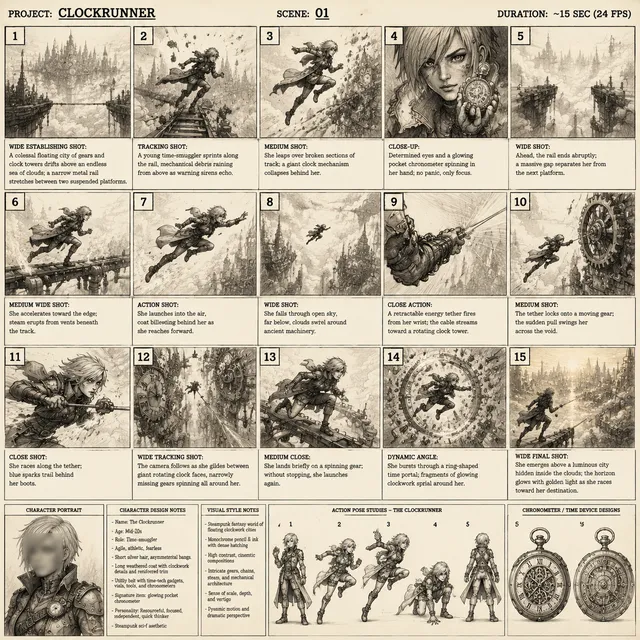
AI Animation Generator Workflow: Create Cinematic Videos
Oct 15, 2026

Why AI Animation Generators Are Changing Video Production
Animated video used to sit behind a wall of specialist skills, expensive software, and long production cycles. A short explainer could take weeks of scripting, storyboarding, illustration, rigging, animation, sound design, and revision. AI animation generators compress that timeline by turning text prompts, reference images, and simple direction into moving scenes. They do not eliminate the need for creative judgment, but they remove enough friction that small teams and solo creators can produce polished animated videos without hiring a full studio.
The shift is not only about speed. It is about access. A solo founder can create a product demo in an afternoon. A social media manager can test five hooks before lunch. An educator can transform a dry process into an engaging visual story. A freelance editor can offer animation services without spending years learning 3D software. The result is a broader range of voices in the video landscape, and more experimentation at the early stages of a campaign.
AI animation also changes how teams think about iteration. Instead of locking a script and storyboard before seeing anything move, creators can generate multiple visual interpretations, compare pacing, and adjust the narrative while the project is still flexible. That feedback loop is valuable because video success often depends on tiny details: the first three seconds, the clarity of a transition, the rhythm of a voiceover, or the emotional tone of a closing shot.
Core Concepts Behind AI Animation Generation
AI animation generation combines several technical layers: language understanding, image synthesis, motion modeling, temporal consistency, audio generation, and editing automation. The user sees a prompt box and a play button, but the system is resolving questions about what should move, how it should move, and how each frame should relate to the last. Understanding these layers helps you choose tools and write better prompts.
Text-to-video, image-to-video, and hybrid pipelines
Text-to-video generation starts with a written description. You describe the subject, setting, action, camera angle, lighting, and mood. The model produces a short clip that attempts to match. This is the fastest route for abstract concepts, title sequences, and quick social pieces.
Image-to-video generation uses a still image as the starting point. You might create an illustration, product photo, or character design, then ask the model to animate it. This gives you more control over composition and brand style because the first frame is already close to what you want.
Hybrid pipelines combine both approaches. You might generate a storyboard frame with text-to-image, animate it with image-to-video, and then add motion graphics or captions in an editor. Most professional workflows are hybrid because no single tool does everything well.
Motion control, consistency, and style
Motion is the hardest part of animation. A model can create a beautiful frame, but if the motion feels floaty, jerky, or physically wrong, the illusion breaks. Look for tools that offer camera controls, motion strength settings, and the ability to guide action with reference videos. Simple scenes with one clear action usually look better than crowded scenes with many simultaneous movements.
Consistency is the second challenge. Characters, environments, and props need to look related across shots. Some tools let you save character descriptions, style references, or seed values. Others require you to reuse the same reference image and prompt structure. If consistency matters, build a small style guide before generating the first clip.
Audio, voice, and lip sync
Audio is not an afterthought. Voiceover, music, ambience, and sound effects shape how viewers interpret an animated scene. Many AI video tools now include text-to-speech, voice cloning, and lip sync. Use natural pacing, avoid robotic delivery, and match the voice to the brand. Captions are also essential for social platforms where many viewers watch without sound.
How to Choose an AI Animation Tool
Evaluation criteria that actually matter
Before committing to a tool, evaluate output resolution, maximum clip length, style range, consistency controls, export formats, collaboration features, learning curve, usage limits, and data policies. A tool that produces stunning 5-second clips may be frustrating for a 90-second explainer. A tool with simple templates may be perfect for social ads but limiting for custom storytelling.
Also consider the workflow around the generator. Does it export clean files for editing? Can you generate transparent backgrounds? Does it support vertical, square, and widescreen aspect ratios? Can multiple team members review and comment? The best tool is the one that fits your production pipeline, not the one with the longest feature list.
AppyPie AI Animation Generator in context
AppyPie AI Animation Generator is an example of a browser-based tool aimed at quick animated videos. It can be useful for simple marketing clips, explainers, and social posts where speed matters more than frame-level control. Like many template-driven generators, it works best when you start with a clear script and a specific use case. If you need complex character animation, precise brand systems, or cinematic camera work, you may want a more advanced generator alongside a traditional editor.
The practical question is not whether one tool is universally best. It is whether the tool removes enough friction from your specific workflow. If your team needs to publish three short videos per week, a simple generator with built-in templates and voiceover may be more valuable than a powerful model that requires hours of prompting.
Other tools that fit different stages
A modern AI animation stack often includes several categories. Generative video models such as Runway, Pika, Luma, Kling, and Sora handle shot creation. Avatar and talking-head tools such as HeyGen, Synthesia, and D-ID handle presenter-led videos. Descript and CapCut simplify editing and captions. Premiere Pro, DaVinci Resolve, and After Effects handle professional finishing and motion graphics. You do not need every tool. Choose one generator, one editor, and one audio solution, then learn them deeply.
A Practical End-to-End AI Animation Workflow
Step 1: Define the job to be done
Before opening any generator, write a one-sentence brief. Who is the audience? What platform will host the video? How long should it be? What should the viewer think, feel, or do after watching? A 15-second vertical clip for a social feed has different rules than a 90-second explainer for a landing page. The brief keeps the project from drifting.
Step 2: Write for motion
Write scripts that describe visible action. Instead of saying the platform is efficient, show a character dragging a file into a folder and watching a progress bar disappear. Use active verbs, concrete nouns, and short sentences. Read the script aloud and mark every place where the visuals could become static. Those static moments are opportunities for simple motion graphics, cutaways, or text animation.
Step 3: Build a lean storyboard
A storyboard does not need to be beautiful. It needs to answer three questions for each shot: what is on screen, what moves, and how long it lasts. Create 6 to 12 panels for a short video. Add camera notes, such as wide establishing shot, close-up on hands, or slow push-in. This shot list becomes your prompt plan and your editing blueprint.
Step 4: Generate shots in small batches
Generate three to five variations per shot, not fifty. Keep prompts consistent and change only one variable at a time. Track which settings, references, and seeds produced the best results. Save your favorite outputs in a folder named by shot number so the edit stays organized. If a shot fails after several attempts, simplify the action or split it into two shots.
Step 5: Assemble, edit, and polish
Edit for rhythm before adding effects. Cut on motion, remove dead frames, and let the audio guide the pacing. Use transitions sparingly; a hard cut often feels more professional than a flashy wipe. Color correction can unify shots that came from different prompts. Add subtle camera shake, film grain, or light leaks only if they support the story.
Step 6: Add sound, captions, and finishing
Sound is half the experience. Record or generate a clear voiceover, choose music that matches the emotional arc, and add sound effects for actions such as clicks, whooshes, and transitions. Add captions with readable timing and high contrast. Export at the correct aspect ratio and resolution for each platform, and check the file on a phone before publishing.
Prompting Techniques for Better Animated Scenes
Use shot-level prompts
One prompt should describe one shot. Include the subject, action, environment, camera angle, lighting, style, and duration. For example: a close-up of a ceramic coffee cup on a wooden desk, steam rising slowly, morning light from the left, shallow depth of field, warm cinematic color, 4-second shot. This gives the model enough direction without overwhelming it.
Control style with references
Style references are powerful. Use a still image, color palette, or visual reference to guide the model. If you need brand consistency, create a mood board with three to five images and describe the shared qualities: muted colors, soft shadows, geometric shapes, or hand-drawn textures. Reuse the same reference across shots to keep the look coherent.
Use negative prompts and retries
Negative prompts help remove unwanted artifacts such as distorted hands, text glitches, flickering, or watermarks. Retries are normal. AI generation is probabilistic, so the tenth attempt may be the one that works. Keep a log of prompts that succeeded so you can reuse them in future projects.
Common Mistakes and How to Avoid Them
The first mistake is trying to generate an entire video in one prompt. AI models work best with short, focused shots. The second mistake is ignoring audio until the end. Voiceover timing affects shot length, so plan audio early. The third mistake is overloading the viewer with too many ideas. One video should communicate one main message. The fourth mistake is accepting inconsistent characters. Build a reference sheet and use it consistently. The fifth mistake is skipping the edit. Raw generations almost always need trimming, color correction, and sound design. The sixth mistake is forgetting platform specs. A beautiful widescreen video may fail on a vertical feed.
Use Cases by Creator Type
Social media teams
Social teams need speed and volume. Use AI animation for hooks, quick explainers, meme-style edits, and product teasers. Keep videos short, front-load the payoff, and design for sound-off viewing with bold captions. Batch-produce several variants from the same script by changing the opening shot or voiceover tone.
Educators and course creators
Educators can use animation to explain abstract concepts, historical sequences, scientific processes, or software workflows. Keep the pace steady, use consistent visual metaphors, and pair animation with clear narration. A simple animated diagram often teaches better than a complex 3D scene.
E-commerce and product marketers
Product marketers can animate feature highlights, lifestyle scenes, and before-and-after comparisons. Use image-to-video to animate product photos, then add text overlays for benefits. Be careful with claims and ensure the animation does not misrepresent the product.
Agencies and freelancers
Agencies can use AI animation for rapid concepting, pitch videos, and multiple creative routes. Freelancers can add animation services without a full animation team. The key is to set client expectations, show early drafts, and leave room for revisions.
Quality Control Checklist Before Publishing
Before you publish, check story clarity, audio mix, caption accuracy, aspect ratio, resolution, frame rate, brand consistency, legal rights, metadata, thumbnail, and the final call to action. Watch the video once with sound, once without sound, and once on a phone. Ask someone else to summarize the main point after one viewing. If they cannot, simplify the edit.
FAQ: AI Animation Generators
Do I need animation experience?
No, but you do need storytelling sense. AI tools handle rendering and motion, but you still decide what the audience should see, feel, and remember. Learn basic editing, pacing, and sound design to get better results.
How long should AI-animated videos be?
For social media, 10 to 30 seconds is often enough. For explainers and product demos, 60 to 120 seconds works well. Longer videos are possible, but they require more shot planning and consistency management.
Can I use AI animation for commercial projects?
Many tools allow commercial use, but you must check the specific license and terms. Also ensure you have rights to any reference images, music, voice clones, and trademarks that appear in the video.
How do I keep characters consistent?
Create a character reference sheet with front, side, and expression views. Use the same reference image and descriptive prompt across shots. Keep clothing, colors, and proportions consistent. Some tools offer character locking or seed control.
What is the best AI animation generator?
There is no single best tool. The best choice depends on your style, budget, timeline, and editing workflow. Test a short project with two or three tools and compare output quality, speed, and ease of use.
Can AI animation replace traditional animation?
For some corporate, social, and explainer videos, yes. For feature films, complex character acting, and highly stylized 2D animation, traditional skills still matter. AI is a production partner, not a complete replacement.
How do I avoid a generic look?
Avoid default templates, add custom sound design, write specific prompts, use your own brand colors, and edit with intention. The more human decisions you make, the less generic the result will feel.
The Bottom Line: Treat AI as a Production Partner
AI animation generators are powerful because they lower the barrier to motion. They let you test ideas, produce faster, and compete with teams that have larger budgets. But they work best when you treat them as part of a production system: clear brief, strong script, lean storyboard, focused prompts, careful editing, and polished sound. Choose tools that fit your workflow, not tools that impress you in a demo. Start with one small project, measure what works, and build your own repeatable process. The creators who succeed with AI animation will not be the ones who press generate the most. They will be the ones who know what to generate, why it matters, and how to shape the output into a story that people actually want to watch.

Alexander
More Blogs
Read MoreVidu Q4 Alternatives: 4K AI Video Models Compared (2026)
Vidu Q4 alternatives compared: Kling 4.0, Seedance 2.5, Wan 3.0, and Runway Gen-4 — 4K support, input modes, durations, audio, and what each costs in credits on Domer.
Top 4K AI Image Generators in 2026: 5 Models Compared on Real Costs
The top 4K AI image generators on Domer compared: Flux 3 Klein, Nano Banana 2.1, GPT Image 2.5, GPT Image 2, and Nano Banana Pro — 4K credit costs, reference limits, and speed.
Nano Banana 2.1 vs GPT Image 2.5: Which Image Model Should You Use? (2026)
Nano Banana 2.1 vs GPT Image 2.5 Flare compared: credit costs per resolution, aspect ratios, reference images, text rendering, and which tasks fit each model.