
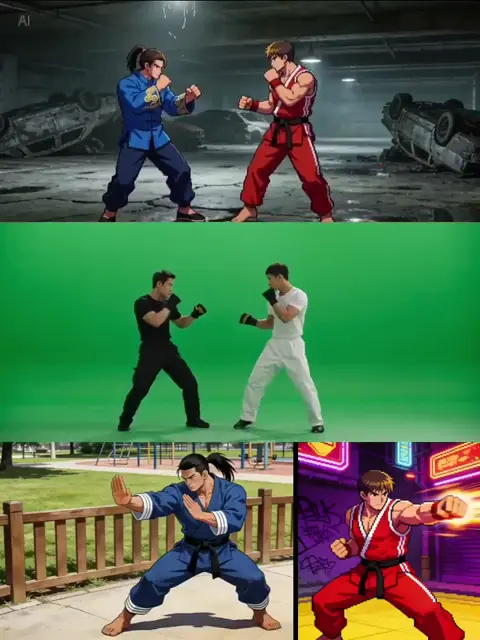
AI Anime Video Generation: A Practical Creator Workflow
Oct 15, 2026

What AI Anime Video Generation Actually Does Well
Anime is a visual grammar, not just a drawing style. Flat cel shading, hard-edged shadows, limited animation, held key poses, speed lines, and exaggerated eye detail are conventions that audiences read instantly. Modern text-to-video and image-to-video systems have absorbed enough of that grammar to reproduce the surface, and in the right conditions, a surprising amount of the motion language as well.
Where these tools shine:
- Establishing and atmosphere shots. A rooftop at dusk, rain on a train window, petals drifting across a schoolyard. These are low-rigor, high-impact clips that hide model weaknesses.
- Static-to-subtle-motion animation. Take a finished illustration and add hair drift, cloth sway, blinking, and a slow camera push. This is the most reliable anime workflow available today.
- Dialogue coverage. Medium shots of a character talking with simple mouth movement and a gentle camera drift.
- Stylized transitions. Ink splashes, grain wipes, glitch cuts, and particle bursts that cover edits.
- Insert shots. A hand tightening on a sword hilt, a teacup steaming, a phone screen lighting up a face.
Where they still struggle:
- Multi-character action with physical contact. Punches, grapples, dance sequences. Limbs merge, faces swap, camera continuity collapses.
- Consistent faces across a full turn or across several shots in a sequence.
- On-screen text, signage, and subtitles rendered inside the frame.
- Long unbroken takes. Most systems degrade after a few seconds, so a clean single generation is short enough that editing is not optional.
The strategic conclusion is simple. Do not ask a generative model to be an animation studio. Ask it to be a very fast second-unit crew that produces plates and inserts, then assemble those plates with editing, sound design, and a small amount of hand correction.
Choosing the Right Model for Your Anime Look
Match the engine to the motion, not to the aesthetic
Many creators pick a tool because its demo reel looked beautiful, then discover it cannot hold a character for two seconds of dialogue. Start from the motion requirement and work backwards.
| Motion need | Best-fit category | Why | Watch out for |
|---|---|---|---|
| A still illustration with gentle life | Image-to-video animator | Preserves your art exactly | Limited camera range |
| A scene from a written description | Text-to-video engine | Fast ideation | Style drift between clips |
| Two shots blended smoothly | First-frame and last-frame interpolation | Controlled start and end | Morphing in the middle |
| Clean slow motion | Frame interpolation tool | Smooth and inexpensive | Warping on fast limbs |
| A talking character | Lip-sync tool plus a locked still | Predictable result | Unnatural jaw motion |
Cel-shaded, flat-color looks
Flat color with hard shadow edges is the friendliest target for generative video because it has few gradients. Aim for large shapes, minimal texture, and strong silhouettes. Prompts should specify flat color, hard shadow edges, and limited shading. Avoid prompts that ask for painterly rendering or complex rim light; they introduce soft gradients that flicker between frames.
Painterly and movie-style looks
If your project leans toward film-like anime, expect more flicker and more correction. Budget extra time for temporal smoothing, grain overlays, and shot-length discipline. Short shots with deliberate cuts read as intentional style rather than error.
Hybrid 3D-to-2D looks
Shows built from 3D bases with 2D shading are attractive to AI workflows because the geometry gives the model a stable skeleton. If you can source a rough 3D blockout, using it as a motion reference dramatically improves limb consistency across a sequence.
Building a Reusable Style Bible Before You Generate Anything
A style bible is the single highest-leverage document in an AI anime workflow. It removes guesswork from prompts, keeps a series coherent across episodes, and lets a collaborator produce matching material without a long briefing.
Include:
- Palette. Six to ten named colors with hex values for skin, hair, uniform, sky, and shadow.
- Line language. Line weight, whether lines taper, and whether outlines are black, dark brown, or colored.
- Eye and face design. Iris shape, highlight placement, and brow angle for each core emotion.
- Character sheets. Front, three-quarter, profile, and back views for every recurring character, plus expression sheets for neutral, happy, angry, surprised, and sad.
- Lighting rules. Where the key light comes from in day scenes, how night scenes are lit, and how shadows are colored.
- Camera rules. Whether you allow Dutch angles, how often you use handheld framing, and your default lens feel.
- Format. Aspect ratio, frame rate, resolution, and a target clip-length ceiling.
Store the character sheets as clean PNGs on a neutral background. These become your first-frame inputs for every shot in which that character appears. When you reuse the same sheet, faces stop drifting.
Naming conventions matter more than people expect. Adopt shot IDs like ep03_sc12_sh04 and apply them to source stills, generated clips, audio stems, and subtitle files. When a reviewer says shot four feels off, you know exactly which five files to open.
The Shot-by-Shot Workflow: From Script to Rendered Clip
Step 1: Write a beat sheet, not a script
List beats as one sentence each: she arrives late; he notices the bruise; the bell rings; they run. Beats keep you from generating shots that do not advance anything.
Step 2: Convert beats into a shot list
A shot list is the contract between writing and generation. Keep it in a spreadsheet.
| Shot ID | Type | Length | Subjects | Action | Camera | Audio |
|---|---|---|---|---|---|---|
| ep01_sh01 | Establishing | 3s | none | city skyline at dawn | slow tilt up | wind, distant birds |
| ep01_sh02 | Medium | 2s | A | turns toward window | static with slight drift | cloth, breath |
| ep01_sh03 | Insert | 1s | A hand | grips a strap | macro push | leather creak |
| ep01_sh04 | Wide | 2s | A, B | stand apart on a platform | slow dolly right | train horn |
Step 3: Generate and approve stills first
Never animate before the still looks right. Generate five to ten variations of the key pose, pick one, and file it. Correcting a still is fast; correcting a bad animated take is not.
Step 4: Animate in short segments
Generate two to four second clips, and produce three to five variations per shot. Expect roughly one in three to be usable. That ratio is normal and should be planned for, not treated as failure.
Step 5: Assemble a rough cut immediately
Drop the best take of each shot onto a timeline with temporary music. Do this before polishing anything. Rhythm problems are invisible in a folder of clips and obvious on a timeline.
Step 6: Fix, do not rebuild
When a shot feels wrong, change one variable: lengthen it, flip the camera, swap the take, or add a sound effect. Regenerating from scratch throws away context you already invested time in.
Step 7: Sound, color, and titles
Add foley, a music bed, and a light grain pass. Anime reads as anime partly because of sound design: cloth movement, footsteps, wind, and a clean ambience layer.
Prompt Patterns That Hold a Scene Together
The five-part prompt formula
Subject, action, camera, style, constraints. Keep it under about forty words. Longer prompts dilute attention and produce mush.
medium shot, girl in a navy school uniform with a short black bob, turns toward the window, slow push-in, cel-shaded anime, flat color, hard shadow edges, minimal shading, quiet mood
Negative constraints that matter
Add a short negative line: no text, no extra characters, no warped hands, no photorealistic skin, no lens flare. Do not paste a hundred negatives; the model only honors a few at a time, and contradictions cause instability.
Camera language models understand
Reliable terms include slow push-in, slow pull-back, gentle dolly left, static shot, slow tilt up, over-the-shoulder framing, and shallow depth of field. Unreliable terms include whip pan, snorricam, and complex crane moves. If you need a whip pan, fake it in the edit with a directional blur.
Style anchoring across shots
Repeat the same style clause in every prompt for a scene. Copy and paste it. Varying the wording, even slightly, changes the render. Build your scene style clause once and lock it.
Prompt hygiene
Remove conflicting terms such as flat color alongside heavy texture. Remove mood words that contradict the palette, such as warm sunset lighting next to cool moonlight. Contradictions are the most common cause of unstable output.
Character Consistency: The Hardest Problem in Anime Video
Faces drift. Hair length changes. Eye color shifts a shade. Here is the pragmatic playbook.
- Lock one canonical still per character and use it as the first frame whenever possible.
- Reuse the same seed and the same style clause for consecutive shots of the same scene.
- Avoid extreme angles. Profile and three-quarter views survive better than full back-of-head or heavy foreshortening.
- Keep wardrobe simple. Intricate patterns and layered accessories flicker badly.
- Stage conversations with framing tricks. Over-the-shoulder shots, off-screen dialogue, reaction close-ups on eyes or hands, and silhouette shots all reduce the number of times a full face must render.
- Plan a repair pass. Inpainting a face on a still and then animating from it is often faster than regenerating a clip.
- Run a face check on a contact sheet. Export every shot with a visible face as a thumbnail grid and scan for drift. It takes two minutes and catches the errors viewers notice instantly.
Budget honesty matters here. If a character must appear in thirty shots, expect to spend meaningful time on consistency. Storyboard around it. Animators working in traditional studios do the same thing: they reuse bank shots, hold frames, and stage dialogue in economical but expressive ways.
Audio, Subtitles, and Timing
Voice
Real performances still beat synthetic ones for emotional range. If you cannot record a performer, use synthetic voice for the temporary track and replace it later. Record in a room with soft surfaces and keep the microphone slightly off-axis to reduce plosives.
Lip sync
Anime dubbing rarely matches phoneme for phoneme, and it does not need to. Two or three mouth shapes per line plus a small jaw movement reads correctly. Over-animated mouths look uncanny and pull attention away from the eyes.
Music and ambience
Build a small library: three tension loops, two warm loops, one comedic loop, and ambience beds for city, classroom, forest, and rain. Reusing a tight library makes a series feel coherent and saves enormous time.
Subtitles
Keep subtitles outside the generated frame. Render them in your editor with a clean sans-serif or a period-appropriate face. Two lines maximum, held for at least one second. Verify legibility against the brightest frame in the shot, not the average one.
Timing
Cut on motion. When a character turns, cut two frames before the turn finishes. Hold reaction shots one beat longer than feels comfortable; that pause is where anime lives.
Editing and Post-Production
Assemble at your target frame rate and never mix rates in one timeline. Many anime-style projects sit comfortably at 24 fps with a slight motion blur pass, while social-first vertical clips often work better at 30 fps for platform smoothness. Pick one rate per deliverable and stay with it.
A layer order that works well:
- Base video clips
- Speed ramps and retimed sections
- Grain or texture overlay at low opacity
- Light bloom or halation
- Subtitles and titles
- Audio mix
Useful techniques that cost almost nothing:
- Match cuts on shape. Cut from a round moon to a round teacup.
- Smash cuts for comedy. Abrupt audio cut plus a hard frame change.
- J and L cuts. Let audio lead or trail the picture to smooth scene changes.
- Comic inserts. A single still frame with a border and a sound sting can carry a joke.
- Speed ramps on impacts. Slow to fast at the moment of contact hides a weak action frame.
Export a master at the highest practical quality, then create platform versions from that master. Never re-encode a re-encode; each pass softens line art and adds banding to flat color areas.
Common Mistakes and a Pre-Publish Checklist
The ten mistakes that cost the most time:
- Over-prompting with paragraphs of adjectives.
- Animating before the still is approved.
- Ignoring aspect ratio until the final export.
- Skipping the shot list and generating whatever feels fun.
- Crowding three or more characters into one frame.
- Expecting clean hands in close-up without a repair pass.
- Forgetting sound design entirely.
- Inconsistent light direction between consecutive shots.
- Regenerating an entire scene to fix one shot.
- Mixing frame rates across a single timeline.
Checklist before publishing:
- Faces and hair read consistently across every shot.
- Light direction matches between adjacent shots.
- Every clip is at least one frame longer than the cut needs.
- Audio peaks are controlled and dialogue is intelligible on phone speakers.
- Subtitles sit inside safe margins and remain legible on the brightest frame.
- No accidental on-screen text or watermarks appear in the render.
- The first three seconds communicate the premise.
- The last shot resolves the scene or deliberately withholds.
FAQ
How long should an AI-generated anime clip be?
Two to four seconds per generated segment is the reliable range. Longer segments tend to drift in style, lose facial detail, or produce unstable motion. You can absolutely build a two-minute scene, but do it from thirty to fifty short segments rather than a handful of long ones.
Can AI anime video hold a conversation between two characters?
Yes, with staging tricks. Keep both characters in frame only for wide establishing beats, then cut to singles, over-the-shoulder framings, and reaction inserts. Avoid long two-shots with continuous dialogue, because both faces must stay stable simultaneously and that is where drift becomes obvious.
Do I need an art background to get good results?
Not for a first project, but the ceiling is set by your visual judgment. Learning composition, color, and shot rhythm matters more than learning software. Study storyboards from shows you admire and copy their framing logic rather than their scenes.
What is the best way to keep a character face consistent?
Lock one reference still, reuse it as the first frame, reuse the same seed for consecutive shots, keep the wardrobe simple, and avoid extreme camera angles. Then run a thumbnail contact sheet and repair drift with inpainting instead of regenerating the whole take.
Should I generate at the final frame rate or retime later?
Choose a target frame rate at the start. Generate at that rate when possible. Retiming after the fact works for short moments but introduces artifacts if pushed too far, especially on fast limb motion and on-line art edges.
How many takes should I generate per shot?
Plan for three to five and expect one keeper. If you consistently need ten or more, your prompt likely contains contradictions or your style clause is unstable. Fix the wording before generating more.
Is it better to write a script or a shot list first?
Write beats, then a shot list, then treat dialogue as something you add once the visual rhythm works. Dialogue written before the shot list often produces scenes that cannot be staged economically within the limits of the tools.
How do I handle scenes with crowds?
Do not stage them directly. Represent crowds as a wide shot with motion blur, a silhouette row, or a single detail shot of feet and uniforms. Crowd rendering is where generative video degrades fastest and where viewers notice first.
What about vertical formats?
Plan for vertical from the start. Reframe with headroom in mind, prefer medium and close shots, and keep subtitles higher than you would in a horizontal cut. Cropping a horizontal master usually ruins composition and cuts off faces.
How do I know when a project is finished?
When the story reads without explanation. Play it for someone who has not seen the shot list. If they ask what happened, the problem is in the edit, not in the generation. Go back to the timeline before generating anything new.

Alexander
More Blogs
Read MoreVidu Q4 Alternatives: 4K AI Video Models Compared (2026)
Vidu Q4 alternatives compared: Kling 4.0, Seedance 2.5, Wan 3.0, and Runway Gen-4 — 4K support, input modes, durations, audio, and what each costs in credits on Domer.
Top 4K AI Image Generators in 2026: 5 Models Compared on Real Costs
The top 4K AI image generators on Domer compared: Flux 3 Klein, Nano Banana 2.1, GPT Image 2.5, GPT Image 2, and Nano Banana Pro — 4K credit costs, reference limits, and speed.
Nano Banana 2.1 vs GPT Image 2.5: Which Image Model Should You Use? (2026)
Nano Banana 2.1 vs GPT Image 2.5 Flare compared: credit costs per resolution, aspect ratios, reference images, text rendering, and which tasks fit each model.