
AI Image and Video Generation Workflows: A Practical Guide
Oct 14, 2026

Why Visual Production Is Moving to Hybrid AI Workflows
Generative imagery stopped being a novelty the moment art directors realized they could explore twenty directions before lunch. What changed more recently is the shape of the work. Instead of typing a prompt, downloading a picture, and dropping it into a layout, teams now run a pipeline: text becomes a still, the still becomes a reference, the reference drives a sequence, and the sequence is finished in a compositor alongside filmed or rendered footage.
Pipeline thinking is what separates repeatable results from lucky ones. A single good generation is not a workflow. A workflow is a documented sequence of prompts, references, seeds, review gates, and finishing steps that produces acceptable output on a deadline, week after week, with more than one person involved.
Three pressures push teams in this direction:
- Speed of exploration. Concepts that once needed a week of illustration can be visualized in an afternoon, which changes how pitch meetings run and how quickly feedback loops close.
- Volume of channels. One campaign now needs vertical, square, and widescreen variants, plus thumbnails, animated loops, and localized versions.
- Cost of changes. When a client swaps a wardrobe color or a product label after the shoot, regenerating a still is far cheaper than booking the studio again.
The result is a hybrid discipline. Filmed footage, 3D renders, generated stills, and AI-assisted motion all land in the same timeline. The craft question is no longer whether to use a generator. It is where in the chain the generator does the most good with the least cleanup afterward.
Choosing the Right Generator Type for the Job
Most disappointments in AI visual work come from using the wrong class of tool. Before you write a single prompt, decide which of these three families fits the task.
Stills-first diffusion models
Tools such as Midjourney, Stable Diffusion, Firefly, and Ideogram are optimized for single-frame quality: composition, lighting, texture, and stylistic range. They are excellent for mood boards, key art, editorial illustration, product mockups, and background plates. They are weak at temporal continuity, because each frame is generated independently unless you add external constraints.
Choose this family when the deliverable is a still, or when the still will be animated later by a different tool.
Sequence-aware video and animation models
Image-to-video and text-to-video systems such as Runway, Kling, Pika, and comparable engines understand motion across time. They handle camera moves, subject motion, and short narrative beats. Their weakness is control: characters drift, hands morph, and small text becomes unreadable. They work best when the shot is short, the motion is simple, and the audience will not study a single frame for ten seconds.
Choose this family when you need motion that would be expensive or impossible to shoot.
Open-weight and self-hosted stacks
Node-based environments such as ComfyUI, combined with open checkpoints and adapters, give you total control over sampling, conditioning, and post-processing. The trade-off is maintenance. You own the updates, the GPU capacity, and the debugging. Teams that need exact reproducibility, unusual fine-tuning, or offline processing usually end up here.
| Need | Best fit | Why |
|---|---|---|
| Hero still with rich lighting | Stills-first model | Highest per-frame fidelity |
| Five-second product loop | Sequence-aware model | Native motion handling |
| Repeating character across 40 shots | Fine-tuned or reference-locked pipeline | Consistency beats novelty |
| On-premise, no external calls | Open-weight stack | Full data control |
A practical rule: use the most controllable tool that can still hit the quality bar, not the most impressive one in a demo reel.
The Anatomy of a Repeatable AI Visual Workflow
Once you have picked the tool family, the workflow itself should look the same from project to project. Five stages cover most productions.
Step 1 - Define the visual grammar before you write prompts
Write down the non-negotiables: palette, contrast curve, lens feel, era, material textures, and what must never appear. A one-page visual grammar prevents the drift that happens when five people each generate images from their own mental model. Include reference images that show the target, not just adjectives.
Step 2 - Build a prompt scaffold
A scaffold is a fixed sentence structure with slots. For example: subject and wardrobe, action or pose, environment, camera and lens, lighting, palette, texture, and exclusions. Keeping the order stable makes results comparable and makes it obvious which variable changed when an image suddenly works.
Step 3 - Generate wide, then cull hard
Produce more variants than you need at low resolution, then select ruthlessly. The mistake is polishing the first plausible image. A useful pattern is twenty small candidates, three refined finalists, one approved frame. Culling at the thumbnail stage saves hours of upscaling.
Step 4 - Lock continuity before you scale
If the project needs the same character, product, or location across multiple shots, solve it now. Save the seed, save the reference image, save the adapter or embedding you trained, and record all of it next to the approved shot. Continuity problems discovered at shot thirty mean redoing shots one through twenty-nine.
Step 5 - Finish outside the generator
The final ten percent of quality lives in the edit: grade, grain, chromatic aberration, matte cleanup, and compositing generated elements against real plates. Generators rarely produce a shot that is ready to publish untouched. Treat their output as footage, not as a final asset.
Prompt Architecture That Survives Across Tools
Prompts written for one model rarely transfer cleanly to another, but the underlying information does. If you organize prompts as structured descriptions rather than incantations, you can move the same creative intent between engines with modest rework.
A portable prompt covers six layers:
- Subject and identity. Age, build, wardrobe, distinguishing features, expression.
- Action and intent. What the subject is doing and why it matters to the story.
- Environment. Location, time of day, weather, background density.
- Camera. Focal length, angle, height, depth of field, motion blur.
- Light and color. Key direction, contrast, palette, mood temperature.
- Constraints. What to exclude, what to preserve from a reference, and what must not change.
Two habits make this practical. First, keep a shared prompt library with named presets, so a lighting setup approved for one campaign can be reused. Second, version your prompts in the same place you version assets, so you can answer the question that always arrives two weeks later: what exactly produced this image?
Negative instructions deserve their own line. Artifacts such as extra fingers, warped text, plastic skin, and floating objects are easier to prevent than to repair.
Continuity, Character Consistency, and Style Locking
Consistency is the hardest problem in AI visual production and the one that most determines whether a viewer trusts the result. A character who changes face shape between shots reads as an error, even if every individual frame is beautiful.
There are four levers, roughly in order of effort:
- Seed and settings discipline. Reusing a seed with small prompt changes keeps some structure stable. It is cheap and imprecise.
- Reference conditioning. Feeding an approved image as a style or identity reference keeps a look close without retraining. Most modern engines support this in some form.
- Trained adapters. Fine-tuning a lightweight adapter on twenty to forty curated images produces strong identity lock for a specific character, product, or illustration style. This is the standard approach for recurring series.
- Post-hoc alignment. When generation cannot hold consistency, use face replacement, texture projection, or compositing to enforce it. Slower, but reliable.
Style locking works the same way. Build a style sheet that defines edge treatment, line weight, grain, saturation, and shadow behavior. Then verify every generated frame against it before it enters the edit. A five-second side-by-side check catches the drift that ruins a sequence.
Reference Fusion, Compositing, and Finishing
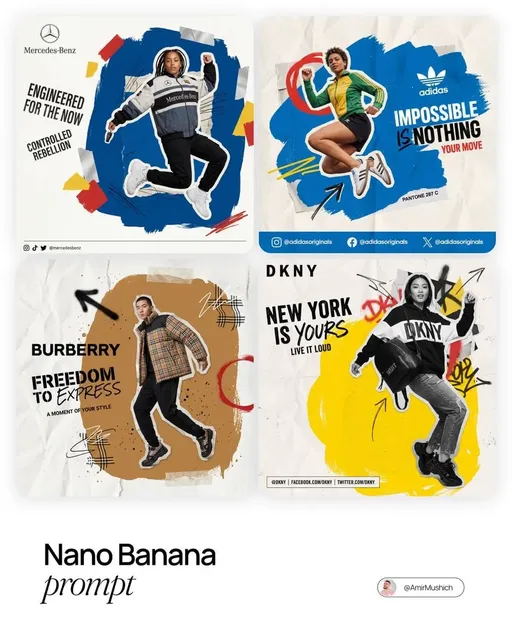
Multi-image fusion - combining elements from several references into one coherent result - is one of the most useful capabilities in modern pipelines. It lets you merge a lighting scheme from one image, a wardrobe from another, and a location from a third without describing any of them in words.
Use it deliberately. Fusion is powerful for concept art, packaging mockups, and marketing key visuals, where you need a specific product silhouette in an invented environment. It is risky when the references come from sources you do not have rights to, because the output may inherit recognizable protected elements.
After generation, the finishing stack usually looks like this:
- Cleanup. Remove artifacts, fix hands and edges, rebuild occluded areas.
- Upscale. Increase resolution with a dedicated upscaler, then add grain so the result does not look synthetic.
- Composite. Place generated elements against real or rendered plates with matching perspective and light direction.
- Grade. Apply a single color pipeline across generated and filmed material so the seams disappear.
- Deliver. Export the formats the channel needs, including vertical crops that keep the subject inside the safe area.
Skipping step three is the most common reason AI visuals look pasted on. Matching light direction and shadow density does more for believability than another round of generation.
Rights, Bias, and Originality: A Practical Checklist
Legal and ethical review is part of the workflow, not a final obstacle. A short checklist prevents most problems.
- Provenance. Record which tool, version, prompt, and reference produced each asset.
- Likeness. Do not generate recognizable real people without documented permission, and be careful with prompts that describe a living person indirectly.
- Trademarks. Avoid logos, distinctive packaging, and brand-specific architecture unless you own them.
- Style imitation. Referencing a living artist by name is a reputational and sometimes contractual risk. Describe the visual properties instead.
- Dataset uncertainty. If you cannot explain where a model learned something, treat output as higher risk for commercial use.
- Bias review. Check representation across skin tones, body types, ages, and abilities in any set of generated people. Default model behavior skews toward narrow norms.
- Disclosure. Follow the requirements of your client, platform, and jurisdiction when labeling synthetic media.
Originality is a spectrum, not a switch. The safest creative position is to use generated material as raw material for a composition you designed, rather than as a finished statement you merely selected.
Common Mistakes and How to Avoid Them
Most stalled AI visual projects fail for the same handful of reasons.
- Prompting before planning. Generating before defining the visual grammar guarantees rework.
- Scaling before locking. Producing fifty shots and discovering continuity problems at the end.
- Over-relying on text in images. Generators still struggle with long strings of type. Set text in a layout tool and composite it.
- Ignoring the grain and grade stage. Clean, sharp AI images sit awkwardly next to filmed footage.
- Treating resolution as quality. A technically sharp image with weak lighting still looks amateur.
- No asset naming convention. Without versioned filenames, nobody can reproduce an approved shot.
- One-person dependency. If only one team member knows the prompt library, the pipeline stops when they go on holiday.
- Skipping review gates. Fast generation tempts teams to skip approval steps that exist for legal and brand reasons.
A simple fix for most of these is a one-page production sheet per project: tool, model version, seeds, references, prompt presets, review owners, and delivery specs. It takes twenty minutes to write and saves days.
FAQ
How do I keep a character consistent across many shots?
Start with reference conditioning on an approved image, then train a lightweight adapter if the character recurs across episodes or campaigns. Always generate a character sheet first - front, three-quarter, profile, and a neutral expression - and reuse it as the anchor for every prompt.
Do I need a different tool for video than for stills?
Usually yes. Stills-first models give better per-frame quality; sequence-aware models handle motion. A common pattern is to generate a strong keyframe in a stills model, then animate it in an image-to-video engine for three to six seconds.
How many generations should I expect per usable image?
For exploratory work, plan on fifteen to thirty candidates before you find one worth refining. Once the prompt scaffold and style locking are in place, that ratio improves dramatically, often to three or five.
Is it safe to use generated images commercially?
It depends on the model license, the reference material you used, and the jurisdiction. Keep provenance records, avoid recognizable people and trademarks, and confirm the terms of the specific engine you used before publishing.
Can AI visuals match filmed footage in the same edit?
Yes, if you match perspective, light direction, shadow softness, and grain, and then apply a single grade across everything. The compositing and finishing stage does more for believability than generation quality.
What is the biggest time sink in these workflows?
Continuity repair. Fixing a character who changed between shots costs far more than setting up references and adapters at the start. Lock continuity before you scale.
How do I keep the workflow portable if I switch tools?
Store prompts as structured six-layer descriptions, keep reference images organized by character and style, and document seeds and model versions. Intent transfers between engines much more easily than raw prompt text does.
Where should a small team start?
Pick one recurring deliverable - a thumbnail series, a product key visual, or a short social loop - and build the full pipeline around it, from visual grammar to final grade. One narrow, repeatable pipeline teaches more than experimenting across ten tools at once.

Alexander
More Blogs
Read MoreVidu Q4 Alternatives: 4K AI Video Models Compared (2026)
Vidu Q4 alternatives compared: Kling 4.0, Seedance 2.5, Wan 3.0, and Runway Gen-4 — 4K support, input modes, durations, audio, and what each costs in credits on Domer.
Top 4K AI Image Generators in 2026: 5 Models Compared on Real Costs
The top 4K AI image generators on Domer compared: Flux 3 Klein, Nano Banana 2.1, GPT Image 2.5, GPT Image 2, and Nano Banana Pro — 4K credit costs, reference limits, and speed.
Nano Banana 2.1 vs GPT Image 2.5: Which Image Model Should You Use? (2026)
Nano Banana 2.1 vs GPT Image 2.5 Flare compared: credit costs per resolution, aspect ratios, reference images, text rendering, and which tasks fit each model.