
Utwórz
AI Video Ad Generator Workflow: From Brief to Final Cut
Oct 15, 2026
Why AI Video Ads Changed the Production Math
A fifteen-second ad used to mean a location, a crew, a talent release, an edit suite, and a week of waiting. Now a solo marketer can move from a written concept to three watchable variants before lunch. The change is not about replacing craft; it is about collapsing the distance between an idea and something you can actually look at, react to, and refine.
The practical consequence is that creative volume becomes affordable. Instead of betting a whole month on a single hero spot, you can produce a family of clips that share a visual language but differ in hook, pacing, and how the product is framed. Testing stops being a luxury and becomes the default way you work.
Generated footage, however, is raw material — not a finished ad. The teams that get good results treat AI as a fast, tireless production assistant embedded in a disciplined advertising process. This guide walks through the technical foundations worth understanding, a workflow that reliably produces usable clips, the audio layer most people neglect, and the quality checks that keep a brand from looking careless.
How AI Video Generation Actually Works
You do not need to read research papers, but understanding three ideas will make you dramatically better at getting what you want out of these tools.
Text-to-video: the prompt is a creative brief
Text-to-video models translate language into motion. The model does not interpret your intention; it interprets your words. That means vague prompts produce generic footage — a smiling person in an office, a slow push-in on a laptop, a handshake you have seen a thousand times. Specific prompts produce specific footage: "handheld medium shot, woman in her thirties, mustard sweater, pouring coffee into a chipped ceramic mug, soft window light from the left, slight camera drift."
Treat every prompt as a miniature brief with five components: subject, action, setting, camera, and light. Add a sixth when it matters — style or treatment. If you cannot name the camera move and the light source, the model will choose for you, and it will choose the most average option available.
Image-to-video: your product as the anchor
Image-to-video takes a still and adds motion. For advertising this is often the more valuable mode, because it lets a real product shot, packaging render, or approved brand image drive the output. The model animates around a fixed visual anchor, which protects the thing that actually needs to be accurate.
The workflow that works: photograph or render the product cleanly, isolate it against a simple background, then describe only the motion and the environment in your prompt. "Slow dolly in, water droplets forming on the can, condensation, cool blue rim light, dark surface" gives the model room to move without letting it reinvent your packaging.
Choosing a model and clip length
Different tools excel at different jobs. Some are strong at photoreal humans, others at stylized illustration, product beauty shots, or fast abstract motion. Rather than committing to one, build a small mental map of which tool handles which shot type, and test the same ten-second prompt across two or three options before a big campaign.
Clip length matters more than most people expect. Most models hold coherence best between four and ten seconds. Longer shots drift — faces change, hands multiply, backgrounds morph. The professional response is not to fight this but to design around it: build ads from short, deliberate beats that cut before the model's weaknesses show.
A Practical Workflow: From Brief to First Cut
AI changes how fast you produce, not the order in which good advertising gets made. Keep the sequence intact.
Step 1: Write the ad brief before the prompt
Before opening a generator, write four lines: who the ad is for, the single idea it communicates, the emotional register, and the action you want. A skincare ad targeting first-time buyers might read: "For people wary of harsh actives; idea: gentleness is strength; tone: calm, tactile, unhurried; action: visit the product page." Those four lines will do more for output quality than any prompt trick.
Step 2: Storyboard in beats, not sentences
A fifteen-second ad is usually four to six beats. Write each as a single line:
- Beat 1 — hand turning the bottle in morning light
- Beat 2 — texture close-up, product applied
- Beat 3 — person exhaling, relaxed face
- Beat 4 — product on a clean surface with a soft shadow
- Beat 5 — call-to-action card
Each beat becomes one generation. This keeps prompts short and focused, and it makes the edit modular: a weak beat can be replaced without regenerating everything.
Step 3: Generate in batches and keep the outliers
Do not generate one clip, evaluate it, then generate another. Generate eight to twelve variations of the same beat in one sitting with small prompt changes — different camera moves, times of day, wardrobe colors. Choose later. Judging options side by side is faster and more accurate than judging them one at a time.
Save anything usable, even if it does not fit the current cut. A stray clip of steam rising off a cup becomes a transition in a campaign six weeks from now. Build a simple folder structure: project, beat, version.
Step 4: Assemble, caption, and mix
Bring the selected clips into an editor. Cut on motion, not on the beat of the music — a cut that lands mid-movement reads as intentional; a cut that lands on a still frame reads as an error. Then add captions. A majority of social viewers watch with sound off, so captions are not optional, and burned-in captions that match your brand typography look considerably more deliberate than auto-generated defaults.
Finally, mix audio. Music, voice, and sound design should be balanced before you export, not after someone complains it is too quiet on mobile.
Prompt Patterns That Produce Usable Footage
Prompts are not magic words; they are shot descriptions. These patterns cover the majority of advertising needs.
Product hero shots
Lead with the product, then the motion, then the light, then the finish:
"Glass serum bottle centered on a pale stone surface, slow orbit to the right, water droplets on glass, diffused daylight from above, shallow depth of field, photoreal, no text."
Two rules: never ask the model to render your logo or label text — composite those in post — and always specify "no text" so you do not get hallucinated lettering baked into the frame.
Lifestyle and UGC-style scenes
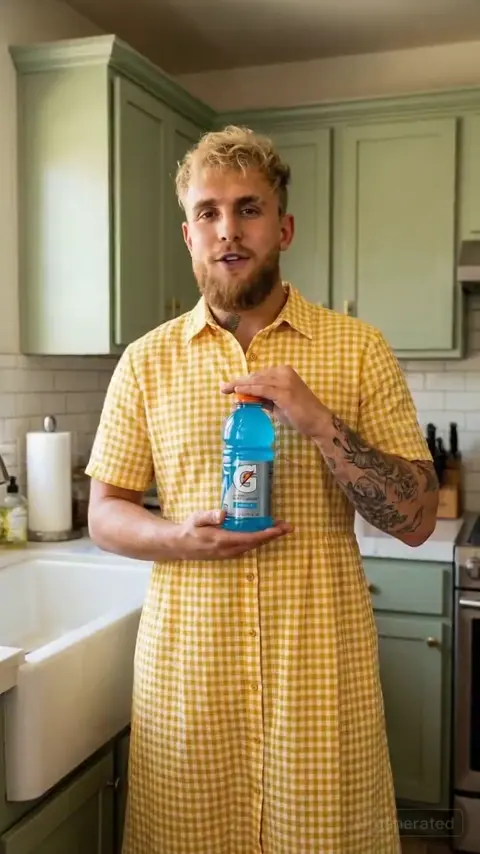
Authenticity now outperforms polish in feeds, which is good news because AI handles imperfect, naturalistic footage surprisingly well. Describe a phone camera and a real moment:
"Vertical shot, young man filming himself in a kitchen, slightly shaky handheld, warm evening light, laughing mid-sentence, natural skin texture, subtle motion blur."
Avoid words like "cinematic" and "professional" here — they push the model toward the glossy stock-footage look you are trying to escape.
Transitions and abstract beats
Not every clip needs a subject. Abstract beats stitch scenes together and buy you time for a voiceover line:
"Macro shot of pale green liquid swirling into clear water, slow motion, soft studio light, clean background."
Generate a handful of these and reuse them across an entire campaign. They are cheap, forgiving, and they make different ads feel related.
Audio, Voice, and the Invisible Half of the Ad
Video generation gets the attention, but audio determines whether an ad feels finished. Three components matter.
Voice synthesis has become good enough for straightforward narration: clear, consistent, and available in many languages. Use it for explainers, listicles, and any ad where the message is informational. For emotionally driven brand work, a human voice still reads warmer, and the cost of recording one is small relative to the rest of the campaign.
Music sets pace. Choose the track before you lock the edit, not after, because tempo should drive cut rhythm. If you cannot license a track, generated instrumental beds are a practical alternative — just verify usage terms for commercial placement.
Sound design is the layer most people skip. A soft whoosh on a transition, a crisp click when a product appears, ambient room tone under a talking-head clip. Ten minutes of subtle sound work makes generated footage feel several times more expensive than it is.
Editing and Fusion: Making Clips Feel Like One Ad
Clips from different generations rarely match out of the box. They differ in color temperature, grain, and contrast. The fix is a short, consistent grade pass: normalize white balance, apply a single look across all clips, and add a light film grain layer over everything. Uniform grain is the fastest way to make disparate sources feel like one shoot.
Beyond color, consider simple compositing. Placing a real product still into a generated environment, masking a logo onto a clean surface, or adding a screen recording inside a device mockup all raise perceived production value. Many generators now include basic image editing and fusion features; even a simple cutout tool plus a mask gets you most of the way.
One more habit: keep a "brand layer" — your fonts, lower-third style, color treatment, and end card — as a reusable template. Consistency across campaigns is what turns a collection of clips into a recognizable brand.
Quality Control Checklist Before You Ship
Run every ad through the same checks before it leaves your hands.
- Anatomy and physics: hands, teeth, eyes, reflections, and shadows. Freeze frames and scan.
- Text: any lettering generated accidentally? Regenerate rather than cover it up.
- Product accuracy: color, proportions, label placement, and cap shape must match reality.
- Brand safety: no unintended logos, no ambiguous gestures, no cultural missteps in background details.
- Claims: does anything on screen imply a result the product cannot support?
- Captions: correct spelling, readable size, safe margins on both vertical and square crops.
- Audio: dialogue intelligible on phone speakers, no clipping, music not fighting the voice.
- Aspect ratios: export native versions for each placement instead of cropping one master.
Regenerate any clip that fails anatomy or product accuracy. Editing around a bad shot costs more time than making a new one.
Testing and Iteration: What to Change Between Variants
Generate variants deliberately rather than randomly. The variables worth testing, in rough order of impact:
- The first frame and first second — the hook that decides whether anyone keeps watching.
- The format: talking head, product demo, text-led, or montage.
- Pacing: number of cuts within the same duration.
- The promise: what the ad says the product does for the viewer.
- The visual treatment: warm and human versus cool and technical.
Change one variable at a time and let each variant run long enough to produce meaningful data. A useful rule of thumb is to judge the first three seconds separately from the rest of the ad; a strong hook with a weak close and a weak hook with a strong close require completely different fixes.
Keep a running document of what you learned. Prompt knowledge decays fast, but audience insight compounds.
Common Mistakes and How to Avoid Them
Generating before writing. Without a brief, every clip looks fine and none of them fit together. Write four lines first.
Long, overloaded prompts. Fifteen clauses confuse the model. Five components per prompt, maximum.
Chasing ten-second shots. Coherence breaks. Cut earlier and use more beats.
Skipping audio. Silent, uncaptioned ads underperform regardless of visual quality.
No uniform grade. Mixed color temperatures make an ad look assembled rather than made.
Using generated text. Always composite typography in your editor.
Ignoring the mobile crop. Design the frame so the subject survives a vertical crop.
Testing everything at once. If three things change between variants, you learn nothing.
FAQ
Do I need video editing experience to use these tools?
Basic editing literacy helps enormously — cutting, trimming, adding captions, and balancing audio cover most needs. If you can use a simple timeline editor, you can finish an AI-generated ad.
How long does one ad take to produce?
A focused fifteen-second ad with four to six beats typically takes a few hours once you have a workflow, including generation, selection, edit, captions, and audio.
Will AI-generated ads look generic?
Only if the prompts are generic. Specificity in subject, light, and camera is what separates distinct work from stock-looking output.
Can I use real product photos?
Yes, and you should. Image-to-video modes that animate a real still are usually the safest route for product accuracy.
What about rights and commercial use?
Terms differ between tools and change over time. Check the current commercial usage terms for each tool you rely on before a paid campaign, and keep a record of what you generated and when.
How many variants should I make?
Three to five well-differentiated variants per campaign is a practical starting point. More than that usually produces noise rather than insight.
Should I still hire a videographer?
For testimonials, founder-led content, and anything requiring real people or real locations, yes. AI is best at concepts, product beauty shots, transitions, and volume — not at replacing a genuine human moment.

Alexander
More Blogs
Read MoreVidu Q4 Alternatives: 4K AI Video Models Compared (2026)
Vidu Q4 alternatives compared: Kling 4.0, Seedance 2.5, Wan 3.0, and Runway Gen-4 — 4K support, input modes, durations, audio, and what each costs in credits on Domer.
Top 4K AI Image Generators in 2026: 5 Models Compared on Real Costs
The top 4K AI image generators on Domer compared: Flux 3 Klein, Nano Banana 2.1, GPT Image 2.5, GPT Image 2, and Nano Banana Pro — 4K credit costs, reference limits, and speed.
Nano Banana 2.1 vs GPT Image 2.5: Which Image Model Should You Use? (2026)
Nano Banana 2.1 vs GPT Image 2.5 Flare compared: credit costs per resolution, aspect ratios, reference images, text rendering, and which tasks fit each model.