

AI Video Generation Workflow for High-Impact Marketing Campaigns
Oct 13, 2026
Why AI Video Has Become a Marketing Baseline
Audiences watch before they read. Short-form feeds, in-app placements, landing pages, sales decks, and onboarding emails all reward motion, and the platforms themselves keep pushing video-first formats because moving images hold attention longer than static assets. The problem was never demand. It was throughput.
Traditional production caps a marketing team at a handful of finished videos per quarter, each one consuming days of planning, shoot time, edit time, and revision cycles. A single concept change can invalidate a full day of work. That math makes experimentation expensive, so most teams default to one polished hero video and hope it lands.
AI video generation changes the economics of that throughput. A single marketer can now take a brief to a watchable first cut in an afternoon, test five hooks on the same concept, and localize a winning spot into four languages without booking a studio. The output is not always broadcast-grade, and it is not meant to be. It is fast, cheap, and good enough to learn from, and learning speed is what separates campaigns that compound from campaigns that stall.
The teams getting the most value from these tools treat them as a production layer inside an existing marketing system, not as a magic button. That distinction is the entire subject of this guide.
How AI Video Generation Actually Works
Text-to-video
Diffusion-based models learn statistical relationships between language and pixels. You describe a scene in plain language, and the model samples a sequence of frames that fits the description. Modern systems add temporal attention layers so that frame two knows about frame one, which is what stops the image from dissolving into noise after half a second.
In practice, a text prompt controls four things: subject, action, camera, and style. Prompts that nail all four and nothing else tend to perform better than long poetic paragraphs. "Wide shot, slow dolly right, woman in a linen shirt opening a laptop on a sunlit kitchen table, warm film grain" gives the model fewer competing signals than a page of mood prose.
Image-to-video
Instead of starting from words, you start from a still. This is the most reliable path for brand work because the first frame is already correct: your product, your color palette, your talent, your composition. The model only has to animate motion, not invent identity. Most product spots, logo reveals, and hero visuals are produced this way, often by generating the still in an image model and then animating it.
Video-to-video and editing assistants
Here the model receives existing footage and transforms it: restyling live action as animation, changing the time of day, extending a shot, removing an object, or generating a clean plate behind a subject. Editing assistants sit one layer up and handle transcript-based cuts, filler-word removal, auto-captions, and rough color matching.
Where the models still struggle
Knowing the failure modes saves hours. Current systems are weakest at: hands and fingers in close-up, legible on-screen text, complex physical interactions like liquid pouring or cloth folding, consistent characters across separate shots, and long continuous takes. If your concept depends on any of those, design around them rather than fighting them. Cut away from the hands. Render text in your editor, not in the prompt. Build scenes from multiple short shots instead of one long one.
The Six-Stage Marketing Video Workflow
This is the process that holds up whether you are producing one ad or forty localized variants.
Stage 1: Define the job the video must do
Before touching a prompt, write one sentence that names the audience, the placement, and the desired action. "Convince trial users who abandoned checkout to restart, on the mobile app, and land them on the resume-plan screen." That sentence determines length, aspect ratio, tone, and hook style. Videos without a defined job become mood boards with sound.
Stage 2: Write a prompt-ready script
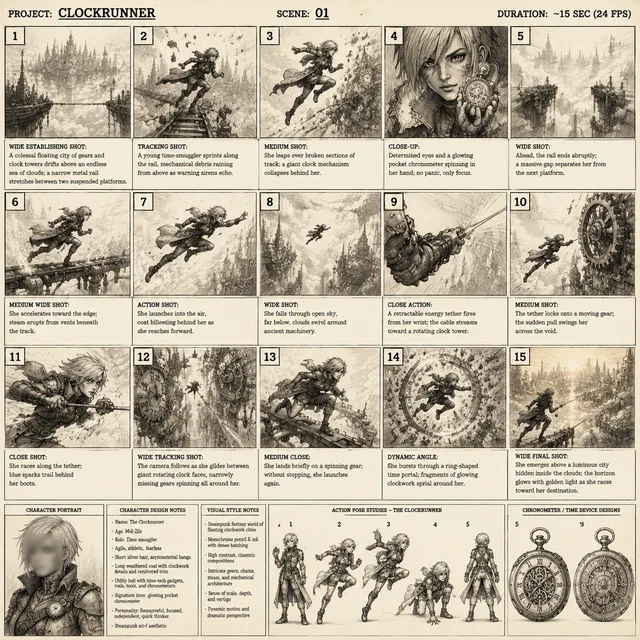
The trick is writing two documents instead of one. The first is the human script: what the viewer sees and hears, in beats. The second is a shot list where each row contains a visual prompt, a duration, and a motion instruction.
Keep each shot between two and five seconds. Shorter shots give you more editorial control and let you drop weak generations without breaking the sequence. Write the voiceover as its own timeline so you can re-record or swap a synthetic voice later without regenerating visuals.
A useful rule: if a shot cannot be described in one sentence, it is two shots.
Stage 3: Generate in shots, not in one take
Generate each shot three to five times. Model output is stochastic, so variety comes from repeated sampling, not from endless prompt tweaking. Save every usable take in a folder named by shot number, and keep a simple text log of which prompt produced which file. When a client asks for "the version with the blue jacket," you will be grateful for the log.
Pay attention to seed control. Locking a seed lets you change one variable (wardrobe, time of day, camera angle) while holding everything else constant, which is how you build a coherent set of variants from a single visual idea.
Stage 4: Assemble, sound, and caption
This is where AI output becomes a video. Rough-cut the shots to the voiceover, then add three things that punch far above their weight:
- Sound design. Room tone, whooshes on cuts, and a subtle music bed make generated footage feel intentional instead of synthetic.
- Motion. Slow push-ins, parallax, and speed ramps hide the small temporal artifacts that give generated clips away.
- Captions. A large share of viewers watch muted. Burned-in or styled captions are not optional for social placements.
Grade the whole sequence at the end rather than per clip. A single color treatment unifies footage generated in different styles and resolutions.
Stage 5: Version for each channel
Reframing is cheaper than regenerating. Master at the highest resolution you can afford, then crop to vertical, square, and horizontal. For vertical, remember that the safe zone excludes the top and bottom of the frame where platform UI sits.
Beyond aspect ratio, version the hook. The first two seconds carry most of the performance difference between placements, so produce three opening variants per concept and let the platform data decide.
Stage 6: Measure and feed the loop
Track hook rate (three-second views divided by impressions), completion rate, click-through rate, and cost per action. When a variant wins, dissect why: was it the opening frame, the pacing, the voice, or the offer? Then encode that lesson into the next batch. Teams that review performance weekly and rewrite their shot library accordingly improve much faster than teams that only look at aggregate campaign numbers.
Choosing Your Tool Stack
No single tool does everything well. A practical stack has four layers:
- Image generation for keyframes, product stills, and consistent characters.
- Video generation for animating stills and producing text-to-video shots.
- Voice and audio for narration, localized voice tracks, and music.
- Editing for assembly, captions, color, and export.
When evaluating a video generation tool, test the same five prompts on each candidate: a product close-up, a person speaking to camera, a wide establishing shot, a stylized abstract transition, and a shot with a moving camera. Score each on prompt adherence, motion stability, detail retention, and generation time. This takes an hour and tells you more than any feature list.
Also check the boring infrastructure: file formats, resolution ceilings, commercial usage terms, watermarking policy, and whether the tool keeps your generations private. Those details decide whether a tool is safe to build a campaign on.
Decision Criteria: When AI Video Beats Traditional Production
Use AI generation when:
- You need volume and variation for testing.
- The concept is conceptual, animated, or impossible to shoot affordably.
- You need localized versions in several languages on a short timeline.
- The content has a short shelf life, such as trend-driven social posts.
Reach for traditional production when:
- Real people, real places, or genuine testimonials carry the message.
- Close-up hands, food preparation, or precision product interaction is central.
- Regulated claims require a documented, auditable shoot.
- The piece is a flagship brand asset expected to run for years.
The strongest campaigns usually mix both: live-action footage for authenticity, AI-generated inserts for scale, transitions, and B-roll that would be expensive or impossible to capture.
Common Mistakes That Waste Time
Prompting for perfection instead of coverage. Beginners write one prompt, dislike the result, and rewrite for an hour. Better to generate eight variations of a good-enough prompt and pick.
Generating long clips. Ten-second generations drift, morph, and lose subject identity. Generate short, cut often.
Ignoring the first frame. If the opening still is weak, no amount of motion fixes it. Approve the keyframe before animating.
Skipping the audio pass. Generated visuals plus generic stock music read as templated. Custom sound design is the cheapest quality upgrade available.
No naming convention. A folder of output_final_v2.mp4 files becomes unusable within a week. Name by campaign, shot, and version.
Over-relying on one tool. Models change monthly. Keeping the workflow tool-agnostic, with assets stored in neutral formats, protects you from any single provider's roadmap.
Forgetting rights and disclosure. Check commercial terms, avoid recognizable faces or trademarks you do not own, and disclose synthetic media where required or where trust matters.
Rights, Disclosure, and Brand Safety
Three questions belong in every project kickoff. Who owns the generated asset under the tool's terms? What happens if a model produces something resembling a real person, logo, or protected work? And where does your organization stand on labeling synthetic content?
Practical safeguards: keep a record of the tool, prompt, and date for each published asset; avoid prompts that name real celebrities or living artists; run a human review pass before publishing anything with a human face; and add a plain-language disclosure when the content could mislead. Brand safety is not only about law. It is about whether the audience feels respected after watching.
Scaling From One Clip to a Content System
Once the workflow is stable, systematize it. Build a reusable library in four parts:
- Prompt templates organized by shot type: hook, product reveal, benefit, proof, call to action.
- Keyframe library of approved brand visuals, product angles, and background plates.
- Voice and music presets matched to tone: energetic, calm, premium, playful.
- Caption and lower-third styles that match the brand system in the editor.
With those in place, a new campaign becomes a remix instead of a rebuild. A single source concept can yield a hero video, six social cutdowns, three hook variants, and localized versions, all from the same library. That is where AI video stops being a novelty and starts being infrastructure.
FAQ
Do AI-generated videos rank or perform worse than filmed content?
Platforms rank on engagement, not on production method. Filmed content tends to win on trust and authenticity, while AI content wins on volume and novelty. Test both and let your own data decide.
How long does a typical AI video take to produce?
A thirty-second social spot with a stable workflow takes roughly half a day including scripting, generation, and editing. Localized versions add much less time because only the audio and captions change.
Can I use AI video for product demos?
Yes for conceptual demos and motion inserts. For screens, precise interfaces, and exact product behavior, capture real screen recordings and use AI for the surrounding visuals instead.
What resolution should I generate at?
Generate as high as your budget and timeline allow, then downscale. Upscaling artifacts are more forgiving than low-resolution source footage, and higher resolution gives you cropping room for vertical formats.
How do I keep characters consistent across shots?
Start from a fixed keyframe, reuse the same seed, and describe the character identically in every prompt. When consistency still drifts, keep the character off-screen for some shots and use reaction, hands, or environment instead.
Is AI video expensive?
Costs are usually dominated by generation volume and editing time rather than software subscriptions. The biggest savings come from fewer reshoots, faster iteration, and the ability to localize without a second production.
What about audio?
Synthetic narration is now good enough for most marketing use, especially for explainer and social formats. Record human voice when warmth and authority matter most, such as flagship brand films.
A Quick Reference Checklist
Before you publish, confirm:
- The video has one clearly stated job and one target action.
- Every shot is under five seconds and serves the script.
- The opening two seconds work muted and without context.
- Sound design, music, and captions are present and consistent.
- Vertical and horizontal versions exist with correct safe zones.
- Three hook variants are ready for testing.
- Tool terms, disclosure, and asset records are in order.
- File naming follows a convention your team can read.
AI video generation rewards teams that build a repeatable process around fast, imperfect output. The technology will keep changing; the workflow is what compounds.

Alexander
More Blogs
Read MoreVidu Q4 Alternatives: 4K AI Video Models Compared (2026)
Vidu Q4 alternatives compared: Kling 4.0, Seedance 2.5, Wan 3.0, and Runway Gen-4 — 4K support, input modes, durations, audio, and what each costs in credits on Domer.
Top 4K AI Image Generators in 2026: 5 Models Compared on Real Costs
The top 4K AI image generators on Domer compared: Flux 3 Klein, Nano Banana 2.1, GPT Image 2.5, GPT Image 2, and Nano Banana Pro — 4K credit costs, reference limits, and speed.
Nano Banana 2.1 vs GPT Image 2.5: Which Image Model Should You Use? (2026)
Nano Banana 2.1 vs GPT Image 2.5 Flare compared: credit costs per resolution, aspect ratios, reference images, text rendering, and which tasks fit each model.