
SDXL Prompt Generator: Craft Stunning AI Art Reliably
Oct 15, 2026
What an SDXL Prompt Generator Actually Does
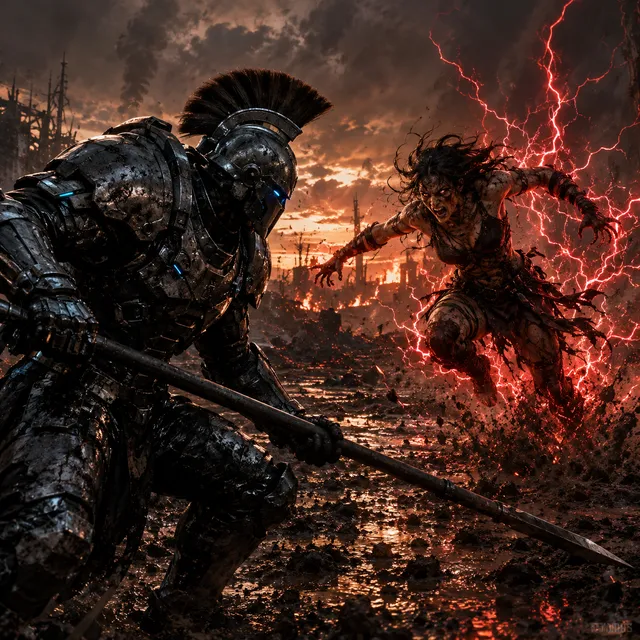
A prompt generator for Stable Diffusion XL is an idea-to-text translator. It takes a fuzzy intention — "a cyberpunk detective in the rain" — and expands it into an ordered description that names the subject, the action, the environment, the lighting, the lens, and the rendering style. A good one also hands you a matching negative prompt and a suggested resolution, because those three inputs only work as a set.
The catch is that a generator is scaffolding, not authorship. It cannot know that you want the coat olive rather than black, or that the scene happens at dawn rather than midnight. Read every generated prompt as a first draft: delete what you never asked for, rewrite what carries your specific intent.
Three kinds of tools get called prompt generators. Genre template libraries give you fill-in-the-blank structures. Rule-based expanders append standard quality and style phrases to whatever you type. Conversational assistants refine your description across several turns. The third kind is the most flexible and the easiest to drift away from your original idea with, so it rewards the discipline described below.
Generators worth keeping share a few traits. They separate subject from style, they respect the token limit instead of padding, they avoid stacking contradictory quality phrases, and they always pair the positive prompt with negatives aimed at the failure modes of the requested style.
When you evaluate a generator, ignore the marketing language and test three things: does it preserve your subject, does it keep style phrases in one coherent family, and does it produce output you would not have to rewrite from scratch? A tool that scores well on all three saves real time. A tool that scores well on none adds a step to your workflow without improving the result.
SDXL Core Concepts That Change How You Write
Dual text encoders and word order
SDXL conditions on two text encoders whose outputs are combined. The practical consequence: the model reads both broad meaning and literal phrasing, and it weighs early tokens more heavily. Lead with the subject and its most important attributes, then move outward to environment, light, and style. Later tokens are easier to drop without breaking the image.
Comma-separated fragments beat full sentences. Sentences carry filler that consumes tokens and dilutes attention. "Woman, red trench coat, standing under a neon sign, rain, night, 85mm, shallow depth of field" outperforms a grammatical sentence describing the same scene.
Resolution, aspect ratio, and refiner passes
The model was trained around a 1024-pixel base. Rendering at 512 and upscaling tends to produce simpler, softer images, while going far above 1024 without care invites duplicated limbs and smeared texture. Choose the aspect ratio closest to your final crop — 1024x1024 square, 896x1152 portrait, 1152x896 landscape — then let an upscaler handle enlargement.
Many pipelines split generation between a base model and a refiner. The base establishes composition; the refiner adds detail at low denoise strength. This division helps diagnosis: if the composition is wrong, fix the prompt; if the texture is wrong, fix the refiner stage.
Seed behavior
A fixed seed makes a run reproducible, which is the foundation of any controlled experiment. Changing the seed is a legitimate creative move when you want variety, but do it deliberately — after you have exhausted prompt-level changes, not before.
The Anatomy of a Strong SDXL Prompt
Subject and action
Name the subject first and state how many there are. "Two cyclists" prevents a third from appearing. Then give the action as a verb phrase: "mid-stride", "leaning against a wall", "pouring coffee". Vague action is the most common reason an image looks static or unintentionally strange.
For people, decide the crop before you write anything else. "Full body shot", "waist-up", and "close-up portrait" are among the highest-leverage phrases available, and they are far more effective than anything you can add later to correct framing.
Environment and time of day
Environment carries the story. "Rain-slicked alley" tells the model more than "street". Time of day sets the light budget: golden hour gives warm rim light, overcast gives soft even illumination, blue hour gives cool ambient tones plus practical lights.
Choose one or two concrete details instead of five abstract ones. "Steam rising from a grate" beats "atmospheric, moody, cinematic" because it gives the renderer something specific to draw.
Style, medium, and lighting
Style phrases fall into families: photographic (film stock, lens, aperture), illustrative (medium, line quality, palette), and hybrid (3D render, matte painting). Mixing families works, but "watercolor photograph" lands somewhere between the two, so mix on purpose rather than by accident.
Lighting vocabulary is the most reliable quality lever in the whole prompt. "Rim light", "softbox", "volumetric haze", "backlit", "candlelit" all produce visible, predictable changes. Generic praise such as "beautiful lighting" does close to nothing.
Camera and lens language
For photorealistic work, camera language adds credibility: focal length, aperture, distance. "35mm, f/2.0, waist-up" reads as a documentary frame; "85mm, f/1.4, tight headshot" reads as a portrait. Avoid contradictions, like a wide lens paired with extreme background compression — the model will attempt both and fail at one.
From Rough Idea to Structured Prompt
Step 1: write the plain-language brief
Before opening any generator, write one sentence describing the image as if briefing a photographer. Include who or what, where, when, and the mood. Example: "A retired lighthouse keeper mending a net on a wooden dock at dawn, calm and slightly melancholic." This sentence is your contract with yourself; everything later either serves it or gets cut.
Step 2: split the brief into ordered slots
Reorganize into subject, attributes, action, environment, time, light, camera, style. This is the skeleton a generator populates. Keeping the slot order identical across a project makes results comparable and makes it obvious which phrase caused a change.
Step 3: add coverage with a negative prompt
Negatives should target the failure modes of your genre. Portraits need hand and eye artifacts; architecture needs warped lines and doubled edges; illustration needs unwanted photorealism and watermark residue. Keep the list short. Overloaded negative lists strip texture and detail you wanted.
Step 4: lock the seed and change one variable
Once a composition is close, fix the seed and change exactly one element per run: lighting first, then lens, then style. This converts guessing into a controlled experiment and leaves you a record of what each phrase actually does in your pipeline.
Weighting, Attention, and Structural Control
Parentheses and numeric weights
Emphasis syntax pushes a concept harder, but small moves are enough. A weight around 1.2 on a color usually suffices; stacking weighted terms is a common cause of muddy, over-cooked output. When a detail keeps vanishing, move it earlier in the prompt before you weight it heavily.
Regional and layout control
Some interfaces let you assign separate prompts to separate canvas regions. That is the dependable way to put a subject on one side and keep the background distinct. Without it, spatial phrases like "on the left" are suggestions the model may ignore entirely.
Structural conditioning
Depth maps, edge maps, and pose skeletons let you dictate composition while the prompt controls appearance. Reach for them when you need a specific silhouette or a character that stays consistent across a series. The prompt then becomes a styling layer rather than a composition tool, which simplifies everything downstream.
Style adapters
Small style adapters lock a look efficiently, but they also narrow what the base model will produce. Test each one at moderate strength and dial it back whenever you still need variety in pose and framing.
Genre Patterns That Work
Photorealistic portraits
Lead with subject and crop, add one environmental anchor, then specify light and lens. Keep skin-related terms minimal; too many texture phrases produce plastic or waxy results. Negative prompts should cover extra fingers, warped eyes, and text artifacts.
Product and packshot renders
State the product, the surface, the background, and the light setup in that order. "Matte black bottle, brushed steel surface, seamless white background, softbox left, reflector right" is more useful than a paragraph of mood words. Consistency across a catalog comes from fixed seeds, fixed lighting language, and only the product varying.
Illustration and concept art
Name the medium and the line quality, then the palette. "Ink and watercolor, loose linework, muted ochre and slate palette" gives a clearer target than "fantasy art". Add negatives for photorealism if the model keeps drifting toward photography.
Architecture and landscape
Composition language matters more here than style language. Specify viewpoint, horizon placement, and scale cues like human figures. Negative prompts should guard against warped verticals, floating elements, and impossible reflections.
Common Mistakes and How to Fix Them
Prompt soup is the most frequent problem: twenty style tags, no subject hierarchy. Fix it by cutting to one phrase per slot and reading the prompt aloud.
Contradictions come second: "wide angle" with "compressed background", "minimalist" with "intricate ornamentation". Contradictions do not average out; the model picks one and the other silently disappears.
Over-weighting is third. Weighted tokens compete for attention, and pushing three concepts at once usually flattens all three. Return to 1.0 and reorder instead.
Ignoring aspect ratio is fourth. A portrait composition rendered square gets cropped or distorted. Set resolution before you iterate, not after.
Treating negatives as a dumping ground is fifth. A generic blocklist copied from a forum will remove the grain, texture, and imperfection that made the image feel real.
Finally, never changing the seed makes it impossible to know whether a change helped. Change one thing, note the result, move on.
Testing, Versioning, and Reproducibility
Keep a simple prompt log. For each image worth keeping, record the positive prompt, negative prompt, seed, resolution, model, adapter strengths, and sampler settings. A spreadsheet with one row per run is enough.
Name files with the seed and a short version tag so you can reconstruct any result months later. When you find a phrase that consistently improves a genre, promote it into your own reusable template rather than retyping it.
After you have two or three candidate prompts, run them side by side on the same seeds instead of evaluating them from memory. Same seed, same resolution, same sampler — only the prompt differs. That side-by-side habit is what separates people who improve quickly from people who keep getting lucky.
Reproducibility is not bureaucracy; it is what turns a lucky render into a repeatable process you can hand to a collaborator.
A Repeatable Workflow End to End
Start with the plain-language brief. Convert it into the slot order. Generate four low-cost variations at the target aspect ratio with different seeds to explore composition. Pick the best one, lock its seed, and refine lighting, then camera, then style, one variable at a time. Add structural conditioning if the silhouette still drifts. Upscale the final frame, then run a short QA pass for hands, eyes, text, and edges.
When you need a set rather than a single image, batch the same prompt across a fixed seed range and keep the template constant. Changing one slot at a time across a batch gives you a coherent series instead of a loose collection of unrelated frames.
Save the log entry. If the image belongs to a series, freeze the prompt template and vary only the subject specifics so the set stays coherent.
FAQ
Do I need a prompt generator at all? No. It is useful when you are learning the vocabulary or working at volume. Once you know your slot order, a handwritten prompt is usually faster and more precise.
How long should a prompt be? Long enough to cover subject, action, environment, light, camera, and style — usually 25 to 60 tokens. Beyond that, added phrases compete with each other instead of contributing.
Why do my results change between runs with the same prompt? Unless the seed is fixed, sampling starts from a different noise pattern every time. Fix the seed for comparisons, vary it for exploration.
Should I use long negative prompts? Only when they target specific failures. Ten relevant negatives beat a hundred generic ones.
How do I get a consistent character across images? Combine a fixed prompt template, a fixed seed range, and structural conditioning such as a pose or depth reference. Style adapters help, but they constrain variety.
What resolution should I render at? Match the aspect ratio of your final crop at roughly 1024 pixels on the long edge, then upscale.
Can one prompt serve both images and video? The vocabulary overlaps, but motion needs its own language: action timing, camera movement, and continuity between frames. Start from the still prompt and add motion terms deliberately.

Alexander
More Blogs
Read MoreVidu Q4 Alternatives: 4K AI Video Models Compared (2026)
Vidu Q4 alternatives compared: Kling 4.0, Seedance 2.5, Wan 3.0, and Runway Gen-4 — 4K support, input modes, durations, audio, and what each costs in credits on Domer.
Top 4K AI Image Generators in 2026: 5 Models Compared on Real Costs
The top 4K AI image generators on Domer compared: Flux 3 Klein, Nano Banana 2.1, GPT Image 2.5, GPT Image 2, and Nano Banana Pro — 4K credit costs, reference limits, and speed.
Nano Banana 2.1 vs GPT Image 2.5: Which Image Model Should You Use? (2026)
Nano Banana 2.1 vs GPT Image 2.5 Flare compared: credit costs per resolution, aspect ratios, reference images, text rendering, and which tasks fit each model.