
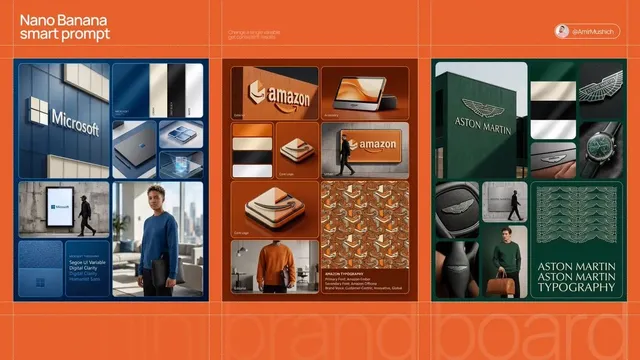
Trending Prompts for AI Image Generators: Viral Visuals Guide
Oct 15, 2026

Trending prompts are not magic spells. They are compressed descriptions of a visual moment that happens to match what an audience is already primed to notice. When a prompt format starts circulating, it usually means someone found a phrasing that reliably produces a striking result across multiple generations — not that the wording itself contains hidden power.
This guide breaks down how to read a trend, translate it into a structured prompt, test it efficiently, and turn a single strong frame into a short video clip that holds attention. It is a workflow guide, not a list of one-off prompt strings, because strings age fast and structure does not.
Why Trending Prompts Outperform Trending Tools
Most creators chase tools. They switch generators every few weeks, hoping the next model will fix a weak idea. In practice, the creators who consistently produce strong visuals are the ones who understand why a prompt works, then port that understanding to whatever generator is current.
A trend in prompts usually contains three reusable pieces of information:
- A compositional idea — the arrangement of subject, environment, and depth.
- A stylistic shortcut — lighting, medium, or color treatment that creates instant mood.
- A cultural hook — a reference the audience recognizes without explanation.
When you strip a popular prompt down to those three parts, you can rebuild it in your own visual language and stop depending on the exact wording. This is also how you avoid the biggest trap of trend-chasing: producing content that looks identical to thousands of other posts, which flattens engagement over time.
A useful mental model: the prompt is the recipe, the model is the oven, and the trend is the season. Recipes survive season changes. Ovens get replaced. If you only collect finished dishes, you will always be borrowing someone else's kitchen.
What Actually Makes a Visual Travel
Before optimizing wording, understand what makes an image spread. Virality in visual content is rarely about technical perfection. It is about a fast, legible emotional hit.
Pattern break and familiarity in one frame
The strongest visuals combine something the viewer recognizes with something they did not expect. A familiar scene with one impossible element. A familiar subject rendered in an unfamiliar medium. A recognizable style applied to an unexpected context.
If everything is familiar, the image is forgettable. If everything is unfamiliar, the viewer has no anchor and scrolls past. The sweet spot is roughly 80 percent recognizable, 20 percent surprising.
Thumbnail legibility
Most viewers decide in under a second, on a small screen, with the image often cropped. Test your prompt output at thumbnail size before you judge it. If the subject, the focal point, and the emotional tone are not readable at 200 pixels wide, the image will underperform no matter how good it looks full-screen.
A practical rule: one subject, one dominant light source, one clear silhouette. Prompts that pack in five characters, three light sources, and two competing backgrounds usually fail this test.
Aspect ratio as a creative decision
Vertical framing for short-form feeds, square for grid-based platforms, wide for headers and cinematic stills. Do not treat this as an export setting — it changes how you should compose the prompt. Vertical framing rewards closer crops, single subjects, and strong top-to-bottom reads. Wide framing rewards environmental storytelling and negative space.
Emotional specificity
"Happy woman in a cafe" is not a creative direction. "A woman quietly relieved that her shift just ended, late afternoon light, half-finished coffee" is. Emotional specificity is the single highest-leverage upgrade you can make to any trending prompt format, and it is also the hardest to copy — which is exactly why it works.
Anatomy of a High-Performing Image Prompt
Once you stop memorizing prompts and start structuring them, output quality becomes consistent. A reliable prompt has six slots, though you rarely need all six at full length.
1. Subject and action
Be concrete about who or what, and what they are doing. Action is what separates a portrait from a scene.
- Weak:
a robot - Strong:
a rusted maintenance robot kneeling to inspect a cracked solar panel
2. Environment and depth layer
Give the scene a foreground, midground, and background cue. Models use these cues to build depth, which is what makes generated images feel photographic rather than flat.
Example: wet cobblestones in the foreground, neon signage midground, fogged skyline behind.
3. Style, medium, and era
Style words do a lot of work short of full-blown style imitation. Editorial photography, ink wash painting, analog film still, isometric illustration, claymation — each one reshapes the whole frame. Pick one primary medium and stop. Stacking five mediums produces mush.
4. Lighting and time of day
Lighting is the most underrated prompt slot. Golden hour backlight, overcast diffusion, single hard key light from camera left, practical neon only, bounced daylight from a white wall — these change mood more than any adjective about emotion.
5. Camera and lens language
Camera terms give you control over compression, distortion, and depth of field:
85mm portrait, shallow depth of field— flattering compression, blurred background.24mm wide, slight distortion— immersive, environmental, energetic.macro, extreme close detail— texture-focused, great for product and food.drone top-down— graphic, pattern-driven, excellent for vertical crops.
6. Mood, color, and constraints
Finish with a short color story and any hard constraints: desaturated teal and amber, high-contrast monochrome with one red accent, no text, no watermark, plain background.
A full example assembled from the slots above:
A rusted maintenance robot kneeling to inspect a cracked solar panel | wet desert road foreground, distant relay towers midground, dust haze background | analog film still | low golden-hour backlight with long shadows | 35mm, moderate depth of field | muted amber and dusty blue palette, no text
The pipe separators are optional, but they help you see which slot is failing when an output misses.
How to Turn a Trend Into a Prompt
When you see a prompt format spreading, do not copy it. Reverse-engineer it in four moves.
Step 1: Identify the trend's core mechanic
Ask what specifically is generating the reaction. Is it the lighting? The medium contrast? The scale mismatch between subject and environment? The color palette? Name the mechanic in a single sentence before you write anything.
Step 2: Translate slang into visual descriptors
Trend language is usually imprecise on purpose. Dreamy, cinematic, hyperreal, retro-futuristic mean different things to different models. Convert each into concrete choices: dreamy becomes soft diffusion, bloom around highlights, pastel gradient background. Concrete terms survive model changes; slang does not.
Step 3: Build a reusable skeleton
Write your own template with the six slots, then reuse it for every prompt in the series. Consistency across a series is what builds a recognizable visual identity, and recognizable identity is what makes an audience follow rather than just watch.
Step 4: Swap the cultural hook, keep the machinery
Keep the composition and lighting; change the subject matter to something tied to your niche. This is the difference between riding a trend and being one of a hundred identical posts.
Reusable Prompt Patterns by Content Type
These patterns are starting points, not finished prompts. Adapt the subject and palette to your own work.
The cinematic still
Built around a strong horizontal composition, one dominant light source, and atmospheric depth. Works well for story-driven posts, thumbnails, and video keyframes. Prioritize environment over facial detail; the setting carries the emotion.
The editorial portrait
Tight crop, controlled lighting, deliberate color grading, minimal background. This pattern is the most reliable for vertical formats because it fills the frame and reads clearly at small sizes. Specify light direction explicitly — it is the difference between an amateur snapshot and a magazine cover.
The product hero shot
Subject on a simple set, one dramatic light, strong shadow shape, controlled reflections. Add studio product photography, seamless backdrop, single softbox for clean commercial results. Avoid busy environments unless you can control reflections and color contamination in post.
The surreal juxtaposition
Two elements that do not belong together, rendered with total visual conviction. This is the highest-variance pattern — it either lands instantly or fails completely. Improve hit rate by keeping the rest of the prompt realistic and restrained. Surreal subject plus surreal style reads as noise.
The diagram or infographic frame
Flat lighting, limited palette, strong shapes, generous negative space reserved for later text overlay. Generate the visual, then add copy in your design tool. Models still struggle with accurate in-image text, so plan for that separation from the start.
Prompting for Motion: From Still Frame to Short Video
A strong still is a good starting point but not a finished clip. Video generation adds three new variables: motion, time, and continuity.
Motion verbs beat adjectives
Describe what moves and how. Slow dolly in, camera drifts left to right, steam rises steadily, fabric ripples in a light breeze, subject turns slightly toward camera. Vague requests like make it dynamic produce jitter, not motion.
Keep shots short and specific
Most short-form clips work best between three and six seconds with one clear action. Trying to fit a beginning, middle, and end into a single generation usually produces morphing artifacts and incoherent physics. Plan a sequence of short shots instead of one ambitious generation.
Plan for temporal consistency
Character faces, clothing details, and background architecture are the most common things to drift between frames. Reduce drift by simplifying the scene, using a clear single light source, and keeping the subject's position and clothing description identical across shots. Where continuity really matters, generate a clean reference still first and animate from that anchor.
Think in shot lists, not single prompts
A practical short video is usually four to eight shots: an establishing wide, one or two mids, a close detail, and a closing beat. Write a one-line intent for each shot before you write any prompt. This structure also makes editing dramatically easier, because each clip has an obvious job.
A Repeatable Test-and-Iterate Workflow
Guessing wastes time. A short, disciplined loop produces better results than dozens of random attempts.
Batch variations with one variable at a time
Generate four to six variations that differ in exactly one slot — lighting, or lens, or palette. If you change three things at once, you learn nothing. Lock a seed when your generator supports it so comparisons stay honest.
Score outputs against a fixed rubric
Rate each output on four criteria, one to five:
- Readability at thumbnail size
- Subject clarity — is the intended focus obvious?
- Lighting and depth
- Brand fit — does it look like your work, not generic output?
Keep the highest scorer and note which prompt slot changed. Over a few sessions you accumulate a personal library of what works for your niche, which is far more valuable than any shared prompt list.
Use the iteration ladder
When a result is close but not right, change one thing at a time in this order:
- Subject and action wording
- Composition and framing
- Lighting
- Medium and style
- Lens and camera
- Color and mood
Wording first, style last. Style words have the largest effect and will mask more precise problems.
Keep a prompt log
A simple spreadsheet with columns for prompt, settings, score, and notes will save you hours within a month. Most creators lose their best results because they never wrote down what produced them.
Mistakes That Quietly Ruin Good Prompts
- Overstuffing. Ten style references create an average of all ten. Choose one.
- Contradiction.
Minimalist maximalist cyberpunkconfuses the model and produces a muddy middle. - Vague emotion words.
Beautiful,epic, andstunningcarry no visual information. - Ignoring aspect ratio. A wide composition cropped to vertical loses its story.
- Text in image. Plan overlay in post rather than fighting the generator.
- Chasing a trend after it peaks. If you have seen the same visual format fifteen times this week, adaptation beats imitation — change the subject, keep the mechanics.
- Judging only at full size. Always preview at the size your audience will actually see.
Post-Production and Publishing Checklist
Generation is roughly half the work. Before publishing:
- Crop and reframe for each target aspect ratio rather than relying on automatic crops.
- Correct color consistently across a series so the feed reads as one body of work.
- Clean artifacts — hands, eyes, reflections, and edges of objects are the usual suspects.
- Add text and branding at the design stage, not in the prompt.
- Compress sensibly — sharp detail at small file sizes survives platform re-encoding better.
- Write the caption as a second hook. The image stops the scroll; the first line of copy earns the click or the watch.
- Publish in series. Three related visuals outperform one strong standalone post because the second and third reinforce recognition.
FAQ
Do I need a different prompt style for each image generator?
Yes, at the margins. Models differ in how literally they follow instructions and how strongly they weight style words. Keep your six-slot skeleton, but retest your lighting and style phrasing whenever you switch models. Your structure transfers; the tuning does not.
How many words should a prompt be?
Most high-quality results come from 25 to 60 words of dense, specific description. Longer prompts are not automatically better — they often dilute focus. If an output feels generic, the problem is usually missing specificity, not missing length.
Can I reuse one prompt across an entire campaign?
Absolutely, and you should. Keep the composition, lighting, and palette slots fixed, and vary only the subject slot. This creates visual consistency while keeping individual posts distinct, which is exactly what campaigns need.
Why do my AI images look flat compared to what I see online?
Usually because the prompt lacks depth cues and lighting specificity. Add a foreground, midground, and background element, and name one dominant light source with a direction. Those two changes fix the majority of flat-looking outputs.
How do I keep characters consistent across shots?
Simplify everything around the character, describe clothing and features with identical wording every time, and use a clean reference still as an anchor when your workflow supports it. If drift persists, reduce the number of shots featuring the character rather than fighting the model.
Is imitation of a trending style a problem?
Imitating a named living artist's signature style is ethically and often legally risky. Imitating a broad visual mechanic — lighting setup, composition logic, palette — is normal creative practice. Copy the technique, not the identity.
How often should I revisit my prompt library?
Every few weeks, or whenever you notice your outputs repeating themselves. Trends rotate quickly, and a prompt that felt fresh last season can read as stale. Retire the weakest third and replace them with variations that performed well in testing.
The Short Version
Trending prompts are useful as raw material, not as finished recipes. Deconstruct them into composition, lighting, medium, and cultural hook. Rebuild them with your own subject matter. Test one variable at a time. Judge results at thumbnail size. Then extend your strongest frame into a short sequence of simple, well-specified shots.
Do that consistently and you stop chasing formats — you start setting them, which is the only durable way to make visuals that spread.

Alexander
More Blogs
Read MoreVidu Q4 Alternatives: 4K AI Video Models Compared (2026)
Vidu Q4 alternatives compared: Kling 4.0, Seedance 2.5, Wan 3.0, and Runway Gen-4 — 4K support, input modes, durations, audio, and what each costs in credits on Domer.
Top 4K AI Image Generators in 2026: 5 Models Compared on Real Costs
The top 4K AI image generators on Domer compared: Flux 3 Klein, Nano Banana 2.1, GPT Image 2.5, GPT Image 2, and Nano Banana Pro — 4K credit costs, reference limits, and speed.
Nano Banana 2.1 vs GPT Image 2.5: Which Image Model Should You Use? (2026)
Nano Banana 2.1 vs GPT Image 2.5 Flare compared: credit costs per resolution, aspect ratios, reference images, text rendering, and which tasks fit each model.