

AI Video Camera Angles: A Practical Prompting Workflow
Oct 15, 2026

Why Angle Control Is the Real Skill in AI Video
Most people start with AI video by describing what happens: a woman walks through a market, a robot turns toward the camera, a car drifts around a corner. The result looks fine for two seconds and then falls apart, because the model has no idea where the audience is standing. Camera angle is the invisible grammar of film. It decides whether the viewer feels like a bystander, a confidant, or a target. When you generate video with a model, you are not moving a physical camera. You are negotiating with a statistical system that learned visual conventions from millions of frames. It will only honor the vocabulary it recognizes.
That constraint is good news. Angle control in AI video is a language skill more than a hardware skill. Once you learn the phrases that reliably shift perspective — low angle, over-the-shoulder, Dutch tilt, top-down — you gain a large amount of directorial control for the cost of a sentence.
This guide covers the prompt vocabulary, the workflow for sequencing angles across a scene, the continuity traps that break the illusion, and the fixes that work when a model ignores you entirely.
The Vocabulary of Angles: What to Actually Type
Generative models respond to the same shorthand that storyboard artists use. If you want a predictable change in perspective, use one of these terms near the start of your prompt rather than buried in the middle.
Height terms
- Eye level — neutral, documentary, conversational. The safest default.
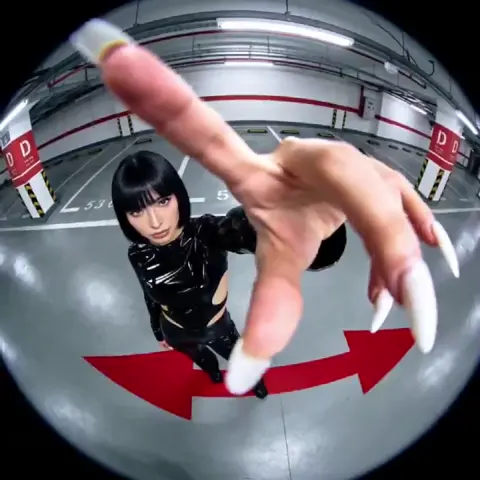
- Low angle — camera below the subject looking up. Reads as power, threat, or heroism.
- High angle — camera above looking down. Reads as vulnerability or detachment.
- Top-down / bird's-eye / overhead — pure geometry. Great for choreography, weak for emotion.
- Ground level / worm's-eye — extreme low. Use sparingly; models often lose the subject's face.
- Shoulder height, hip height, knee height — precise alternatives when "low angle" is too vague.
Distance terms
- Extreme close-up — eyes, hands, a single object. Highest emotional intensity.
- Close-up, medium close-up, medium shot, wide shot, extreme wide shot.
- Full shot — head to toe, useful for costume and silhouette.
Orientation terms
- Over-the-shoulder — puts the viewer behind a character, implies conversation.
- Profile / side view — clean, graphic, good for product spins.
- Three-quarter view — the most flattering angle for faces.
- Front-facing / direct to camera — breaks the fourth wall.
- Behind the subject / back view — creates mystery and walking-away endings.
Movement and lens terms
- Static locked-off shot, slow push in, pull back, pan left, tilt up, tracking shot, orbit / arc shot, crane up, handheld.
- 24mm wide, 35mm, 50mm, 85mm portrait, macro, anamorphic.
- Shallow depth of field, deep focus, rack focus.
The important insight is that angle, distance, and movement are three independent dials. Beginners collapse them into one word — "cinematic" — and get whatever the model's average of cinematic happens to be that day. Professionals set each dial separately.
Prompt Patterns That Reliably Move the Camera
A prompt that controls perspective has a consistent anatomy. Here is the pattern that works across most current text-to-video and image-to-video systems:
Shot type + subject + action + environment + angle and lens + lighting + style
Example:
Medium close-up of a cyclist catching her breath at the top of a hill, alpine valley behind her, low angle looking slightly up, 35mm lens, shallow depth of field, overcast morning light, muted naturalistic color grade.
Three habits separate prompts that work from prompts that drift.
First, front-load the shot. Models weight early tokens more heavily. "Extreme close-up of a key turning in a lock" will follow the instruction far more often than "A hand turns a key in a lock, extreme close-up."
Second, keep the action physically simple. A camera instruction plus a complex multi-step action means the model compromises on both. If the angle matters, simplify what happens inside the frame.
Third, describe the optics, not the emotion. "Low angle" is an instruction. "Feels intimidating" is a wish. Models translate mood words inconsistently; they translate lens and height words consistently.
When a single prompt is not enough
If you need two angles of the same moment, generate them separately and cut them together in the edit. Asking one generation to move from a wide to a close-up usually produces a smear in between rather than a cut. Treat each angle as its own shot, the same way a live-action crew would.
Image-to-Video and Keyframes: Locking a Perspective Before You Move
The single biggest upgrade in perspective control is starting from a still. With image-to-video, you generate or photograph a frame from the exact angle you want, then ask the model to animate it. The angle is now a fact rather than a suggestion, and the model's job shrinks to motion, lighting, and texture.
A practical pipeline looks like this:
- Generate a set of stills in an image model, one per angle, using the same subject description and style block.
- Pick the frames that hold up at full resolution. Reject anything with warped hands, melted signage, or inconsistent wardrobe.
- Feed each still into the video model with a motion-only prompt: "slow push in, subtle breathing, drifting clouds, static camera position."
- Generate three to five variations per shot at short duration and choose the cleanest.
Keyframe control extends this idea. Instead of one starting frame, you supply a start frame and an end frame, and the model interpolates the motion between them. This is the closest thing AI video has to blocking. If you want a shot that begins as a wide establishing view and ends as a tight profile, generate both endpoints as stills from the correct perspective and let the model bridge them. The angle change becomes deliberate rather than accidental.
Two cautions. First, large jumps between keyframes produce morphing artifacts — keep the change gradual, roughly what a real camera could achieve in the same number of seconds. Second, keyframe interpolation tends to lock in the lighting and color of the endpoints, so build both stills with the same light direction.
Building an Angle Sequence for a Scene
The real craft is not one shot; it is the order of shots. A scene that feels professional usually follows a recognizable escalation.
The classic escalation
- Extreme wide — establishes geography and time of day.
- Wide — places the character in that geography.
- Medium — establishes the action.
- Close-up — establishes the emotional stake.
- Insert / macro — a detail that carries meaning: a shaking hand, a blinking light.
- Return to wide or a low angle — releases tension or raises it.
You do not need all six. Three well-chosen angles beat six random ones. But notice the principle: each new angle should add information the previous one could not show. If two shots tell you the same thing, cut one.
Matching angle to intent
- Power and dominance: low angle, wide lens, subject centered, slow push in.
- Vulnerability: high angle, longer lens, subject small in frame.
- Unease: Dutch tilt of 5–15 degrees, handheld micro-shake.
- Intimacy: tight close-up, 85mm, shallow depth of field, static camera.
- Scale and awe: extreme wide, slow crane up, tiny human figure.
- Disorientation: overhead top-down combined with rotating movement.
Write the intent in a column next to your shot list. When a generation comes back and does not serve the intent, you know immediately whether to fix the prompt or cut the shot.
Continuity: The Traps That Break the Illusion
AI video has no continuity department. You are the continuity department. Four problems show up constantly.
The 180-degree rule. If a conversation is shot from one side of an imaginary line between two characters, every angle must stay on that side. Cross it and the characters appear to swap positions, which reads as confusing even to viewers who have never heard the term. In practice, this means writing your prompts with an explicit screen direction: "character on the left faces right," "character on the right faces left." Repeat that phrase in every shot of the exchange.
Eyeline mismatch. If a subject looks slightly off-camera in shot A, they must look in a consistent direction in shot B. Add the gaze direction to the prompt: "gazing slightly left of camera."
Lighting direction drift. A face lit from the left in one shot and the right in the next feels wrong without anyone knowing why. Include the light source position in every prompt for a scene: "key light from camera left, soft window light."
Wardrobe and prop mutation. Colors, logos, and accessories change between generations. Lock them with a written style block that you paste into every prompt, and prefer image-to-video when a specific garment matters.
Motion, Lens, and Framing Modifiers That Pair With Angles
Angle alone is half the recipe. These modifiers change how an angle reads.
Focal length flattens or expands space. A 24mm lens at a low angle exaggerates height and makes ceilings loom. An 85mm lens at the same height compresses the background and isolates the subject. Ask for the focal length explicitly.
Depth of field controls where attention goes. Shallow depth of field in a medium shot can make an ordinary location feel like a portrait studio.
Camera height micro-adjustments are surprisingly visible. "Chest height" and "hip height" produce different psychological readings even though both count as roughly eye level.
Movement speed matters as much as direction. "Very slow push in" and "fast push in" are different shots with different emotional payloads. Slow reads as contemplation; fast reads as alarm.
Aspect ratio changes composition requirements. Vertical formats reward close-ups and top-down shots and punish wide establishing views. Horizontal formats reward depth and layered staging. Choose the aspect ratio before you design the shot list, not after.
Frame rate and shutter feel — a slightly stuttered, handheld motion reads as documentary; a smooth glide reads as commercial. Some platforms let you hint at this through motion strength settings rather than prompt text.
Common Mistakes and How to Fix Them
Stacking contradictory angles. "Low angle overhead view" cannot be resolved. The model picks one at random. Fix: one angle per shot.
Burying the shot type mid-sentence. Move it to the front.
Forgetting the subject. "Low angle tracking shot" alone gives you a camera move with nothing worth filming. Always include who or what we are watching.
Relying on negative prompts for composition. Telling a model what not to show is weak. Describe the frame you want instead.
Generating long clips. Most models lose coherence in extended durations. Generate short, cut in the edit.
Ignoring the aspect ratio until export. Cropping a horizontal composition into vertical usually decapitates your subject.
Accepting the first good take. Models are stochastic. Run the same prompt several times; variation between runs is often larger than variation between prompts.
Overloading a single prompt with a whole scene. If you need three beats, generate three shots.
A Practical End-to-End Workflow
Here is a repeatable process you can run for any project, from a product teaser to a short narrative beat.
Step 1: Write the beat sheet
One sentence per beat. "She arrives." "She notices the door is open." "She steps inside." Beats are content, not camera.
Step 2: Convert beats into a shot list
Add a column for intent and a column for camera. Fill the camera column using the vocabulary from earlier in this guide. Keep it to one angle and one movement per shot.
Step 3: Build a style block
A reusable paragraph describing look, palette, lens family, lighting logic, and film texture. Paste it into every prompt for the project. This is what makes separate generations feel like one film.
Step 4: Generate reference stills
Use an image model to produce one frame per shot at the target aspect ratio. Iterate on composition here, where changes are cheap, rather than in video.
Step 5: Animate with restrained prompts
Feed each still into a video model with motion instructions only. Keep motion modest. If the model adds camera movement you did not ask for, add "static camera" explicitly.
Step 6: Generate alternatives and select
Three variations per shot minimum. Watch them muted and at speed. The shot that reads clearly without sound is the keeper.
Step 7: Assemble and grade
Cut in an editor. Match color and contrast across shots. Add sound design — footsteps, ambience, a low drone — because audio does more continuity work than any prompt.
Step 8: Review for continuity
Check screen direction, eyelines, light direction, wardrobe, and color temperature shot by shot. Fix the two worst offenders rather than every small flaw.
Tool Landscape: What to Look For
You do not need every platform. You need a set that covers four capabilities: still generation, image-to-video, keyframe or start-end frame control, and basic editing.
When evaluating a video generator for angle work, ask:
- Does it accept start and end frames, or only a single image?
- Can you set aspect ratio and duration before generating?
- Does it hold a subject's identity across a sequence?
- How much does camera motion drift when you ask for a static shot?
- Does it support motion strength or camera-motion sliders that you can turn down?
Platforms such as Runway, Kling, Luma Dream Machine, Pika, Veo, and Sora each have different strengths, and the ranking shifts quickly. The durable skill is not which button you press but knowing what a low angle with a 35mm lens should look like before you press it.
For the still-generation half of the pipeline, Midjourney, Adobe Firefly, and Stable Diffusion workflows in ComfyUI all handle consistent character framing well once you build a reference prompt. For editing, DaVinci Resolve, Premiere, and CapCut all do the job; the choice matters far less than matching color across shots.
Frequently Asked Questions
Can AI video generators actually produce specific camera angles?
Yes, within limits. Height, distance, and orientation terms are honored fairly reliably in short clips. Complex compound moves — a crane up that becomes an orbit that becomes a close-up — usually fail. Break them into separate shots.
Why does the model ignore my camera instruction?
Three usual causes: the instruction is buried late in the prompt, the action is too complex for the model to also manage the camera, or the phrasing is not in the model's vocabulary. Move the shot type to the front, simplify the action, and use standard film terminology.
Is image-to-video better than text-to-video for angle control?
For anything where perspective matters, yes. A still frame removes the ambiguity. Text-to-video is faster for exploration and mood boards; image-to-video is more controllable for finished sequences.
How do I keep a character consistent across multiple angles?
Use a single detailed description plus a reference image, keep the wardrobe and hair description identical in every prompt, and avoid changing the lighting setup within a scene. Consistency is a documentation problem more than a technology problem.
What is the fastest way to learn angle vocabulary?
Watch a scene you admire with the sound off and write down every angle change. You will usually find only four or five distinct setups across two minutes. Reuse those patterns in your own shot lists.
How long should each generated clip be?
Short. Generate four to eight seconds and cut in the edit. Longer generations tend to drift in anatomy, background detail, and lighting.
Do I need to learn traditional cinematography?
You need its vocabulary, not its equipment knowledge. Knowing why a low angle feels powerful is what lets you ask a model for it deliberately instead of hoping.
Where to Go From Here
The ability to direct perspective in AI video is a compounding skill. Start with one scene, one location, and four angles: wide, medium, close, and one deliberately extreme choice. Write the intent next to each shot. Generate stills first, animate second, and cut in the edit rather than trying to get everything in one generation. Then review your output muted and ask whether each angle change added information. If it did not, remove it. That single editing discipline will improve your results more than any prompt trick, and it will keep working no matter which generation platform you open next.

Alexander
More Blogs
Read MoreVidu Q4 Alternatives: 4K AI Video Models Compared (2026)
Vidu Q4 alternatives compared: Kling 4.0, Seedance 2.5, Wan 3.0, and Runway Gen-4 — 4K support, input modes, durations, audio, and what each costs in credits on Domer.
Top 4K AI Image Generators in 2026: 5 Models Compared on Real Costs
The top 4K AI image generators on Domer compared: Flux 3 Klein, Nano Banana 2.1, GPT Image 2.5, GPT Image 2, and Nano Banana Pro — 4K credit costs, reference limits, and speed.
Nano Banana 2.1 vs GPT Image 2.5: Which Image Model Should You Use? (2026)
Nano Banana 2.1 vs GPT Image 2.5 Flare compared: credit costs per resolution, aspect ratios, reference images, text rendering, and which tasks fit each model.