
Affiliazione
Inizia Gratis Ora
Creating Photorealistic Portraits with AI: A ChatGPT & Midjourney Workflow
Aug 3, 2026

Why the Right Prompt Changes Everything
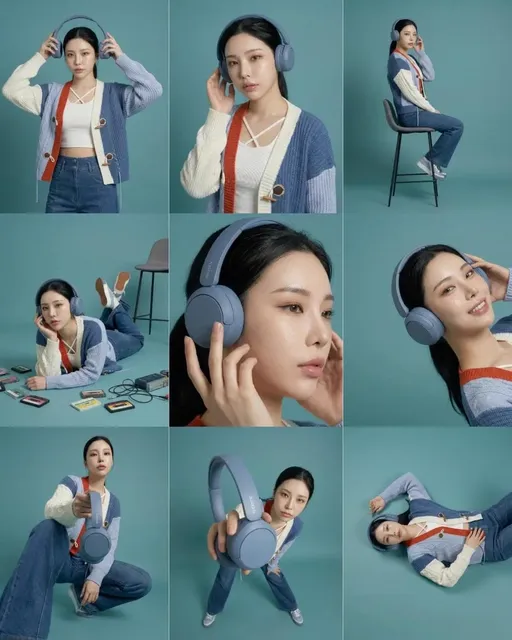
The race toward photorealistic AI portraits has fundamentally shifted. What once required hours of manual 3D sculpting and lighting setup can now be achieved with a well-structured text prompt. Yet most creators still struggle to get consistent, believable faces from diffusion models. The bottleneck isn't the model's capability—it's the precision of the instructions we feed it.
A powerful way to break through this bottleneck is by combining ChatGPT's language skills with Midjourney's image synthesis. This workflow lets you turn a vague idea like "a thoughtful elderly fisherman" into a highly technical prompt that includes camera specs, lighting angles, film grain, lens distortion, and skin micro-detail. The result is a portrait that doesn't just look good—it looks photographed.
This guide walks through the exact architecture of that workflow, from prompt decomposition to final image refinement, and shows how you can carry your character into video using tools like Domer's AI image generator and AI video generator.
Step 1: Using ChatGPT as Your Prompt Architect
Midjourney v6 and newer models respond incredibly well to dense, structured prompts. But most people still type one-liners. That's where ChatGPT becomes your competitive edge.
Start by giving ChatGPT a simple concept. For example: "A 38-year-old botanist in a rainforest, natural window light, calm expression." Then ask the model to decompose that into a Midjourney-ready prompt block. A good expansion will include:
- Camera and lens details:
85mm lens, f/1.8, shallow depth of field - Lighting model:
soft diffused window light, gentle rim light on hair - Film or sensor characteristics:
Kodak Portra 800 emulation, slight grain - Skin and material specifics:
visible pores, subsurface scattering on cheeks, tiny hairs on forehead - Composition and framing:
tight headshot, subject slightly off-center, muted green background
The key is that ChatGPT translates emotive words into measurable attributes. "Calm" becomes "relaxed brow, soft mouth, steady gaze slightly to the right of camera." This precision gives Midjourney far less ambiguity to fight against.
Making ChatGPT Output Midjourney Syntax
Beyond descriptive text, you need the parameters that Midjourney understands. Ask ChatGPT to append the right flags: --ar 2:3 for a vertical portrait, --style raw to reduce Midjourney's default beautification, or --v 6.0 to target a specific model version. This syntax compliance ensures your carefully crafted descriptions are actually executed as intended.
Step 2: Iterating on Midjourney Outputs
The first image Midjourney returns is rarely perfect. You'll often see plastic skin, misshapen hands, or odd background artifacts. The real power of this workflow is iterative refinement. Instead of manually tweaking every word, you feed the output back into ChatGPT and ask for targeted corrections.
For example, if the eyes look lifeless, you might say: "The eyes need more catchlight and the iris should be more detailed. Also reduce the smoothness of the skin." ChatGPT will rewrite your prompt to emphasize bright catchlight in both eyes, detailed iris fibers, visible skin texture with slight blemishes.
This loop can be repeated until you hit the exact level of photorealistic fidelity you need. Over time, you'll notice that the prompt blocks get shorter because you've learned which phrases actually matter. If you want to bypass that trial-and-error phase entirely, consider starting with a model that's already fine-tuned for realism. GPT Image 2 is an excellent choice for generating high-fidelity portraits with natural skin detail, and it plugs directly into Domer's text-to-image pipeline.
Step 3: Maintaining Character Consistency Across Frames
One of the biggest challenges in AI portraiture isn't generating a single great image—it's keeping the same person recognisable across multiple shots. If you're building a brand campaign, a virtual influencer, or a short film, character consistency is non-negotiable.
Your ChatGPT + Midjourney workflow can help here too. By creating a "character reference block"—a paragraph that defines the face shape, eye color, nose structure, skin tone, hair texture, and age—you can prepend it to every prompt. Midjourney will then use that anchor to produce variations that still feel like the same person.
But for even stronger consistency, especially when you want to move from stills to motion, you need a dedicated platform. Domer's text-to-video tool allows you to upload a reference image and generate video clips where the same character walks, talks, and gestures naturally. That continuity turns a portrait project into a full storytelling asset.
Step 4: Enhancing Photorealism in Post
Even the best Midjourney output can benefit from a light post-processing pass. You don't need heavy retouching—that would destroy the realism. Instead, focus on:
- Adding film grain to hide any residual AI smoothness.
- Adjusting contrast curves to mimic a real camera's dynamic range.
- Sharpening the eyes and edges while keeping skin slightly soft.
- Correcting color temperature to match a plausible light source.
These small touches make a portrait feel like it was shot on a real camera. If you're lucky enough to generate with Google's Seedance 2.0 image model, you'll already start with incredible sensor-like noise and natural color science. Seedance 2.0 is one of the best models currently available for portraits that need no or minimal tweaking.
Taking the Workflow Further
Once you've mastered the ChatGPT + Midjourney portrait workflow, you can apply the same principles to other creative tasks:
- Character concept art for narratives and games.
- Ads with AI models that don't require a photoshoot.
- Historical photo restoration by generating missing details.
- Virtual try-ons where realistic faces make products look more trustworthy.
All of these benefit from the same structured prompt engineering. And as your library of character reference blocks grows, you'll be able to spin up new portraits in minutes, not days.
Tools That Make the Workflow Smoother
While ChatGPT and Midjourney are a powerful duo, the ecosystem around them is evolving fast. Platforms that understand the importance of continuity and speed will help you ship work faster. Domer offers a complete AI media suite where you can generate, refine, and even animate your portraits without switching tools. Check out the AI tools directory to explore image, video, and effect models that fit your exact creative need.
For viral style transfers or meme-ready portraits, you can also try Domer's effects like Kirkify or the engagement photo generator. These are fun additions to your AI toolkit, but they also show how far the field has come from simple face-swaps to nuanced, photorealistic synthesis.
Final Thoughts
The days of hoping for good AI portraits by stacking random keywords are over. The ChatGPT + Midjourney workflow puts you in control of every variable that matters for photorealism—light, texture, emotion, and composition. By treating ChatGPT as your prompt engineer and Midjourney as your camera, you can achieve results that used to require a full studio and a professional photography team.
As you refine your own process, remember that your goal isn't to make images that look AI-generated. It's to make images that look like someone pointed a real camera at a real person. With the right prompts, the right iteration strategy, and the right companion tools, that goal is more attainable than ever. Start with a single portrait and build your own workflow from there.

Alexander
More Blogs
Read MoreVidu Q4 Alternatives: 4K AI Video Models Compared (2026)
Vidu Q4 alternatives compared: Kling 4.0, Seedance 2.5, Wan 3.0, and Runway Gen-4 — 4K support, input modes, durations, audio, and what each costs in credits on Domer.
Top 4K AI Image Generators in 2026: 5 Models Compared on Real Costs
The top 4K AI image generators on Domer compared: Flux 3 Klein, Nano Banana 2.1, GPT Image 2.5, GPT Image 2, and Nano Banana Pro — 4K credit costs, reference limits, and speed.
Nano Banana 2.1 vs GPT Image 2.5: Which Image Model Should You Use? (2026)
Nano Banana 2.1 vs GPT Image 2.5 Flare compared: credit costs per resolution, aspect ratios, reference images, text rendering, and which tasks fit each model.