
作成
How AI Video Platforms Are Reshaping Video Marketing Workflows
Oct 15, 2026

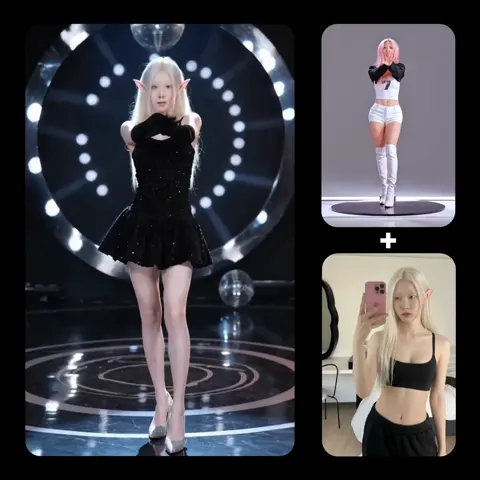
Why AI video production changed the marketing calculus
The bottleneck in video marketing was never the idea. It was the pipeline. A single 30-second brand film used to mean location scouting, casting, permits, a two-day shoot, a colorist, a sound designer, and weeks of post-production before anyone could see whether the concept even worked. That arithmetic only supported a handful of campaigns per year, which is why so many brands recycled the same hero asset for months while their paid social calendar quietly starved.
Generative video tools invert that arithmetic. When a usable clip can be produced in minutes rather than weeks, the constraint moves from budget to judgment. The teams that win are not the ones with the largest production war chest. They are the ones who can decide quickly what a shot needs to accomplish, generate six plausible versions of it, and discard five without sentiment.
Three shifts matter most:
- Iteration speed. A creative director can test a hook, a visual metaphor, or a product angle before committing budget. Testing that used to cost five figures now costs an afternoon.
- Asset volume. Instead of one master film and two cutdowns, a team can produce a dozen hook variants, three aspect ratios, and localized versions without reshooting anything.
- Risk profile. Traditional production front-loads risk. If the concept is wrong, you discover it after the invoice. AI-assisted production spreads risk across many small, cheap experiments.
None of this means craft stops mattering. Quite the opposite. When generation is cheap, taste becomes the scarce resource. The difference between a forgettable AI clip and a genuinely good one is almost never the model — it is the shot list, the reference discipline, the sound, and the edit.
How the modern AI video stack fits together
There is no single tool that does everything well. Treating one platform as a complete solution is the fastest route to mediocre output. A working stack looks more like a small studio than a single app, with each stage handling what it does best.
Generation engines
Generation splits into a few distinct families, and each has a different feel:
- Text-to-video is best for establishing shots, abstract transitions, and B-roll where no specific subject continuity is required.
- Image-to-video is the workhorse. Starting from a controlled still gives you far more influence over composition, lighting, and framing than a text prompt ever will.
- Video-to-video handles restyling, relighting, and turning existing footage into something new — useful when you already have a library of real footage.
- Talking-head and avatar tools handle presenter-led content, explainers, and training material where a human on camera is the point.
- Motion transfer tools take the performance from one clip and apply it to another subject, which is how you get believable gesture without directing an actor.
Voice, music, and sound design
Sound is where AI video most often collapses. Bad audio makes even technically impressive visuals feel amateur within two seconds. Build a separate sound layer:
- Synthetic voiceover for scratch tracks and, with proper consent, finished narration.
- Music generation for beds that match the edit length instead of being cut to fit.
- Sound effects — footsteps, cloth, room tone, whooshes — which are what actually sell the illusion of reality.
Editing, upscaling, and finishing
This stage is unglamorous and decisive. Upscaling, frame interpolation, background removal, captioning, stabilization, and color work all live here. A modern editor with built-in AI features is often enough; the goal is not to automate the edit but to remove the friction around it.
Orchestration and asset management
The quiet killer of AI video projects is file chaos. Establish naming conventions, versioning, and a single review location early. A practical convention is project_shot###_version_language_ratio. It sounds bureaucratic until the first time someone needs to find the third take of shot 12 in vertical format.
Choosing a model for the shot, not for the brand
Creators rarely stick to one engine, and they shouldn't. The useful mental model is a portfolio: one workhorse model you know deeply, plus two or three specialists you reach for when the workhorse struggles.
When evaluating an engine, score it against the specific shot rather than the marketing page:
| Criterion | What to test |
|---|---|
| Motion fidelity | Fast action, hand gestures, walking, water, fabric |
| Style adherence | Does it respect a locked look across many prompts? |
| Subject consistency | Same face, same product, same wardrobe across clips |
| Duration | Usable output length before artifacts creep in |
| Aspect ratio support | Native 9:16 and 1:1 for social, not just 16:9 |
| Camera control | Explicit dolly, pan, tilt, or push instructions |
| Latency | Time from prompt to reviewable clip at your volume |
| Licensing | Commercial use, output ownership, indemnification |
A practical decision rule: if a shot involves a named character or a real product, always start from a still image. If it involves atmosphere, weather, or scale, text-to-video is usually faster. If it involves a specific performance, motion transfer beats prompting every time.
A repeatable workflow from brief to publish
Ad hoc prompting produces ad hoc results. The teams that ship consistently run the same six stages every time, even on small projects.
Stage one: brief decomposition and shot list
Write the script first, in plain language. Then break it into beats, and convert each beat into a shot specification containing six fields: subject, action, camera, lighting, duration, and audio cue. Keep individual shots between three and five seconds. Longer generations drift, morph, and lose coherence — you will save time by cutting more often.
Stage two: look development and style locking
Before generating any video, produce 15 to 20 still frames with an image model. Choose one direction, then write it down as a reusable style block: lens, film stock, palette, key light direction, contrast, grain, and reference frame. This single document prevents the most common AI video failure — a sequence where every shot looks like it came from a different production.
Stage three: keyframes and first-frame control
For anything with continuity, generate a first frame and a last frame, then let the model interpolate between them. This gives you a controllable arc instead of a lottery. Character reference images, product photography, and consistent wardrobe descriptions all belong here. Feed the model what you want to see rather than describing it and hoping.
Stage four: generation, review, and selection
Generate in batches. Review with a simple five-point rubric: composition, motion quality, artifacts, brand fidelity, and emotional read. Anything scoring below three is deleted immediately and never reconsidered. The discipline of fast deletion is what keeps a project from drowning in near-misses.
Stage five: assembly, sound, and finishing
Cut to a temp music bed before you fall in love with any shot. Sound design comes next: room tone, impact hits, transitions, subtle ambience under dialogue. Then upscale, match grain across shots, and color grade the whole sequence as one piece so the contrast and saturation are unified.
Stage six: versioning and distribution
Export a master, then produce crops and cutdowns. A useful habit is to create three distinct opening hooks for the same body and let performance data pick the winner. Add burned-in or platform-native captions, check safe areas for interface overlays, and export thumbnails from the strongest frames rather than designing them from scratch.
The consistency problem: characters, products, and brand assets
Consistency is the hardest technical problem in AI video and the one audiences notice first. An audience will forgive stylized motion; they will not forgive a protagonist whose face changes between cuts.
A few approaches work in practice:
- Character sheets. Build a reference sheet with front, three-quarter, and profile views plus a locked wardrobe description. Reuse the same language every time you prompt that character.
- Fine-tuned models or personalized style sets. When a recurring character or product appears across many videos, investing in a fine-tune pays for itself quickly.
- Product photography as reference. Never let a model invent your packaging. Start from a real photograph and animate from there.
- Logos and typography in post. Do not ask a generative model to render your wordmark. Composite it in the edit where you control kerning, placement, and color accuracy.
- A unified grade. Even slight differences in temperature and contrast read as inconsistency. A single color pass across all clips hides a surprising amount of variation.
Quality control checklist before anything goes live
Run this list on every deliverable. It takes four minutes and prevents the majority of embarrassing retractions.
- Hands, fingers, teeth, and ears checked at full resolution, frame by frame.
- Eye-line and gaze direction consistent between shots.
- On-screen text, numbers, and signage verified — or removed.
- Physics plausibility: shadows, reflections, liquid, fabric drape, foot contact.
- Continuity of light direction, wardrobe, props, and time of day.
- Audio sync within one frame; no lip drift on speaking shots.
- Loudness normalized to platform targets; no clipping on impact sounds.
- Captions accurate, including product names and proper nouns.
- Safe areas respected for vertical formats and platform overlays.
- Every factual or comparative claim reviewed by whoever owns legal risk.
- Synthetic media disclosure applied where the platform or jurisdiction requires it.
Common mistakes that make AI video look cheap
Most disappointing AI video is not the fault of the model. It is the fault of predictable production shortcuts.
- Shots that run too long. Six and eight second generations almost always reveal the seams. Cut at three.
- No sound design. Silence or a single looped track reads as unfinished work.
- Prompt bloat. Contradictory instructions — "handheld and perfectly stable," "minimal and richly detailed" — average out into mush.
- Style drift. Each shot prompted from scratch instead of from a locked style block.
- Typography in generation. The model draws letters that aren't letters. Keep text in the edit.
- Constant camera movement. Not every shot needs a push-in. Static frames with good lighting hold up better.
- The same face everywhere. Reusing one generated performer across unrelated campaigns makes a brand look like a stock library.
- Publishing the first output. The first generation is a draft, not a deliverable. The tenth is usually the one.
Governance, rights, and disclosure
Operational questions catch teams off guard more often than creative ones. Settle these before scaling:
- Model terms. Confirm commercial use rights, output ownership, and whether inputs are used for training.
- Likeness and voice. Never clone a real person's face or voice without documented permission. Store that documentation.
- Third-party assets. If a reference image is not yours, do not feed it in and do not publish the derivative.
- Disclosure. Several platforms and jurisdictions require labeling realistic synthetic media. Build the label into your template so it is never an afterthought.
- Internal review. Decide in advance who signs off on realism, claims, and brand safety.
- Documentation. Keep a short record per deliverable: source references, tools used, and approvals. It costs five minutes and resolves future disputes.
FAQ
Do AI video tools replace videographers and editors?
No. They replace the parts of production that were pure logistics — permits, travel, simple B-roll, and endless resizing. Craft skills shift upward: lighting judgment, editing rhythm, sound design, and taste become more valuable, not less, because they now differentiate output that would otherwise look identical.
How many shots does a 30-second spot need?
Plan for eight to twelve. Three to five seconds each gives you room for a hook, a build, a payoff, and a call to action. Beginners typically generate four long clips and wonder why the result feels sluggish; the fix is almost always more cuts.
What separates professional-looking AI video from amateur output?
Three things, in order: sound design, shot pacing, and color consistency. Most first attempts fail on all three. Mastering them matters more than gaining access to another generation engine.
Can AI video handle product demos accurately?
Yes, if you start from real product photography and animate it carefully, and if any interface or packaging detail is composited in post. Text-to-video alone will invent details that do not exist, which is a compliance problem in regulated categories.
How do I keep a character consistent across many clips?
Lock a reference sheet, reuse identical descriptive language every time, generate from stills rather than text, and apply one grade to the final sequence. If the character appears in dozens of videos, invest in a fine-tuned model instead of fighting the prompts.
Which metrics should I track?
Hook retention at three seconds, completion rate, cost per finished second of video, and time from brief to publish. The last two are the ones that tell you whether your workflow is actually improving or just producing more files.
How long does a typical project take?
A 30-second social spot with a locked look can move from brief to final export in one to three working days for an experienced operator, including review cycles. The bulk of that time is selection and sound, not generation.
Should I build my own pipeline or use an all-in-one platform?
Start with focused tools you understand, then consolidate once you know where the friction lives. Teams that consolidate too early end up fighting limitations they cannot see until they hit them.
Where to start this week
Pick one product, one audience, and one 20-second concept. Write the shot list by hand. Produce a locked style frame before generating a single second of video. Generate in batches, delete aggressively, and finish the sound before you judge the picture.
Publish it, measure the three-second retention, then repeat the exercise with a different hook for the same body. After three cycles you will have something more valuable than a tool subscription: a workflow you can hand to another person and get the same result. That repeatability — not any individual model — is what makes AI video production a durable advantage rather than a novelty.

Alexander
More Blogs
Read MoreVidu Q4 Alternatives: 4K AI Video Models Compared (2026)
Vidu Q4 alternatives compared: Kling 4.0, Seedance 2.5, Wan 3.0, and Runway Gen-4 — 4K support, input modes, durations, audio, and what each costs in credits on Domer.
Top 4K AI Image Generators in 2026: 5 Models Compared on Real Costs
The top 4K AI image generators on Domer compared: Flux 3 Klein, Nano Banana 2.1, GPT Image 2.5, GPT Image 2, and Nano Banana Pro — 4K credit costs, reference limits, and speed.
Nano Banana 2.1 vs GPT Image 2.5: Which Image Model Should You Use? (2026)
Nano Banana 2.1 vs GPT Image 2.5 Flare compared: credit costs per resolution, aspect ratios, reference images, text rendering, and which tasks fit each model.