
作成
How to Build an AI Video Editing App: A Practical Guide
Oct 15, 2026

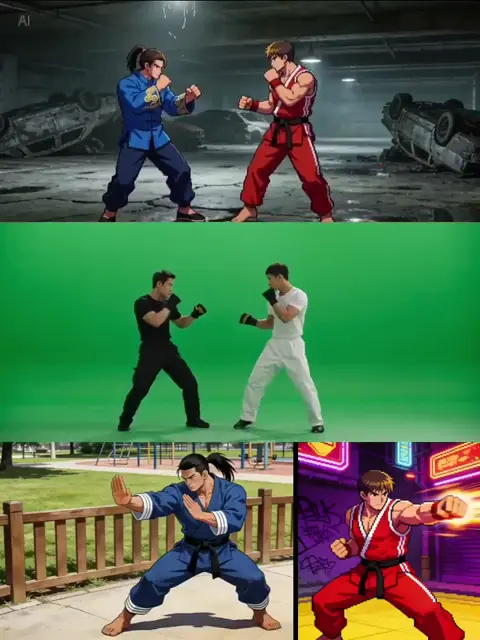

Building a video editing app is no longer just about cutting clips and adding transitions. The most interesting products in this space combine a fast editor with AI assistance that removes repetitive work, suggests creative options, and keeps large media libraries organized. That shift changes the design brief. Instead of asking how to expose every tool, you ask how to shorten the distance between an idea and a finished video.
This guide walks through the product, technical, and workflow decisions behind a modern AI video editing app. It covers architecture, AI features, user experience, testing, and iteration. The goal is not to clone an existing editor but to build a focused tool that solves a clear editing problem for a specific audience.
Why AI Video Editing Apps Are Changing Creative Work
Video is the default format for tutorials, product demos, social updates, course lessons, interviews, and internal communication. The volume of footage keeps growing, but the time people have for editing does not. That gap creates demand for tools that can handle the mechanical parts of editing: syncing audio, finding the best takes, generating captions, removing silence, matching color, and creating multiple aspect ratios.
AI is useful when it reduces decision fatigue. A good AI editing feature does not take over the creative process. It presents a draft, a suggestion, or a shortcut, then lets the editor stay in control. For example, text-based editing turns a transcript into a timeline. The editor deletes a sentence in the transcript and the corresponding video segment disappears. That interaction is faster and more intuitive than scrubbing through hours of footage.
Another reason AI editing apps are gaining attention is that distribution has become fragmented. A single recording may need to become a horizontal video for a website, a vertical clip for short-form platforms, a square post for social feeds, and an audio file for a podcast. Manual reframing and export for each format is tedious. AI-assisted reframing, caption styling, and loudness normalization can make multi-format delivery practical.
The opportunity is not to build the biggest editor. It is to build the most focused assistant for a specific workflow. A podcast editor, a course creator tool, a real estate walkthrough editor, and a social clip generator all need different defaults, different templates, and different AI models. The clearer the workflow, the easier the product is to design and market.
Start with the User Job, Not the Feature List
Before choosing a framework or an AI model, define the job the app performs. A feature list can be copied, but a deep understanding of the user job creates a defensible product. Ask what the user is trying to publish, how often they publish, what equipment they use, and where they get stuck.
Consumer creator workflow
A solo creator usually records with a phone, a webcam, or a mirrorless camera. They need fast import, automatic transcription, simple trimming, captions, music, and export presets for social platforms. They may not know editing jargon, so the interface should use plain language. AI can suggest a hook, remove filler words, and generate a first draft. The main success metric is time from import to export.
Professional editor workflow
A professional editor cares about codec support, frame rate control, color management, audio routing, keyboard shortcuts, and reliable rendering. They may welcome AI for transcription, rough cuts, and object removal, but they will reject any tool that hides essential controls or changes their footage without permission. For this audience, AI should be optional, transparent, and reversible. Every automated decision needs a manual override.
Team and review workflow
Teams need comments, version history, approval states, and role-based access. A marketing team may need a brand kit with fonts, colors, and logo placement. A training team may need review checkpoints and export logs. The app must support collaboration without turning into a generic project management tool. The video timeline should remain the center of the experience.
Once the primary workflow is clear, write a one-sentence product promise. For example: help course creators turn a one-hour lesson into a polished module in twenty minutes. That promise guides every technical tradeoff. If a feature does not support the promise, it belongs on a later roadmap.
Architecture for a Modern AI Video Editor
A video editing app has three major layers: the client interface, the processing backend, and the data layer. The client handles interaction and preview. The backend handles media ingest, transcoding, AI jobs, and export. The data layer stores projects, assets, metadata, permissions, and job status.
Frontend timeline and preview layer
The frontend must feel immediate even when the underlying media is large. Use proxy files for editing so the timeline plays smoothly on average hardware. Keep the original files for final export. The preview can be a lower-resolution render, while the timeline stores references to source clips, trims, effects, and audio settings.
A timeline is a complex state machine. Every clip has in and out points, track position, speed, transform, opacity, audio levels, and effect parameters. Undo and redo must be reliable. Autosave should be frequent but not disruptive. If the app runs in a browser, use a canvas or WebGL-based preview and consider a desktop wrapper for heavy workloads.
Backend media pipeline
Media processing should be asynchronous. When a user uploads a file, the backend stores it, generates proxies, extracts metadata, creates thumbnails, and queues any AI analysis. Long-running jobs should report progress and survive page refreshes. Use job queues, workers, and a status store so users can close the app and return later.
Transcoding is the foundation. Different cameras produce different codecs, resolutions, frame rates, and color profiles. A robust pipeline normalizes media into editing-friendly formats while preserving the original. GPU acceleration helps with encoding, decoding, and effects. If you support 4K or higher, plan for significant storage and bandwidth.
Data layer and access control
Projects, media assets, transcripts, AI outputs, and comments all need structured storage. A relational database works well for users, projects, permissions, and billing relationships. Object storage is better for large media files. A search index can help users find clips by transcript, object, scene, or tag.
Authentication should support email, social login, and enterprise single sign-on when needed. Authorization must be granular. A viewer should not be able to delete a project. An editor should not be able to change workspace settings. Every API request should verify both identity and permission. Audit logs are useful for teams and for debugging suspicious activity.
AI Features That Deliver Real Value
AI features should be tied to specific moments of friction. A model that generates a random clip is less useful than a model that finds the best ten seconds from a forty-minute interview. Prioritize features that save time, improve consistency, or unlock a workflow that was previously too difficult.
Text-based editing and automatic captions
Transcription is the gateway feature. Once you have an accurate transcript with timestamps, you can offer text-based editing, caption generation, keyword search, and chapter creation. Word-level timestamps improve the experience because users can delete a single filler word or correct a name without cutting the whole sentence.
Caption styling should include safe areas for different platforms. Vertical videos need captions that avoid the top and bottom interface zones. Provide presets for common styles, but allow font, size, color, background, and animation control. Export captions as burned-in text or as separate subtitle files.
Scene detection and rough cuts
Scene detection splits footage into usable segments based on visual changes. It helps editors skip dead space and find the beginning of a new topic. Combine scene detection with audio analysis to detect laughter, applause, silence, or speaker changes. The output should be a rough cut the user can accept, reject, or adjust.
A good rough cut is not a final edit. It is a starting point that removes obvious waste. The app can mark low-confidence decisions so the editor knows where to review. This transparency builds trust. If the AI silently removes an important sentence, the user will not trust the next suggestion.
Enhancement, style transfer, and generative fills
Enhancement features include denoising, sharpening, stabilization, color correction, and audio cleanup. These are practical because they improve footage that cannot be reshot. Style transfer can apply a consistent look across clips, but it must be subtle by default. Generative fills can extend a background, remove an object, or create a transition, but they should be clearly labeled.
AI audio tools are often more valuable than visual effects. Noise reduction, room tone matching, loudness normalization, and voice isolation solve real problems for interviews, vlogs, and remote recordings. If the audio is bad, viewers leave. A video editor that fixes audio quickly has a strong retention advantage.
Quality control and human approval
Automated quality control can catch black frames, missing audio, incorrect aspect ratios, clipped dialogue, and caption timing errors. It can also compare exports against platform requirements. The final decision should remain with the user. A review step prevents embarrassing mistakes and gives the editor a chance to add creative polish.
Designing the Editing Experience
The interface determines whether users stay. A powerful engine with a confusing interface feels broken. Design the editing experience around the most frequent actions: importing, trimming, arranging, captioning, and exporting. Everything else can be organized into secondary panels.
Timeline ergonomics
Zooming, scrubbing, snapping, and keyboard shortcuts should feel natural. The timeline should show enough detail without becoming cluttered. Waveforms help with audio editing. Markers help with collaboration. Track headers should make it easy to mute, lock, or solo tracks. New users need clear labels, while experienced users need shortcuts.
Consider a simplified mode and an advanced mode. Simplified mode exposes templates, auto-cuts, and captions. Advanced mode reveals keyframes, blending modes, audio routing, and color scopes. This approach lets the app serve beginners without limiting professionals.
Performance perception
Perceived speed matters as much as actual speed. Show progress indicators for AI jobs. Render previews in the background. Let users continue editing while export runs. If a task takes longer than a few seconds, explain what is happening in plain language. A spinner with no context feels slower than a progress bar with stages.
Collaboration and review
Comments should be attached to a timecode and, ideally, to a specific clip or frame. Reviewers should be able to approve, request changes, or resolve comments. Notifications should be configurable so teams are not overwhelmed. Version history should show what changed and allow rollback.
Accessibility and localization
The app should support keyboard navigation, screen reader labels, captions, and sufficient color contrast. Localization goes beyond translating buttons. Date formats, text expansion, right-to-left layouts, and subtitle conventions vary by region. Build a string system early and avoid hard-coded text.
A Practical Build Workflow
A focused build workflow keeps the team from getting lost in edge cases. Start with a narrow editing loop and expand only after it works reliably.
Define the core editing loop
Write down the steps from opening the app to exporting a finished video. For a social clip tool, the loop might be import, transcribe, select highlights, add captions, choose aspect ratio, and export. For a course editor, it might be upload lesson, remove silence, add chapter markers, insert slides, and publish.
Build media ingest and proxy generation
Ingest is where many apps fail. Support common formats first, and make failures understandable. If a file cannot be processed, tell the user why and suggest a workaround. Generate proxies quickly, create thumbnails, and store metadata such as duration, resolution, frame rate, and audio channels.
Add AI jobs one at a time
Start with transcription because it unlocks multiple features. Then add silence removal, scene detection, captions, and enhancement. Each AI job should have a clear input, output, progress state, and error state. Store the model version with the result so you can reproduce or update outputs later.
Implement export and delivery
Export presets should match real platforms. Include resolution, bitrate, codec, frame rate, aspect ratio, audio loudness, and caption settings. Allow batch export for multiple formats. Provide a download link and, for team plans, a direct publish or storage integration. Test exports on actual devices, not just desktop previews.
Testing and Quality Benchmarks
Testing a video editor requires a media compatibility matrix. Collect sample files from phones, action cameras, mirrorless cameras, screen recordings, and webcams. Include variable frame rate footage, HDR clips, vertical video, and audio with background noise. Run every build against this library.
Latency budgets
Set acceptable times for import, preview, AI job completion, and export. For example, a one-minute 1080p clip should import quickly, generate a proxy within a reasonable window, and export without freezing the interface. Measure on mid-range hardware, not only high-end workstations. If the app is browser-based, test on slower connections.
Failure modes
Plan for upload interruptions, unsupported codecs, out-of-storage errors, expired sessions, and AI job timeouts. Each failure should have a recovery path. Resume uploads. Retry failed jobs. Preserve project state. Never lose a user timeline because a network request failed.
Feedback loops
Watch new users edit for the first time. Note where they hesitate. Track which features are used, which are ignored, and where exports fail. Combine analytics with interviews. A feature that looks clever in a demo may be confusing in daily use.
Common Mistakes to Avoid
One common mistake is treating AI as a replacement for editing fundamentals. Users still need precise trimming, audio control, and reliable export. AI should sit on top of a solid editor, not hide a weak one.
Another mistake is making every AI feature mandatory. Some creators want a fully manual workflow. Others want suggestions but not automatic changes. Provide defaults, but always allow users to disable, undo, or adjust AI decisions.
A third mistake is underestimating storage and bandwidth. Video files are large, and AI analysis can create additional outputs. Plan for lifecycle rules, compression, and cleanup. If the app stores every proxy, render, and generated asset forever, the infrastructure bill will grow faster than the user base.
Finally, avoid building for everyone. A tool that tries to serve casual creators, professional editors, and enterprise teams at launch will feel unfocused. Pick a beachhead audience, solve their workflow deeply, then expand.
Launch, Learn, and Iterate
Launch with a clear onboarding path. New users should complete a meaningful edit within their first session. Templates help because they remove blank-canvas anxiety. A sample project can teach the interface while producing a real result.
After launch, focus on reliability and speed. The most common reasons users abandon editing tools are crashes, slow exports, and confusing errors. Fix those before adding advanced effects. Build observability into the backend so you can see job success rates, processing times, and model performance.
Iterate based on workflow bottlenecks. If users repeatedly trim silence, improve that tool. If they struggle with captions, add better styling and timing controls. If they export the same project to multiple formats, add batch presets. The roadmap should follow real friction, not competitor feature lists.
FAQ
Do I need AI to build a competitive video editing app?
No, but AI can differentiate a focused product. Basic editing, performance, and export reliability matter more than novelty. Add AI where it saves time or improves consistency, such as transcription, captions, silence removal, and rough cuts.
What technology stack should I use?
Choose based on your team and deployment model. Browser apps often use JavaScript or TypeScript with WebGL for preview, plus a backend for media processing. Desktop apps can use native frameworks or cross-platform toolkits. The backend usually needs a job queue, object storage, a relational database, and media processing tools.
How long does it take to build a video editing app?
A focused MVP can take several months with an experienced team. A full editor with collaboration, advanced effects, and multi-platform export can take much longer. Scope is the biggest variable. Start with one editing loop and one audience.
How do I keep exports fast?
Use proxy editing, hardware acceleration, sensible bitrate presets, and asynchronous rendering. Avoid re-encoding everything at maximum quality. Let users choose speed versus file size when appropriate.
Can I build an AI video editor without a backend?
For very simple tools, some processing can happen in the browser or on-device. For transcription, large file handling, collaboration, and reliable export, a backend is usually necessary. Hybrid approaches work well: lightweight preview and effects on the client, heavy processing on the server.
What is the most important metric to track?
Time to first finished video. If users can import footage and export a satisfying result quickly, they are more likely to return. Pair that with export success rate and retention to understand whether the product delivers real value.
Final Thoughts
Building an AI video editing app is a product design challenge as much as an engineering challenge. The winning pattern is a reliable editor with intelligent shortcuts, clear controls, and a workflow that matches how people actually create. Start with the user job. Build a stable media pipeline. Add AI features that remove real friction. Then test, listen, and improve the moments that matter most: import, edit, review, and export.

Alexander
More Blogs
Read MoreVidu Q4 Alternatives: 4K AI Video Models Compared (2026)
Vidu Q4 alternatives compared: Kling 4.0, Seedance 2.5, Wan 3.0, and Runway Gen-4 — 4K support, input modes, durations, audio, and what each costs in credits on Domer.
Top 4K AI Image Generators in 2026: 5 Models Compared on Real Costs
The top 4K AI image generators on Domer compared: Flux 3 Klein, Nano Banana 2.1, GPT Image 2.5, GPT Image 2, and Nano Banana Pro — 4K credit costs, reference limits, and speed.
Nano Banana 2.1 vs GPT Image 2.5: Which Image Model Should You Use? (2026)
Nano Banana 2.1 vs GPT Image 2.5 Flare compared: credit costs per resolution, aspect ratios, reference images, text rendering, and which tasks fit each model.