
Beyond Traditional Video: Next-Gen AI Video Editing and Image-to-Video in 2025
Aug 4, 2026
The Next Frontier in AI Video Production
While text-to-video generation has captured headlines, the real revolution in 2025 lies in AI video editing and image-to-video capabilities. These technologies are transforming how creators work with existing footage, opening up possibilities that were previously impossible or prohibitively expensive.
This guide explores the cutting edge of AI video tools and how they're expanding the creative toolbox for content producers at every level.
Image-to-Video: From Still to Motion
How It Works
Image-to-video technology takes a static image and generates a video sequence from it. Unlike text-to-video which starts from scratch, image-to-video builds on existing visual assets — your product photos, concept art, or reference images.
This approach offers advantages:
- Greater control: You define the starting visual precisely
- Brand consistency: Existing brand assets become the foundation
- Faster iteration: Start from known-good imagery
Domer offers image-to-video capabilities that let you animate product photos, bring concept art to life, or create dynamic social content from static images.
Practical Applications
Product Demos: Upload a product photo and generate a 360° rotation video or a lifestyle context video showing the product in use.
Character Animation: Take character concept art and generate short animated clips — breathing life into static designs.
Architectural Visualization: Transform still renders of buildings into walkthrough videos with natural lighting changes.
Social Media Content: Turn a single hero image into 10 different video variations for A/B testing across platforms.
AI Video Editing: Beyond Cuts and Transitions
Intelligent Scene Understanding
Modern AI video editing tools don't just cut and splice — they understand what's happening in each scene. This enables:
- Auto-tagging: All footage automatically categorized by content type (interview, b-roll, action)
- Smart trimming: AI identifies and removes dead space, pauses, and mistakes
- Content-aware reframing: Automatically adjust aspect ratios while keeping the subject in frame
Style Transfer and Enhancement
AI can now apply sophisticated visual treatments to existing footage:
- Color grading: Match the look of reference footage or apply cinematic LUTs intelligently
- Style transfer: Transform live footage into animation styles, pixel art, or painterly aesthetics
- Upscaling: Enhance lower-resolution footage to 4K or beyond with AI detail reconstruction
Domer AI Video Generator integrates these capabilities, making professional-grade editing accessible without years of training.
Motion Graphics and Effects
AI is democratizing motion graphics. Instead of learning complex software, describe the effect you want:
- "Animate this logo with a liquid metal reveal"
- "Add particle effects that follow the subject's movement"
- "Create a seamless transition between these two unrelated clips"
Multi-Model Workflows
Why One Model Isn't Enough
Different AI models excel at different tasks. Professional video production increasingly involves orchestrating multiple specialized models:
- Image generation for keyframe creation: GPT Image 2 on Domer
- Video generation for motion: Seedance 2.0 on Domer
- Image generation for supplementary assets: Domer AI Image Generator
The Orchestration Challenge
The key challenge is maintaining visual consistency when switching between models. Solutions include:
- Using consistent reference images across all models
- Defining explicit style parameters that transfer between tools
- Creating a style guide that works universally
Advanced Editing Techniques
Frame-Accurate Control
New AI tools offer frame-level precision. You can specify exact start and end frames for effects, control motion curves, and fine-tune timing — all without traditional keyframing interfaces.
Multi-Reference Generation
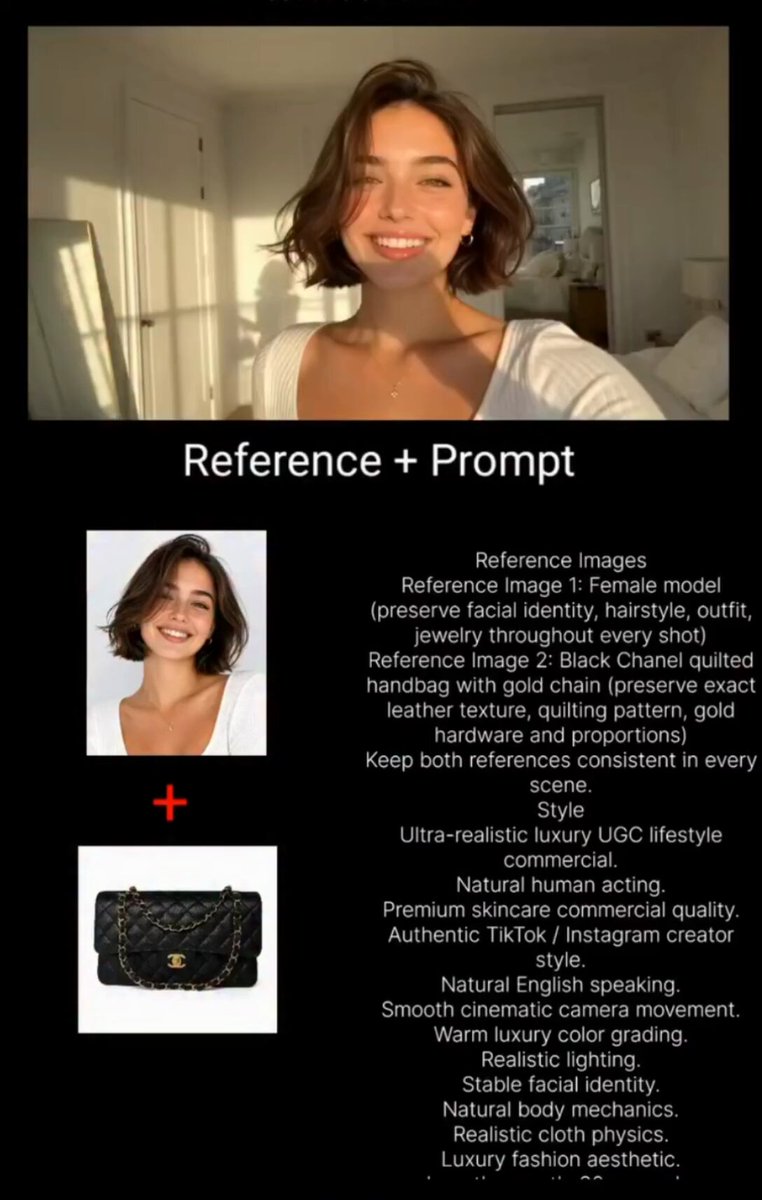
Feed multiple reference images to guide AI generation. For example, combine:
- A pose reference showing the desired action
- A style reference showing the visual aesthetic
- A lighting reference showing the mood
The AI synthesizes these inputs into a coherent output.
Seamless Looping
Create perfectly looping video backgrounds, ideal for websites, digital signage, and social media. AI analyzes motion patterns and creates seamless transitions between end and start.
Workflow Integration
From Raw Footage to Final Cut
- Ingest: Upload raw footage; AI auto-tags and organizes
- Select: Use AI-powered search ("find clips with people smiling") to locate best takes
- Edit: Rough cut assembled by AI based on your creative brief
- Enhance: Apply style transfer, color grade, upscale as needed
- Export: Render in platform-optimized formats
Batch Processing
For high-volume content needs, batch processing is essential. Process dozens of videos simultaneously — different aspect ratios, durations, and styles from the same source material.
Case Study: E-Commerce Video Production
Challenge: Produce 200 product videos per month for an online marketplace.
Traditional approach: $50-200 per video, 2-3 day turnaround per product.
AI approach:
- Product photo uploaded to Domer AI Image Generator
- AI generates lifestyle context images and 360° rotation keyframes
- Image-to-video transforms stills into 15-second product clips
- Batch processing produces all 200 videos in 4 hours
Result: 90% cost reduction, 95% time reduction.
The Future of AI Video
Real-Time Processing
Coming soon: AI video editing that works in real-time during live streams. Imagine auto-reframing, background replacement, and style transfer applied live as you broadcast.
Interactive Video
AI-generated video that responds to viewer input — choose-your-own-adventure style narratives, personalized product demos, interactive tutorials.
Cross-Modal Generation
The convergence of text, image, video, and audio AI will enable holistic content creation. Describe a scene verbally, and AI generates the complete multimedia package.
Conclusion
AI video editing and image-to-video technology represent the next evolution in content creation. They don't replace human creativity — they amplify it, removing technical barriers and enabling faster experimentation.
Domer provides access to these cutting-edge capabilities in an integrated platform. Whether you're a solo creator or part of a production team, these tools can transform your workflow and output quality.

Alexander
More Blogs
Read MoreVidu Q4 Alternatives: 4K AI Video Models Compared (2026)
Vidu Q4 alternatives compared: Kling 4.0, Seedance 2.5, Wan 3.0, and Runway Gen-4 — 4K support, input modes, durations, audio, and what each costs in credits on Domer.
Top 4K AI Image Generators in 2026: 5 Models Compared on Real Costs
The top 4K AI image generators on Domer compared: Flux 3 Klein, Nano Banana 2.1, GPT Image 2.5, GPT Image 2, and Nano Banana Pro — 4K credit costs, reference limits, and speed.
Nano Banana 2.1 vs GPT Image 2.5: Which Image Model Should You Use? (2026)
Nano Banana 2.1 vs GPT Image 2.5 Flare compared: credit costs per resolution, aspect ratios, reference images, text rendering, and which tasks fit each model.