

How to Create Engaging Film Reviews with AI Video Tools
Oct 15, 2026


Why AI-Assisted Film Reviews Are Worth Learning
Film criticism used to live on the page. Today it lives on the timeline, where a review competes with trailers, reaction videos, and thirty-second hot takes. Viewers still want analysis, but they want it delivered visually: over clips, diagrams, reconstructions, and carefully paced narration. That shift created a real bottleneck for anyone working alone. Writing the analysis is only about a third of the job. The other two thirds are producing something worth watching and assembling it fast enough that the review still feels timely.
AI is genuinely useful across all three stages, though unevenly. Language models are strong at organizing research, finding counterarguments, and tightening prose. Video generation models are strong at producing connective footage that no archive can supply: mood pieces, abstract transitions, reimagined locations, and illustrative shots that carry a point without showing material you have no right to use. Voice synthesis and audio cleanup tools remove the last excuse for bad sound. What AI cannot supply is taste. The thesis, the moral judgment, the weird personal observation that makes a review memorable, that still has to come from you.
The practical payoff is speed without a corresponding drop in quality. A channel that once published one review a month can publish one a week if the pipeline is designed properly, and a well-designed pipeline is mostly about refusing to skip steps. This guide walks through each stage, the decisions that matter at each one, and the mistakes that waste the most time.
The End-to-End Workflow at a Glance
Most first attempts fail because people start generating clips before they know what the video is arguing. Lock the argument first, then the script, then the shot list, then the visuals. Every stage should produce an artifact that the next stage depends on.
| Stage | Typical time | Output you move forward with |
|---|---|---|
| Film selection and angle | 45-90 min | A one-sentence thesis |
| Timestamped research pass | 1-2 hours | Note file with timecodes and themes |
| Script draft and edit | 2-4 hours | Finished narration script |
| Shot list and storyboard | 1-2 hours | Production-ready visual plan |
| Clip generation and selection | 2-5 hours | Approved b-roll folder |
| Voiceover and audio | 1-2 hours | Clean narration track |
| Assembly and polish | 3-6 hours | Locked cut |
| Packaging and publishing | 1-2 hours | Title, thumbnail, description |
Treat those numbers as a starting point for a solo creator, not a law. The important structural point is that generation time is one line item among eight, not the whole project. Teams that treat the video model as the center of the workflow end up with a folder of pretty clips and no film review.
Research and Angle: From Plot Summary to Point of View
A plot recap is not a review. The angle is what separates a channel people subscribe to from one they scroll past. Before touching any AI tool, watch the film once without pausing, then do a second pass with a notebook and a timer, recording timecodes for anything you might reference later: a performance choice, a camera move, an editing rhythm, a line of dialogue, a production design detail.
Strong angles tend to fall into a few families. Craft analysis examines how a specific department solved a problem, such as how a sound team built dread across three acts. Thematic reading argues that the film is about something other than its plot. Comparative reviews place two films side by side to reveal what each one chooses. Defensive reviews rescue a film from a lazy consensus. Contextual reviews reconstruct the production history, the genre moment, or the cultural conversation the film entered. Adaptation reviews track what changed between source material and screen and whether the change earns itself.
This is where language models earn their keep. Feed your messy note file in and ask for themes to be clustered, contradictions between critics to be summarized, or counterarguments to your thesis to be listed so you can address them head-on. Ask specifically for the weakest version of your argument. A model that tells you where your reading is thinnest is more valuable than one that agrees with you.
What models should never do here is fill gaps with invention. Scene details, quotes, and production anecdotes must be verified against the film itself or a reliable interview. If a sentence about a director's intent cannot be traced to something the director actually said, cut it or attribute it clearly as your interpretation. One fabricated detail in an otherwise sharp review destroys trust faster than a bad take ever will.
Scripting for Retention
The first fifteen seconds
The opening determines whether the rest of the work matters. Avoid throat-clearing. Start with the claim, the contradiction, or the question the video answers. A useful test: read your first two sentences aloud. If they could open any review of any film, they are too generic.
Structure that holds attention
A reliable shape is hook, thesis, evidence in ascending order of persuasiveness, one honest counterpoint, then a verdict that says something about the film and something about your taste. Long essays can break evidence into titled chapters so viewers can navigate. When your retention graph later shows a cliff at a specific minute, you can usually trace it to a chapter change that lost momentum.
Spoiler policy
Decide your spoiler boundary before writing, not while editing. The common options are full spoilers with a warning up front, mild spoilers below a marked point in the video, or a spoiler-free review with a separate spoilercast. Whatever you choose, state it once, clearly, early, and then honor it.
Writing for the ear
Narration is not prose. Sentences should be shorter than in an essay, clauses should not stack more than two deep, and numbers should be written the way you would say them. Read every draft aloud and mark the spots where you stumble. Those are the spots where viewers stop listening.
For word counts, most narration lands between 140 and 155 words per minute at a comfortable pace. An eight-minute review therefore needs roughly 1,100 to 1,250 words of script, leaving room for pauses and visual-only beats. Ask a model to suggest structural outlines or to flag repetition, but write the lines yourself. Generic phrasing is the most common reason AI-assisted reviews feel hollow, and it usually comes from letting a model draft the sentences rather than the scaffolding.
Visual Planning: Storyboards, Shot Lists, and B-Roll
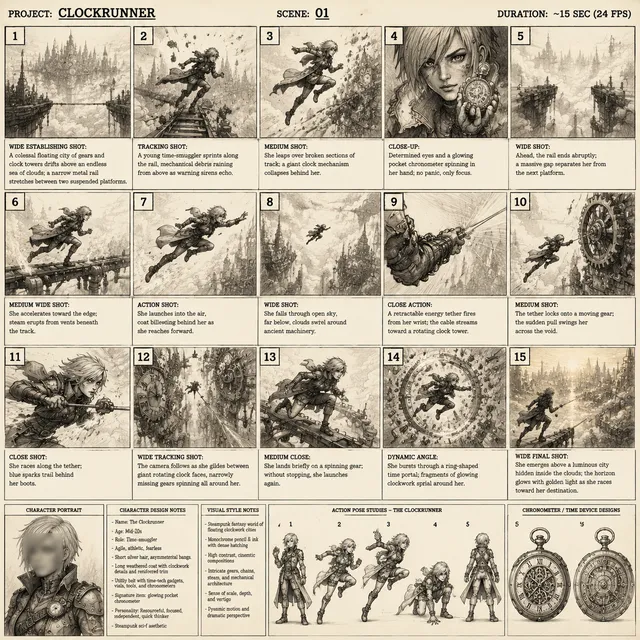
Once the script is locked, build a shot list with one row per beat. Useful columns: script timecode, the point the visual must support, the visual description, the source, and notes on duration or motion.
Sort every visual into a bucket. Licensed clips from the film carry the analysis and should be used deliberately, short, and always in service of a point. Archival stills, posters, and press images add texture. Screen recordings of timelines, scripts, or comparison grids work well for craft analysis. Generative footage fills the gaps: establishing moods, imagined sequences, abstract transitions, and illustrative moments no archive contains. Diagrams and simple animated text explain structure, chronology, or box office context.
A practical pacing rule is to change something on screen every eight to twelve seconds. That does not mean a new clip every eight seconds; it can mean a push in, a text overlay, or a cut to a different framing of the same material. Storyboarding does not need to be beautiful. Rough thumbnails or even a column of written descriptions are enough to prevent the classic trap of finishing a script and then staring at an empty timeline with no plan.
Keep a style guide for the video with three or four visual rules: color temperature, grain level, aspect ratio for inserts, and the typeface used for on-screen text. Consistent rules make disparate sources feel like one piece.
Generating AI Clips That Match Your Script
Anatomy of a useful prompt
A prompt that produces usable footage usually specifies the subject, the action, the setting, the camera, the lens, the lighting, the style, the motion, and the duration or aspect ratio. A weak prompt says a city at night. A strong prompt says a slow dolly push down an empty rain-slicked street at night, neon signage reflecting in puddles, shallow depth of field, handheld micro-shake, cinematic 2.39:1 framing, five seconds.
Write prompts directly from shot list rows so each generation has a job. Generate three or four variations per shot rather than one, then pick. Keep a prompt log so you can reuse the phrasing that worked and avoid regenerating a look you already approved.
Consistency across a long video
Consistency is the hardest part of generative video. Solutions that work in practice include reusing the same seed and reference image, keeping a written character sheet with wardrobe, hair, and lighting notes, describing style in identical wording across prompts, and generating all shots for one sequence in a single session so your phrasing stays stable. Where a sequence needs to match, generate a hero shot first, then treat it as the reference for everything around it.
Common generation failures and what to do
Faces morph between frames, hands acquire extra fingers, background text turns into glyph soup, and motion stutters when the model cannot decide on a direction. Most of these are cheaper to solve by shortening the clip and hiding the flaw behind a cut than by regenerating endlessly. Text in generated footage is almost never worth fighting; overlay real text in the edit instead. If a clip looks over-stylized next to your licensed material, a slight blur, grain pass, and color match in post will do more than another prompt rewrite.
Before approving any clip, check four things: does it match the point of the beat, does it match the visual style guide, is it free of distracting artifacts, and is it short enough that viewers will not notice the weakness. Tools like Runway, Pika, Kling, and Luma each have quirks worth learning, but the checklist is tool-agnostic.
Editing, Sound, and Pacing
Organize the timeline so each layer has one job. A main visual track for clips and archival material, an overlay track for text and graphics, a narration track, a music track, and a sound effects track. This structure makes revisions fast when a note comes in.
Cut audio before cutting video. Trim narration first, remove breaths and long pauses, and only then lay visuals against the finished rhythm. Use J-cuts so audio from the next scene begins before the visual change, and L-cuts so narration lingers over a new shot. These two techniques do more for perceived professionalism than any visual effect.
Music should sit under narration at roughly minus eighteen to minus twenty-two decibels, sidechained or manually ducked at every sentence. Target a consistent loudness so viewers never touch the volume slider. If you record your own voice, treat the room before the microphone: soft furnishings, a blanket behind the mic, and a consistent distance beat any plug-in. Noise reduction and de-reverb tools help, but they cannot rescue a bad take, and heavy processing makes narration sound synthetic.
Captions are not optional. Auto-transcription tools such as Descript or the caption features in CapCut and Premiere get you most of the way, but film titles, actor names, and technical jargon need proofreading. Burned-in captions for short-form clips and a properly uploaded caption file for long-form cover both audiences.
Color matching ties generative and licensed footage together. A simple LUT, a slight contrast curve, and a consistent grain layer will unify sources that were never meant to sit side by side.
Legal, Ethical, and Platform Considerations
Review and criticism are widely recognized as commentary, which gives more room than a straight re-upload, but the boundaries are not unlimited and they vary by country. Keep clips short and tied to specific points, avoid extended sequences that could substitute for watching the film, and never use footage to imply endorsement. When in doubt, use fewer seconds and more analysis.
Do not use generative tools to fabricate statements from real people, to place real actors in scenes they never performed, or to make it look like a studio said something it did not. This is the line between commentary and deception, and crossing it ends careers rather than reviews. Equally, avoid generating visuals that closely mimic protected characters for commercial use; archetypes, moods, and original designs carry the same emotional weight without the risk.
Most platforms now require disclosure when content is synthetically generated or manipulated. Read the current policy for each destination and comply with it plainly, in the description and where required in the video itself. Music, archival footage, and photographs all need licenses or public domain status, and attribution belongs in the description. Finally, publish a corrections policy. If a detail is wrong, pin a comment, note it in the description, and move on. Audiences forgive mistakes far more readily than they forgive pretending a mistake never happened.
Publishing, Packaging, and Repurposing
Packaging decides how many people ever see the analysis. Titles should promise a specific idea rather than an emotion, and thumbnails should work at the size of a phone screen. Two or three words of large text, one readable human face or a striking frame, and high contrast do most of the work. Never let the packaging promise a take the video does not deliver; the retention graph punishes the mismatch within seconds.
In the description, list the film, the runtime, your spoiler boundary, sources for factual claims, and timestamps for chapters. Pin a comment that invites a specific debate rather than a generic request for opinions.
Repurposing is where a single review becomes a week of publishing. Pull a 60 to 90 second vertical clip around the strongest single argument, reformat captions for vertical viewing, and export a quote card. The narration audio becomes a podcast episode or a newsletter draft. A companion post that expands a section the video had to compress gives search engines something to index and gives viewers a reason to return.
After publishing, read three analytics signals: the first thirty-second retention, the retention curve around every chapter break, and click-through rate against impressions. A low click-through rate is a packaging problem. A cliff at minute six is a script problem. A flat but low curve is a pacing problem, usually too few visual changes or too much recap.
Common Mistakes, Fixes, and FAQ
The most expensive mistakes are predictable. Letting a model write the entire script produces polished, forgettable narration, so limit AI to outlines, research synthesis, and line-level tightening. Generating clips before the script is locked wastes hours on footage that never fits. Ignoring audio quality sinks otherwise strong videos, because viewers tolerate soft visuals far better than harsh room tone. Buried hooks in the first minute lose the audience before the argument starts. Missing spoiler warnings generate angry comments that outrank the review itself. Using generative footage that contradicts the film, such as the wrong weather, wrong era, or wrong costume, undermines credibility. Skipping captions cuts off a large share of silent viewers. And approving generations in batches without reviewing each one almost always lets a broken clip slip into a finished cut.
Can I monetize a video that uses AI-generated visuals?
Usually yes, provided you disclose synthetic content as required and your generated footage does not imitate protected characters or real people. Check the policy of each platform separately, because the rules are not identical.
How long should a film review be?
Short-form clips work at 60 to 90 seconds. For long-form, most successful review essays run eight to fifteen minutes, which fits 1,100 to 2,200 words of narration with room for visual-only beats. Length should follow the argument, not a target.
Do I need to own the film to review it?
No. You need lawful access for your own viewing, and your use of excerpts should stay short, transformative, and tied to commentary. Owning a copy does not grant the right to republish the film.
How do I keep visuals consistent across a forty-clip video?
Write a style guide, keep a prompt log, reuse seeds and reference images, generate one sequence at a time, and apply a single color and grain pass in post. Consistency is a process problem more than a model problem.
Is AI narration acceptable?
It is acceptable when it is disclosed and genuinely well directed, meaning paced, punctuated, and emotionally shaped rather than pasted in. Human narration still builds audience loyalty faster, and a hybrid approach, your voice for the argument and synthesis for citations, often works best.
How many generated clips do I need per minute?
Plan on ten to twenty visual events per minute including overlays and reframes, of which maybe three to six are fully generated shots. The rest can be licensed material, stills, diagrams, and text cards.

Alexander
More Blogs
Read MoreVidu Q4 Alternatives: 4K AI Video Models Compared (2026)
Vidu Q4 alternatives compared: Kling 4.0, Seedance 2.5, Wan 3.0, and Runway Gen-4 — 4K support, input modes, durations, audio, and what each costs in credits on Domer.
Top 4K AI Image Generators in 2026: 5 Models Compared on Real Costs
The top 4K AI image generators on Domer compared: Flux 3 Klein, Nano Banana 2.1, GPT Image 2.5, GPT Image 2, and Nano Banana Pro — 4K credit costs, reference limits, and speed.
Nano Banana 2.1 vs GPT Image 2.5: Which Image Model Should You Use? (2026)
Nano Banana 2.1 vs GPT Image 2.5 Flare compared: credit costs per resolution, aspect ratios, reference images, text rendering, and which tasks fit each model.