
AI Image Generator Prompts: A Practical Comparison Guide
Oct 14, 2026

Why Prompt Strategy Matters More Than the Model
Most people assume image quality comes down to which generator they subscribe to. In practice, the gap between two prompts written by different people using the same model is usually wider than the gap between two competing models given the same prompt. A well-structured prompt can make a mid-tier generator produce publishable work. A vague prompt can make the most capable model on the market produce something that looks like a stock photo archive from a decade ago.
The reason is simple: text-to-image systems do not read your intent. They match your words against patterns learned from enormous collections of captioned images. Every ambiguous word gives the model freedom to drift. Every specific, concrete detail narrows the probability space toward what you actually imagined.
Modern generators have added capabilities that make prompt craft even more important rather than less:
- Multi-image fusion, where reference images are blended with text instructions, so a poorly described reference gets averaged into mush.
- Character consistency, where identity has to be anchored explicitly or the face drifts between frames.
- Scene sequencing, where a single prompt must describe four to six frames without collapsing them into near-identical images.
- Style locking, where brand palettes and art directions must be held stable across an entire campaign.
This guide compares the prompt patterns that consistently work across today's major generators, explains how each tool interprets the same instruction differently, and gives you a repeatable workflow so results stop being lucky accidents.
The Anatomy of a Strong Image Prompt
Before comparing tools, it helps to agree on what a complete prompt contains. Almost every high-performing prompt, regardless of model, is built from six layers. Think of them as slots you fill deliberately rather than a paragraph you improvise.
Subject and action
Who or what is in frame, and what are they doing? "A woman" is weak. "A detective kneeling beside an overturned delivery bike in the rain" is strong. Action implies anatomy, weight, and story, which in turn gives the model more constraints to satisfy.
Lighting and atmosphere
Lighting is the single highest-leverage modifier available. Terms like rim light, golden hour, overcast diffusion, neon backlight, volumetric haze, or hard noon sun change an image more dramatically than most style keywords. If you only add one layer to a bare prompt, make it lighting.
Camera, lens, and framing
Phrases such as 85mm portrait, macro detail, wide establishing shot, low-angle hero shot, shallow depth of field, or tilt-shift miniature tell the model how the scene should be photographed, not just what it contains. Generators trained on photography metadata respond strongly to this vocabulary.
Style and medium
Editorial photograph, gouache illustration, cel-shaded animation still, architectural render, risograph print, analog film scan. Pick one primary medium. Stacking three unrelated mediums produces muddy compromises.
Color and material direction
Hex values, named palettes, or material references such as brushed titanium, matte ceramic, oxidized copper, or translucent resin give you repeatability. Hex codes are especially useful when a series of images must match a brand system.
Technical constraints
Aspect ratio, resolution target, negative constraints, and composition rules. Not every model honors negatives, but most respond to explicit framing instructions like centered composition, generous negative space at top, or symmetrical layout.
A practical template that works across most generators looks like this:
[shot type] of [subject + action], [environment], [lighting], [lens or perspective], [medium and style], [color or material notes], [composition rule]
Fill every slot and you rarely get a generic image.
How Leading Generators Respond to Different Prompt Styles
The same sentence is not interpreted identically everywhere. Understanding each tool's bias saves hours of trial and error.
| Generator | Strengths | Prompt style it rewards | Watch out for |
|---|---|---|---|
| Midjourney | Aesthetic polish, cinematic mood | Short, dense, comma-separated phrases with strong style words | Long grammatical sentences get partially ignored |
| Stable Diffusion and Flux | Control, fine-tuning, reproducibility | Structured tags plus negative prompts and weight adjustments | Needs more technical setup and seed management |
| DALL·E | Instruction following, spatial logic | Full sentences describing relationships between objects | Slightly softer, more illustrative default look |
| Adobe Firefly | Commercial safety, brand integration | Plain descriptive language plus style references | Less tolerant of aggressive stylistic extremes |
| Ideogram | Text rendering inside images | Explicit typography instructions with font and layout notes | Photorealism still trails dedicated photo models |
| Flux | Prompt adherence and detail density | Detailed natural language with precise spatial cues | Can over-render textures if not told to simplify |
Three practical conclusions follow from this table.
First, matching format to model matters. A comma-separated tag string that sings in Midjourney can read as noise to an instruction-following model. Rewrite prompts when you switch platforms rather than pasting blindly.
Second, negatives are a tool, not a habit. On models that support them, negatives clean up recurring artifacts like extra fingers or watermark-like text. On models that ignore them, the words simply waste prompt space.
Third, iterate one variable at a time. If you change lighting, lens, and style simultaneously, you learn nothing about which change produced the improvement. Change one layer, generate four variations, keep the winner, then move on.
Prompt Pattern 1: Hyper-Realistic Portraits With Emotional Depth
Portraits are where prompt quality becomes obvious. Generic prompts produce symmetrical, vacant-faced renders that look like passport photos taken in a wind tunnel.
A strong portrait prompt anchors four things: skin behavior, micro-expression, lighting geometry, and background separation.
Example:
Close-up portrait of a cyberpunk detective in her late thirties, neon rain reflections catching on synthetic skin, slight squint and tightened jaw conveying quiet determination, cinematic side key light with cyan rim light, 85mm lens, shallow depth of field, blurred cityscape bokeh behind, 8K photorealism, documentary color grade
Why each element earns its place:
- Age and role give the model a face structure prior instead of an averaged youthful default.
- Micro-expression language such as slight squint or tightened jaw produces far more character than the word emotional.
- Lighting geometry — side key plus rim — creates separation and dimension that flat frontal light never achieves.
- Depth of field tells the model to compress the background, which reads as photographic rather than rendered.
Common mistakes in portrait prompts:
- Using beauty keywords as a substitute for lighting. They push toward the same glossy, uncanny look.
- Forgetting gaze direction, which leaves the model guessing and often yields a dead-center stare.
- Overloading style terms until the face loses coherence in service of the aesthetic.
For a genuinely useful stress test, generate the same prompt at three different lens lengths and compare how much of the environment survives. If the 35mm version looks identical to the 85mm version, the model is ignoring your camera layer and you should move it earlier in the prompt.
Prompt Pattern 2: Multi-Scene Narrative Sequences and Character Consistency
Sequencing is the fastest way to turn single images into a story, and the hardest thing to prompt well. The failure mode is predictable: you ask for four frames and receive four variations of the same frame.
Fix it by separating the prompt into a global block and a per-frame block.
Global block — identity, wardrobe, palette, and lighting rules that must never change:
Character A: 40-year-old samurai, weathered face, scar over left eyebrow, layered indigo armor, red sash. Global palette: cherry blossom pink, deep indigo, ember orange. Global lighting: dusk with warm practical sources.
Per-frame block — one distinct camera decision per frame:
Frame 1: extreme wide establishing shot, small figures on a blossom-lined bridge, low horizonFrame 2: mid-action medium shot, sparks arcing across frame, motion blur on the bladeFrame 3: tight close-up, defiance in the eyes, sweat and ash on skinFrame 4: high-angle wide shot, subject silhouetted against a glowing lake, debris settling
Keeping the global block byte-identical between frames is what maintains consistency. If you re-describe the character loosely each time, the model re-invents them each time.
Additional techniques that help:
- Reference images plus text. Supply one strong character image and describe only what changes per frame.
- Aspect ratio consistency. Reusing the same ratio across a sequence keeps composition logic stable.
- Explicit scene transitions. Words like then, meanwhile, and finally signal ordering cues that some models partially respect.
- A contact-sheet pass. Generate all frames in one prompt first to test whether the model can hold the concept, then refine frames individually.
Storyboards, comic panels, and short-form video previsualization all benefit from this structure because it forces you to make directing decisions before generation rather than after.
Prompt Pattern 3: Concept Art, Worldbuilding, and Product Visualization
These two categories sit at opposite ends of the same spectrum: one invents a fictional world, the other reproduces a real product with precision. Both reward specificity in different ways.
Concept art and environment design
A worldbuilding prompt needs a scale cue, an era cue, and at least one human element to communicate proportion.
Example:
Sprawling steampunk city at sunset, brass towers with docking airships, crowded market street with Victorian attire mixed with futuristic gadgets, highly detailed architecture, warm golden hour lighting, isometric perspective, matte painting style
What makes it work:
- Scale anchor — airships docking at towers implies enormous vertical distance.
- Era blend — naming both Victorian and futuristic tells the model this is retrofuturism, not historical accuracy.
- Human element — crowds establish how big the architecture actually is.
- Perspective keyword — isometric locks the viewpoint, which is why the buildings read as designed rather than photographed.
For a coherent world, keep a written style bible: two or three palette hexes, one architecture vocabulary, one transport motif. Feed the same bible into every prompt for that setting and the images will feel like they belong to one place.
Product visualization and brand alignment
Product prompts invert the priorities. Mood matters less than consistency, because the same object will appear across dozens of placements.
Example:
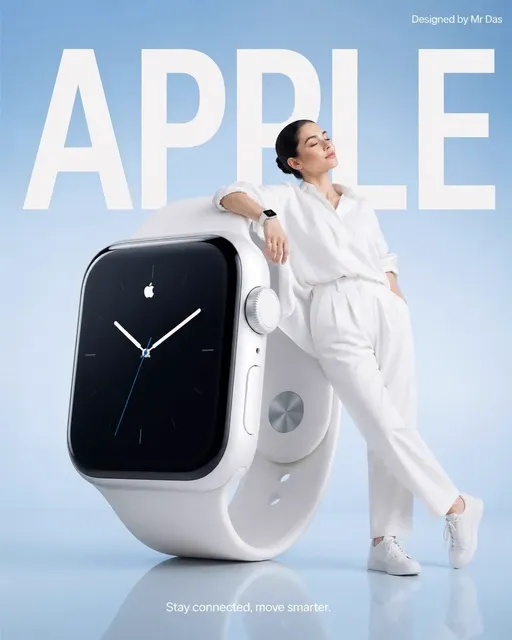
Minimalist campaign shot of a titanium smartwatch, product close-up on a model wrist with warm skin tone, brushed metal reflections, background gradient from deep teal to soft sky blue, Scandinavian design aesthetic, soft diffused studio light, generous negative space on the left
Practical rules:
- Lock the background. Gradient, seamless studio, or one repeated environment. Never let the background drift across a set.
- Name materials, not adjectives. Brushed titanium, matte ceramic, and anodized aluminum produce repeatable surfaces in a way that premium never will.
- Reserve negative space deliberately. Marketing layouts need room for text, so ask for it explicitly.
- Avoid logos in the prompt. Generating brand marks creates legal and quality problems. Composite real assets afterward.
A useful comparison exercise: run the same product prompt with three background treatments — seamless studio, gradient, and environmental lifestyle. This quickly reveals which direction the model renders most convincingly before you commit a full campaign to it.
Prompt Pattern 4: Abstract and Surrealist Compositions
Abstraction is the one category where standard prompt discipline can work against you. Over-specification produces literal, cautious images. The strongest surreal results come from combining a recognizable style anchor with one impossible physical premise.
Example:
Melting clock draped over a quantum computer, Salvador Dalí meets retrofuturism, iridescent oil-slick colors, hyperdimensional distortion, dreamlike vignette, soft focus edges
Techniques that reliably produce interesting abstraction:
- Style fusion with a twist. Name one historical movement and one technological subject. Two art movements plus one subject produces noise.
- Material impossibilities. Glass that behaves like fabric, stone that flows like water.
- Palette as the only constant. Keep three colors fixed and let form wander. This makes an abstract series feel intentionally curated.
- Lower adherence on purpose. Slight prompt looseness gives the model room to invent, which is desirable here and harmful everywhere else.
When abstracts fail, the cause is usually contradiction: asking for photorealistic rendering, minimalist composition, and maximalist detail at once. Pick two intentions and drop the third.
A Repeatable Prompt Workflow From Idea to Final Frame
Consistency comes from process, not intuition. This pipeline works for solo creators and small teams alike.
Step 1 — Write the brief in one sentence. Not a prompt, a brief. Who is looking at this image, and what should they feel? Prompts written without a brief drift toward whatever the model finds easiest.
Step 2 — Fill the six-layer template. Subject, lighting, camera, medium, color, composition. Write it in your own words first, then reformat for the target model.
Step 3 — Generate a low-cost exploration pass. Four to eight variations at draft resolution. Judge composition and lighting only. Do not evaluate fine detail at this stage.
Step 4 — Pick one direction and document the seed. Record the exact prompt, the model version, the seed, and the aspect ratio. This single habit is what makes results reproducible next month.
Step 5 — Refine one layer per iteration. Sharpen the lens, adjust the palette, add a hair light. Track what changed so you can undo it.
Step 6 — Upscale last, after the composition is final. Upscaling a flawed composition just produces a large flawed composition.
Step 7 — Build a personal prompt library. Group prompts by use case: portrait, environment, product, sequence, abstract. After twenty projects you will have a reusable asset that outperforms any generic prompt list.
Step 8 — Route between models. Use instruction-following models for complex spatial scenes, aesthetic models for mood-driven hero shots, and controllable local models when you need exact repeatability. The prompt is portable; the formatting is not.
Teams often add a ninth step: a shared review board where approved prompts and reference frames live together. It prevents five people from independently rediscovering the same settings.
Common Mistakes, Fixes, and FAQ
Writing one prompt and giving up after a single output. The first generation is a draft, not a verdict. Expect three to five iterations on anything important.
Stacking conflicting styles. Cyberpunk plus cottagecore plus watercolor produces visual static. One primary style, one accent at most.
Treating resolution words as quality words. Terms like 8K and ultra HD are weak proxies for detail. Concrete detail — fabric weave, condensation, chipped paint — does far more work.
Ignoring aspect ratio until the end. Ratio changes composition, not just crop. Decide it before you generate.
Re-describing a character from scratch each time. Copy the identity block verbatim instead.
Letting the background change between product shots. Lock it with a gradient or environment description.
Frequently asked questions
How long should a prompt be? Long enough to cover six layers, short enough that no clause contradicts another. Roughly 40 to 90 words covers most needs. Beyond that, contradictions start outweighing detail.
Do negative prompts actually help? On models that support them, yes — especially for recurring artifacts. On models that ignore them, they waste space. Test once per model and remember the answer.
Should I describe camera gear? Yes, if you want photographic realism. Lens and lighting language is the most efficient shortcut to a credible photograph.
How do I keep a character consistent across many images? Combine an identity block reused verbatim, one or more reference images, and a fixed aspect ratio and palette. Change only the action and camera per frame.
Can one prompt work across multiple generators? The concept can, the phrasing usually cannot. Translate the six layers into each model's preferred format rather than pasting text between tools.
What is the fastest way to improve results overall? Add specific lighting and one camera detail to prompts you already use. That single change improves more outputs than any style keyword list.
How should I organize prompts for a team? Store prompt, model version, seed, ratio, and an approved reference frame together. Anything less makes handoffs unreliable.
Is there a point where more prompting stops helping? Yes. When composition is settled and only fine texture is wrong, switch to inpainting, reference images, or post-processing instead of rewriting the prompt again.
The broader lesson is that prompts are a craft skill with a short feedback loop. Compare deliberately, change one variable at a time, and keep what works in writing. The creators producing consistently strong imagery are not using secret keywords — they are running a disciplined process and documenting it.

Alexander
More Blogs
Read MoreVidu Q4 Alternatives: 4K AI Video Models Compared (2026)
Vidu Q4 alternatives compared: Kling 4.0, Seedance 2.5, Wan 3.0, and Runway Gen-4 — 4K support, input modes, durations, audio, and what each costs in credits on Domer.
Top 4K AI Image Generators in 2026: 5 Models Compared on Real Costs
The top 4K AI image generators on Domer compared: Flux 3 Klein, Nano Banana 2.1, GPT Image 2.5, GPT Image 2, and Nano Banana Pro — 4K credit costs, reference limits, and speed.
Nano Banana 2.1 vs GPT Image 2.5: Which Image Model Should You Use? (2026)
Nano Banana 2.1 vs GPT Image 2.5 Flare compared: credit costs per resolution, aspect ratios, reference images, text rendering, and which tasks fit each model.