
Create
AI Mythical Portrait Workflow: Tools, Prompts, Consistency
Oct 14, 2026


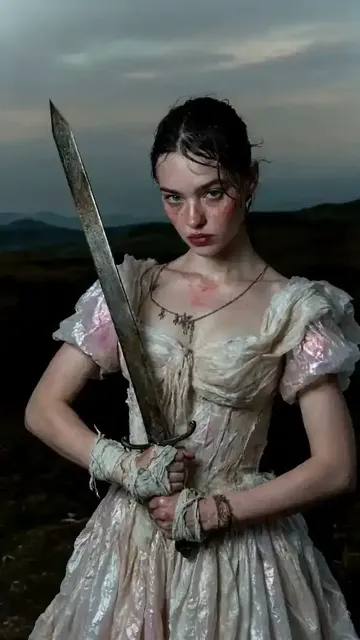
Why Mythical Portraits Need a Different AI Workflow
Mythical portraits look easy until you try to make a series. A single image of a dragon can be impressive because the viewer has no real-world reference for its face. A set of twelve elf portraits is much harder because the viewer notices when the cheekbones change, the ear angle shifts, or the cloak changes from moss green to teal. The challenge is not only generating fantasy. It is generating identity across multiple images while keeping the fantasy readable.
Generic fantasy prompts produce generic results. If you type only 'elf queen portrait, fantasy art' into a text-to-image model, you will get a beautiful but anonymous face. That face may work for a thumbnail. It will not work for a character sheet, a tabletop campaign, a book cover series, or an animated storyboard. The difference between a lucky image and a production-ready portrait is workflow.
Start by defining the output tier. A one-off hero image needs impact, mood, and a strong silhouette. A character sheet needs front, side, and three-quarter views with consistent costume details. A keyframe sequence needs the same face across different poses, lighting conditions, and environments. A cover illustration needs negative space for typography and a composition that reads at small sizes. Each tier changes your tool choices and your tolerance for variation.
Mythical subjects also have internal anatomy rules. Dragons need believable wing structure, scale flow, snout length, and weight distribution. Elves need a consistent ear shape, brow structure, and posture. Gods need iconography that communicates domain: a storm god carries weather symbols, a harvest god carries grain or tools, a death god carries liminal markers. Monsters need a silhouette that reads in one second. Without those constraints, the model averages many myths into a bland design.
Cultural context matters as much as anatomy. Norse, Greek, Japanese, West African, Mesoamerican, and Slavic myths have distinct visual languages. If you blend them carelessly, you get a fantasy soup that feels disrespectful or simply forgettable. A strong workflow includes research, intentional borrowing, and a clear note about which elements are invented versus referenced.
Decision criteria for any mythical portrait project: consistency versus novelty, speed versus control, hosted versus local tools, manual refinement versus automated pipelines, and single-image impact versus series continuity. Write those criteria down before you open a generator. They will save hours later.
Build the Character Bible Before You Prompt
A character bible is a short document that keeps you and your tools aligned. It does not need to be long. It needs to be specific enough that two different prompts still produce the same character.
Identity core
Write eight to twelve fixed traits. Example for a frost elf ranger: tall and lean, angular jaw, silver eyes, dark blue skin with pale freckles, long braided white hair, scar across left eyebrow, missing right ear tip, quiet expression, practical posture. These traits become the non-negotiable core of every prompt.
Silhouette and props
Describe the shapes that make the character recognizable at a glance. A horned helmet, a crescent staff, a heavy fur mantle, a serpent-shaped belt, a broken sword, a lantern with green fire. Props are anchors. They tell the viewer which scene they are looking at and help the model maintain continuity.
Lore and palette
Define the culture, climate, materials, and color script. A desert djinn might use sun-bleached linen, brass, lapis, and cracked leather. A deep-sea god might use abalone, driftwood, storm grey, bioluminescent teal, and salt-crusted wool. A fixed palette prevents style drift across a series.
Reference gathering
Collect eight to fifteen references. Use museum object photos, historical garment studies, animal anatomy, material close-ups, and lighting references. Avoid using the name of a living artist as a style shortcut. It is better to describe the visual qualities you want: soft rim light, matte texture, high micro-contrast, muted earth palette, painterly brushwork.
Prompt stack template
A reliable prompt stack has layers: subject, species, age, expression, wardrobe, materials, pose, camera, lighting, environment, style, and aspect ratio. Example: 'full-body portrait of an elder frost giant, weathered blue-grey skin, braided white beard, iron crown, fur mantle, rune-carved axe, standing on a glacier at dusk, low-angle shot, 85mm lens, rim light, volumetric fog, muted teal and amber palette, concept art realism, 2:3.'
Negative prompt
Keep a negative prompt file for recurring problems: extra limbs, fused fingers, waxy skin, plastic armor, floating jewelry, symmetrical face, text, watermark, blurry background, duplicate heads. Adjust it per project, but start from a stable base.
The Core Workflow: From Reference to Final Portrait
Step 1: Thumbnail composition
Sketch or describe three compositions before generating anything. A bust portrait focuses on face and costume. A three-quarter body shot shows pose and props. A full-body environmental shot establishes scale and world. Most mythical portraits fail because the composition was never decided; the model decided it instead.
Step 2: Base generation
Run a small batch of eight to sixteen images at a moderate resolution. Do not chase perfection here. Look for silhouette, pose, and lighting potential. Save the seeds and settings for any image that has a strong foundation.
Step 3: Identity refinement
Take the best base images and refine identity. Use reference images, face-locking features, or a small character model trained on your selected outputs. If the face changes too much, reduce prompt complexity and strengthen the reference weight. If the face becomes rigid, lower the reference weight slightly.
Step 4: Pose and scene expansion
Once the identity is stable, expand into different scenes. Use pose controls, depth maps, or rough sketches to guide the body. Keep the character bible visible. A dragon should keep the same horn curve in flight, in a cave, and on a mountain peak. An elf should keep the same ear shape in profile and in three-quarter view.
Step 5: Upscale and detail
Upscale in stages. A two-times pass often preserves more texture than a direct four-times jump. After upscaling, fix eyes, hands, jewelry, and weapon edges. Those areas carry most of the viewer's attention.
Step 6: Final polish
Color grade, add atmospheric depth, clean up edges, and check the image at thumbnail size. If the character does not read at 200 pixels wide, the portrait is not finished. Export layered files when possible so future edits do not require a full regeneration.
Choosing the Right Tool for the Job
Hosted text-to-image models
Hosted models are excellent for exploration. They produce polished lighting, strong composition, and beautiful color with little setup. They are less reliable for exact identity across many images unless they offer reference-image or character-reference features. Use them for mood boards, cover concepts, and style discovery.
Local diffusion workflows
Local diffusion gives you repeatability. You can lock model versions, samplers, seeds, and extensions. Tools such as Stable Diffusion interfaces and node-based pipelines let you build a repeatable character factory. The trade-off is setup time and hardware requirements.
Multi-reference and fusion tools
Multi-reference tools blend several images into one coherent result. This is useful for mythical portraits because you can combine a face reference, a costume reference, and a material reference. The risk is over-blending. If the output looks like a collage, reduce the number of references or use them in separate passes.
Pose and structure controls
Pose controls help you direct bodies without writing a novel. Use open-pose skeletons for character stance, depth maps for volume, and edge maps for costume details. This is especially useful for dragons, whose wings and tails are hard to control with text alone.
Upscaling and retouching tools
Upscalers add resolution but can also add plastic texture. Pair them with manual retouching. Use frequency separation or simple clone and heal tools to fix skin, scales, and fabric. A portrait that is sharp but waxy looks worse than a slightly softer but natural one.
Decision matrix: choose hosted tools for speed and polish, local diffusion for repeatability, multi-reference for fusion, pose controls for action, and manual retouching for final quality. Most professional workflows combine at least three of these categories.
Consistency Techniques for Elves, Dragons, and Gods
Seed and prompt locking
When you find a character foundation, lock the seed and keep the prompt skeleton stable. Change only the variables you intend to change: pose, environment, expression, lighting. If you rewrite the entire prompt, the model will rewrite the character.
Train a small character model
A small character model trained on eight to twenty curated images can lock a face, costume, and species traits. Keep the training set clean. Remove images with inconsistent lighting or contradictory costume details. A focused model beats a huge messy one.
Use reference images carefully
Reference images are powerful but can leak unwanted details. If your face reference includes modern clothing, crop it out. If your costume reference has a different color palette, use it in a later pass. Separate identity, costume, and environment references whenever possible.
Control pose without losing identity
Pose controls change the body, not the face. Combine pose guidance with a stable identity reference. Generate the body first, then refine the face. For dragons, lock scale pattern and horn shape before changing flight angles.
Maintain a color script
A color script assigns emotional meaning to palettes. The same elf queen can appear in spring green, autumn amber, winter blue, and ritual red without losing identity. Keep skin tone, hair shape, and signature props consistent while the palette shifts.
Version your work
Save every accepted prompt, seed, model, sampler, and reference set in a project log. When a client asks for one more portrait six weeks later, you will not have to reverse-engineer your own workflow. Versioning is the difference between a hobby and a repeatable production process.
Prompt Patterns That Actually Work
Species and anatomy first
Start with species and anatomy before style. 'Ancient bronze dragon, long crocodilian snout, swept-back horns, layered scales, muscular forelimbs, folded wings' gives the model more to work with than 'epic dragon.' Style words come later and should not overpower structure.
Cultural cues with restraint
Use two or three specific cultural cues instead of ten. A Norse-inspired god might have a rune-carved arm ring, a heavy wool cloak, and a raven motif. More than that becomes costume clutter. Research the meaning of symbols before using them.
Materials and surface
Describe how surfaces behave. 'Salt-crusted leather,' 'rain-slicked scales,' 'tarnished silver,' 'cracked obsidian,' 'woven reeds,' 'pearl inlay.' Material language creates realism without forcing a photorealistic style.
Lighting direction and quality
Lighting is the fastest way to make a mythical portrait feel cinematic. Specify direction, quality, and color: 'low side light, soft falloff, cold blue ambient, warm amber rim.' Avoid only saying 'dramatic lighting' because it is too vague.
Camera and lens language
Camera terms guide composition. '85mm portrait lens, shallow depth of field' creates intimacy. '24mm low-angle environmental shot' creates scale. 'Telephoto compression' makes a dragon feel massive. Use camera language deliberately.
Environment as character
A throne room, a storm coast, a frozen temple, a volcanic forge, and a moonlit forest all change the story. The environment should support the character, not distract from it. Leave negative space for titles if the image is a cover.
Prompt example for a river nymph: 'bust portrait of a river nymph, translucent skin, reed-woven hair, pearl diadem, wet silk, soft dawn light, shallow depth of field, 50mm, painterly realism, cool green and silver palette, 4:5.' Prompt example for a cave troll: 'full-body portrait of a cave troll, mossy grey hide, heavy brow, broken tusks, stone hammer, standing in a dripping limestone cave, torchlight from below, high micro-contrast, muted ochre and charcoal palette, 2:3.'
Common Mistakes and How to Fix Them
Mistake 1: Vague species prompts
'Fantasy creature' gives the model no anatomy. Fix it by naming the species, body plan, and scale. Add one or two unusual traits that make the design memorable.
Mistake 2: Overstuffed prompts
Too many adjectives cancel each other out. Fix it by choosing three priority clusters: identity, costume, and lighting. Move everything else to a negative prompt or a later pass.
Mistake 3: Inconsistent faces
If every image has a different face, you are changing too many variables. Fix it with a reference image, a small character model, a fixed seed, and a stable prompt skeleton.
Mistake 4: Style drift
Style drift happens when you switch models, samplers, or aspect ratios mid-project. Fix it by locking technical settings and testing any new tool on a disposable image first.
Mistake 5: Bad hands and weapons
Hands and weapon grips fail when the pose is unclear. Fix it by generating the body with pose guidance, then inpainting the hands and props at high resolution.
Mistake 6: Generic fantasy design
Generic design comes from generic references. Fix it by adding material specificity, cultural cues, and a clear silhouette. A character should be recognizable as a black shape.
Mistake 7: Wrong scale
A giant looks like a person if there is no environmental anchor. Fix it by including small trees, tiny buildings, low clouds, or human-sized objects in the frame.
Mistake 8: Flat lighting
Flat lighting makes even a dragon look like a sticker. Fix it by describing direction, color temperature, and shadow behavior. Rim light and atmospheric haze add depth.
Mistake 9: Ignoring composition
A beautiful face in the center of the frame can still be a boring portrait. Fix it with rule-of-thirds placement, diagonal action lines, and negative space for the intended use.
Mistake 10: No rights or usage plan
Before publishing, document which assets you generated, which references you used, and what usage rights apply. Keep model licenses and input rights organized. This is not legal advice, but a clear paper trail prevents future problems.
A Practical Example: Norse Storm God Portrait Set
Brief: create five portraits for a tabletop campaign. The character is a Norse-inspired storm god named Vekkr. The set includes neutral, battle, ritual, throne, and wounded scenes. The art must work at card size and at poster size.
Character bible: tall, broad-shouldered, weathered face, braided grey beard, storm-grey eyes, runic arm rings, salt-stained wool cloak, iron crown with broken points, driftwood staff, raven companion. Palette: storm blue, iron grey, sea green, amber lightning, bone white.
Reference board: museum photos of Viking-age brooches, wool textile close-ups, storm cloud photos, raven anatomy, driftwood texture, cold coastal lighting. No living artist style references.
Prompt skeleton: 'Vekkr, Norse storm god, tall weathered man, braided grey beard, storm-grey eyes, runic arm rings, salt-stained wool cloak, iron crown with broken points, driftwood staff, raven companion, [scene], [pose], [lighting], cinematic concept art, 2:3.'
Neutral scene: standing on a cliff, calm before the storm, soft overcast light, distant lightning. Battle scene: mid-swing with staff, rain horizontal, harsh backlight, flying spray. Ritual scene: kneeling at a stone altar, runes glowing, low firelight and cold moonlight. Throne scene: seated on a driftwood throne, ravens on the armrests, storm clouds behind, dramatic side light. Wounded scene: leaning on staff, torn cloak, rain-soaked, pale dawn light, quiet expression.
Technical workflow: fixed model version, fixed seed family, fixed aspect ratio, same style phrase. Generate sixteen variants per scene. Select three per scene based on silhouette and expression. Inpaint eyes, hands, and staff details. Use pose control for the battle scene. Upscale two times, then retouch at full resolution. Color grade to the palette. Export card crops and poster versions.
Project log: save prompt, seed, sampler, model, reference set, and retouch notes in a text file. If the client asks for a sixth portrait, the workflow is ready. This is how a mythical portrait moves from a lucky generation to a dependable asset.
Quality Control Checklist for Mythical Portraits
Use this checklist before delivery:
- Silhouette test: does the character read as a black shape?
- Species test: can a viewer identify elf, dragon, god, or monster without reading a label?
- Face consistency: do eyes, nose, mouth, and jaw match previous images?
- Costume continuity: are signature props, colors, and materials present?
- Anatomy check: are hands, wings, tails, horns, and joints believable?
- Lighting logic: does light direction match shadows and highlights?
- Color harmony: does the palette support the character and scene?
- Texture at 100 percent: are skin, scales, fabric, and metal convincing up close?
- Edge quality: are there halos, cutouts, or floating details?
- Background depth: does the environment feel layered rather than flat?
- Cultural sensitivity: are borrowed symbols used accurately and respectfully?
- Composition: is there room for text, UI, or cropping if needed?
- Thumbnail readability: does it work at small size?
- File organization: are layered files, exports, and project logs saved?
- Usage documentation: are model licenses, references, and rights notes stored with the project?
If any item fails, fix it before moving to the next portrait. A series is only as strong as its weakest frame.
FAQ: AI Mythical Portrait Workflow
How many reference images do I need for a consistent mythical character?
For a single character, eight to fifteen references are a good starting point. Include face structure, costume details, material close-ups, and lighting references. More is not always better. Clean, consistent references beat a large messy folder.
Can I keep the same face across many images?
Yes, but you need control. Use a fixed seed, a stable prompt skeleton, reference images, and ideally a small character model trained on your selected outputs. If you change model, sampler, or aspect ratio, expect the face to drift.
What resolution should I start with?
Start at 1024 pixels on the long edge for exploration. Move to 1536 or 2048 for refinement if your tool supports it. Upscale in stages rather than jumping straight to a huge file. Retouch at full resolution after upscaling.
How do I avoid generic fantasy designs?
Add specific materials, cultural cues, and a strong silhouette. Instead of 'dark elf warrior,' try 'underground elf sentinel, obsidian lamellar armor, bioluminescent fungi cloak, bone-white braids, hooked spear, cool violet and moss green palette.' Specificity creates originality.
Can I animate these portraits later?
Yes. Generate a clean portrait first, then use image-to-video tools for subtle motion such as breathing, hair movement, or floating embers. Keep the camera move slow and preserve the face. If the animation distorts identity, reduce motion strength or use a shorter clip.
How do I handle cultural accuracy in mythical portraits?
Research primary sources when possible. Use museum collections, academic articles, and cultural consultants. Avoid mixing sacred symbols as decoration. If you invent elements, document what is invented and what is referenced. Accuracy does not limit creativity; it gives it a stronger foundation.
What is the best tool for beginners?
A hosted text-to-image model with reference-image support and an upscaler is the easiest starting point. It lets you focus on prompts and composition before you learn node-based pipelines or local diffusion. Add a pose control tool when you need action poses.
What is the best tool for advanced consistency?
A local diffusion workflow with pose control, reference adapters, and small character models gives the most repeatability. It requires more setup, but it pays off when you need twenty or fifty consistent portraits. Keep your pipeline documented.
How do I fix extra limbs or broken anatomy?
Reduce prompt complexity, add pose guidance, and generate the body before the face. Then inpaint problem areas at high resolution. For dragons and monsters, use clear anatomy references and avoid extreme poses in the first pass.
How should I organize a mythical portrait project?
Create folders for references, prompts, accepted outputs, rejected outputs, and final exports. Keep a text log with seed, model, sampler, prompt, negative prompt, and retouch notes. This makes revisions faster and protects you when a project expands.
What if the model keeps producing the same face?
Same-face syndrome usually comes from a narrow reference set or a strong character model. Vary age, bone structure, expression, and scene while keeping the core identity traits. If you need different characters, train separate small models instead of forcing one model to do everything.
How do I choose between speed and quality?
Use speed for exploration. Generate wide batches at lower resolution. Use quality for final delivery. Refine the best candidates with pose control, inpainting, upscaling, and color grading. The workflow should have a fast lane and a final lane, not one compromise lane.
A dependable mythical portrait workflow is less about finding a magic prompt and more about controlling variables. Build the character bible, lock the identity, choose the right tool for each stage, and quality-check every frame. Do that, and dragons, elves, gods, and monsters will stay consistent from the first sketch to the final export.

Alexander
More Blogs
Read MoreVidu Q4 Alternatives: 4K AI Video Models Compared (2026)
Vidu Q4 alternatives compared: Kling 4.0, Seedance 2.5, Wan 3.0, and Runway Gen-4 — 4K support, input modes, durations, audio, and what each costs in credits on Domer.
Top 4K AI Image Generators in 2026: 5 Models Compared on Real Costs
The top 4K AI image generators on Domer compared: Flux 3 Klein, Nano Banana 2.1, GPT Image 2.5, GPT Image 2, and Nano Banana Pro — 4K credit costs, reference limits, and speed.
Nano Banana 2.1 vs GPT Image 2.5: Which Image Model Should You Use? (2026)
Nano Banana 2.1 vs GPT Image 2.5 Flare compared: credit costs per resolution, aspect ratios, reference images, text rendering, and which tasks fit each model.