
AI Video Composition: Build a Cinematic Workflow That Works
Oct 15, 2026

Why AI Video Feels Like Conducting an Orchestra
Most people meet AI video through a single prompt box: type a sentence, wait, receive a five-second clip. That moment is genuinely magical the first time and genuinely limiting the twentieth time. A clip is a note. A piece of video that people watch to the end, remember, and share is a composition — notes arranged in time, with dynamics, silence, repetition, and a payoff.
That distinction is the whole game right now. Generation quality has improved to the point where "can the model produce a convincing shot?" is rarely the interesting question. The interesting question is whether you can assemble twenty convincing shots into something that holds attention for sixty seconds. Filmmakers have always solved that problem with craft: shot lists, continuity, sound, pacing. AI video does not remove the need for that craft; it relocates it. You spend less time hauling equipment and more time making decisions.
This guide treats AI video as a composition discipline. You will learn how to build a model palette, keep characters recognizable across scenes, write prompts that behave like musical notation, design sound instead of bolting it on, and run a production workflow that survives deadlines. The goal is not to press a button and hope. The goal is to conduct.
The Four Layers of an AI Video Composition
Almost every AI video project that disappoints fails at one of four layers. When something feels off, diagnose the layer before you start regenerating randomly.
The narrative layer
This is what the video is about: a product reveal, a short story, a tutorial step, a mood piece. Weak narrative shows up as beautiful shots that do not connect. Fix it before generation by writing a one-sentence premise and a three-beat structure: setup, turn, resolution. If you cannot describe the turn in one sentence, the video will not have one.
The visual layer
Framing, subject design, lighting, color palette, texture. This is where most prompt effort goes, and it is the layer most visible in a thumbnail. Consistency here is what makes a sequence feel intentional rather than assembled from a stock pile.
The motion layer
How the camera and subjects move: dolly in, handheld drift, orbital sweep, whip pan, static locked-off shot. Motion is emotional. A slow push reads as curiosity or tension; a handheld sway reads as documentary immediacy. Most beginners describe subjects and forget camera behavior, which is why their footage feels flat even when the images are attractive.
The audio layer
Music, ambience, foley, dialogue, silence. Audio is the layer that determines whether viewers stay past three seconds. A strong track with mediocre visuals outperforms stunning visuals with a generic loop every time.
Write these four layers into your project notes at the start. A one-page plan that names the premise, the palette, the camera language, and the sound direction will save you hours of regeneration later.
Building a Model Palette Without Chaos
Modern AI video tools ship with large libraries of models, each with its own strengths: photorealism, animation, stylized illustration, fast drafts, long takes, strong motion physics. Having many options is not the same as having many good options for your shot. The composer's skill is selection.
Match the model to the shot, not the other way around
Start with a shot list, then assign a tool to each line. A practical mapping looks like this:
- Establishing landscapes and cityscapes: models that handle wide depth and atmospheric haze well.
- Character close-ups with dialogue: models with reliable facial stability and subtle micro-expression.
- Action and sport: models with strong motion coherence and few limb artifacts.
- Stylized inserts: illustration-first models or strong style-transfer pipelines.
- Draft exploration: faster, cheaper models used purely to test composition before committing to a final render.
The trap is falling in love with one model and forcing it to do everything. A single-model workflow produces a monotonous visual signature, and monotony reads as amateur even when each shot is technically clean.
Keep a personal shot-type map
Build a simple document with three columns: shot type, best-performing tool, and the prompt pattern that worked. After ten projects you will have a private reference that is more valuable than any tutorial, because it reflects your own material, your own lighting preferences, and your own audience.
Balance quality, speed, and spend
Every generation costs time and compute. A workable rule is to spend roughly 60 percent of your generation budget on drafts and look development, and 40 percent on final renders. Creators who do the opposite end up with expensive footage that does not cut together.
Character Consistency Across Scenes
Nothing breaks the illusion of a composed video faster than a protagonist whose face changes between shots. Consistency is not a single trick; it is a system of small disciplines.
Build a reference kit
Collect four to six reference images of your character from different angles: front, three-quarter, profile, and a full-body shot. Include one with a neutral expression and one with the emotional range you need most. Feed the same kit into every generation for that character, and keep the files named consistently, for example character_aria_front.png, so you never mix versions by accident.
Lock the boring details
Wardrobe, hair parting, a scar, a specific jacket color, the shape of a collar. Describe these in identical language every single time. Paraphrasing is where drift begins: "a red wool coat" and "a crimson winter jacket" will produce two different garments. Copy and paste your character block verbatim from a saved snippet file.
Maintain a continuity ledger
Keep a running list of scene state: what the character is wearing, what time of day it is, whether they are holding something, which direction they were walking in the previous shot. Continuity errors are not just about faces; a character who exits frame carrying a bag and re-enters empty-handed is a broken composition.
Test before you scale
Generate a three-shot micro-scene with your character before committing to a full sequence. If the face holds across three shots with a lighting change, it will usually hold across twelve.
Prompt Engineering as Musical Notation
A prompt is not a wish. It is a score. The clearer the notation, the more predictable the performance.
The five-part prompt structure
A reliable pattern for video prompts is:
- Subject — who or what, with two or three defining attributes.
- Action — what happens in the clip, in simple present tense.
- Camera — shot size plus movement ("medium close-up, slow dolly in").
- Light — source, direction, and quality ("window light, soft, camera left").
- Texture and style — lens character, grain, color treatment, reference era.
Example: "A ceramicist in her forties, sleeves rolled, shaping a bowl on a wheel; hands press and rotate steadily; medium close-up, slow dolly in; warm window light from camera left, soft falloff; shallow depth of field, fine 35mm grain, muted earth tones."
That is a shot you can direct. Compare it to "woman making pottery, cinematic," which is a lottery ticket.
Use negative direction carefully
Listing what you do not want can help, but long negative lists often confuse models. Limit yourself to two or three genuine risks: "no text overlays, no warped hands, no lens flares." If a problem persists across many generations, change the model rather than stacking more negatives.
Change one variable at a time
When a shot almost works, resist rewriting the whole prompt. Adjust camera or light first, then subject detail. Systematic iteration produces knowledge; random iteration produces luck.
Design for the edit
Write prompts that anticipate the cut. If shot three ends on a character looking screen-right, shot four should begin with the subject entering from screen-left. This is basic continuity, and it is the difference between footage that feels authored and footage that feels shuffled.
Sound Design: The Layer Most Creators Skip
Audio is where composed video separates itself from generated clips. Three tracks do most of the work: music, ambience, and foley.
Music sets the emotional arc
Choose or generate a track before you finish editing if the video is mood-led, and after if it is information-led. Either way, look for a track with an actual shape: a quiet opening, a build, a small drop or resolution near the end. Loops without arcs force you to manufacture energy through cuts, which rarely works.
Ambience creates place
Room tone, wind, distant traffic, a hum of fluorescent lights. Ambience is the cheapest and most effective realism tool available. A shot of a person in a silent room feels synthetic; the same shot with a low room tone and a ticking clock feels like a scene.
Foley makes motion physical
Footsteps, cloth movement, the tap of a mug on a table, keyboard clicks. Adding three or four precise foley hits to a fifteen-second sequence can transform perceived production value more than a full re-render of your visuals.
Mix for small speakers
Most viewers watch on a phone with a tiny driver. Check dialogue and mid-range clarity on a phone speaker, keep music from masking the frequency range where speech lives, and use restraint with low-end rumble that will simply disappear on mobile. Leave a beat of near-silence before your most important line. Silence is a mixing choice, not an absence.
Style, Texture, and Visual Continuity
A composition has a visual signature: a palette, a grain structure, a lens language. Here is how to keep that signature stable across many generated shots.
Define a palette with three colors
Pick a dominant, a secondary, and an accent. Write them into every prompt in plain language — "slate blue, warm sand, muted copper accent." Ignore specific hex values in prompts; descriptive color language transfers more reliably.
Treat grain as a character choice
Fine 35mm grain reads as premium and cinematic. Heavy digital noise reads as an error. Clean, grain-free renders read as corporate. Decide which one fits the piece and state it explicitly, then apply a light unifying grain pass in the edit so mixed sources feel like one camera.
Beware over-stylization
Aggressive style transfer on an already stylized render can melt faces and smear texture. Apply style at moderate strength on a clean base render, and check a single frame at full resolution before exporting the whole sequence.
Unify in post, not in generation
A single color grade, a consistent grain overlay, and one aspect-ratio crop will do more for coherence than trying to make every model agree on a look from scratch.
A Production Workflow, Start to Finish
This is a workflow you can run on a one-person schedule without losing the thread.
Step 1: Brief and shot list
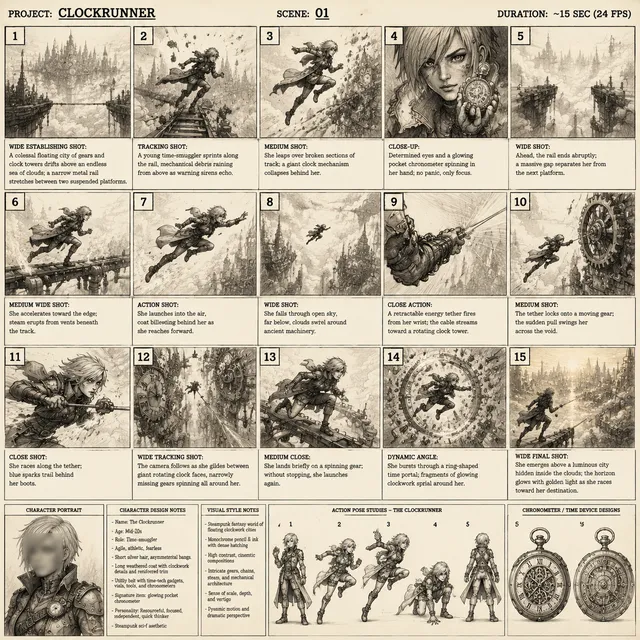
Write the premise in one sentence, the beats in three lines, then a shot list of eight to twenty entries with shot size, motion, and purpose. Every shot should earn its place. If a shot does not advance information or emotion, cut it before it costs you time.
Step 2: Look development
Generate still images first. Stills are fast and cheap, and they settle palette, wardrobe, and lens questions before you commit to motion. Produce three visual directions and choose one.
Step 3: Draft motion
Generate short, low-commitment motion tests with fast models. Assemble them in order without sound and watch the sequence twice. If the pacing does not work with rough footage, better renders will not save it.
Step 4: Final generation
Lock the shot list, then render finals. Generate two or three takes of your hero shots and one take of supporting shots. Hero shots are the ones the audience will remember; everything else is connective tissue.
Step 5: Assemble and add rhythm
Cut to a temp track. Trim aggressively — most first assemblies are 20 to 30 percent too long. Vary shot length deliberately: shorter cuts to build momentum, one longer hold to let a moment breathe.
Step 6: Run a director-pass with an agent
Automated director-style agents are useful for mechanical revisions: generating consistent shot variations, proposing alternate takes of a beat, checking whether a sequence matches a written style guide, and flagging continuity mismatches. Use them for iteration volume, not for taste. The final call on pacing, tone, and which take is better remains human work, and it is the part audiences actually respond to.
Step 7: Sound, captions, and delivery
Add music, ambience, and foley, then mix. Burn in or upload captions, because a large share of viewers watch muted. Export a horizontal master, a vertical crop with reframed subjects, and a square version if your channels need it. Never let an automatic vertical crop cut off faces; reframe shot by shot instead.
Common Mistakes and How to Fix Them
- Prompting in generalities. Replace adjectives like "epic" and "cinematic" with concrete camera, light, and texture language.
- Reusing one model for everything. Assign tools by shot type so the piece has visual range without losing coherence.
- Ignoring camera movement. Add shot size and movement to every prompt; motion carries emotion.
- Changing three prompt variables at once. Iterate one variable per attempt so you know what worked.
- Skipping ambience. Add room tone and two or three foley hits; perceived production value jumps immediately.
- Over-cutting. Let shots breathe. A four-second hold often lands harder than four one-second cuts.
- Chasing perfect single clips. Judge shots in sequence, not in isolation. A slightly imperfect shot that cuts perfectly beats a flawless shot that does not.
- No continuity ledger. Track wardrobe, time of day, props, and screen direction between shots to avoid obvious breaks.
- Exporting one aspect ratio. Plan for vertical and square crops from the start, and reframe deliberately.
FAQ
Do I need professional editing experience to compose AI video?
No, but you need editing judgment. Watch your sequence muted and ask whether the story is still understandable. If it is, your visual composition works. If it is only clear with sound, the visuals are underperforming.
How many models should I use in a single project?
Three to five is a healthy range for most projects: one for wide environments, one for close character work, one for motion-heavy shots, plus a fast draft model and an optional stylized tool. More than that and consistency becomes expensive to manage.
How do I keep a character's face stable across many shots?
Use a fixed reference kit, copy your character description verbatim into every prompt, keep lighting direction consistent between consecutive shots, and test with a three-shot micro-scene before committing to a full sequence.
Should music come before or after the visuals?
Before, if the piece is mood-led and built around a feeling. After, if the piece is informational and driven by a script. In both cases, choose a track with an arc rather than a flat loop.
How long should an AI-composed video be?
Match the length to the platform and the idea. A social piece often works best between 15 and 45 seconds, while a brand film can hold attention for 60 to 120 seconds if the narrative earns it. Length is a consequence of how many shots carry real information, not a target to hit.
What is the fastest way to improve my output?
Fix sound first. Most AI video reads as amateur because of silent rooms, mismatched music, and no foley. One afternoon of audio work will improve your perceived quality more than another week of prompt tweaking.

Alexander
More Blogs
Read MoreVidu Q4 Alternatives: 4K AI Video Models Compared (2026)
Vidu Q4 alternatives compared: Kling 4.0, Seedance 2.5, Wan 3.0, and Runway Gen-4 — 4K support, input modes, durations, audio, and what each costs in credits on Domer.
Top 4K AI Image Generators in 2026: 5 Models Compared on Real Costs
The top 4K AI image generators on Domer compared: Flux 3 Klein, Nano Banana 2.1, GPT Image 2.5, GPT Image 2, and Nano Banana Pro — 4K credit costs, reference limits, and speed.
Nano Banana 2.1 vs GPT Image 2.5: Which Image Model Should You Use? (2026)
Nano Banana 2.1 vs GPT Image 2.5 Flare compared: credit costs per resolution, aspect ratios, reference images, text rendering, and which tasks fit each model.