
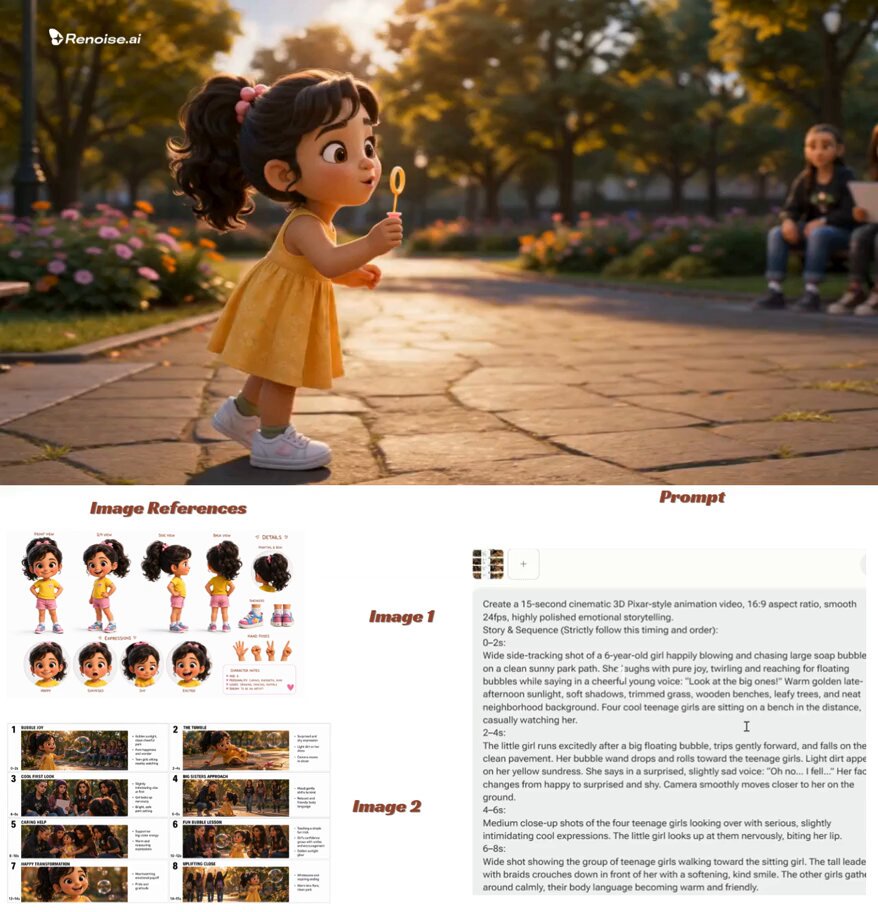
AI Video Script Generator: A Practical Marketing Guide
Oct 13, 2026


Why the Script Still Decides Video Campaign Performance
Video production has become remarkably accessible. A marketer with a phone, a light, and editing software can publish something polished in an afternoon. The hard part is no longer the camera or the timeline. It is the narrative. A weak script produces a video that looks professional and says nothing memorable. A strong script gives editors, designers, and presenters a clear job to do. For marketers, the script is where strategy becomes concrete. It defines the hook, the promise, the proof, and the next step.
AI video script generators change the economics of that work. They do not remove the need for judgment, but they remove the blank page. They let a small team explore ten angles before lunch, adapt one idea across platforms, and test hooks against audience data. The result is not automation for its own sake. It is a faster path from campaign brief to a script that can actually be produced.
What an AI Video Script Generator Actually Does
At its core, an AI video script generator turns structured input into narrative output. You provide an objective, an audience, a platform, a duration, a tone, mandatory messages, and calls to action. The tool returns a script with scenes, voiceover, on-screen text, and sometimes shot suggestions. Modern systems use large language models and related AI techniques to infer intent, maintain context, and adapt style. They can also generate variations for A/B testing.
It helps to think of the generator as three tools in one. First, it is a research synthesizer: it organizes the notes, customer quotes, product facts, and campaign constraints you feed it. Second, it is a drafting engine: it proposes hooks, transitions, and endings. Third, it is an adaptation layer: it reformats the same core idea for short-form video, a product demo, a webinar intro, or a paid ad. What it cannot do is invent verified facts, understand your legal boundaries, or know what your audience will find funny. Those remain human responsibilities.
The Anatomy of a High-Performing Marketing Video Script
A useful script is not a block of prose. It is a sequence of jobs. Whether the final video is fifteen seconds or fifteen minutes, most effective marketing scripts share a recognizable structure.
Hook
The first seconds must earn attention. A strong hook names a tension, asks a question, makes a bold promise, or shows a surprising visual. For example: 'Your best customers are not the ones who spend the most. They are the ones who come back.' The hook should connect to the audience's world, not to the brand's internal priorities.
Context
After the hook, give the viewer enough context to care. Who is this for? What problem are we solving? Why now? Keep context short in social video and slightly longer in explainers. The goal is clarity, not completeness.
Value and Proof
This is where you deliver the promise. Use a demonstration, a customer story, a comparison, or a simple before-and-after. Proof can be visual, testimonial, or data-driven. If you make a claim, show the evidence or at least point to where it lives. AI can suggest proof points, but a human must verify them.
Call to Action
End with one clear next step. 'Book a demo.' 'Start free.' 'Download the guide.' 'See the full story.' Multiple asks compete; one ask converts. The CTA should feel like the natural conclusion of the script, not an interruption.
A short-form script might look like this: Hook: 'You are losing sales in the follow-up email.' Context: 'Most teams send the same generic message to every lead.' Value: 'Here is a three-line template that gets replies.' CTA: 'Grab the template and try it on your next ten leads.' A longer product launch script might use five beats: problem, stakes, solution reveal, demonstration, and offer. The structure stays simple even when the story expands.
Build a Better Campaign Brief Before You Generate
The quality of AI output depends on the quality of the brief. A vague request like 'write a fun video about our new app' produces generic results. A structured brief gives the generator constraints to work with. Include the following:
- Objective: awareness, consideration, conversion, retention, or education.
- Audience: role, pain point, sophistication level, and where they are in the buying journey.
- Platform and format: vertical short-form, landscape explainer, webinar opening, paid ad, or product page embed.
- Target length: seconds or word count.
- Tone: practical, bold, warm, technical, playful, or premium.
- Mandatory messages: product name, key feature, offer, legal line, or tagline.
- Must-avoid list: claims you cannot make, competitor mentions, jargon, or visual styles.
- Proof assets: customer quotes, statistics, demo steps, or testimonials.
- Desired action: one primary CTA and, if needed, one secondary CTA.
A reusable brief template can be a simple table with those fields. When you feed it to an AI script generator, ask for two or three distinct interpretations rather than one perfect draft. Variation is the point. You are not looking for the final script on the first pass; you are looking for a direction worth refining.
A Practical Workflow from Brief to Publish-Ready Script
A repeatable workflow keeps AI from becoming a random idea machine. It also makes collaboration easier.
Step 1: Define the campaign job
Write one sentence that describes what the video must accomplish. If the sentence contains two jobs, split it into two videos. A single video that tries to announce a feature, explain a category, and drive a demo will usually do none of those things well.
Step 2: Gather source material
Collect product details, customer language, sales objections, previous scripts, and performance data. The more specific the input, the less generic the output. Customer support tickets and sales call notes are especially useful because they contain the phrases your audience actually uses.
Step 3: Generate deliberately
Ask the AI tool for multiple options: a direct version, a story-led version, and a data-led version. Request hooks separately, then ask for full scripts using the strongest hook. Separating ideation from drafting gives you more control.
Step 4: Edit for voice and truth
Read the draft aloud. Cut anything that sounds like a brochure. Replace abstract claims with concrete examples. Verify every number, testimonial, and product claim. Add the legal or compliance language your industry requires.
Step 5: Turn the script into a production plan
A good AI script can often output a shot list, b-roll suggestions, on-screen text, and caption notes. Treat those as recommendations, not requirements. The editor and designer should shape the final visuals around the strongest narrative, not the other way around.
Step 6: Record, edit, and caption
Keep the script visible during recording, but allow natural delivery. Captions are not optional for most platforms; they improve accessibility and watch time. Check that on-screen text matches the spoken script and that the CTA appears both verbally and visually.
Step 7: Test and improve
Launch with at least two hook variations when the platform allows it. Compare retention, click-through, and conversion. Feed the winning language back into the brief for the next video. The workflow becomes a loop, not a one-time task.
Platform-Specific Script Patterns That Work
The same idea needs a different script for every platform. AI can handle much of that adaptation, but you should know what to ask for.
Short-form social
Short-form rewards speed, specificity, and personality. Start with the payoff or the tension. Use short sentences. Write for sound-off viewing with captions and on-screen text. One idea per video. The CTA can be soft, such as 'follow for more', or direct, such as 'tap the link'. Avoid intros that delay the value.
YouTube and explainers
Viewers on long-form platforms will tolerate more context if the promise is clear. Use a cold open that states the problem, then a roadmap. Chapters help, but the script should still flow as a story. Demonstration sections benefit from precise language because the visuals carry less of the explanation. End with a specific next step and, when relevant, a related video suggestion.
LinkedIn and B2B
B2B audiences respond to clarity, proof, and a point of view. A strong LinkedIn video script often starts with a counterintuitive observation, follows with a short framework, and ends with a question that invites comments. Keep the tone professional but not stiff. Avoid jargon that hides a weak idea. One graphic or screen recording can carry the whole video if the script is sharp.
Paid ads and product launches
Paid video needs immediate relevance. Match the ad to the audience segment and the stage of the funnel. A cold audience needs problem awareness; a warm audience needs differentiation; a ready audience needs an offer. Write multiple hooks for the same body, then test them. Keep compliance language intact, but place it where it does not break the flow.
Keeping AI Scripts On-Brand, Human, and Compliant
AI tends to produce competent, middle-of-the-road language. That is useful for structure and speed, but it is not a brand voice. To get better results, give the model examples of writing you like and writing you dislike. Define tone rules: use short sentences, avoid exclamation points, never use certain buzzwords, always address the viewer directly. Some tools let you save these rules as presets. If yours does not, keep a style guide in the prompt.
Human editing is where the script becomes memorable. Add a specific detail that only your team would know. Replace a generic benefit with a customer's exact words. Cut the first sentence if it is throat-clearing. Read the script aloud and mark every place you stumble; those are the lines to rewrite.
Compliance is another human layer. Regulated industries need review for claims, disclaimers, testimonials, and disclosures. AI can help draft alternatives, but it should never be the final approval step. Build a review checklist into your workflow so compliance is not an afterthought.
Quality Control, Measurement, and Common Mistakes
Before you publish, run a simple quality check. Does the hook match the thumbnail and title? Is the main message clear within the first few seconds? Does the script deliver what the opening promised? Are captions accurate? Is the CTA impossible to miss? Does the video work without sound? These checks catch most avoidable problems.
After publishing, measure what matters. Hook rate shows whether the opening earned attention. Average watch time and completion rate show whether the middle held interest. Click-through rate and conversion rate show whether the CTA worked. Saves, shares, and comments reveal whether the video felt useful or worth discussing. Different platforms report different metrics, so compare trends within each channel rather than across all channels at once.
Use those results to write the next brief. If viewers drop at second eight, the context section may be too slow. If they watch to the end but do not click, the CTA may be weak or mismatched. If one hook outperforms another, generate more variations around that angle. Over time, your brief becomes a record of what your audience actually responds to.
Common mistakes follow predictable patterns. The first mistake is asking for too much. A script that tries to cover every feature, audience, and offer becomes noise. Narrow the job. The second mistake is accepting the first draft. Good scripts come from iteration, not from a single prompt. Generate options, combine the best parts, and rewrite. The third mistake is ignoring the platform. A script written for a webinar will feel slow on social; a script written for social may lack the depth of a product demo. Adapt structure, length, and CTA to the destination. The fourth mistake is letting AI invent facts. Always verify names, numbers, quotes, and claims. The fifth mistake is skipping the visual plan. A script that cannot be shot is not finished. Add shot notes, b-roll ideas, and on-screen text. Finally, do not let the tool flatten your voice. If every video sounds like every other AI-assisted video, the speed advantage disappears. Use AI for structure, variation, and adaptation, then add the human details that make your brand recognizable.
FAQ: AI Video Script Generation for Marketers
How long should a marketing video script be?
It depends on the platform and the job. A short-form social video often works best between fifteen and sixty seconds, which is roughly forty to one hundred fifty words. An explainer or product demo might run two to five minutes, or three hundred to eight hundred words. A webinar opening can be longer, but the script should still be built around a small number of clear beats. Write for attention, not for a word count.
Can an AI script generator match our brand voice?
It can get close if you give it examples, tone rules, and a must-avoid list. Save a brand voice preset if the tool supports it. Even then, a human editor should review the draft. Brand voice lives in specific word choices, rhythm, and point of view, and those are easier to refine than to generate from scratch.
Is AI script generation safe for regulated industries?
It can be part of the drafting process, but it should not be the final approval step. Use AI to create options and simplify language, then route the script through legal, medical, or compliance review. Keep a list of approved claims and required disclaimers in your brief so the model has less room to invent something risky.
Do we still need a copywriter?
For many teams, yes. The copywriter's role shifts from drafting every first version to directing, editing, and quality control. The best results come from a human who understands the audience working with an AI tool that can produce variations quickly. The copywriter becomes a strategist and editor rather than a blank-page generator.
How do I write a better prompt for a video script generator?
Give the tool a structured brief. Include the objective, audience, platform, length, tone, mandatory messages, must-avoid list, proof points, and CTA. Ask for multiple options. Then ask for revisions with specific notes, such as 'make the hook more concrete' or 'cut the context by half'. Specific feedback produces specific scripts.
Can AI adapt one script across multiple platforms?
Yes, and this is one of its strongest uses. Start with the core narrative, then ask for platform-specific versions: vertical short-form, landscape explainer, paid ad, and webinar intro. Review each version for native pacing and CTA. The core message should stay consistent, but the structure should change with the format.
Final Pre-Generation Checklist
Before you generate the next script, confirm that you have a clear objective, a defined audience, a chosen platform, a target length, a tone direction, mandatory messages, a must-avoid list, verified proof points, and one primary CTA. Decide how many variations you want and how you will judge them. Then generate, edit, fact-check, storyboard, caption, and measure. AI can compress the drafting stage dramatically, but the strategy, truth, and taste still come from you. That is how an AI video script generator becomes more than a novelty. It becomes a production system: faster ideation, more consistent campaigns, and more room for the creative work that actually differentiates your brand.

Alexander
More Blogs
Read MoreVidu Q4 Alternatives: 4K AI Video Models Compared (2026)
Vidu Q4 alternatives compared: Kling 4.0, Seedance 2.5, Wan 3.0, and Runway Gen-4 — 4K support, input modes, durations, audio, and what each costs in credits on Domer.
Top 4K AI Image Generators in 2026: 5 Models Compared on Real Costs
The top 4K AI image generators on Domer compared: Flux 3 Klein, Nano Banana 2.1, GPT Image 2.5, GPT Image 2, and Nano Banana Pro — 4K credit costs, reference limits, and speed.
Nano Banana 2.1 vs GPT Image 2.5: Which Image Model Should You Use? (2026)
Nano Banana 2.1 vs GPT Image 2.5 Flare compared: credit costs per resolution, aspect ratios, reference images, text rendering, and which tasks fit each model.