

Anime AI Art Without Restrictions: A Creator's Workflow
Oct 15, 2026

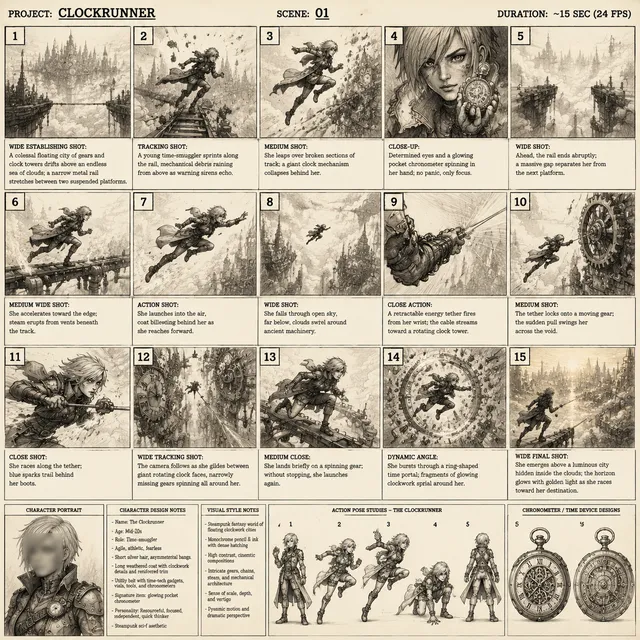

What "Unrestricted" Really Means for Anime AI Art
Most people searching for an anime art generator "with no restrictions" are not looking for a tool that ignores every rule. They are looking for a workflow without arbitrary bottlenecks. No hard cap on how many variations they can explore before a good idea appears. No forced house style that flattens every prompt into the same glossy, over-rendered look. No queue that kills momentum halfway through a character design. No surprise limitation that only becomes visible after an hour of work.
In practice, "unrestricted" breaks down into four concrete capabilities:
- Prompt freedom. You can describe a specific character, outfit, pose, camera angle, and lighting setup without the tool quietly rewriting your intent into something safer and blander.
- Model and style freedom. You can bring a fine-tuned checkpoint, use community style adapters, or blend several references together instead of being locked to one model.
- Technical freedom. You can control resolution, aspect ratio, seed, sampling steps, and post-processing rather than accepting a single preset.
- Commercial clarity. You know what you are allowed to publish, sell, or hand to a client before you start, not after.
That last point matters more than most beginners expect. A generator that produces beautiful frames but leaves your rights ambiguous is not really unrestricted. It is just unrestricted in one direction and constrained in another.
The practical goal, then, is not chaos. It is a pipeline where the tool stops being the obstacle. You should be able to move from a rough idea to a usable image in minutes, repeat it for a second character, and then a third, without the results drifting apart into three different visual universes.
How Anime Pipelines Differ From Photoreal Pipelines
Anime art looks simple and is deceptively hard for generative models. Photoreal generation rewards texture and lighting realism. Anime rewards discipline: clean line work, deliberate shape language, limited palettes, and consistency that survives hundreds of frames.
Several characteristics make anime a distinct technical problem:
- Line art is structural. In photoreal images, a wobbly edge can hide inside texture. In anime, a wobbly outline is immediately wrong. The model must produce confident, continuous contours.
- Shading is symbolic. Cel shading is not physics. It is a visual code for form, and models trained mostly on photographs tend to produce gradients where a flat shape belongs.
- Faces carry enormous weight. A 3-pixel shift in eye placement can turn a confident character into an unsettling one. Anime relies on extreme stylization, which leaves little room for averaged-out "safe" faces.
- Backgrounds follow different rules. Painterly backgrounds, flat character art, and layered depth cues are all normal and expected in the same shot.
- Tagging conventions dominate. Many of the strongest anime models were trained on datasets organized by concise comma-separated tags rather than flowing sentences, which changes how you should write prompts.
Once you understand these differences, tool selection becomes much easier. You stop asking "which generator makes the prettiest anime girl" and start asking "which pipeline gives me control over line weight, identity, and continuity."
Choosing a Generator: Criteria That Actually Matter
Feature lists all look similar. These are the questions that separate a tool you will use once from a tool you will build a project on.
| Criterion | Why it matters | What good looks like |
|---|---|---|
| Prompt adherence | Determines whether your composition survives | Your specified pose and camera angle are recognizable in the output |
| Tag support | Anime models often expect tag syntax | Handles both tag lists and natural sentences without collapsing |
| Adapter support | Style and identity control | Loads community style adapters and identity references |
| Structural control | Pose, depth, line art guidance | Accepts pose skeletons, depth maps, and rough sketches |
| Inpainting | Fixing hands, eyes, and props | Edits blend cleanly without changing the surrounding line art |
| Seed stability | Reproducibility | Same seed and prompt produce essentially the same image |
| Batch coherence | Series work | Variations stay in the same style family rather than drifting |
| Resolution headroom | Print and 4K delivery | Upscaling preserves line quality instead of smearing it |
| Export control | Compositing | Clean alpha, layered output, lossless formats |
| Licensing | Client work | Commercial terms written in plain language |
A useful test: take one character description and generate twenty variations. If fewer than half are usable, the tool is fighting you. If twelve or more are close, and three are genuinely good, you have a workable engine.
Prompt Structure That Produces Clean Anime Results
Tag-Based Prompting Versus Natural Language
Anime models trained on tag-annotated datasets respond best to compact, comma-separated descriptors in a predictable order. Models trained on longer captions respond better to sentences. Most modern tools handle both, but they do not handle them equally well.
A reliable compromise is a hybrid: open with a short natural-language sentence describing the scene, then add a tag block for the details that matter most.
The Order of Ingredients
Order is not cosmetic. Most samplers weigh earlier tokens more heavily, so front-load the things you cannot compromise on:
- Subject and identity — who or what is in frame
- Action and pose — what they are doing
- Framing — close-up, medium shot, wide, three-quarter view
- Environment — location, time of day, weather
- Lighting — rim light, soft overcast, neon backlight
- Style cues — cel shaded, retro television look, watercolor background
- Quality modifiers — line art emphasis, clean color, high detail
If the face is wrong, move identity tokens earlier. If the composition is wrong, move framing tokens earlier. Debugging prompts is mostly a reordering exercise.
Negative Prompts and the Anatomy Problem
Hands, eyes, and ears are where anime generation fails most often, and negative prompts are the cheapest first fix. Build a reusable negative block that targets structural problems rather than aesthetic ones: extra fingers, fused limbs, asymmetric eyes, malformed ears, blurry line art, duplicated limbs, text artifacts, watermarks.
When negatives stop helping, switch to inpainting. Regenerating a whole frame to fix one hand destroys three things that were already correct.
Character Consistency Across a Whole Series
This is the real dividing line between a hobby experiment and a project. Anyone can generate one striking anime portrait. Generating the same character in forty different poses, outfits, and lighting conditions is a different discipline.
Reference Images and Identity Adapters
The quickest approach is to supply one or more reference images of your character and let an identity adapter pull facial structure, hair shape, and color palette into new generations. Two or three references from different angles work far better than a single perfect portrait, because the model learns shape rather than one lighting condition.
Training a Small Character Adapter
When references are not enough, train a lightweight adapter on a small curated set. Twenty to forty images is often sufficient if they are consistent. The quality of the set matters more than the count:
- Vary angle, expression, and pose.
- Keep the outfit and hairstyle identical.
- Remove images where the face is partially hidden or heavily shaded.
- Caption consistently so the adapter learns identity, not background.
- Hold back a few images to test whether the adapter generalizes.
A well-built character adapter makes everything downstream faster: storyboards, key poses, expression sheets, and thumbnail variations.
Seed Locking and Prompt Libraries
Seed locking gives you reproducibility within a session. Prompt libraries give you reproducibility across months. Keep a plain text file per character with the canonical identity block, the canonical negative block, and the settings that produced your best results. When you return after a break, you can rebuild the look instead of guessing.
The Hybrid Approach That Ships
The most reliable workflows combine three layers: a trained adapter for identity, a locked prompt block for the core description, and structural guidance for pose. Adapters alone drift in unusual poses. Structural guidance alone loses the face. Together they hold.
Locking a Style So Every Frame Belongs to the Same Show
Style consistency is subtly different from character consistency, and it fails in subtler ways. Two images can both look like anime and still feel like they came from different studios.
What actually creates a unified look:
- Line weight. Consistent thickness and taper across characters and props.
- Palette discipline. A limited set of hues, with contrast reserved for focal points.
- Shading model. Choose cel shading or soft shading and never mix casually within one project.
- Detail density. A photoreal background next to a flat character reads as a mistake, not a style choice.
- Color temperature. Warm interiors and cool exteriors are a convention worth respecting.
Practically, lock style by generating a style board first: six to nine images of the same subject in different contexts. Only when those hold together should you start producing content. It feels slow. It saves days.
From Still Frame to Animated Shot
Once your stills are consistent, animation becomes a translation problem rather than a design problem.
A dependable sequence:
- Design the keyframe. Generate and clean a single strong image with the correct composition.
- Create motion prompts. Describe the movement, not the scene: slow push in, hair drifting left, cloak fluttering.
- Generate short clips. Keep clips brief. Five to eight seconds holds quality and stays editable.
- Control camera separately. Animate the camera and the character as distinct decisions; combining them in one prompt usually muddles both.
- Interpolate on twos. Anime traditionally animates on twos — twelve distinct frames per second. Interpolating toward that cadence looks more authentic than smooth sixty-frame motion.
- Repair the worst frames. Expect two or three broken frames per clip. Fixing them individually costs less than regenerating everything.
- Composite and grade. Add grain, subtle chromatic aberration, and a consistent color pass so shots feel like one production.
Keep a shot log: clip ID, seed, prompt, duration, and notes. On a ten-shot sequence, this single habit prevents hours of confusion.
A Repeatable Production Pipeline
Here is a full pipeline that works for shorts, trailers, and client pitches alike.
- Brief. Write one paragraph describing the character, the world, and the intended look.
- Reference board. Collect six to ten images that define tone and palette. Not to copy, but to calibrate.
- Character sheet. Generate front, three-quarter, and profile views. Lock the best identity block.
- Style board. Produce six to nine images across varied contexts and confirm they feel like one world.
- Keyframe pass. Generate the main shots at low resolution. Choose compositions before spending time on detail.
- Refinement pass. Regenerate selected frames at full resolution with the same seeds where possible.
- Cleanup. Inpaint hands, eyes, and props. Fix broken line art.
- Upscale. Upscale in stages rather than one large jump, and re-sharpen line art after each stage.
- Animation. Convert approved frames to clips, then interpolate.
- Compositing. Assemble, grade, add sound, and export.
Steps five and six are where most people waste effort. Committing to detail too early means re-detailing everything when a composition changes.
Common Mistakes and How to Fix Them
| Problem | Likely cause | Fix |
|---|---|---|
| Faces look different every generation | No identity anchor | Add references or train a small adapter |
| Hands are malformed | Weak structural guidance | Add pose guidance and inpaint hands specifically |
| Colors drift between shots | No palette lock | Define a fixed palette and apply a final grade |
| Images look "AI generic" | Prompt is too short and too safe | Add specific framing, lighting, and style cues |
| Style looks photoreal | Wrong checkpoint or mixed shading | Switch models and choose one shading model |
| Everything looks over-detailed | Too many quality tags | Remove quality spam; keep one or two |
| Animation looks liquid | Too much interpolation | Interpolate on twos and add held frames |
| Sets feel inconsistent | No style board | Build the board before producing content |
Rights, Ethics, and Platform Reality
"No restrictions" does not mean "no responsibility," and any serious creator should treat this section as part of the workflow rather than an afterthought.
Style imitation. Replicating a living artist's signature style is legally complex and reputationally risky. Replicating broad era aesthetics — nineties cel animation, watercolor background painting — is a different and generally safer practice.
Training data. Models differ in what they were trained on and how transparently that is documented. If you are producing commercial work, choose tools whose terms you can actually read and cite.
Commercial use. Confirm whether outputs may be sold, used in client deliverables, or incorporated into products. Save the terms you agreed to.
Disclosure. Some platforms and clients require labeling synthetic imagery. Knowing the policy before delivery prevents awkward conversations.
Character likeness. Anime characters can resemble protected properties. Avoid producing recognizable protected characters for commercial use, and keep original designs distinct in silhouette and costume.
None of this limits creativity in practice. It limits bad surprises.
FAQ
Do I need a powerful computer to generate anime art with AI?
No. Cloud tools handle generation remotely, which lowers the barrier considerably. Local generation gives you more control and no per-image cost, but it requires a capable GPU and some tolerance for setup work. Many creators start in the cloud and move local only when volume justifies it.
Why does my anime art look photoreal no matter what I write?
The checkpoint is doing most of the work. Most base models are trained primarily on photographs, so anime prompts only push them partway. Switch to an anime-oriented model and add explicit style cues like cel shading and flat color.
How many reference images do I need for a consistent character?
Three to five well-lit images from different angles usually outperform twenty inconsistent ones. If you plan to train an adapter, aim for twenty to forty curated images with consistent outfit and hair.
Can I animate my generated characters?
Yes. The standard approach is image-to-video: generate a strong keyframe, then describe motion. Short clips work better than long ones, and interpolating on twos gives a more authentic anime cadence.
What resolution should I generate at?
Start at a moderate resolution to explore composition cheaply, then regenerate or upscale the winners. Upscaling in two moderate stages preserves line quality better than one aggressive jump.
How do I stop hands from breaking?
Three layered fixes: add a targeted negative prompt, use pose guidance so the model knows where hands belong, and inpaint problem areas at high resolution instead of regenerating the full frame.
Is anime AI art good enough for commercial work?
For backgrounds, props, concept art, storyboards, and social content, yes, with cleanup and consistent grading. For hero character art on a major brand, expect a human refinement pass before delivery.
How long does it take to build a consistent character?
A usable identity block can be established in a single session. A reliable adapter takes an afternoon to train and a few hours to test properly. Style consistency across a project takes longer because it depends on your palette and line-weight discipline, not just the model.
A Final Checklist Before You Publish
Run this list at the end of every project. It catches most of the problems that show up after delivery:
- Identity holds across every shot of the same character.
- Line weight and shading model are consistent throughout.
- Palette is limited and intentional.
- Hands, eyes, and text artifacts have been inspected frame by frame.
- Resolution is sufficient for the intended output, with clean upscaling.
- Color grading is applied as a final pass, not baked into individual pieces.
- Sound, pacing, and held frames support the animation style.
- Licensing and disclosure requirements are satisfied.
- Source files, seeds, and prompts are archived for future revisions.
The appeal of an anime art generator with fewer restrictions is not the ability to break rules. It is the ability to stay in a creative flow long enough to build something coherent. Freedom in AI art is mostly about control: control over identity, style, motion, and rights. Get those four under management, and the tool stops being the limiting factor — your ideas become the only real constraint.

Alexander
More Blogs
Read MoreVidu Q4 Alternatives: 4K AI Video Models Compared (2026)
Vidu Q4 alternatives compared: Kling 4.0, Seedance 2.5, Wan 3.0, and Runway Gen-4 — 4K support, input modes, durations, audio, and what each costs in credits on Domer.
Top 4K AI Image Generators in 2026: 5 Models Compared on Real Costs
The top 4K AI image generators on Domer compared: Flux 3 Klein, Nano Banana 2.1, GPT Image 2.5, GPT Image 2, and Nano Banana Pro — 4K credit costs, reference limits, and speed.
Nano Banana 2.1 vs GPT Image 2.5: Which Image Model Should You Use? (2026)
Nano Banana 2.1 vs GPT Image 2.5 Flare compared: credit costs per resolution, aspect ratios, reference images, text rendering, and which tasks fit each model.