
Best AI Video Maker Apps for Mobile Creation Workflows
Oct 13, 2026

Why Mobile Became the Default Studio
Not long ago, producing a decent video meant sitting at a desk. You needed a machine with enough graphics power to scrub a timeline, storage for large media files, and hours of uninterrupted attention. Today, a phone that fits in a pocket handles most of that work, and the heavy lifting has moved from the editor's own skill to the model running behind the interface.
The shift is not just about convenience. It is about the collapse of the distance between an idea and a finished clip. When you can shoot, script, narrate, animate, caption, and publish from one device, the friction that used to kill small projects disappears. A creator waiting for a bus can turn a half-formed thought into a fifteen-second vertical video before the bus arrives.
That said, mobile AI video tools are not magic. They have specific strengths and very specific weaknesses, and the difference between a polished result and an embarrassing one usually comes down to whether you understand those limits. This guide covers what these apps actually do, how to choose between them, how to build repeatable workflows around them, and the mistakes that quietly ruin otherwise good clips.
What a Modern AI Video App Actually Does
The label "AI video maker" covers a wide range of features that solve different problems. Before comparing apps, separate them into capability layers.
Text-to-video generation
You type a description, and the model produces moving footage. Prompt-based generation is the most visible feature and the one that gets the most attention, but it is also the least controllable. Results vary significantly between runs, and consistency across multiple shots is still the hardest problem in the category. Use it for establishing shots, abstract visuals, background plates, and stylized inserts rather than for anything requiring precise human action.
Image-to-video and motion transfer
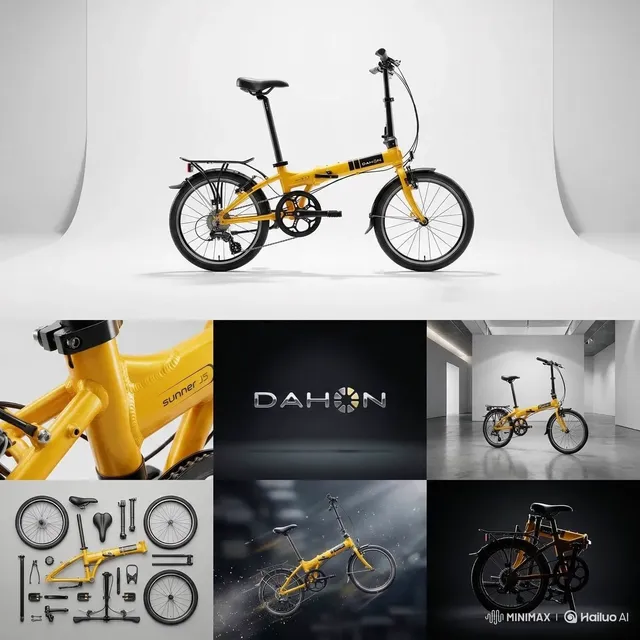
This is where mobile tools become genuinely practical. You supply a still image — a product photo, a portrait, a logo, a frame you liked from an earlier generation — and the app animates it with a controlled camera move or subtle motion. Because your starting frame is fixed, the output is far more predictable than pure text-to-video. If you sell physical products, this single feature often delivers more usable footage than every generative prompt combined.
Editing, captions, and templates
Less glamorous, but used far more often: automatic transcription, animated captions, beat-matched cuts, background removal, noise reduction, and one-tap template application. These features are where most creators spend most of their time, and they are the reason a phone can now replace a desktop editor for short-form work.
Audio generation
Voice synthesis, music generation, and automatic ducking of music under narration. Audio is what separates a clip that feels amateur from one that feels produced, and mobile apps now handle it in a few taps rather than a few hours.
Choosing an App: A Practical Decision Framework
Most comparison articles list features. Feature lists are not useful because nearly every app claims the same things. Instead, evaluate candidates against the constraints of your actual workflow.
Output length and resolution
Short bursts of four to ten seconds are the natural unit of most generative video models. If your content is a series of short cuts, this is fine. If you need a continuous sixty-second take, you will be stitching clips together, and you should check how well the app handles continuity between segments. Also confirm the maximum export resolution before you commit — some free tiers quietly cap output at a lower resolution than the preview suggests.
Rendering latency
Generation happens on remote servers, not on your phone. This means two things: your battery stays cool, and you are dependent on a queue. Test the same prompt at different times of day. An app that returns a clip in forty seconds during off-peak hours may take five minutes at peak. If you publish on a schedule, latency matters as much as quality.
Style control and consistency
Look for reference image support, style presets, seed control, and the ability to lock a look across multiple generations. Without at least one of these, your five-shot video will look like five different videos.
Audio pipeline
Does the app generate voice, accept your own recorded narration, or both? Can it separate vocals from music? Can it auto-duck background audio when a voice track is present? These details determine whether you finish inside the app or export to a second tool.
Export, watermark, and licensing
Check whether exports carry a watermark, whether commercial use is permitted on your plan, and who owns the generated output. This is the least exciting criterion and the one most likely to cause problems later, especially for brand work.
Workflow One: Prompt to Vertical Social Clip
This is the fastest path and the one most beginners try first. Done carelessly, it produces generic-looking results. Done deliberately, it is a legitimate production method.
Start with a single sentence describing subject, action, setting, and camera behavior. Something like "a ceramic mug on a wooden table, steam rising, slow push-in, warm morning light" gives a model four independent decisions to make. A prompt like "a nice coffee video" gives it none, and you get whatever the model finds statistically safe.
Generate three to five variations at the lowest quality setting your app offers. Fast, cheap iterations let you find the composition you want before you commit to a high-quality render. Pick the strongest one, then upscale or re-render it at full quality.
Next, add the layers that make it feel intentional: a caption track built from your voiceover or script, a music bed that sits roughly twelve to eighteen decibels below the narration, and a hook in the first second. The hook matters more on mobile than anywhere else because vertical feeds give viewers almost no reason to wait.
Finish by exporting at the platform's native aspect ratio rather than cropping later. Cropping a 16:9 render into 9:16 almost always loses the framing the model intended.
Workflow Two: Product Footage from Still Photos
If you have a store, a service, or a physical product, image-to-video is where mobile AI earns its place. The workflow looks like this:
- Shoot or select three to six clean stills of the product from different angles, ideally on a neutral background with soft light.
- Animate each still with a restrained camera move — slow orbit, gentle push, subtle parallax. Aggressive motion breaks the illusion instantly.
- Keep a consistent light direction across all clips so the sequence feels like one session.
- Add a short text overlay naming the benefit, not the feature.
- Close with a clear call to action and a logo at low opacity.
The temptation is to animate everything dramatically. Resist it. The most convincing AI product videos look almost static; the motion exists to prove the image is alive, not to show off the model.
Workflow Three: Faceless Narration Video
Narration-driven videos — explainers, listicles, mini-documentaries — are the most reliable format for AI-assisted mobile production because the structure is carried by the script rather than by visual spectacle.
Write the script first and read it aloud. If you stumble, the sentence is too long. Cut it. Aim for roughly 140 to 160 spoken words per minute, which means a three-minute video needs about 450 words.
Generate or record the narration, then let the app transcribe it. The transcript becomes your caption track and your shot list: every sentence gets one visual. This one-to-one mapping prevents the common failure where a video shows the same stock-style clip for thirty seconds while the narrator moves through four different ideas.
For visuals, mix three sources: animated stills you already own, short generated clips for abstract concepts, and screen recordings for anything involving software. Variety keeps attention without requiring complex editing.
Finally, add a subtle background music bed with no vocals. Vocal music competes with narration in a way that is nearly impossible to fix after the fact.
Prompting for Video Instead of Images
Image prompting rewards detail. Video prompting rewards clarity about motion. The model already knows what a city street looks like; what it does not know is what should happen there.
Structure prompts in four parts: subject, action, environment, camera. Then add one style qualifier at most. Multiple style words — cinematic, hyperrealistic, 8k, dramatic — tend to cancel each other out and push the output toward a generic average.
Describe camera behavior in plain terms. Words like push-in, pull-back, orbit, handheld, static, and slow pan are understood well because they map to real cinematography. Avoid vague instructions like "make it dynamic."
When a generation fails, change one variable at a time. If you rewrite the entire prompt, you learn nothing about which part caused the problem. Most failures come from asking for too many simultaneous actions or from describing something physically impossible.
Keep a running note of prompts that worked. Prompt libraries compound in value faster than almost anything else in this workflow.
Audio: The Half of the Video People Forget
Viewers forgive soft visuals. They do not forgive bad audio. On a phone, this is easy to fix, and skipping it is the most common reason otherwise competent videos feel unfinished.
For voice, decide between synthesis and your own recording. Synthetic narration is consistent, fast, and easy to revise; a real voice carries authority and warmth that synthesis still struggles to match over long stretches. A practical hybrid: use synthetic voice for drafts and timing, then re-record the final version yourself if the piece is important.
Whichever route you choose, normalize levels. Narration should peak consistently, and music should sit well underneath. If your app offers automatic ducking, enable it. If it does not, lower the music manually and check the result on phone speakers rather than headphones — most of your audience listens on a small speaker at low volume.
For music, generated tracks are useful because they match length precisely and avoid licensing questions. If you use library music instead, keep the same track across a series so your content becomes recognizable by sound.
Ambient sound is the secret ingredient. Twenty seconds of room tone, rain, or traffic underneath a generated clip makes it feel filmed rather than synthesized.
Common Mistakes That Wreck Mobile AI Videos
Animating everything. Constant motion reads as artificial. Static moments give viewers a place to rest.
Ignoring the first second. Vertical feeds move fast. If the hook arrives at second three, most viewers never see it.
Mixing lighting directions. Clips lit from the left next to clips lit from the right look assembled rather than directed.
Overlong captions. Two short lines maximum. Captions are read peripherally, not studied.
Chasing maximum resolution. A well-lit, well-composed 1080p clip outperforms a poorly composed 4K one every time, especially on a phone screen.
Skipping a script. Improvising narration produces rambling audio and an unfocused edit. Even three bullet points is enough.
Publishing the first render. Generative output rewards selection. Generate more than you need and choose deliberately.
Forgetting licensing. Read the terms for the specific feature you used. Generated audio, generated video, and uploaded assets may fall under different rules.
A Pre-Publish Quality Checklist
Run through this before every upload, and the quality floor of your output rises immediately.
- Does the first second contain a reason to keep watching?
- Is the audio intelligible on a phone speaker at half volume?
- Do all clips share a consistent light direction and color temperature?
- Are captions free of transcription errors and positioned clear of platform UI elements?
- Is the aspect ratio native to the destination platform?
- Is the total length justified by the content, or could thirty seconds be cut?
- Does the ending contain a single clear next step?
- Are watermarks, licensing, and usage rights settled?
FAQ
Do I need a powerful phone?
No, as long as generation happens in the cloud. A mid-range device handles prompting, editing, captions, and export comfortably. Storage and a stable connection matter more than raw processing power.
Can AI-generated video be used commercially?
It depends entirely on the tool and the plan. Some allow commercial use on free tiers, others restrict it to paid plans, and some restrict specific models. Check the terms for the exact feature you used, not just the app in general.
How long should a mobile-generated video be?
For social platforms, fifteen to forty-five seconds is the reliable range. Longer pieces work when a narrative carries them, which usually means scripting and narration rather than visuals alone.
Is text-to-video or image-to-video better for beginners?
Image-to-video. Starting from a fixed frame gives you control over composition and produces far more consistent results, which makes it easier to learn how the model behaves.
How many generations does a finished clip usually require?
Expect to generate five to ten variations for every clip you keep. The selection step is where quality comes from, and it is the step beginners skip.
Should I edit in the app or export to a desktop editor?
For vertical short-form content, staying in the app is usually faster. For anything with complex sound design, multi-cam footage, or precise color work, export and finish on a desktop.
Where to Take This Next
Start by mastering one format rather than one tool. Pick the workflow above that matches the content you already make — product stills, narration explainers, or fast social clips — and produce five pieces inside that single format before exploring others. Repetition within a format teaches you what prompts work, how long renders take, and where your app breaks, none of which any comparison chart can tell you.
When you do expand, add capabilities rather than apps. Learn image animation properly, then voice synthesis, then music. Each new layer should make your existing output better before it makes your output longer. The creators who get the most from mobile AI video tools are not the ones with the longest feature lists — they are the ones who understand the limits of each layer and design around them.

Alexander
More Blogs
Read MoreVidu Q4 Alternatives: 4K AI Video Models Compared (2026)
Vidu Q4 alternatives compared: Kling 4.0, Seedance 2.5, Wan 3.0, and Runway Gen-4 — 4K support, input modes, durations, audio, and what each costs in credits on Domer.
Top 4K AI Image Generators in 2026: 5 Models Compared on Real Costs
The top 4K AI image generators on Domer compared: Flux 3 Klein, Nano Banana 2.1, GPT Image 2.5, GPT Image 2, and Nano Banana Pro — 4K credit costs, reference limits, and speed.
Nano Banana 2.1 vs GPT Image 2.5: Which Image Model Should You Use? (2026)
Nano Banana 2.1 vs GPT Image 2.5 Flare compared: credit costs per resolution, aspect ratios, reference images, text rendering, and which tasks fit each model.