

Best Video Editing Apps for Reels: An AI Workflow Guide
Oct 13, 2026
The Short-Form Reality: Why Reels Need a Different Editing Approach
Short-form video is not a shortened version of long-form video. The frame is vertical, the viewer is scrolling with a thumb, and the first second decides whether anything else you made will ever be seen. A clip that plays beautifully on a television can die instantly on a phone because the subject sits in the bottom third of the frame, the caption hides behind the interface, or the opening beat spends two seconds on a logo instead of a promise.
That difference changes what an editing tool has to do. You are not mainly cutting a story; you are engineering retention. You layer burned-in text, match cuts to a beat, keep motion in the frame at all times, and export a file that the platform will not recompress into mush. Classic editors assume a patient viewer who has already decided to watch. Short-form tools assume a distracted one who has not.
AI moved into that gap because short-form editing is repetitive. Transcription, silence detection, reframing from horizontal to vertical, background removal, subtitle styling, loudness normalization, upscaling: all of it is rule-based enough for a model to handle in a first pass, and all of it eats hours when done by hand. When a single creator publishes daily, those hours are the entire business.
This guide is about choosing and using that class of tool well. It covers what AI genuinely improves, where automation quietly damages your work, how to compare apps on criteria that matter, and a complete workflow from script to published clip. It does not promise that a button will make you a filmmaker. It does promise that you can cut your editing time roughly in half without your videos looking like everyone else's.
What AI Actually Contributes to a Reel Workflow
Two very different technologies get bundled under the phrase "AI video editing," and confusing them leads to bad purchases.
Generation versus editing assistance
Generation creates pixels that never existed: a text prompt becomes a shot, a still photo becomes a moving scene, a face becomes a speaking character. Editing assistance works on footage you already have: cutting, captioning, reframing, denoising, tracking. Generators are useful when you lack footage or need a visual you cannot shoot. Editing assistants are useful every single day, even when you have perfect footage.
Most creators need the second category far more than the first. A tool that removes filler words and burns accurate captions will save more time per week than one that produces a dreamy five-second clip you use once.
Where automation helps and where it hurts
Automation wins on anything measurable. It loses on judgment. A model can find the moment where you stopped talking; it cannot decide that the pause is funnier than the line. It can cut on every beat; it cannot know that the fourth cut should land late so a joke has room.
The practical split is simple. Let AI handle transcription, silence removal, reframing, caption timing, color normalization, and export presets. Keep pacing, punchlines, music choice, and the final trim in your hands.
The hybrid model that works
Use AI for the first seventy percent and your own hands for the last thirty. Let it transcribe, assemble a rough cut, generate captions, and propose a vertical reframe. Then review, delete the clever-but-wrong cuts, and finish the rhythm yourself. Creators who adopt this split consistently ship more without the output feeling generic.
Choosing an Editing App: The Criteria That Actually Matter
App store rankings are a poor guide. The right app depends on your shooting style, your publishing cadence, and how much control you want. Compare candidates on these five axes.
Aspect ratio and export presets
The app must export true 9:16 at 1080x1920 or higher, ideally 1440p or 4K for headroom, with a bitrate around 10-20 Mbps for 1080p. If it only offers square or landscape templates, you will spend your life letterboxing. Check whether it can also produce 1:1 and 16:9 versions from the same timeline, because one shoot should feed several platforms.
Transcript accuracy and caption control
Captions are not optional. Most people watch with sound off, and accurate captions lift completion rates. Look for word-level timestamps, easy correction of names and jargon, and styling that keeps text inside the safe zone above the interface. Test the app with your own accent, your own background noise, and the proper nouns you actually say.
Speed of iteration
Time how long it takes to go from raw clips to a publishable export. An app that renders a 45-second vertical clip in twenty seconds lets you try three versions. An app that takes ten minutes makes you accept the first one. Iteration speed is the single biggest predictor of whether you will keep posting.
Manual override
Every automated decision must be reversible. Auto-cuts need handles you can drag. Auto-captions need an editable text layer. Auto-reframe needs keyframes you can adjust when the model tracks the wrong subject. If you cannot override something, you have outsourced your taste.
Ecosystem and handoff
Sooner or later you will need desktop precision, a designer, or a client approval step. Apps that export standard project files or clean intermediates survive that handoff. Apps that trap your work in a proprietary format become a liability the moment your requirements grow.
The Feature Set Worth Paying Attention To
Feature lists are long and mostly filler. These are the capabilities that change your output.
Text-to-video and image-to-video generation
Generation is best used for b-roll you cannot shoot: an abstract background, a period setting, a product that does not exist yet. Image-to-video is often more controllable, because you can design the still frame in a design tool and let the model animate it. Keep generated shots short, three to five seconds, and cut them fast so viewers do not have time to notice artifacts.
Character consistency and multi-image fusion
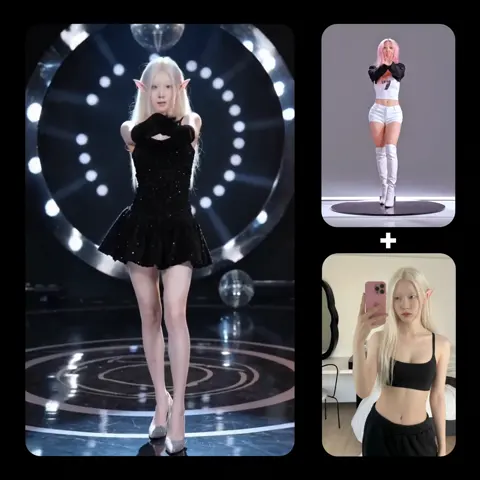
If your content features a recurring persona, consistency matters more than realism. Tools that accept several reference images and hold a face steady across shots let you build a series that feels like one world. Expect to generate several takes and pick the best; consistency is a probability, not a guarantee.
Auto-cut, silence removal, and beat detection
This is the highest-value automation for talking-head creators. It removes dead air, tightens rambling sections, and can align cuts to a music track. Always review the result: aggressive silence removal produces a jittery, breathless pace that feels robotic. Set the threshold conservatively and keep 150-250 milliseconds of breathing room around each cut.
Captions, translation, and dynamic typography
Modern caption engines produce word-by-word highlighting, emoji insertion, and automatic translation into other languages. The translation feature is underrated: a single clip can ship with subtitles in several languages, which multiplies reach without doubling work. Review translated captions if you speak the language, because idioms fail badly.
Upscaling, denoise, and background cleanup
Phone footage shot indoors at night is noisy. Upscalers and denoisers make it usable. Background removal without a green screen lets you swap in a clean set, add graphics behind you, or cut a subject out for a collage layout. These are quiet features that consistently rescue shoots.
Voice, dubbing, and lip sync
Synthetic voiceover is now good enough for narration and for fixing a single flubbed line. Lip sync tools let you re-record audio and match the mouth, which is genuinely useful for corrections. Use them for narration and repair, not for impersonation, and always disclose synthetic voice in contexts where the audience would reasonably assume a real person spoke.
A Practical End-to-End Reel Workflow
Here is a workflow that holds up whether you shoot with a phone or generate footage.
Step 1: Script and shot list in twenty minutes
Write one sentence that states the promise of the clip, then three to five beats that deliver it, then a closing line that invites a specific action. Convert the beats into a shot list: what is on screen for each beat, whether it is you talking, b-roll, or a generated shot. A twenty-minute plan saves an hour of editing.
Step 2: Capture or generate the raw material
Shoot vertical natively when you can. If you must crop, frame loosely so a 9:16 crop does not cut off hands or heads. For generated shots, describe camera movement explicitly, keep each clip short, and generate two or three variations per shot so you have choices in the edit.
Step 3: Assemble a rough cut with AI assists
Import everything, let the app transcribe, then run silence removal at a conservative setting. Read the transcript instead of scrubbing the timeline: deleting a sentence in text is three times faster than finding it in a waveform. Get the story to roughly final length before touching any styling.
Step 4: Layer captions, sound, and motion
Add captions, then fix names and jargon by hand. Add music at a low bed level, then push key words with small sound effects. Add motion deliberately: a slow push on static shots, a quick whip between sections, an on-screen text pop on the punchline. Motion should mark structure, not fill every second.
Step 5: Export, check safe zones, and publish
Watch the export on an actual phone. Confirm captions do not collide with the app interface, the first frame is legible as a thumbnail, and the audio does not clip. Export at the highest quality the app supports, because platforms recompress aggressively, and upload the file rather than screen-recording it.
Step 6: Review performance and feed it back
After a few days, compare retention graphs across clips. Note where viewers drop. If they leave in the first two seconds, your hook is weak; if they leave at fifteen seconds, your middle is padding. Keep a running list of what worked and reuse the patterns.
Creative Patterns That Consistently Perform
The hook ladder
Open with the most surprising claim, not the setup. Then stack a second hook at three seconds and a third at eight. Each one is a small reason to keep watching. Written hooks beat clever visuals in most niches because the text is readable in silence.
Pattern interrupts every few seconds
Change something on a predictable rhythm: camera angle, zoom level, background, caption position, music energy. The change does not have to be dramatic. A subtle reframe every two to three seconds is enough to keep the eye engaged.
Text as a second soundtrack
Treat captions as design, not transcription. Emphasize the four or five words that carry the meaning and let the rest sit quietly. This is also what makes a clip work for someone watching in a crowded room with the sound off.
Format consistency across a series
Recurring intros, colors, caption styles, and sign-offs train your audience to recognize you in a crowded feed. Reuse a template, then vary the content inside it. Consistency in form buys you freedom in substance.
Common Mistakes and How to Avoid Them
Over-generating and losing authenticity
When every shot is generated, viewers feel a missing human presence even if they cannot name it. Mix formats: your face, your screen, real b-roll, then generated shots for the moments you could not otherwise film.
Treating audio as an afterthought
Bad audio kills more clips than bad video. Record close to the microphone, normalize loudness to roughly -14 LUFS for social platforms, and cut any room tone that sounds like an air conditioner.
Fighting the format with length
A tight twenty-second clip that holds attention outperforms a padded ninety-second one. Cut until it hurts, then check whether anything you removed was essential. Usually it was not.
Letting captions drift out of sync
Automatic timing can slip after manual edits to the timeline. Whenever you cut, re-check caption alignment near the edit point. Drift of even 300 milliseconds is visible and costs you trust.
Skipping the manual pass
An entirely automated export is recognizable. It has the same pacing, the same emoji captions, and the same music bed as thousands of other clips. Fifteen minutes of human editing is the difference between content and filler.
Troubleshooting AI Output That Looks Wrong
Warped hands, faces, and text
Generators still struggle with fingers, teeth, and lettering. Crop tighter, keep shots short, animate a designed still instead of prompting from scratch, and avoid asking a model to render readable words. If a hand is on screen for one second, most viewers will not notice; if it is on screen for six, they will.
Flicker and morphing between frames
Flicker usually comes from trying to change too much between keyframes or from a low-motion prompt that the model over-interprets. Reduce the movement described in the prompt, lower the motion strength setting, and generate more, shorter clips rather than one long one.
Lip sync that drifts
Long lines drift more than short ones. Break dialogue into shorter segments, re-sync each, and prefer audio recorded cleanly over audio rescued from background noise. Visible sync errors are more disturbing than a slightly less expressive delivery.
Captions that mis-hear names
Build a custom vocabulary list with your brand name, product names, and recurring jargon. Most transcription engines support a glossary, and adding ten words once saves a correction on every future upload.
Exports that look soft or blocky
Softness usually comes from exporting at a low bitrate, from upscaling twice, or from re-encoding a file that was already compressed. Keep an uncompressed master, export once, and upload the file directly.
Building a Repeatable Publishing System
Templates and presets
Save your caption style, intro card, lower-thirds, music levels, and export preset. Recreation is where time disappears. A saved template turns a two-hour edit into forty minutes.
A searchable asset library
Keep b-roll, stingers, sound effects, brand fonts, and generated clips in folders named by use case, not by date. When you need an establishing shot, you should be able to find one in ten seconds.
Batch day versus publish day
Shoot and edit in batches, publish on a schedule. Context switching between creation and promotion is the biggest hidden cost in a solo operation. Batching also makes consistency easier to maintain.
Measuring what matters
Track three numbers: two-second hold rate, average watch time, and shares. Everything else is a vanity figure. Shares in particular tell you the clip said something people wanted to send to a friend, which is the strongest signal short-form platforms reward.
Frequently Asked Questions
Do I need a separate AI app if my main editor already has AI features?
Only if the built-in features are weak in a specific area, most often captions or vertical reframing. Test the built-in tool first with your own footage. If it produces accurate captions and usable crops, you do not need another subscription. If you spend twenty minutes fixing what it produced, a dedicated tool pays for itself quickly.
Can AI-generated footage work for brand or client content?
Yes, with disclosure and judgment. Use generated footage for backgrounds, abstract concepts, and scenarios that would be expensive to shoot. Avoid it for claims about a real product, and always check the client's policy on synthetic media before delivering.
How long should a Reel be?
As short as the idea allows. Entertainment and comedy clips often work best between fifteen and thirty seconds. Tutorials and story-driven clips can run forty-five to sixty. Let retention data decide, not convention, and cut the tail if viewers consistently leave before the end.
What is the fastest way to add captions?
Transcribe automatically, apply a saved caption style, correct proper nouns, then verify timing near the edit points. That sequence takes a few minutes and produces captions that look designed rather than auto-generated.
Should I edit on mobile or desktop?
Mobile wins for speed on simple talking-head clips: shoot, caption, export, publish without leaving the phone. Desktop wins when you need layered graphics, precise audio work, or multiple aspect ratios from one timeline. Many creators draft on mobile and finish on desktop.
How do I keep a consistent look across clips?
Lock three variables: a color preset, a caption style, and a music palette. Apply the same three to every clip in a series. Consistency in these small choices reads as professionalism, and it makes your content recognizable in a third of a second of scrolling.
What should I do first if my clips are not performing?
Rewrite the first two seconds. Test the same clip with three different opening hooks while keeping the rest identical, then compare two-second hold rates. Most underperforming short-form video is not badly shot; it is badly introduced.

Alexander
More Blogs
Read MoreVidu Q4 Alternatives: 4K AI Video Models Compared (2026)
Vidu Q4 alternatives compared: Kling 4.0, Seedance 2.5, Wan 3.0, and Runway Gen-4 — 4K support, input modes, durations, audio, and what each costs in credits on Domer.
Top 4K AI Image Generators in 2026: 5 Models Compared on Real Costs
The top 4K AI image generators on Domer compared: Flux 3 Klein, Nano Banana 2.1, GPT Image 2.5, GPT Image 2, and Nano Banana Pro — 4K credit costs, reference limits, and speed.
Nano Banana 2.1 vs GPT Image 2.5: Which Image Model Should You Use? (2026)
Nano Banana 2.1 vs GPT Image 2.5 Flare compared: credit costs per resolution, aspect ratios, reference images, text rendering, and which tasks fit each model.