
Hailuo 2.5 vs International AI Video Models: A Workflow Guide
Oct 13, 2026
Compare the Shot, Not the Brand
Ask ten creators which AI video model is best and you will get ten confident, contradictory answers. One swears by Hailuo 2.5 for stylized, high-energy motion. Another insists that international platforms such as Runway, Kling, or PixVerse render cleaner realism. A third has quietly abandoned pure text-to-video in favor of image-to-video pipelines. All three can be right, because the useful question is never "which model wins." It is "which model fits this shot, this deadline, and this edit."
This guide takes a deliberately practical stance. Instead of crowning a winner, it walks through how modern video models actually differ, which differences survive all the way into a finished edit, and how to build a model-agnostic workflow so the next release slots into your process rather than resetting it. If you have ever generated a beautiful five-second clip that refused to match the next five seconds, this is written for you.
What Actually Separates Modern Video Models
Most current video generators share the same broad recipe: a diffusion or transformer-based backbone trained on enormous quantities of video, guided by a text encoder that interprets your prompt, plus a temporal module that tries to keep frames coherent over time. The differences live in the details of that recipe, and those details are what you feel when you work.
Architecture in plain language
Three families dominate. The first is latent diffusion with a temporal attention layer, where the model denoises a compressed representation of many frames at once. This tends to produce smooth, cinematic motion but can smear fine detail during fast camera moves. The second is a transformer-based sequence model, which treats video as a sequence of tokens and often excels at prompt adherence and longer, more logical action. The third is a hybrid pipeline: generate a strong first frame, then let a motion model animate it. Hybrids are why image-to-video so often beats text-to-video for character work.
Why architecture matters to you
You do not need to know the math, but you do need to know the symptoms. Temporal-attention models give you buttery camera moves and dreamy lighting. Token-sequence models follow complicated instructions such as "she picks up the cup, turns left, then sits down." Frame-anchored models preserve a specific face, product, or logo across the whole clip. Once you can predict which symptom you will get, you can pick a model in seconds instead of guessing for an hour.
The Seven Criteria That Predict Real-World Results
Marketing pages list features. Editors care about outcomes. These are the criteria that consistently determine whether a clip survives the edit.
1. Motion realism and physics
Watch how cloth settles, how hair responds to a turn, how liquid behaves when poured. Hailuo 2.5 is frequently praised for expressive, almost anime-adjacent motion, which makes it strong for stylized action, exaggerated expressions, and dynamic camera sweeps. International flagships such as Veo and Sora tend to push toward grounded, documentary-style physics. Neither is better; a chase sequence and a product pour test different muscles.
2. Prompt adherence
Give the model a two-part instruction and see what it drops. Models with strong language grounding honor spatial relationships ("the red box behind the blue chair") and sequencing. Weaker adherence shows up as a clip that is beautiful but wrong: right aesthetic, wrong action, wrong wardrobe, wrong weather. For narrative work, adherence beats beauty every single time.
3. On-screen text and signage
If your shot includes a sign, a phone screen, or a logo, test text rendering early. Most models still produce confident gibberish. The practical workaround is universal: generate the shot without text and composite the typography in your editor. Treat on-model text generation as a bonus, never a dependency.
4. Continuity across shots
This is where projects live or die. Consistency breaks down in three layers: character identity, lighting direction, and color grade. A model that produces gorgeous isolated clips but drifts in skin tone between takes is more expensive to use than a slightly duller model that holds steady.
5. Clip length and resolution
Longer native clips reduce stitching, but they also increase the chance of mid-clip morphing. A reliable pattern is to generate short bursts of three to five seconds where motion is clean, then assemble. Resolution matters most if you plan to push in, crop vertically, or deliver to a large screen.
6. Iteration speed
Latency quietly shapes creative decisions. When each generation takes two minutes, you explore ten ideas. When it takes twelve minutes, you explore two and settle. Fast turnaround also makes it practical to generate pickups and alternates, which is where the best moments usually hide.
7. Control surfaces
Camera controls, motion strength sliders, first and last frame conditioning, style references, and negative prompts are not glamorous, but they are how you turn a lucky generation into a repeatable one. A model with fewer controls but more predictable output is often easier to direct.
Hailuo 2.5 in Practice: Where It Shines
Hailuo 2.5, from MiniMax, has earned a reputation for expressive movement and strong stylization. In practical terms, that means it is often the fastest route to a clip that feels alive.
Best-fit shot types
- Dynamic character beats. Turns, reactions, gestures, and small physical comedy land with weight rather than stiffness.
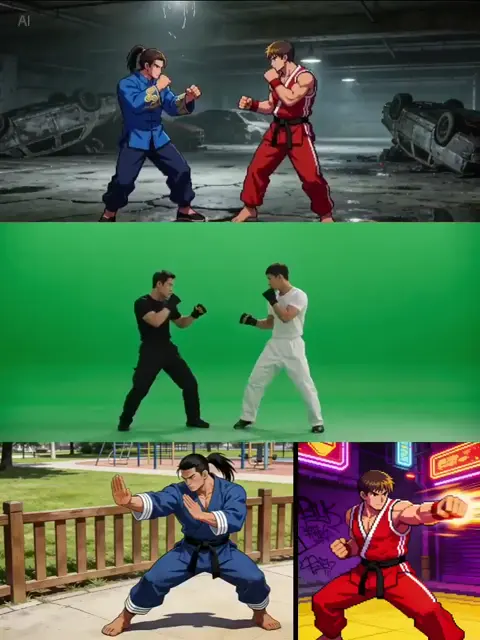
- Stylized and animated looks. Cel-shaded, painterly, and graphic-novel aesthetics tend to hold together better than in models tuned purely for photorealism.
- Camera-motion-driven shots. Push-ins, orbits, and whip pans can carry a scene even when the subject is simple.
- Short social formats. Vertical clips under six seconds are where expressive motion reads best on small screens.
Where to be cautious
Highly technical realism, subtle micro-expressions, and complex multi-character blocking are harder asks. If your shot depends on two people exchanging believable eye contact while handling props, generate it in a model tuned for grounded performance, or shoot plates and animate only what you must.
A practical Hailuo test
Before committing to a look, run a three-shot audition: one character close-up with a turn, one wide environmental move, and one prop interaction. Judge motion first, adherence second, identity third. If all three hold, the model will carry your sequence.
International Models: What Each One Is Good At
The international landscape is not a monolith, and treating it as one leads to bad decisions. A short field guide:
- Runway is a control-heavy, filmmaker-friendly environment. Motion brushes, camera controls, and reference conditioning make it excellent for shot-by-shot direction and VFX-adjacent work.
- Sora leans toward strong language understanding and coherent, grounded scenes. It suits narrative beats and prompt-heavy storyboards where the instruction matters more than the aesthetic.
- Kling AI is often chosen for smooth human motion and clean, natural camera work, and it handles image-to-video character continuity well.
- PixVerse is a strong stylization playground: effects, transitions, and template-style transformations are quick to produce and easy to iterate.
- Veo and Luma Dream Machine are frequently used for cinematic realism, lighting, and environment-heavy establishing shots.
None of these names should be treated as permanent. Models update, strengths shift, and the workflow below is designed to survive those shifts.
A Model-Agnostic Workflow From Script to Final Cut
Here is a pipeline that works whether you are using Hailuo 2.5, an international flagship, or three models in the same timeline.
Step 1: Write a shot list, not a prompt list
Start in your script or outline and break it into shots. For each shot, define four things: subject, action, camera, and duration. A useful entry looks like: "Mara, medium close-up, turns from window to camera, slow push-in, four seconds." Only after this is written should you think about model choice.
Step 2: Generate stills first
Stills are cheap to iterate and easy to judge. Produce five to ten keyframes per shot using an image model, then pick the one with the right composition, wardrobe, and lighting. Locking a first frame dramatically improves every video model's output, because you have removed composition from the list of things it can get wrong.
Step 3: Convert to short bursts
Generate three to five seconds at a time using image-to-video. Keep motion instructions simple: one primary action, one camera behavior. If a clip needs two actions, split it into two clips and cut between them. Editors solve sequencing better than generators do.
Step 4: Manage continuity deliberately
Create a continuity sheet with reference stills for each character, the lighting direction for each scene, and a fixed color grade. When identity drifts, re-anchor with a fresh first frame taken from an approved clip. When lighting flips, mirror your prompt's light direction rather than fighting it in post.
Step 5: Assemble, then fill pickups
Cut a rough assembly with placeholder timing before perfecting any clip. You will discover that half your expensive hero shots are three frames long in context. Spend the saved effort on pickups: alternate takes, reaction shots, and inserts, which are what make cuts feel intentional.
Step 6: Finish in post
Use a dedicated upscaler for hero shots, stabilize or add subtle camera motion where the generator drifted, and composite all text, screens, and logos manually. Add sound design early; audio hides small motion artifacts better than any filter.
Prompt Patterns That Transfer Between Models
Prompts are not portable word-for-word, but structure is. These patterns work across Hailuo, Runway, Kling, Sora, PixVerse, and Veo.
- Subject, action, camera, light, look. Keep the order stable so you can debug one variable at a time.
- One verb per clip. "She turns" outperforms "she turns, laughs, and walks away."
- Describe light like a gaffer. "Warm key from camera left, cool rim from behind" beats "dramatic lighting."
- Name the lens. "35mm, shallow depth of field, slight handheld" gives the model a visual target.
- Use negatives sparingly and specifically. "No on-screen text, no extra limbs" is useful. Long lists of prohibitions dilute the instruction.
- Iterate one change at a time. If you change style, motion, and framing together, you learn nothing from the result.
Seven Mistakes That Waste Entire Sessions
- Starting with text-to-video when image-to-video would work. If you can describe the frame, generate the frame.
- Requesting long clips to save stitching. Morphing and identity drift scale with duration.
- Ignoring the cut. A clip judged in isolation often fails in context, and vice versa.
- Chasing photorealism in a stylized project. Match the model's temperament instead of fighting it.
- Rewriting prompts from scratch. Change one variable and keep the rest.
- Skipping the continuity sheet. Memory is not a continuity system.
- Delivering straight out of the generator. Compression, color, and audio polish still matter.
How to Evaluate a New Model in One Afternoon
When a new model appears, avoid the hype cycle and run the same audition every time. Build a fixed test pack: one character close-up with dialogue-adjacent expression, one wide establishing shot with weather, one prop interaction, one fast camera move, and one stylized alternate of the first shot. Generate all five in two models and compare side by side on motion, adherence, identity, and finish. Keep a written log of which model won each category. Within a month you will have a personal decision table that is more useful than any leaderboard, and it will still be relevant after the next release.
FAQ
Is Hailuo 2.5 better than international models?
It is better for specific jobs: expressive motion, stylized looks, and short dynamic clips. International flagships tend to lead on grounded realism, complex prompt adherence, and control surfaces. Most serious projects end up using more than one.
Which model is best for character consistency?
Any workflow built on image-to-video with a locked first frame plus a continuity sheet will outperform pure text-to-video, regardless of brand. Kling and similar frame-anchored pipelines make this easier, but the discipline matters more than the tool.
Can I mix clips from different models in one video?
Yes, and you should. Normalize resolution and frame rate on import, apply a single color grade, and add consistent grain or a subtle film emulation pass. A unified grade hides most model differences.
How long should each generated clip be?
Three to five seconds is the sweet spot for reliability. Longer clips are fine for slow, simple motion such as landscapes or a slow push-in with no character action.
Do I need a powerful computer?
Most of these are cloud tools. A mid-range laptop with a stable connection is enough. Local rendering only becomes a factor if you run open-weight models or heavy upscaling.
What about audio?
Generate video first, then design sound. Voice, foley, and ambience do more for perceived realism than another generation pass, and they are far cheaper to iterate.
How do I keep prompts organized?
Keep a spreadsheet with columns for shot number, subject, action, camera, lighting, model used, and take count. Note which take you approved and why. This turns guesswork into a repeatable process and makes reshoots trivial.
The Takeaway
The comparison between Hailuo 2.5 and international video models is a useful framing device, but it is not the decision that shapes your work. What shapes your work is whether you arrive with a shot list, a locked first frame, a continuity sheet, and a plan for post. Models will keep changing. A pipeline that treats every generator as a replaceable component in a larger system will keep producing finished videos long after the current leaderboard is forgotten.
Start small: pick one shot from your next project, run the three-shot audition, and let the results choose the model. Then write down what you learned. That log is the only comparison chart that will ever be calibrated to your own work.

Alexander
More Blogs
Read MoreVidu Q4 Alternatives: 4K AI Video Models Compared (2026)
Vidu Q4 alternatives compared: Kling 4.0, Seedance 2.5, Wan 3.0, and Runway Gen-4 — 4K support, input modes, durations, audio, and what each costs in credits on Domer.
Top 4K AI Image Generators in 2026: 5 Models Compared on Real Costs
The top 4K AI image generators on Domer compared: Flux 3 Klein, Nano Banana 2.1, GPT Image 2.5, GPT Image 2, and Nano Banana Pro — 4K credit costs, reference limits, and speed.
Nano Banana 2.1 vs GPT Image 2.5: Which Image Model Should You Use? (2026)
Nano Banana 2.1 vs GPT Image 2.5 Flare compared: credit costs per resolution, aspect ratios, reference images, text rendering, and which tasks fit each model.