

Multi-Image Compositing for Consistent AI Video Characters
Nov 21, 2026
Why AI characters drift between shots
Anyone who has tried to build a narrative with generated video knows the failure mode. Shot one introduces a character with a crooked nose, a small scar over the left eyebrow, and a moss-green canvas jacket. By shot four the nose is straight, the scar has migrated to the cheek, and the jacket is a completely different shade of teal. The performance might be beautiful, the lighting cinematic, the camera move flawless, and yet the whole sequence collapses because the viewer no longer believes they are watching the same person.
This is not a bug in a particular tool. It is the natural consequence of how diffusion image models and generative video models work. Understanding the three root causes makes the fix obvious.
Stochastic sampling. Every generation begins from random noise. The model resolves that noise into an image according to your prompt, but the exact path it takes differs each time. Small early decisions cascade: a slightly different jaw angle at the first denoising step becomes a visibly different face by the final step. Seeds help, but a fixed seed only reproduces the same image, not the same person in a new pose.
Prompt paraphrase drift. Most people rewrite their prompt for every shot because the shot description changes. Shot one says "a woman in a green jacket, close-up." Shot four says "same woman, medium shot, walking." The words "same woman" mean nothing to a text encoder. Everything the model knows about identity has to be re-derived from whatever adjectives survived the rewrite, and each rewrite subtly reshuffles the priority of features.
No persistent identity anchor. Text alone is a weak identity signal. A model can hold roughly a dozen visual attributes in mind from a paragraph of prose, and a human face has hundreds. Without a visual anchor that travels with the character from shot to shot, the model fills the gaps with plausible but different detail.
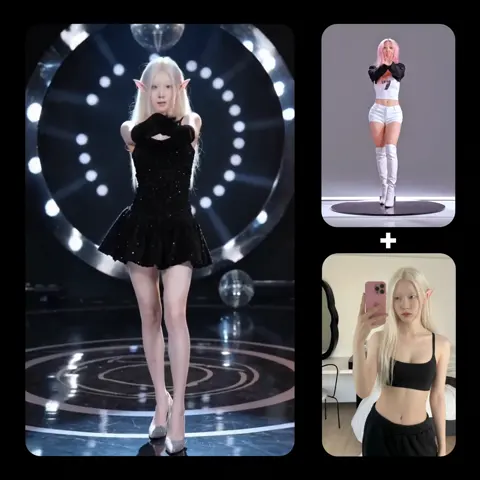
Multi-image compositing is the practical answer to all three. Instead of describing a person, you show the model several images of that person at once and let it fuse them into a single conditioning signal that persists across the whole sequence.
How multi-image compositing actually works
At a technical level, modern image and video models accept more than one visual input. Each reference image is encoded into a feature representation, and those representations are combined — through cross-attention, concatenation, or an identity embedding — before the generation step. The result is a joint condition: not "a woman" plus "a green jacket," but a specific face with a specific bone structure wearing a specific garment under a specific light.
The practical consequence is that you stop writing descriptions and start assembling a cast. A character becomes an asset folder rather than a paragraph, and the quality of that folder determines how stable the character will be.
Give every reference image a job
The single most common mistake is uploading five near-identical headshots. That gives the model five redundant signals and no information about the body, the wardrobe, or the silhouette. Treat references like a film crew's continuity bible, where each page answers a different question:
- Identity reference: a clean, evenly lit, front-facing portrait with a neutral expression. This is the anchor and should never change across a project.
- Three-quarter reference: the same person turned roughly 45 degrees, which teaches the model how the face composes in depth.
- Profile reference: useful for shots where the character turns, and for catching ear and jaw shape.
- Full-body reference: establishes height, build, posture, and the exact cut of the costume.
- Wardrobe or detail reference: fabric texture, logos, jewelry, weapon, or prop, isolated and clearly lit.
- Environment reference (optional): a plate of the location, used to keep color temperature and set dressing aligned rather than to define the character.
Six images is usually the sweet spot. Below four, the model improvises. Above eight, references start competing and you get a blended face that looks like nobody.
Respect the reference budget
Most tools cap how many images they will accept, and many degrade quietly as you approach the cap. If a model takes four references, do not assume the fifth is free. Test with three and four and compare the output against your anchor portrait before you commit to a long sequence. If quality drops, prune rather than add. A tight set of four excellent references beats a loose set of nine mediocre ones every time.
Build a reusable character kit
Consistency is a production discipline, not a prompt trick. The teams that get stable characters are the ones who build the kit once and reuse it relentlessly.
The five-image starter set
Start with one hero portrait generated at high resolution and inspected at 200 percent zoom for skin texture, eye highlights, and hair strands. Then use an image editor to produce the derived views — a three-quarter, a profile, a full body, and a costume detail. If your model supports angle control or turnarounds, generate the derived views from the hero rather than writing new prompts from scratch; that keeps the identity tied to a single source.
Name the files predictably: character_ava_hero_v01.png, character_ava_threequarter_v01.png, and so on. When you iterate, bump the version rather than overwriting. Six weeks later, when a client asks for one more shot, you will need to know exactly which reference set produced the approved footage.
Write a canonical prompt block
Keep a fixed block of text that describes the character in immutable terms — age range, ethnicity, hair color and length, eye color, distinguishing marks, body type, and default wardrobe. Paste it verbatim into every shot prompt. Then write only the shot-specific variables around it: camera angle, action, lighting, lens, and mood.
The block should be factual, not poetic. "Late twenties, olive skin, dark brown hair in a low bun, thin scar above left eyebrow, hazel eyes, athletic build" travels further than "a mysterious beauty with knowing eyes." Adjectives that express opinion add noise; adjectives that describe measurable features add stability.
Lock the negative prompt too
Repeat your negative prompt across the sequence. If shot two excludes glasses and shot five does not mention them, the model may quietly add them. Consistency cuts both ways: you are defining what must appear and what must never appear.
A shot-by-shot production workflow
Here is a workflow that scales from a thirty-second teaser to a multi-minute narrative.
Step 1: lock the hero keyframe
Generate the character's establishing shot first, in the widest and most demanding framing you plan to use. If the character will appear in a close-up, lock the close-up. If they will appear full body, lock that. Every subsequent shot inherits from this frame, so a weak hero frame contaminates the entire sequence.
Iterate here without shame. Generate twenty candidates, keep three, and pick one. The cost of a bad hero frame is ten minutes of regeneration later; the cost of a great hero frame is nothing.
Step 2: generate in overlapping pairs
Instead of generating shots independently, generate them in overlapping pairs. Use the final frame of shot one as the first frame of shot two. Many video models support explicit first-frame and last-frame conditioning, which turns a chain of independent guesses into a continuous take. Where that is not available, use the last frame as an image reference for the next shot.
This overlap does two things: it preserves lighting and wardrobe automatically, and it gives the model a geometric anchor for the body position, which dramatically reduces pose jitter between cuts.
Step 3: verify before you extend
Never generate shot five before shot four is approved. Build a contact sheet of all approved frames side by side at identical crop and scale, and look at them as a group. Problems that are invisible in isolation — a half-shade cooler skin tone, a slightly narrower jaw, a collar that has gained a button — become obvious in a lineup.
When you find a discrepancy, regenerate the offending shot using the approved previous frame as the first-frame condition rather than tweaking the prompt. Prompt tweaks fix composition; reference frames fix identity.
Choosing models and settings for consistency
Different model families have different strengths, and mixing them within a single sequence is one of the fastest ways to break continuity.
Photoreal versus illustrated
Photoreal models are unforgiving about identity: viewers recognize faces with extraordinary precision, so a two-millimeter shift in eye spacing reads as a different person. Illustrated and stylized models are more forgiving but tend to homogenize features, which can make two characters look like siblings. For stylized work, exaggerate one or two distinctive design choices — an unusual hair silhouette, a specific scar, a signature garment — so the audience has something unambiguous to track.
Image models versus video models
Use image models to establish identity and video models to animate it. Generating a character directly in video is convenient but gives you far less control, because you cannot inspect and reject intermediate frames. A more reliable pipeline is: image model for the hero frame and key poses, video model for motion, then an editor for the final assembly.
Resolution, aspect ratio, and crop discipline
Keep the aspect ratio identical across the sequence unless a shot genuinely demands a change. Cropping a 16:9 frame to 9:16 for social crops the character differently and can cut off the very silhouette cues that make them recognizable. If you need vertical deliverables, generate a dedicated vertical hero frame rather than reframing the horizontal one.
Also match resolution. Mixing a 4K-generated shot with an upscaled 720p shot produces visible differences in skin texture and edge sharpness that read as a character change even when the geometry is identical.
Wardrobe changes, aging, and scene transitions
Stories require change, and change is where most consistency systems fall apart. Handle it deliberately.
Costume changes should be planned as new reference sets rather than prompt edits. Photograph or generate the character in the new outfit from the same four angles, and store it as a separate version. The face references stay; only the wardrobe references swap.
Aging and transformation need a graduated approach. Generate intermediate stages and use each as the reference for the next, so the audience sees a continuous arc rather than a jump cut between two unrelated people. Three stages is usually enough for a short piece; five for anything longer.
Scene transitions benefit from a bridging shot. When a character moves from a warm interior to a cold exterior, generate one transitional frame at the doorway where both lighting conditions are plausible. It gives the model and the audience a place to adjust.
Injuries, dirt, and weather should be layered as textures on top of the locked identity, not baked into the hero reference. Keep a clean hero and apply damage per shot, or you will be unable to return to the clean version later.
Mistakes that quietly destroy consistency
Most consistency failures trace back to a short list of avoidable habits.
- Rewriting the identity description each time. Even a synonym swap changes the conditioning. Freeze the block.
- Using a different seed philosophy per shot. Fixed seeds are not a cure, but randomly changing every parameter at once makes debugging impossible.
- Accepting the first good frame. The first acceptable frame is rarely the most consistent one. Generate three and compare against the anchor.
- Ignoring hands and ears. Audiences forgive a lot, but ears change shape constantly in generated footage. Check them in the contact sheet.
- Mixing lighting temperatures. A character lit at 3200K in one shot and 5600K in the next looks like a different complexion.
- Skipping the contact sheet. Reviewing shots one at a time hides drift; reviewing them together exposes it.
- Over-referencing. Nine references produce an averaged face. Fewer, better references win.
Quality control checklist before rendering
Run this pass before committing to a final render, and again after any regeneration.
- Compare the new frame against the hero portrait at 100 percent zoom, focusing on eye spacing, nose bridge, jawline, and ear shape.
- Confirm the scar, mole, or other distinguishing mark is present and in the correct location.
- Verify wardrobe color against a color-picked sample from the previous approved shot.
- Check that the light direction and color temperature match the previous shot in the sequence.
- Confirm the aspect ratio, resolution, and crop match exactly.
- Review three consecutive frames from each shot as a strip to catch flicker and morphing.
- Watch the assembled sequence once at normal speed with the sound off, then once with your eyes half-closed — silhouette drift shows up immediately.
If a shot fails more than two checks, regenerate it from the previous approved frame instead of patching it.
FAQ
How many reference images do I actually need?
Four to six for most projects: one hero portrait, one three-quarter view, one profile, one full body, and one wardrobe detail. Add an environment plate only if you need color matching across a location.
Can I get consistency with text prompts alone?
Partially, and only for short sequences. A frozen prompt block plus a fixed seed will hold a character for two or three shots. Beyond that, visual references are far more reliable than any amount of description.
Does first-frame and last-frame control replace reference images?
No — they solve different problems. Reference images define who the character is; first-and-last-frame control defines where they move. Use both together for the strongest result.
What if my character has to speak or show emotion?
Lock the neutral hero frame first, then generate emotional variants as a separate reference subset. Feeding a smiling reference into a serious scene will pull the whole performance toward the smile.
Why does the character look right in stills but wrong in motion?
Motion models interpolate, and interpolation amplifies small inconsistencies into visible morphing. Check the frame-to-frame stability of the reference set before blaming the video model.
How do I keep two characters from blending?
Generate them separately with their own reference sets, then composite them in an editor rather than prompting for both in a single frame. When a shared shot is unavoidable, keep the two characters visually opposed — different heights, palettes, and silhouettes.
Is it worth rebuilding the kit for every project?
Yes for recurring characters, no for one-offs. A reusable kit pays for itself the moment a client asks for a second deliverable featuring the same cast.

Alexander
More Blogs
Read MoreThumbnail Optimization: Visual Strategies That Lift CTR
Learn how contrast, faces, text hierarchy, and structured testing combine into a repeatable thumbnail workflow that raises click-through rate.
TikTok Trend Keywords: Build Viral Short Videos With AI
Learn a repeatable workflow for finding TikTok trend keywords, shaping hooks, producing AI-assisted visuals, and testing short videos that hold attention.
YouTube-Thumbnails optimieren: Der Leitfaden für mehr Klicks
So gestalten Sie YouTube-Thumbnails, die Aufmerksamkeit gewinnen: Psychologie, Technik, Branding, Testverfahren und ein klarer Workflow für bessere Klickraten.