
Create
Vertical vs Long-Form Video: A Practical AI Workflow Guide
Oct 13, 2026


Why Format Strategy Still Decides Video Performance
Most video projects fail for a boring reason: the format was chosen before the idea was understood. A creator spends three days producing a polished eight-minute horizontal video for a platform where the audience watches in a vertical feed with sound off. Or a brand churns out thirty vertical clips that never build a coherent body of work because each one was made in isolation.
The industry conversation has shifted from "should we make video?" to "which video, on which surface, at which length?" That is a format strategy question, and it has become more consequential as feeds fragment across vertical short-form, mid-length documentary-style content, live formats, and long-form library content that gets discovered months later.
This guide is a practical workflow for teams and solo creators working with AI assistance. It covers how to choose between vertical and long-form, how to build a repeatable short-form engine, where AI genuinely improves the pipeline, how to keep visual identity consistent across formats, and how to measure results beyond raw view counts.
Vertical vs Long-Form: A Decision Framework
Treat format as a function of three variables: intent, attention budget, and distribution surface. Intent is what the viewer should do or feel. Attention budget is how many seconds of patience the context realistically grants you. Distribution surface is where the video will actually be seen, not where it might theoretically end up.
When vertical short-form wins
- Discovery-driven goals: reaching new viewers who do not know you yet.
- Single-idea content: one technique, one reaction, one before-and-after.
- Personality-led content: faces, voice, movement, and direct eye contact.
- Repetition-heavy topics: tips, quick reviews, myth corrections.
- Product moments: unboxing, first impressions, feature spotlights under thirty seconds.
When long-form wins
- Trust-building and evaluation: buying guides, comparisons, deep tutorials.
- Topics with dependencies: a process where step four only makes sense after steps one to three.
- Search and library value: content that answers a durable question and keeps getting found.
- Story arcs: interviews, case studies, narrative documentary.
- High-consideration purchases: anything where the viewer needs reasons, not vibes.
The hybrid approach most teams should actually use
Pick one anchor format and treat everything else as derivatives. A common pattern: produce a 6–12 minute anchor video that carries the full argument, then cut three to five vertical clips, each built around a single self-contained moment. The anchor does the persuading; the clips do the discovering.
A simple heuristic: if the idea can survive losing 80% of its context, it is clip-ready. If it collapses without setup, keep it in the anchor and use the clip to tease the payoff rather than explain it.
Building a Short-Form Engine Without Burning Out
Short-form is not a lighter version of long-form. It is a different craft with a different failure mode: volume pressure. The fix is systems, not willpower.
Design hooks before you design shots
The first two seconds do most of the work. Useful hook patterns:
- Contradiction: "Everyone says to shoot in golden hour. Here is why I stopped."
- Specific number: "Three settings that fixed my muddy footage."
- Visual anomaly: an unusual frame that only makes sense after the caption.
- Mid-action entry: start inside the process rather than at the beginning.
- Direct question: "Why does your export look softer than the timeline?"
Write ten hooks for every idea you intend to shoot. Keep the three that still feel interesting an hour later. This single habit eliminates more wasted production time than any editing trick.
Batch by function, not by project
Group work by type: script day, shoot day, edit day, caption day, publish day. Context switching is the hidden cost in short-form production. Batching ten clips into one script session consistently produces better output than writing one script ten times across a week.
Template the parts that repeat
Captions, lower thirds, end cards, intro stings, and export presets should be templated. Your creative energy belongs to the idea and the first two seconds, not to re-typing a font size for the fortieth time. Most editing tools and AI-assisted editors support reusable project templates — set them up once and stop thinking about them.
Plan for sound-off viewing
A large share of viewers will never enable audio. Design for that reality: readable captions, on-screen text that carries the key point, and visuals that make sense without narration. Then add a clean audio mix for the people who do listen. Treat audio as a bonus layer, not the load-bearing structure.
How Algorithmic Feeds Change Your Creative Choices
Recommendation systems optimize for predicted satisfaction given a viewer's history, session context, and early signals. You cannot control the model, but you can control the signals you hand it.
Signals you actually influence
- Retention in the first three seconds, and the shape of the retention curve afterward.
- Rewatches, which usually indicate a payoff worth revisiting or a detail missed.
- Completion rate relative to length.
- Shares and saves, which are stronger indicators of value than casual likes.
- Follow-through actions: profile visits, subscribes, link clicks.
- Negative signals: instant scrolls, muted-and-skipped, "not interested."
Practical implications
Front-load value. Put the most interesting frame, claim, or visual in the opening, not after a logo animation. Keep a clip as short as the idea allows — padding to hit a length target reduces completion rate. Build a clear reason to watch again: a detail, a list, a small reveal.
For long-form, the equivalent discipline is chaptering. Well-named chapters help both human navigation and feed comprehension, and they encourage viewers to jump to the section that matches their intent rather than leaving entirely.
One caution: optimizing purely for short-term engagement signals tends to homogenize output. If every clip is engineered for the same emotional beat, the audience learns nothing new about you. Rotate between education, demonstration, opinion, and personality.
Where AI Actually Helps in the Video Pipeline
AI assistance is most valuable where the work is mechanical, repetitive, or exploratory. It is least valuable where judgment and taste are the product. A useful dividing line: let AI generate options, you make decisions.
Pre-production
- Research clustering: summarizing large volumes of source material into themes and contradictions.
- Script structure: generating three alternative outlines for the same topic so you can compare pacing.
- Hook generation: producing twenty variations to react against, which is faster than writing from a blank page.
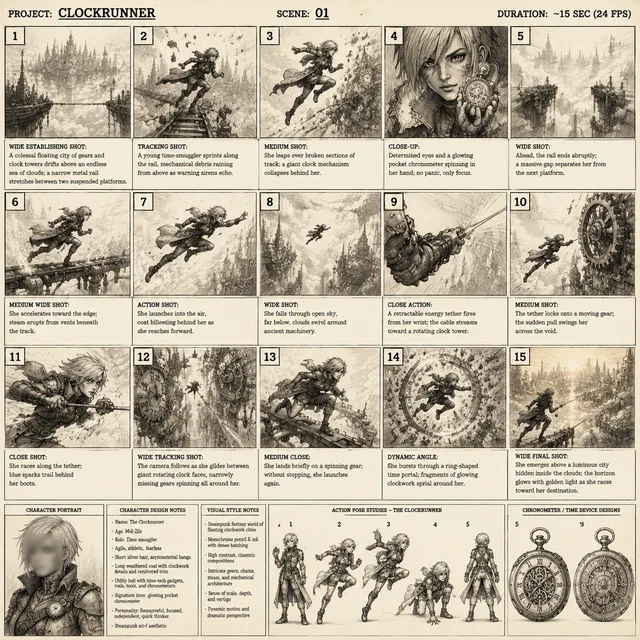
- Shot lists and storyboards: text-to-image storyboard frames help communicate a visual plan to a client or collaborator before any shooting happens.
Production
- B-roll and abstract footage: generated clips work well as texture, transitions, and background, especially when the subject is conceptual rather than physical.
- Motion graphics and simple animation: useful for diagram-style explanations.
- Voice tracks: synthetic narration is acceptable for internal, instructional, or localization-adjacent content; for personality-led channels it usually reads as a downgrade.
- Avatar or presenter formats: effective for scale and translation, risky for trust-building where the audience expects a real person.
Post-production
- Automatic transcription and captioning, which is now close to a solved problem.
- Silence and filler-word removal for interview-heavy edits.
- Rough assembly from transcripts, where you edit text and the timeline follows.
- Loudness normalization and basic cleanup.
- Multi-format reframing: converting a wide shot into a vertical crop with subject tracking.
- Localization: subtitles and dubbed tracks that widen the same asset's reach.
Two rules keep this honest. First, always review generated media for artifacts, especially hands, text, and reflections. Second, disclose synthetic media where the audience would reasonably assume a human made it — trust is more valuable than the time saved.
Visual Identity at Scale: Consistency Across Formats
When you publish across vertical, horizontal, and mid-length formats, consistency is what makes scattered clips feel like one body of work. Identity here means repeatable choices, not a logo.
Define a small style sheet and enforce it:
- Color treatment: a fixed set of grades or looks per content type.
- Typography: one or two caption fonts with defined sizes and weights.
- Pacing: an editing rhythm viewers associate with you — fast-cut explainer, calm documentary, punchy review.
- Framing: consistent subject placement in vertical, consistent headroom in horizontal.
- Sound: a signature audio texture or bed, kept subtle.
- Opening and closing devices: the same visual or verbal cue each time.
Keep a shared asset library: reusable intros, transitions, caption presets, music beds, and export presets. The point is to make consistency the path of least resistance. If staying on-brand requires effort every single time, it will erode.
Also decide how formats relate. A common, workable rule: vertical gets energy and immediacy; long-form gets depth and calm. Same palette, different pace. That gives viewers a predictable experience without making every asset identical.
A Practical Workflow: From Idea to Multi-Format Release
Here is a workflow that scales from a solo creator to a small team.
Step 1: Idea intake and scoring
Maintain a single running list. Score each idea on three axes: audience relevance, your ability to produce it well, and reuse potential. Ideas that score well on reuse potential — because they contain multiple self-contained moments — should be prioritized for anchor treatment.
Step 2: Anchor script or outline
Write the anchor at the length the argument needs, not the length the platform prefers. Mark the three to five moments that could stand alone. Those marks become your clip plan before you shoot anything.
Step 3: Production with dual framing in mind
If you know a moment will become vertical, shoot it a little wider than the final crop and keep the subject centered. When possible, capture a second take framed vertically. Twenty extra seconds on set saves an hour in post.
Step 4: Transcript-first edit
Generate a transcript, edit the text for clarity, then let the timeline follow. This is the single biggest time saver in interview and tutorial content, and it keeps your narration tight.
Step 5: Derivative pass
Cut clips from the transcript moments flagged in step two. Add a hook, add captions, trim until nothing is left that does not earn its seconds. Resist the urge to compress the whole anchor into sixty seconds — that produces neither good short-form nor good long-form.
Step 6: Packaging
Titles, thumbnails or cover frames, and the first caption line should present one clear promise. Test two cover frames when the platform allows it; small differences in framing often beat large differences in wording.
Step 7: Release rhythm and recycling
Publish the anchor, then space the clips across the following weeks rather than dumping them on one day. Recycle evergreen clips after a few months with new hooks and updated covers. Many strong performers are second or third attempts at the same idea.
Step 8: Review
Once a month, review retention curves, saves, and traffic sources. Kill formats that consistently underperform, and double down on the two or three patterns that work.
Measuring What Matters Beyond Views
Views inflate easily and explain little. Build a small dashboard around outcomes instead.
- Retention curve shape: a steep early drop points to a weak hook; a mid-video drop points to pacing or a redundant section.
- Completion rate normalized by length: a three-minute video and a fifteen-minute video should not share a benchmark.
- Saves and shares: the strongest proxy for usefulness you can observe.
- Returning viewers: the clearest sign that format and identity are working together.
- Assisted conversions: profile visits, link clicks, trial signups, or replies that follow a video session.
- Production efficiency: hours per finished minute. If this number worsens as volume rises, your workflow is the problem, not your ideas.
Review monthly, not daily. Daily metric-checking drives reactive decisions, and reactive decisions produce inconsistent output, which undermines the identity work described earlier.
Common Mistakes and How to Avoid Them
- Choosing format before idea. Fix: write the one-sentence promise first, then pick the surface.
- Chasing volume without a system. Fix: batch by function and template the repetitive parts.
- Padding to hit a length target. Fix: cut to the natural end, then cut again.
- Using AI for judgment calls. Fix: use it for options, outlines, captions, and reframing — not for deciding what the story is.
- Ignoring the vertical crop while shooting. Fix: compose with the crop in mind.
- Abandoning an idea after one weak release. Fix: retry the concept with a new hook and cover before discarding it.
- Letting each format develop its own visual language. Fix: one style sheet, applied everywhere.
- Measuring only views. Fix: track saves, returning viewers, and hours per finished minute.
FAQ
How long should a vertical video be?
As long as the single idea requires and no longer. Many effective clips land between fifteen and forty-five seconds, but a strong forty-second clip beats a padded fifteen-second one. Watch your own retention curve to find your natural range.
Should I convert all long-form content into clips?
No. Convert the moments that stand alone. Clips that require the anchor's context usually underperform because they lack a self-contained payoff.
Is AI-generated footage good enough for client work?
For abstract texture, backgrounds, transitions, and conceptual visuals, often yes — with review. For anything implying a real event, real person, or real product demonstration, be cautious and disclose synthetic elements.
What is the fastest way to speed up editing?
Transcript-first editing. Cut the text, let the timeline follow, then refine pacing. It consistently produces the largest time savings for narration-heavy content.
How many short clips should one anchor produce?
Three to five is a healthy range. Fewer and the anchor is underused; more and you start publishing fragments that do not stand on their own.
Do captions really matter that much?
Yes. They carry the message for sound-off viewers, improve comprehension, and make content accessible. Treat them as part of the creative, not an afterthought.
How do I keep visual identity consistent when using multiple AI tools?
Define the style sheet first, then constrain the tools to it. Lock your color treatment, fonts, caption style, and pacing rules, and apply them as presets. Tools change; the rules should not.
When should I drop a format entirely?
When it consistently underperforms on saves, returning viewers, and downstream actions across at least three genuine attempts. Do not judge a format on one release in a bad week.
The through-line is simple: decide the format from the idea, build a system so consistency is easy, use AI to generate options and remove mechanical work, and measure outcomes rather than applause. Teams that do this ship more, burn out less, and build a recognizable body of work across every surface they publish on.

Alexander
More Blogs
Read MoreVidu Q4 Alternatives: 4K AI Video Models Compared (2026)
Vidu Q4 alternatives compared: Kling 4.0, Seedance 2.5, Wan 3.0, and Runway Gen-4 — 4K support, input modes, durations, audio, and what each costs in credits on Domer.
Top 4K AI Image Generators in 2026: 5 Models Compared on Real Costs
The top 4K AI image generators on Domer compared: Flux 3 Klein, Nano Banana 2.1, GPT Image 2.5, GPT Image 2, and Nano Banana Pro — 4K credit costs, reference limits, and speed.
Nano Banana 2.1 vs GPT Image 2.5: Which Image Model Should You Use? (2026)
Nano Banana 2.1 vs GPT Image 2.5 Flare compared: credit costs per resolution, aspect ratios, reference images, text rendering, and which tasks fit each model.