

Video Synthesis Practice Examples: A Practical Workflow Guide
Oct 15, 2026

Video synthesis has moved from novelty to production discipline. The teams and solo creators getting the best results are not necessarily using the newest model. They are using a repeatable practice loop: study strong examples, isolate one variable, test it, and save the result in a searchable library. That is the real value of a community model library or a personal example vault. It turns random generation into craft.
This guide is a practical workflow for learning from video synthesis examples. It covers how to compare model families, how to document what works, how to use references and frame control, how to work with an AI agent director, and how to run a full practice project from brief to final cut. Use it as a studio notebook rather than a list of tricks.
Why Practice Examples Beat Feature Lists
Feature lists tell you what a model can do in a demo reel. Practice examples tell you what a model does when you need a specific look, a recurring character, a camera move, or a clean transition. A model that produces stunning one-off shots may fail when you ask for the same character in three scenes. Another model may look less impressive in a highlight reel but hold a composition better across a sequence.
When you study examples, look for the decisions behind the output. What was the shot length? How much motion was requested? Was there a reference image, a depth map, or a first and last frame? Was the prompt describing action, camera, lighting, style, or all four? A good example entry answers those questions. A bad example is just a video file with a vague title.
The fastest way to improve is to build a comparison habit. Choose one creative goal, such as a slow dolly-in on a product, and test it across three or four models with the same source frame and prompt. Save the results side by side. Note which model preserved the label, which one warped the background, and which one added unwanted camera shake. Over time, this comparison habit becomes your personal model selection system.
The Modern Video Synthesis Stack: Model Strengths by Creative Goal
No single model wins every category. The useful approach is to think in model families and match them to the job. The names change, but the archetypes are stable: cinematic consistency models, narrative depth models, and fast iteration models.
Cinematic Consistency: Runway, Flux-Style Pipelines, and High-Fidelity Shots
Cinematic consistency is about controlled lighting, believable lens behavior, and minimal identity drift. Runway-style workflows are often strong when you need precise camera language and clean compositing. Flux-style pipelines can be excellent for stylized realism and prompt adherence when combined with a strong reference frame.
For practice, create a shot that has a clear subject, a simple background, and one camera move. Avoid crowds or complex hand interactions at first. Test a slow push-in, a lateral tracking shot, and a subtle rack focus. Document how each model handles the edge of the frame. Does the background breathe? Does the subject's face change? Does the camera move feel mechanical? These details matter more than raw resolution.
Narrative Depth: Sora and Kling-Style Long-Form Scene Logic
Narrative depth models are built for multi-shot thinking. They can handle a character walking through a space, a conversation beat, or a sequence with a beginning, middle, and end. Sora and Kling-style systems are often used for this kind of scene logic, especially when you want a shot to feel like part of a larger story.
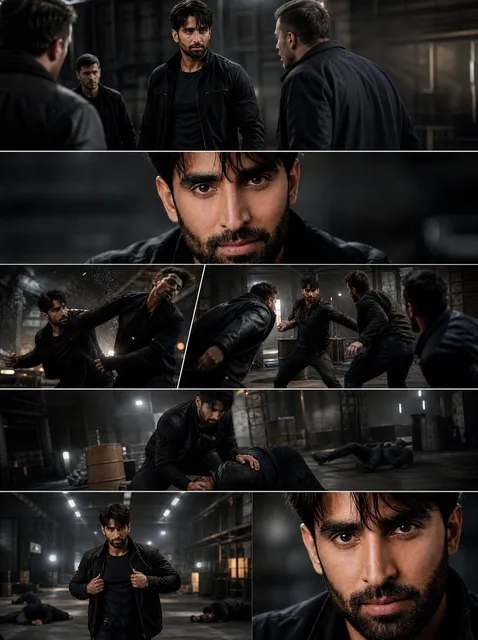
Practice with a three-shot sequence: an establishing shot, a medium shot, and a close-up. Give the model a clear continuity anchor, such as the same jacket, the same time of day, and the same direction of movement. Then evaluate whether the sequence feels like one scene or three unrelated clips. The best narrative examples usually come from strong pre-production, not from longer prompts.
Fast Iteration: MiniMax, Luma, Pika, and Lightweight Tests
Fast iteration models are your sketchbook. MiniMax, Luma, and Pika-style tools are useful for testing an idea before you commit to a high-fidelity render. They help you answer questions like: Does this camera angle work? Is the action readable? Does the color palette support the mood?
Use them for animatics, style tests, and timing experiments. Do not expect every frame to be final. The goal is to fail quickly and cheaply, then move the winning idea into a more controllable pipeline.
Building a Personal Model Library for Practice
A model library is only useful if you can search it. Most creators save videos in folders named by date or project. That works for one project but fails when you need to find every example of a successful product rotation or a believable rain scene.
Tagging System
Use a consistent tagging system with four dimensions: subject, action, camera, and look. For example: subject=cyclist, action=coasting, camera=low tracking, look=overcast documentary. Add a model name and a control method tag, such as reference-image or first-last-frame. This makes it possible to filter for the exact combination you need.
Keep tags short and reusable. Avoid project-specific names unless they describe the content. If you are working with a client, use a client tag only after the content tags. The goal is to find the example by creative problem, not by client.
Model Card Template
For each model in your library, write a one-page model card. Include:
- Best use cases: three to five scenarios where the model consistently wins.
- Weak spots: motion artifacts, identity drift, text rendering, hand detail, or camera control.
- Preferred input: text only, image reference, video reference, depth, or first-last frame.
- Typical prompt style: short action prompts, long cinematic descriptions, or structured shot lists.
- Review notes: what to check in the first five seconds of a render.
Update the card after every meaningful test. A model card prevents you from repeating the same failed experiment six months later.
Control Mechanisms That Make Output Repeatable
Prompting alone is unreliable for professional work. Control mechanisms reduce randomness. The most useful controls are reference images, first-to-last frame control, and technical passes like depth, motion, and segmentation.
Reference and Character Consistency
Reference images anchor identity and style. Use a clean front-facing image for character consistency, plus one or two additional angles if the model supports multi-reference input. Keep the background simple in references. Remove accessories that you do not want the model to copy. If you are using Vidu Q1-style multi-reference systems, label each reference by role: character, wardrobe, environment, lighting.
For character consistency, test the same character in three poses: standing, walking, and close-up. Note where the model breaks. Some systems hold the face but change the outfit. Others hold the outfit but drift on age. A useful example entry includes both the input references and the failure notes.
First-to-Last Frame Control
First-to-last frame control is one of the most practical techniques for sequence work. You provide the opening frame and the closing frame, and the model generates the motion between them. This is useful for product reveals, scene transitions, and matching camera moves across shots.
The Alibaba Wan series and similar systems are often used for this. Practice by creating a simple arc: a closed box to an open box, a wide street to a close doorway, or a neutral face to a smile. Keep the movement linear at first. Then try a curved path or a change in lighting. Evaluate whether the model respects the end frame or drifts into a different composition.
Technical Precision and Motion Control
For technical shots, use tools that expose depth, motion vectors, or segmentation. Framepack, MAGI-1, and LTX-style workflows are useful when you need to control parallax, layer separation, or camera motion more precisely. These are not always the fastest options, but they can save a shot that would otherwise be unusable.
A practical exercise is to take a still image and generate three camera moves: dolly in, pan left, and crane up. Use the same depth map and prompt for each. Compare how the model handles occlusion and edge stretching. Save the best settings as a preset in your notes.
The AI Agent Director Workflow
An AI agent director is not a replacement for a human director. It is a structured assistant that helps with shot selection, continuity checks, and prompt translation. The value is in reducing cognitive load. You describe the scene, and the agent helps you turn it into a shot list with camera, lighting, and action notes.
Shot Selection
Start with a scene objective. What must the audience understand by the end of the sequence? Then list the shots that carry that information. A common mistake is to generate a beautiful shot that does not advance the story. An agent director can flag those shots and suggest a replacement.
Use a simple shot grammar: establishing, medium, close-up, insert, and transition. For each shot, write one line of action and one line of camera. If a shot cannot be described in one line, it is probably two shots.
Briefing an Agent Like a Cinematographer
Give the agent constraints, not just adjectives. Instead of asking for a cinematic look, specify: 35mm lens, shallow depth of field, soft window light from camera left, handheld but stable, muted teal and amber palette. Add what to avoid: no lens flares, no fast zooms, no crowd movement. Constraints produce more consistent results than mood words alone.
Ask the agent to generate two or three shot variations, then choose one. Keep the chosen shot list as the source of truth for prompts. This prevents prompt drift across a sequence.
A Complete Practice Project: From Brief to Final Cut
This project is designed for a single practice session. It uses one character, one location, and four shots. The goal is not a masterpiece. The goal is to produce a complete example entry that you can reuse.
Step 1: Write a One-Page Visual Brief
Define the character, location, time of day, mood, and camera style. Include one reference image for the character and one for the location. Write three lines of story: what happens at the start, what changes, and how it ends. Keep the brief visual. Avoid abstract themes that cannot be photographed.
Step 2: Generate a Shot Matrix
Create a table with four rows: establishing shot, medium shot, close-up, and insert. For each row, write action, camera, lighting, and continuity notes. The continuity notes should include wardrobe, props, direction of movement, and screen direction. This matrix becomes your prompt checklist.
Step 3: Run Small Tests Before Full Renders
Test each shot at low resolution or short duration. Check the first two seconds for identity drift, warped edges, and unwanted camera movement. If a shot fails, change one variable at a time. Try a different reference image, a simpler action, or a stronger first frame. Do not rewrite the entire prompt unless the concept is clearly wrong.
Step 4: Assemble and Review
Edit the four shots into a sequence. Add simple sound design: room tone, footsteps, and one music bed. Watch the sequence three times. First for story, second for continuity, third for technical issues. Write a model card entry for every model used. Save the final sequence with tags for subject, action, camera, and look.
Common Mistakes and How to Fix Them
The most common mistake is over-prompting. Long prompts often contain contradictory instructions. If you ask for a slow dolly and a handheld feel, the model may produce neither. Separate camera, action, and style into short blocks.
Another mistake is ignoring the first frame. The first frame sets the composition. If it is weak, the model will either preserve a weak composition or fight it. Spend time creating or selecting a strong opening frame.
A third mistake is testing too many variables at once. Change one thing per test: model, reference, prompt structure, or control method. Otherwise you cannot learn which change improved the result.
Finally, do not skip review notes. A render without notes is just a file. A render with notes is a lesson. Write down what worked, what failed, and what you would try next.
Model Selection Cheat Sheet by Creative Goal
Use this as a starting point, then refine it with your own examples.
- Product beauty shot: cinematic consistency model with a strong reference image and a slow push-in.
- Character dialogue scene: narrative depth model with multi-shot framing and identity references.
- Fast concept test: lightweight iteration model with short prompts and low-resolution previews.
- Scene transition: first-to-last frame control with matched lighting and camera direction.
- Technical camera move: depth-aware or motion-control workflow with a locked composition.
- Stylized montage: fast iteration model plus a consistent color grade in post.
- Documentary realism: cinematic consistency model with natural light references and minimal prompt styling.
The cheat sheet is not a rulebook. It is a way to avoid starting from zero. After a few practice projects, you will have your own map of which model fits which creative problem.
FAQ
How many examples should I collect before I can trust my model library?
Aim for at least three strong examples per model per use case. One example can be luck. Three examples with similar settings show a pattern. Keep the failed examples too, because they tell you where the model breaks.
Should I use the newest model for every project?
No. Newer models often improve quality, but they can also change the way they interpret prompts. If a project depends on a specific look or a specific control method, use the model that has already proven itself for that job. Test the new model on a small shot before switching your whole pipeline.
How do I stop character drift across shots?
Use a clean reference image, keep wardrobe and lighting consistent, and avoid extreme angles at first. If the model supports multi-reference, include a front, three-quarter, and profile view. Also keep the character in similar screen positions across shots until the model proves reliable.
What is the best prompt structure for video synthesis?
A practical structure is: subject and action, camera and lens, lighting and mood, then negative constraints. Keep each block short. For example: a cyclist coasts down a wet street, low tracking shot, 35mm lens, overcast light, muted colors, no fast cuts, no lens flare. This gives the model clear priorities.
How long should a practice project be?
Four to six shots is enough to learn continuity and model behavior. Longer projects introduce more variables than you can isolate. Once you can produce a clean four-shot sequence with consistent character and lighting, extend to eight shots.
Do I need an AI agent director?
It helps when you are managing many shots or working with a team. A simple shot list and continuity checklist can do the same job for a solo project. The agent becomes valuable when you need to generate variations, check continuity, or translate a creative brief into prompts quickly.
How often should I update my model cards?
Update a model card after every project where the model played a major role. A quick five-minute note is enough. Record the prompt style, control method, and any new failure pattern. Over time, the cards become a reliable production reference.
Final Practice Loop
The creators who improve fastest follow a simple loop: study an example, test one variable, save the result, and write a note. That loop works whether you are using a large community model library or a personal folder of experiments. The tools will keep changing. The practice discipline will not. Start with one scene, one character, and four shots. Compare models with the same inputs. Document the differences. Then use those notes to choose the right model for the next project. That is how video synthesis practice becomes a repeatable craft.

Alexander
More Blogs
Read MoreVidu Q4 Alternatives: 4K AI Video Models Compared (2026)
Vidu Q4 alternatives compared: Kling 4.0, Seedance 2.5, Wan 3.0, and Runway Gen-4 — 4K support, input modes, durations, audio, and what each costs in credits on Domer.
Top 4K AI Image Generators in 2026: 5 Models Compared on Real Costs
The top 4K AI image generators on Domer compared: Flux 3 Klein, Nano Banana 2.1, GPT Image 2.5, GPT Image 2, and Nano Banana Pro — 4K credit costs, reference limits, and speed.
Nano Banana 2.1 vs GPT Image 2.5: Which Image Model Should You Use? (2026)
Nano Banana 2.1 vs GPT Image 2.5 Flare compared: credit costs per resolution, aspect ratios, reference images, text rendering, and which tasks fit each model.