

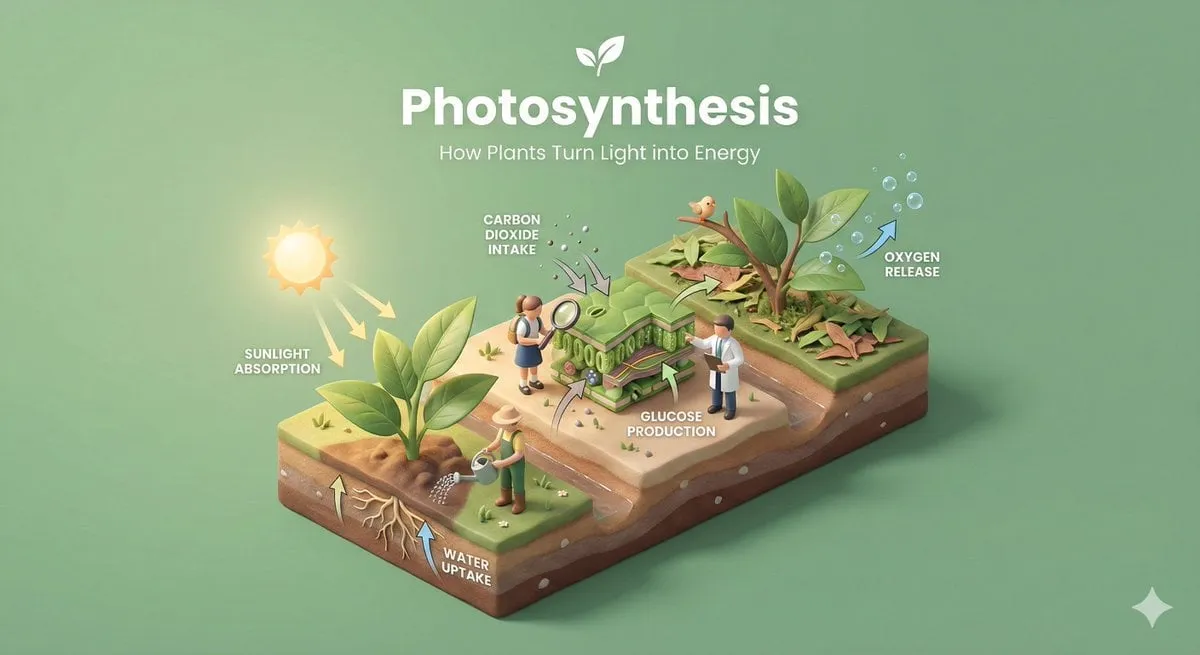


Create a clear, 45° top-down isometric miniature 3D educational diorama…
A
Aleena Amir@aleenaamiir
920 48,909 1/20/2026
Model Nano Banana 2
Nano Banana 2Categories
Share:
Prompt
Create a clear, 45° top-down isometric miniature 3D educational diorama explaining [PROCESS / CONCEPT].

Use soft refined textures, realistic PBR materials, and gentle lifelike lighting.

Build a stepped or layered diorama base showing each stage of the process with subtle arrows or paths.

Include tiny stylized figures interacting with each stage (no facial details).

Use a clean solid [BACKGROUND COLOR] background.
At the top-center, display [PROCESS NAME] in large bold text, directly beneath it show a short explanation subtitle, and place a minimal symbolic icon below.

All text must automatically match the background contrast (white or black).
How to Use This Prompt
Get started in three simple steps.
1
Copy or Use
Copy the prompt text, or click Use this Prompt to open the generator with it pre-filled.
2
Adjust Settings
Tweak the aspect ratio, resolution, or any other settings to fit your project.
3
Generate & Share
Hit generate and share your creation once it's ready.
Related Prompts
![A hyper-realistic 3D travel guide infographic poster for [COUNTRY]](https://storage.brightvectorlabs.com/prompts/bright/illustration-and-3d/2043047413770809708-0.webp)
![A simple black-and-white illustration of a [subject] in [outfit], [doing…](https://storage.brightvectorlabs.com/prompts/bright/illustration-and-3d/2043284009116160473-0.webp)
![A hyper-realistic 3D world guide infographic poster for [SHOW]](https://storage.brightvectorlabs.com/prompts/bright/illustration-and-3d/2045107949639455223-0.webp)


By Media Type
By Model


Create stunning images with this prompt
Open the generator and start creating in seconds