
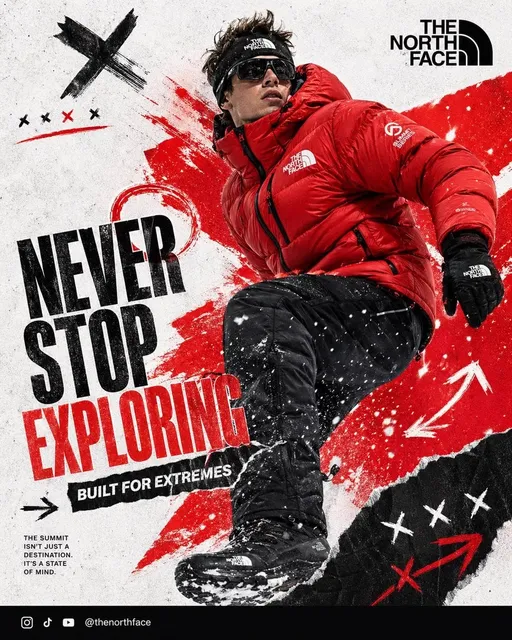
AI Art Generator with Text — Typography Images
Use an ai art generator with text to create images that include words. Describe the text and visual style, then generate typography artwork.
AI Image Generator
0/20000 characters
My images
Loading...
Can I add text to AI-generated images?
You can describe text as part of your image prompt—for example, 'a poster with the words HELLO WORLD in bold letters.' The generator will attempt to include the text in the image, though accuracy varies and short text works best.
AI Art Generator with Text — Typography Images
Quote poster
Input
A poster with the words 'CREATE MORE' in bold serif font centered on a sunset gradient background, minimalist style, warm orange-to-purple colors, subtle texture
Expected output
A typography poster with bold centered text on a warm gradient background, clean minimalist composition with subtle paper texture overlay
Event graphic
Input
A social media graphic saying 'SUMMER FEST' in large playful letters, with confetti and sparkle elements around the text, bright yellow and pink color scheme
Expected output
A celebratory graphic with large display text surrounded by confetti dots, sparkle shapes, bright warm colors, and a festive energetic feel
Labeled diagram
Input
A botanical-style illustration of a sunflower with the parts labeled 'petal', 'center', 'stem', 'leaf' in elegant handwritten-style text, vintage paper background
Expected output
An educational botanical illustration with a detailed sunflower drawing, handwritten-style labels with thin callout lines, and an aged paper background
Generate AI artwork that incorporates readable text elements from descriptive prompts
Create typography-based artwork
Describe the text you want to appear in the image along with the visual style, colors, and layout for integrated text-and-image results.
Design quote and poster graphics
Generate inspirational quote images, announcement graphics, and poster designs with textual elements described in your prompt.
Combine words and visuals
Explore creative combinations of typography and imagery by describing both elements together in a focused prompt.
How It Works
1
Describe text and style
Describe the desired image.
2
Choose settings
Choose the available generation settings.
3
Generate and review
Generate, review, and download a suitable result.
Tips for text-in-image prompts
Text rendering in AI images is not always perfectly accurate, so plan accordingly. Short text and clear descriptions work best.
Input Constraints
- Do not rely on AI-generated text for critical information — verify all rendered text
- Avoid including real names, private data, or sensitive words
- Review outputs for text accuracy before using them publicly
Practical Tips
- Keep text short — one to three words are more likely to render clearly
- Describe the font style: 'bold serif', 'playful handwritten', 'elegant script', 'clean sans-serif'
- Describe text placement: 'centered', 'top banner', 'bottom caption', 'wrapped around the subject'
- If text is inaccurate in the first attempt, try rephrasing or simplifying the wording
Privacy
- Do not upload personal or sensitive material unless you have permission to use it.
Usage Rights
- Confirm that you have the rights needed for the inputs and intended use of the result.
Prompt recipes
Copy a structure, then adjust the subject, lighting, camera, and output details for your own result.
Motivational quote poster
A typographic poster with the words 'RISE & SHINE' in bold uppercase sans-serif font, centered on a soft morning gradient from peach to light blue, clean modern design with generous white space
Describes both the text content and the visual style—font, color, layout—giving the generator clear direction for a cohesive typographic composition.
Brand logo concept
A circular logo with the word 'ORGANIC' in elegant script font at the top, a simple leaf illustration in the center, and 'FARM' in bold sans-serif at the bottom, green and brown earth tones
Specifies the text, font styles, visual elements, and color palette, helping the generator produce a balanced logo-style composition.
Event invitation text
An invitation card design with 'SAVE THE DATE' written in gold calligraphy script on a white background with delicate watercolor floral accents in the corners
Combines text description with decorative visual elements and color cues, making the output immediately usable as an invitation template.
Educational infographic label
A simple diagram of the water cycle with arrows and labels reading 'evaporation', 'condensation', 'precipitation' in clean sans-serif font, blue and white color scheme, educational illustration style
Describes the diagram subject, the specific labels needed, and the font style, helping the generator produce an educational visual with integrated text.
Social media announcement
A bold graphic with the words 'NEW PRODUCT' in large blocky letters across the center, surrounded by geometric shapes and arrows, vibrant orange and teal color scheme, modern digital design
Specifies the announcement text, visual style, and color palette, making the output suitable for social media or marketing announcements.
Vintage signage design
A retro-style sign with the text 'FRESH COFFEE' in distressed vintage lettering, coffee bean illustrations on the sides, warm brown and cream colors, weathered texture, 1950s diner aesthetic
Describes the text, style era, decorative elements, and color scheme, helping the generator produce a cohesive vintage signage look.
Best use cases
Match the workflow to the input you have and the result you need before opening the generator.
Quote and inspirational graphics
Input: Short quotes or phrases with font style, color palette, and layout descriptions
Result: Typography-focused images suitable for social media, posters, or personal projects
Tool: Text to Image with prompts that describe the text, font style, and background treatment
Event announcements and invitations
Input: Event text with decorative visual elements, color schemes, and design style cues
Result: Announcement graphics and invitation templates ready for use or further customization
Tool: Text to Image with terms like 'invitation card', 'announcement graphic', and specific font and color descriptions
Educational diagrams and labels
Input: Subject descriptions with specific label text, font style, and instructional diagram layout
Result: Educational visuals with integrated labels and text suitable for presentations or learning materials
Tool: Text to Image with clear label text and 'educational illustration style' or 'diagram' cues
Logo and branding concepts
Input: Brand name or tagline with font style, visual symbols, color scheme, and layout structure
Result: Logo-style concepts that combine text and imagery, ready for refinement in design software
Tool: Text to Image with terms like 'logo concept', 'circular logo', and specific font and color descriptions
Limitations to know before generating
- AI-generated text is often inaccurate or illegible—expect misspellings, missing letters, or garbled words, especially for longer phrases
- Short text (one to three words) renders more accurately than long sentences or complex phrases
- Font styles are interpreted loosely—the generator may approximate the style you describe but not match it precisely
- Text placement may not match your description exactly—review outputs and be prepared to regenerate or adjust manually in design software
- Do not rely on AI-generated text for critical information like legal notices, product labels, or anything requiring exact accuracy—plan to add or replace text manually
Creative Suite: AI Video Generator & AI Image Generator Tools
Power up your creative workflow with our AI-driven tools. Generate stunning videos, create images, and apply custom adjustments - our AI Video Generator and AI Image Generator offer a complete solution for all your creative needs.
Strictly Prohibits Adult/NSFW Content








Pricing
Choose the credit package that works best for you.
No hidden fees • Cancel anytime • Unused credits roll over
Starter
Perfect for trying out AI creation.
Credits
200 credits / month
- Up to 20 videos per month
- Up to 100 images per month
$6.99/ month$9.9930% OFF
Billed monthly
First-time subscribers get 30% off their first month, then standard price
What's included
- Credits never expire
- Standard models
- HD, Watermark-Free Downloads
- Private Generation
- Faster Generation Speed
- Ad-free experience
Basic
Perfect for light creators.
Credits
500 credits / month
- Up to 50 videos per month
- Up to 250 images per month
$13.99/ month$19.9930% OFF
Billed monthly
First-time subscribers get 30% off their first month, then standard price
What's included
- Credits never expire
- Standard models
- HD, Watermark-Free Downloads
- Private Generation
- Faster Generation Speed
- Ad-free experience
Pro
PopularBest value for creators
Credits
1,200 credits / month
- Up to 120 videos per month
- Up to 600 images per month
$39.99/ month
Billed monthly
What's included
- Credits never expire
- All models + Early access to new models
- HD, Watermark-Free Downloads
- Private Generation
- Faster Generation Speed
- Ultra HD resolution
- Ad-free experience
Ultra
For video creators and power users.
Credits
5,000 credits / month
- Up to 500 videos per month
- Up to 2,500 images per month
$99.99/ month
Billed monthly
What's included
- Credits never expire
- All models + Early access to new models
- HD, Watermark-Free Downloads
- Private Generation
- Faster Generation Speed
- Ultra HD resolution
- Ad-free experience
Free
Standard models only — upgrade to unlock premium models.
Credits
10 free credits on signup
Questions? Contact us at support@domer.io
Start creating typography artwork
Describe the text and visual style you want and generate artwork in seconds.