

AI Cover Image Generator for All Formats
Create cover images for books, albums, playlists, or channels. Describe the theme and format, generate options, and download the best fit.
AI Image Generator
0/20000 characters
My images
Loading...

What is an AI cover image generator?
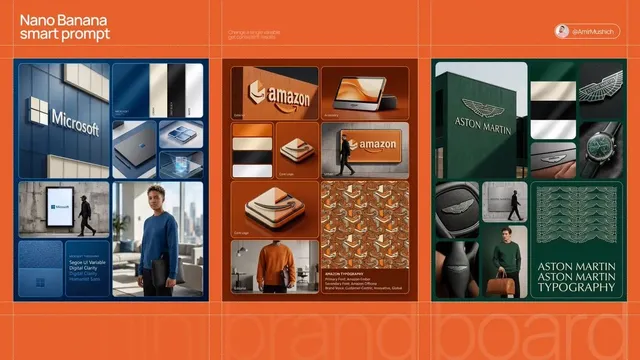
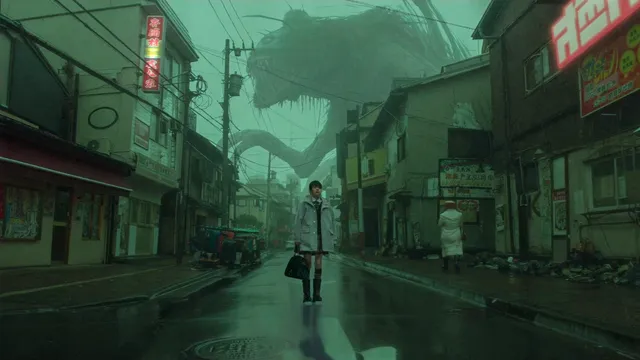
An AI cover image generator creates cover images from text descriptions. You describe the theme, format (book, album, playlist, banner), and visual style, then generate and review the result. It's useful for book covers, music artwork, social media headers, and publication designs.
AI Cover Image Generator for All Formats
Book cover design
Input
A mysterious forest with a glowing path leading into the distance, dark blue and teal color palette, space for title text at the top, atmospheric thriller genre look
Expected output
A book cover composition with atmospheric visuals and deliberate negative space for title placement
YouTube banner
Input
A gaming-themed banner with neon controller silhouettes, dark background with purple and cyan accent lights, clean space for channel name on the left side
Expected output
A wide-format banner image with gaming aesthetics and designated area for channel branding
Spotify playlist cover
Input
A cozy rainy window view with warm indoor light contrast, lo-fi aesthetic, soft focus, square composition suitable for playlist artwork
Expected output
A square-format cover image with a moody atmosphere suitable for music playlist presentation
Generate cover images suitable for books, albums, social media profiles, or publication headers.
Format-specific compositions
Generate covers designed with the correct aspect ratio and composition for your target platform or medium.
Brand-consistent covers
Create a series of covers with consistent visual themes for albums, episodes, or publications.
Professional presentation
Produce polished cover images that present your content with a cohesive visual identity.
How It Works
1
Describe the desired image.
Describe the desired image.
2
Choose the available generation settings.
Choose the available generation settings.
3
Generate, review, and download a suitable result.
Generate, review, and download a suitable result.
Designing effective cover images
Specify your target format and whether you need space for text. Covers need strong focal points and clear visual hierarchy.
Input Constraints
- Avoid claiming the cover is print-ready without professional review.
- Do not guarantee text placement accuracy without testing.
- Keep cover descriptions focused on visual elements rather than content claims.
Practical Tips
- Specify the format like book cover, banner, or square cover to guide composition.
- Mention if you need space for text or branding elements in the layout.
- Use mood descriptors like mysterious, energetic, or minimalist to set the cover tone.
Privacy
- Do not upload personal or sensitive material unless you have permission to use it.
Usage Rights
- Confirm that you have the rights needed for the inputs and intended use of the result.
Prompt recipes
Copy a structure, then adjust the subject, lighting, camera, and output details for your own result.
Thriller book cover with moody atmosphere
A dark atmospheric book cover with a foggy street at night, single streetlight glow, shadowy figure in the distance, deep blue and gray tones, space for title text at top, thriller genre mood.
The foggy street and shadowy figure immediately signal thriller/mystery, while the designated text space ensures the title remains readable over the artwork.
Album cover with bold typography space
A square album cover with abstract gradient waves in pink, purple, and blue, clean center area for artist name and album title, modern electronic music aesthetic, vibrant and energetic mood.
The square format fits streaming platforms, and the clean center area provides clear space for text overlay, while vibrant colors catch attention in small thumbnails.
YouTube gaming channel banner
A wide gaming channel banner with neon-lit controller and headset silhouettes, dark background with purple and cyan accent lights, left third reserved for channel name and profile picture, futuristic and bold.
The wide format fits YouTube's banner dimensions, and reserving the left third accommodates the profile picture overlay that YouTube applies automatically.
Minimalist podcast cover
A minimalist square podcast cover with a single vintage microphone illustration in black line art, cream background, top third clear for podcast title, clean and professional aesthetic.
Minimalist design ensures legibility at small sizes on podcast apps, and the single focal element (microphone) clearly communicates the medium.
Romance novel cover with warm tones
A romance novel cover with a sunset beach scene, silhouettes of two people walking toward the horizon, warm orange and pink sky, space at top for title and author name, dreamy and romantic mood.
The sunset and silhouettes are classic romance genre signals, and the warm palette evokes the emotional tone readers expect from the genre.
Tech report cover with professional look
A professional report cover with abstract circuit board patterns in dark blue and silver, clean geometric composition, large center space for report title and company logo, corporate and modern aesthetic.
The circuit pattern signals technology/innovation, while the corporate color scheme and clean layout convey professionalism suitable for business reports.
Best use cases
Match the workflow to the input you have and the result you need before opening the generator.
Book cover for self-publishing
Input: Genre-specific mood (thriller, romance, sci-fi) with color palette and space for title/author
Result: A genre-appropriate cover design with clear text placement area
Tool: Text to Image with genre keywords, mood descriptors, and specified text space
Music album or playlist artwork
Input: Music genre aesthetic (lo-fi, electronic, rock) in square format with artist/title space
Result: A square cover image that conveys the music mood and works at small thumbnail size
Tool: Text to Image with square aspect ratio, genre-specific visuals, and vibrant colors
YouTube or social media banner
Input: Channel theme (gaming, tech, lifestyle) in wide format with designated branding area
Result: A wide banner image with clear space for profile picture and channel name
Tool: Text to Image with wide aspect ratio and specified left/right area for overlays
Magazine or newsletter header
Input: Publication theme with professional color scheme and space for publication name
Result: A polished header image that establishes visual identity and accommodates text
Tool: Text to Image with clean composition, brand colors, and designated title area
Limitations to know before generating
- Cover format aspect ratios must be specified in the prompt; the tool does not automatically adjust for platform requirements.
- Text is not reliably generated within images; plan to add titles and text separately using design software.
- Small details may not render clearly at thumbnail size; test your cover at the actual display size before finalizing.
- Genre conventions are interpreted by the model; review that the visual signals match your content's actual genre and audience.
- Print covers require higher resolution and color accuracy than generated images typically provide; use these as concept drafts, not print-ready files.
Creative Suite: AI Video Generator & AI Image Generator Tools
Power up your creative workflow with our AI-driven tools. Generate stunning videos, create images, and apply custom adjustments - our AI Video Generator and AI Image Generator offer a complete solution for all your creative needs.
Strictly Prohibits Adult/NSFW Content








Pricing
Choose the credit package that works best for you.
No hidden fees • Cancel anytime • Unused credits roll over
Starter
Perfect for trying out AI creation.
Credits
200 credits / month
- Up to 20 videos per month
- Up to 100 images per month
$6.99/ month$9.9930% OFF
Billed monthly
First-time subscribers get 30% off their first month, then standard price
What's included
- Credits never expire
- Standard models
- HD, Watermark-Free Downloads
- Private Generation
- Faster Generation Speed
- Ad-free experience
Basic
Perfect for light creators.
Credits
500 credits / month
- Up to 50 videos per month
- Up to 250 images per month
$13.99/ month$19.9930% OFF
Billed monthly
First-time subscribers get 30% off their first month, then standard price
What's included
- Credits never expire
- Standard models
- HD, Watermark-Free Downloads
- Private Generation
- Faster Generation Speed
- Ad-free experience
Pro
PopularBest value for creators
Credits
1,200 credits / month
- Up to 120 videos per month
- Up to 600 images per month
$39.99/ month
Billed monthly
What's included
- Credits never expire
- All models + Early access to new models
- HD, Watermark-Free Downloads
- Private Generation
- Faster Generation Speed
- Ultra HD resolution
- Ad-free experience
Ultra
For video creators and power users.
Credits
5,000 credits / month
- Up to 500 videos per month
- Up to 2,500 images per month
$99.99/ month
Billed monthly
What's included
- Credits never expire
- All models + Early access to new models
- HD, Watermark-Free Downloads
- Private Generation
- Faster Generation Speed
- Ultra HD resolution
- Ad-free experience
Free
Standard models only — upgrade to unlock premium models.
Credits
10 free credits on signup
Questions? Contact us at support@domer.io
Create your cover image
Open the text-to-image tool, describe your cover theme and format, and generate a professional cover design.