
Create
AI Image Generator from Photo and Text
Upload a photo and add text instructions to transform it. Describe the changes you want, generate the result, and review before downloading.
AI Image Generator
0/20000 characters
My images
Loading...

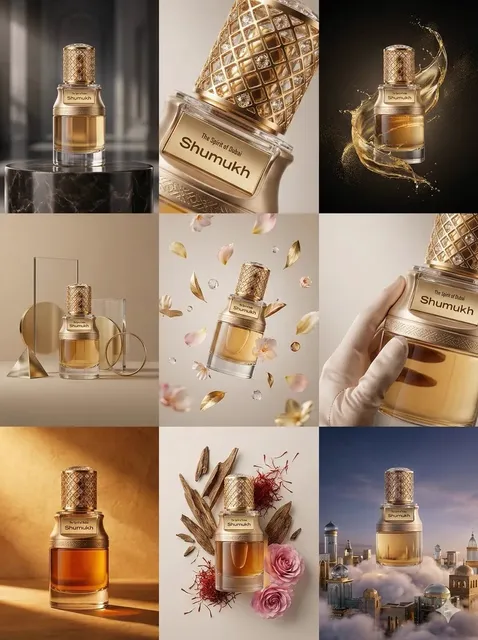
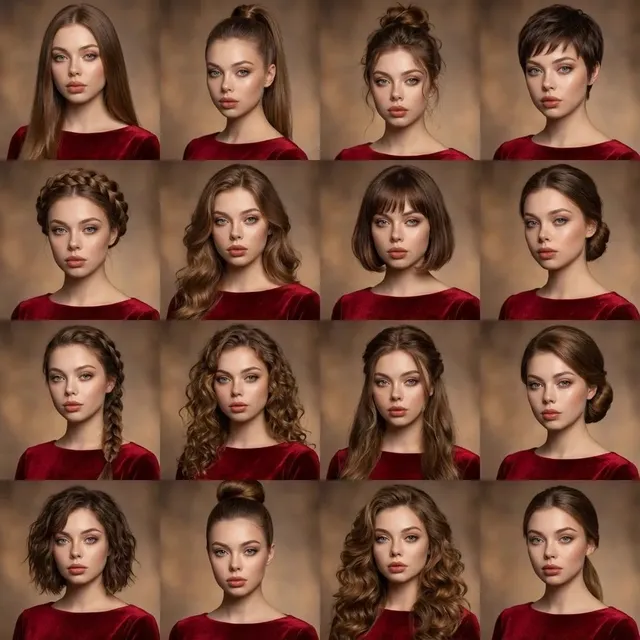
How to combine a photo and text instructions for AI editing
Upload a photo you have permission to edit, then write a text prompt describing the changes you want, such as style transformation, object addition or removal, background changes, or artistic effects. The AI applies your instructions to the uploaded image and generates a new version. This approach combines the structure of an existing photo with the creative direction of text prompts, making it useful for photo editing, creative reinterpretation, and visual experimentation.
AI Image Generator from Photo and Text
Interior redesign from existing room photo
Input
Upload a source image you have permission to edit, then describe the framing, style, background, and finish you want for the profile picture.
Expected output
A redesigned interior image that maintains the original room layout while applying new colors, furniture, and decor. Review the edited result before deciding whether it represents the person or subject accurately.
Artistic style transfer
Input
Upload a source image you have permission to edit, then describe the artistic style, era, and visual treatment you want applied.
Expected output
A stylistically transformed version of the original photo reflecting the requested artistic period or medium. Review the edited result before deciding whether it represents the person or subject accurately.
Scene transformation with added elements
Input
Upload a source image you have permission to edit, then describe new elements, lighting changes, or atmospheric effects to add.
Expected output
A modified scene that integrates the described additions with the original photo composition. Review the edited result before deciding whether it represents the person or subject accurately.
Transform an existing photo by uploading it and adding text instructions that describe the edits, style changes, or enhancements you want applied.
Start with your own image
Use an image you have permission to edit instead of recreating the subject from a text-only description.
Direct the changes
State the framing, background, and style you want, then compare the result with the original image.
Choose before you use it
Review the edited image for likeness, context, and crop before downloading or posting it.
How It Works
1
Upload the image you want to refine
Start with an image you have the right to edit.
2
Describe the profile-picture changes you want
Keep the requested edits specific so the intended profile look is clear.
3
Generate, compare, and download
Review the output for likeness, accuracy, and the final profile crop before using it.
Making a profile-picture edit that stays clear
A clear source image and a focused edit request make it easier to judge the result.
Input Constraints
- Only upload images you have permission to edit and use.
- Keep the requested changes focused on the profile-picture outcome you need.
- Review the final image for likeness and context before sharing it.
Practical Tips
- Use a source image with a visible face and enough detail around the subject.
- Ask for one or two concrete changes, such as a neutral background or a square crop.
- Compare the result with the original image before choosing a version to use.
Privacy
- Do not upload personal or sensitive material unless you have permission to use it.
Usage Rights
- Confirm that you have the rights needed for the inputs and intended use of the result.
Prompt recipes
Copy a structure, then adjust the subject, lighting, camera, and output details for your own result.
Season change transformation
Upload a summer landscape photo. Text: 'Transform this scene to winter with snow covering the ground and trees, overcast sky, muted cool color palette, keep the same composition and camera angle'
Combines photo context with specific seasonal transformation instructions, allowing the AI to maintain structure while changing environmental details.
Architectural style conversion
Upload a modern building photo. Text: 'Reimagine this building in art deco style with geometric patterns, brass accents, vintage color grading, keep the basic structure and perspective'
Uses the photo as a compositional base while applying a specific historical design language through text, creating a hybrid of real and stylized.
Fantasy scene enhancement
Upload an outdoor portrait. Text: 'Add magical elements: glowing fireflies, soft ethereal mist, enchanted forest background, keep the subject natural and unaltered, fantasy illustration style'
Preserves the subject while adding described fantasy elements around them, balancing realism with creative enhancement.
Product mockup from plain object photo
Upload a photo of a plain mug. Text: 'Add custom graphic design on the mug surface, place on a wooden table with morning light, add steam rising from coffee inside, product photography style'
Enhances a simple object photo with context, styling, and details that transform it into marketing-ready imagery.
Time-of-day lighting shift
Upload a daytime street photo. Text: 'Change to nighttime scene with streetlights glowing, neon signs, wet pavement reflections, warm artificial lighting, keep the same buildings and composition'
Maintains the spatial layout of the photo while completely transforming the lighting and atmosphere through detailed text instructions.
Best use cases
Match the workflow to the input you have and the result you need before opening the generator.
Interior design visualization
Input: A photo of a room with text describing furniture changes, color scheme updates, or style transformations
Result: A redesigned interior that shows how the space would look with the described changes applied
Tool: Image to Image with interior design vocabulary and specific material or color names
Product concept variations
Input: A plain product photo with text describing color variations, branding additions, or presentation style changes
Result: Multiple product versions showing different designs or settings without reshooting
Tool: Image to Image with product styling and context descriptions
Creative photo reinterpretation
Input: An existing photo with text describing artistic style, mood shift, or fantasy elements to add
Result: An artistically transformed version that keeps the original composition while applying creative changes
Tool: Image to Image with art style keywords and creative effect descriptions
Environmental transformation
Input: A landscape or outdoor photo with text describing weather, season, or time-of-day changes
Result: A visually transformed scene showing the same location under different conditions
Tool: Image to Image with atmospheric and lighting descriptions
Limitations to know before generating
- Complex transformations that contradict the original photo structure may produce inconsistent results
- The tool interprets both the visual content and the text prompt, which can sometimes conflict if instructions are unclear
- Large-scale changes to the main subject may alter recognizability or introduce artifacts
- Results depend on both the quality of the uploaded photo and the specificity of the text instructions
- Multiple edits described in one prompt may not all be applied accurately; simpler requests produce more reliable outcomes
Creative Suite: AI Video Generator & AI Image Generator Tools
Power up your creative workflow with our AI-driven tools. Generate stunning videos, create images, and apply custom adjustments - our AI Video Generator and AI Image Generator offer a complete solution for all your creative needs.
Strictly Prohibits Adult/NSFW Content








Pricing
Choose the credit package that works best for you.
No hidden fees • Cancel anytime • Unused credits roll over
Starter
Perfect for trying out AI creation.
Credits
200 credits / month
- Up to 20 videos per month
- Up to 100 images per month
$6.99/ month$9.9930% OFF
Billed monthly
First-time subscribers get 30% off their first month, then standard price
What's included
- Credits never expire
- Standard models
- HD, Watermark-Free Downloads
- Private Generation
- Faster Generation Speed
- Ad-free experience
Basic
Perfect for light creators.
Credits
500 credits / month
- Up to 50 videos per month
- Up to 250 images per month
$13.99/ month$19.9930% OFF
Billed monthly
First-time subscribers get 30% off their first month, then standard price
What's included
- Credits never expire
- Standard models
- HD, Watermark-Free Downloads
- Private Generation
- Faster Generation Speed
- Ad-free experience
Pro
PopularBest value for creators
Credits
1,200 credits / month
- Up to 120 videos per month
- Up to 600 images per month
$39.99/ month
Billed monthly
What's included
- Credits never expire
- All models + Early access to new models
- HD, Watermark-Free Downloads
- Private Generation
- Faster Generation Speed
- Ultra HD resolution
- Ad-free experience
Ultra
For video creators and power users.
Credits
5,000 credits / month
- Up to 500 videos per month
- Up to 2,500 images per month
$99.99/ month
Billed monthly
What's included
- Credits never expire
- All models + Early access to new models
- HD, Watermark-Free Downloads
- Private Generation
- Faster Generation Speed
- Ultra HD resolution
- Ad-free experience
Free
Standard models only — upgrade to unlock premium models.
Credits
10 free credits on signup
Questions? Contact us at support@domer.io
Turn your source image into a profile-ready version
Open Image to Image, upload an image you can edit, and review the result before you decide to use it.