
AI Mode Photo Generator — Fashion
Create fashion-style photos with an ai mode photo generator. Describe your look, choose settings, and generate mode-inspired visuals from text.
AI Image Generator
0/20000 characters
My images
Loading...

What is an AI mode photo generator for fashion?
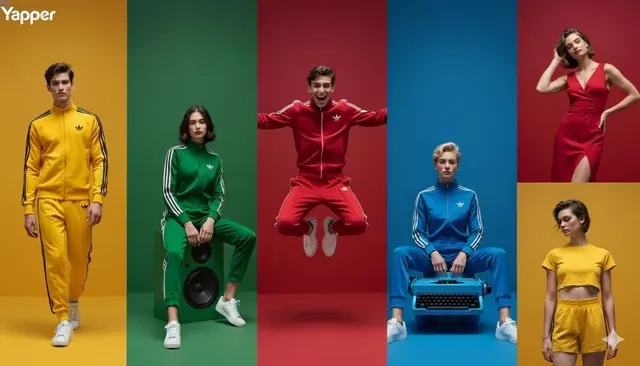
An AI mode photo generator for fashion is a text-to-image tool that creates fashion-style photos from written descriptions. You describe the outfit, pose, setting, and photography style, and the tool generates a fashion-mode image you can use for mood boards, styling references, or visual inspiration.
AI Mode Photo Generator — Fashion
Fashion Editorial Portrait
Input
A model wearing a structured red dress with dramatic shoulder details, standing against a concrete wall, harsh directional lighting, editorial style
Expected output
A fashion editorial image with a model in a bold red dress, architectural background, and strong directional light creating deep shadows
Studio Pose
Input
A person in a tailored black blazer and white shirt, three-quarter pose, plain gray seamless background, soft key lighting
Expected output
A clean studio portrait with a suited subject, neutral gray background, soft key light, and professional fashion photography quality
Street Style Outfit
Input
A person in oversized denim jacket and white sneakers, walking on a city sidewalk, natural daylight, candid-style street fashion shot
Expected output
A street style photograph with casual fashion, urban sidewalk setting, natural sunlight, and a candid walking pose
Generate fashion and style-mode photos from text prompts.
Fashion Concept Visualization
Generate outfit and styling visuals from text descriptions for fashion inspiration
Style Reference Creation
Create model poses and outfit references for fashion design, styling, or mood boards
Fashion Aesthetic Exploration
Explore different fashion aesthetics from editorial to street style through descriptive prompts
How It Works
1
Describe the image
Describe the desired image.
2
Choose settings
Choose the available generation settings.
3
Generate and review
Generate, review, and download a suitable result.
Tips for fashion photo prompts
Outfit details and shooting style define the fashion aesthetic.
Input Constraints
- Describe the outfit and its key features first
- Add the pose and expression details
- Specify the photography style such as editorial or street
- Describe the background or setting
- Review images before deciding on a final version
- Avoid describing too many competing fashion styles
Practical Tips
- Describe clothing items by type, color, and material
- Mention the fashion genre like editorial, street style, or studio
- Use photography terms like hard light, soft light, or natural light
- Describe the model's pose such as walking, standing, or leaning
- Include background details that match the fashion style
Privacy
- Do not upload personal or sensitive material unless you have permission to use it.
Usage Rights
- Confirm that you have the rights needed for the inputs and intended use of the result.
Prompt recipes
Copy a structure, then adjust the subject, lighting, camera, and output details for your own result.
Minimalist runway look
A model wearing an all-white tailored pantsuit with sharp shoulders, walking confidently down a white runway, soft even lighting from above, minimalist modern fashion aesthetic
Monochrome styling, clean lines, and runway context create a high-fashion minimalist image.
Vintage-inspired editorial
A person wearing a 1970s-style flared jeans and a burnt orange turtleneck, sitting on a retro velvet sofa, warm tungsten lighting, film photography grain, vintage fashion editorial
Period-specific clothing, retro setting, and film-grain aesthetic evoke a vintage editorial feel.
High-contrast beauty portrait
A close-up of a model wearing bold red lipstick and black eyeliner, neutral skin tone, plain black background, single hard key light from the side, beauty photography style
Bold makeup, minimal background, and hard lighting emphasize beauty details and create dramatic contrast.
Casual streetwear candid
A person in baggy cargo pants and a graphic hoodie, standing in front of a graffiti wall, holding a skateboard, natural midday sunlight, relaxed candid street photography
Streetwear staples, urban backdrop, and candid posing create an authentic street-style image.
Glamorous evening wear
A model wearing a sequined gold gown with a high slit, standing on a grand staircase, chandelier lighting in the background, elegant upright posture, glamorous event photography
Luxurious garment, formal setting, and ambient chandelier lighting convey high-end glamour.
Best use cases
Match the workflow to the input you have and the result you need before opening the generator.
Fashion mood board creation
Input: Outfit description with pose, setting, and photography style keywords
Result: A fashion-style image for inspiration or client presentations
Tool: Text to Image
Styling reference for photoshoots
Input: Detailed clothing, pose, and lighting description that matches the desired shoot aesthetic
Result: A reference image for styling and lighting direction
Tool: Text to Image
Fashion content for social media
Input: Trendy outfit description with street or studio setting and natural or editorial lighting
Result: A shareable fashion image for Instagram or Pinterest
Tool: Text to Image
Limitations to know before generating
- Generated fashion images are concept visuals; exact garment fit, fabric draping, and model proportions may vary.
- Complex patterns, logos, or fine garment details may not render consistently.
- The tool does not insert real brand names or text; add overlays in a separate editing step.
- Review each image for styling accuracy and aesthetic fit before using it in your project.
Creative Suite: AI Video Generator & AI Image Generator Tools
Power up your creative workflow with our AI-driven tools. Generate stunning videos, create images, and apply custom adjustments - our AI Video Generator and AI Image Generator offer a complete solution for all your creative needs.
Strictly Prohibits Adult/NSFW Content








Pricing
Choose the credit package that works best for you.
No hidden fees • Cancel anytime • Unused credits roll over
Starter
Perfect for trying out AI creation.
Credits
200 credits / month
- Up to 20 videos per month
- Up to 100 images per month
$6.99/ month$9.9930% OFF
Billed monthly
First-time subscribers get 30% off their first month, then standard price
What's included
- Credits never expire
- Standard models
- HD, Watermark-Free Downloads
- Private Generation
- Faster Generation Speed
- Ad-free experience
Basic
Perfect for light creators.
Credits
500 credits / month
- Up to 50 videos per month
- Up to 250 images per month
$13.99/ month$19.9930% OFF
Billed monthly
First-time subscribers get 30% off their first month, then standard price
What's included
- Credits never expire
- Standard models
- HD, Watermark-Free Downloads
- Private Generation
- Faster Generation Speed
- Ad-free experience
Pro
PopularBest value for creators
Credits
1,200 credits / month
- Up to 120 videos per month
- Up to 600 images per month
$39.99/ month
Billed monthly
What's included
- Credits never expire
- All models + Early access to new models
- HD, Watermark-Free Downloads
- Private Generation
- Faster Generation Speed
- Ultra HD resolution
- Ad-free experience
Ultra
For video creators and power users.
Credits
5,000 credits / month
- Up to 500 videos per month
- Up to 2,500 images per month
$99.99/ month
Billed monthly
What's included
- Credits never expire
- All models + Early access to new models
- HD, Watermark-Free Downloads
- Private Generation
- Faster Generation Speed
- Ultra HD resolution
- Ad-free experience
Free
Standard models only — upgrade to unlock premium models.
Credits
10 free credits on signup
Questions? Contact us at support@domer.io
Start generating fashion photos
Open the Text to Image tool and describe the fashion visual you want to create.