
Create
Banana Pro AI Image Generator for Quality Visuals
Describe any subject and generate professional-looking images for product concepts, marketing, or creative projects in moments.
AI Image Generator
0/20000 characters
My images
Loading...

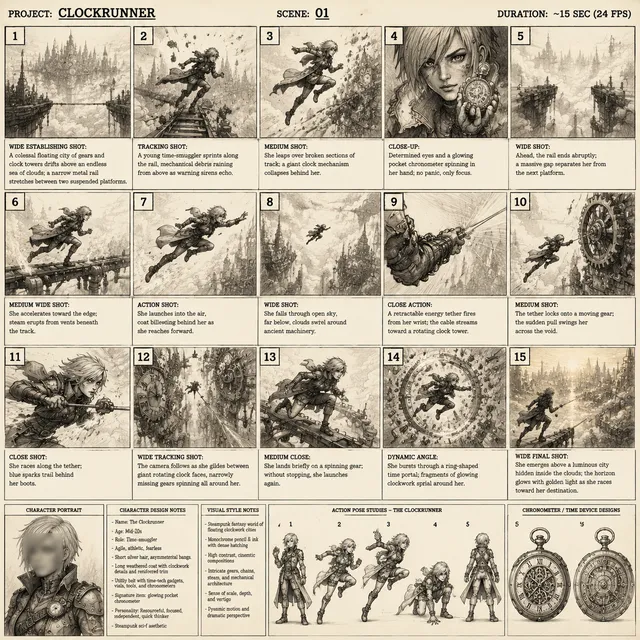

What is the Banana Pro AI Image Generator?
A text-to-image tool designed for generating high-quality, professional-style visuals. You describe the subject, style, and setting, then review and download the result for use in product design, marketing materials, or polished creative work.
Banana Pro AI Image Generator for Quality Visuals
Product Concept
Input
a sleek wireless earbud case with LED indicator, product photography style, clean background
Expected output
a product-style image of a glossy earbud case with a subtle LED glow on a clean surface
Professional Portrait
Input
a businesswoman in a navy blazer standing in a modern office, professional headshot style
Expected output
a professional portrait of a woman in a navy blazer in a bright modern office setting
Marketing Graphic
Input
a modern tech startup team collaborating at a whiteboard, bright professional lighting
Expected output
a professional scene of a team working together at a whiteboard in a bright office
Generate professional-quality visuals for product concepts, marketing materials, and polished creative work
Professional-Grade Generation
Generate polished, high-quality images suitable for professional use cases.
Versatile Output
Create product concepts, portraits, marketing visuals, and more from text descriptions.
Quick Visual Prototyping
Rapidly generate visual concepts without photoshoots or design software.
How It Works
1
Describe the image
Describe the desired image.
2
Adjust settings
Choose the available generation settings.
3
Generate and review
Generate, review, and download a suitable result.
Tips for Professional Results
Get higher-quality outputs with detailed prompts.
Input Constraints
- Describe the subject clearly and include style preferences
- Mention lighting, background, and composition for better results
- Keep prompts focused on a single main subject
Practical Tips
- Use terms like 'professional lighting' or 'clean background' for polished looks
- Mention the intended use — product photo, portrait, marketing — for context
- Review and regenerate to fine-tune the professional quality
Privacy
- Do not upload personal or sensitive material unless you have permission to use it.
Usage Rights
- Confirm that you have the rights needed for the inputs and intended use of the result.
Prompt recipes
Copy a structure, then adjust the subject, lighting, camera, and output details for your own result.
Product hero shot
A luxury watch on a marble surface with soft side lighting and a dark gradient background, product photography, high detail
Combines premium material cues with controlled lighting and minimal background to create a professional product showcase image.
Corporate headshot
A confident professional in a charcoal suit against a neutral gray background, studio portrait, natural expression, soft key light
Specifies attire, background, lighting style, and expression to produce a polished corporate portrait suitable for LinkedIn or company sites.
Tech product in use
Hands holding a sleek smartphone displaying a colorful app interface, close-up shot, soft focus background, natural daylight
Focuses on product interaction with human context while keeping attention on the device through composition and focus cues.
Marketing lifestyle scene
A family relaxing in a bright modern living room with natural light streaming through large windows, candid moment, warm tones
Combines setting, lighting, and emotional tone to create an authentic lifestyle image for marketing campaigns or brand storytelling.
Event keynote visual
A speaker presenting on stage with a large screen behind them showing a product logo, professional conference setting, dramatic stage lighting
Establishes context and atmosphere for a corporate event with clear subject, setting, and lighting to convey professionalism and scale.
Best use cases
Match the workflow to the input you have and the result you need before opening the generator.
Product concept visualization
Input: Detailed product description with lighting, material, and background notes
Result: High-quality product image for pitch decks or e-commerce drafts
Tool: Text to Image with 'product photography' or 'studio lighting' keywords
Marketing campaign visual
Input: Scene description with people, setting, mood, and brand context
Result: Professional lifestyle or brand image for ads or social media
Tool: Text to Image with 'lifestyle' or 'professional' style keywords
Corporate content asset
Input: Portrait or office scene with clear subject and neutral background
Result: Polished image for websites, presentations, or internal comms
Tool: Text to Image with 'portrait' or 'corporate' style keywords
Limitations to know before generating
- Professional quality is not guaranteed; review each result for appropriateness before use in client-facing materials
- Text within generated images is often unreadable and must be added separately
- Complex multi-subject scenes may not match professional composition standards on the first attempt
- Consistency across multiple generations is not guaranteed; document prompts that work well
- You are responsible for confirming usage rights and avoiding content that could infringe third-party intellectual property
Creative Suite: AI Video Generator & AI Image Generator Tools
Power up your creative workflow with our AI-driven tools. Generate stunning videos, create images, and apply custom adjustments - our AI Video Generator and AI Image Generator offer a complete solution for all your creative needs.
Strictly Prohibits Adult/NSFW Content








Pricing
Choose the credit package that works best for you.
No hidden fees • Cancel anytime • Unused credits roll over
Starter
Perfect for trying out AI creation.
Credits
200 credits / month
- Up to 20 videos per month
- Up to 100 images per month
$6.99/ month$9.9930% OFF
Billed monthly
First-time subscribers get 30% off their first month, then standard price
What's included
- Credits never expire
- Standard models
- HD, Watermark-Free Downloads
- Private Generation
- Faster Generation Speed
- Ad-free experience
Basic
Perfect for light creators.
Credits
500 credits / month
- Up to 50 videos per month
- Up to 250 images per month
$13.99/ month$19.9930% OFF
Billed monthly
First-time subscribers get 30% off their first month, then standard price
What's included
- Credits never expire
- Standard models
- HD, Watermark-Free Downloads
- Private Generation
- Faster Generation Speed
- Ad-free experience
Pro
PopularBest value for creators
Credits
1,200 credits / month
- Up to 120 videos per month
- Up to 600 images per month
$39.99/ month
Billed monthly
What's included
- Credits never expire
- All models + Early access to new models
- HD, Watermark-Free Downloads
- Private Generation
- Faster Generation Speed
- Ultra HD resolution
- Ad-free experience
Ultra
For video creators and power users.
Credits
5,000 credits / month
- Up to 500 videos per month
- Up to 2,500 images per month
$99.99/ month
Billed monthly
What's included
- Credits never expire
- All models + Early access to new models
- HD, Watermark-Free Downloads
- Private Generation
- Faster Generation Speed
- Ultra HD resolution
- Ad-free experience
Free
Standard models only — upgrade to unlock premium models.
Credits
10 free credits on signup
Questions? Contact us at support@domer.io
Use Banana Pro Generator
Open the generator, describe your professional image, and create it.