
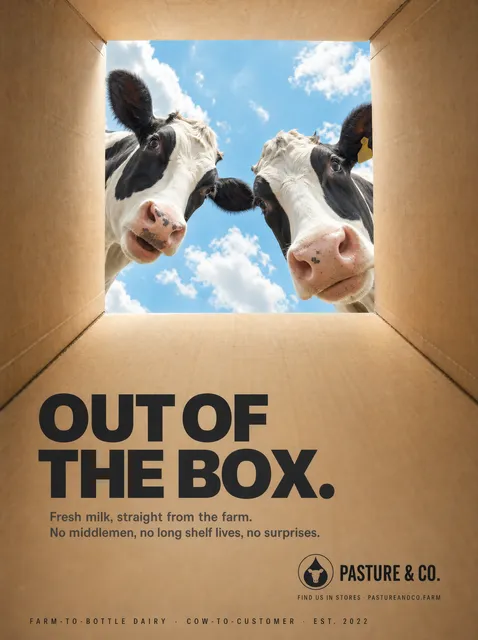
DALL E 3 AI Image Generator from Text
Describe what you want to see and generate an image. Write a prompt, choose settings, and get a visual result in moments.
AI Image Generator
0/20000 characters
My images
Loading...

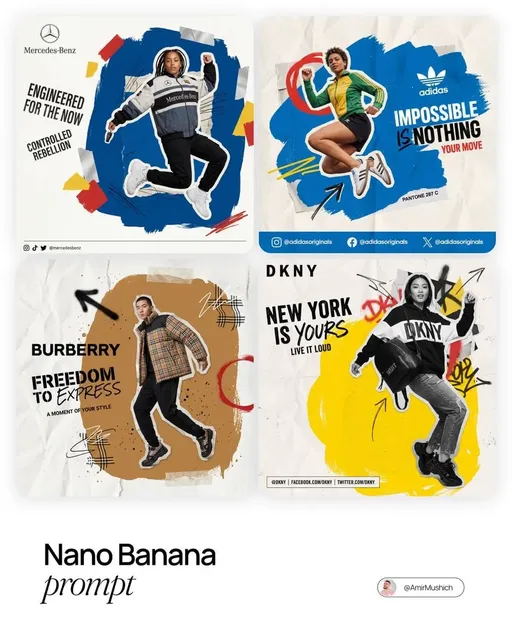
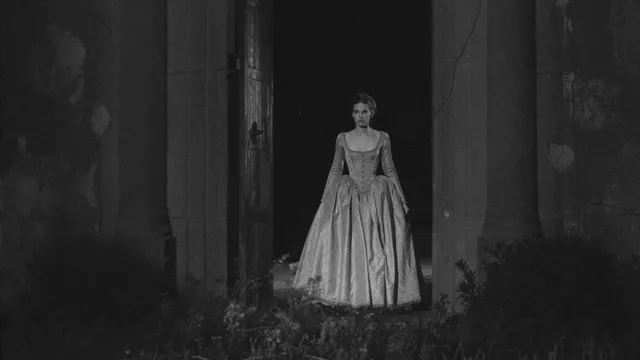
How does text-to-image generation work?
A text-to-image generator converts written descriptions into visual images. You provide a prompt with subject, setting, style, and mood details, and the tool produces a corresponding image based on your input.
DALL E 3 AI Image Generator from Text
Fantasy landscape
Input
A floating island with a single ancient tree, waterfalls cascading off the edges into clouds, soft golden sunset lighting
Expected output
A generated scene matching the floating island concept with the described lighting and water effects
Character portrait
Input
A medieval knight in weathered silver armor standing in a misty forest at dawn, holding a glowing blue sword
Expected output
A portrait-style image that reflects the described character and atmospheric setting
Interior design concept
Input
A cozy reading corner with a deep green armchair, a brass floor lamp, and floor-to-ceiling bookshelves in warm wood tones
Expected output
A generated interior image matching the described furniture arrangement and color palette
Generate images from text descriptions using an AI-powered tool
Text-driven generation
Describe what you want to see in plain language and the tool produces an image based on your description.
Adjustable prompts
Refine your prompt to change the scene, style, or details and generate a new version without starting over.
Broad subject range
Create images of landscapes, characters, objects, interiors, and conceptual scenes from descriptive text.
How It Works
1
Describe the desired image.
Describe the desired image.
2
Choose the available generation settings.
Choose the available generation settings.
3
Generate, review, and download a suitable result.
Generate, review, and download a suitable result.
Writing effective image prompts
Clear, structured descriptions produce more predictable results.
Input Constraints
- Start with the main subject, then add environment, lighting, and style details
- Avoid negations like 'no shadows' — describe what you want instead of what you do not
- Keep descriptions focused on visual elements rather than abstract concepts
Practical Tips
- Mention the dominant colors and lighting conditions for more consistent output
- Use descriptive but concise language — short prompts often work as well as long ones
- If the output is not what you expected, adjust one element at a time and regenerate
Privacy
- Do not upload personal or sensitive material unless you have permission to use it.
Usage Rights
- Confirm that you have the rights needed for the inputs and intended use of the result.
Prompt recipes
Copy a structure, then adjust the subject, lighting, camera, and output details for your own result.
Fantasy character in environment
An elven archer with silver hair and green cloak crouched on a moss-covered branch, misty ancient forest, shafts of sunlight breaking through the canopy, digital illustration style
Combines character detail with environmental storytelling and atmospheric lighting for a cohesive fantasy scene.
Modern interior visualization
A minimalist living room with white walls, a gray L-shaped sofa, a geometric rug, and large windows overlooking a city skyline at dusk, architectural photography style
Specific furniture, color palette, and architectural style cues produce a realistic interior rendering.
Dramatic landscape with weather
A lighthouse on a rocky cliff during a storm, crashing waves, dark clouds lit by flashes of lightning, moody and dramatic atmosphere, cinematic wide shot
Strong weather and lighting elements create a visually dynamic scene with clear mood and composition.
Product in natural setting
A ceramic coffee mug with a mountain scene painted on it, sitting on a wooden dock by a calm lake at sunrise, warm natural lighting, shallow focus
Product integrated into a natural environment with specific lighting and depth cues produces an appealing lifestyle shot.
Conceptual abstract image
Flowing ribbons of light in gold and deep blue intertwining in space, particle effects, sense of motion, ethereal and dreamlike, digital art
Abstract subject with color, motion, and mood descriptors guides the tool toward a non-representational result with emotional tone.
Best use cases
Match the workflow to the input you have and the result you need before opening the generator.
Story or game concept art
Input: Character or scene descriptions with setting and mood
Result: Narrative visuals that support world-building
Tool: /text-to-image
Social media and blog graphics
Input: Simple, striking subjects with clear visual direction
Result: Eye-catching images for posts or articles
Tool: /text-to-image
Interior or product visualization
Input: Specific object or space descriptions with color and lighting
Result: Realistic or stylized visuals for design concepts
Tool: /text-to-image
Abstract or artistic exploration
Input: Color, mood, and texture descriptions without concrete subjects
Result: Non-representational images for creative or decorative use
Tool: /text-to-image
Limitations to know before generating
- Output depends on how the tool interprets your prompt; ambiguous or conflicting descriptions may produce unexpected results
- Fine details like text, intricate patterns, or precise anatomy may need human review and correction
- Niche or highly specific visual styles may not match professional reference material without iteration
- Generated images should be reviewed for suitability before use in any project
- Rights and usage permissions vary; confirm you have the necessary rights for your intended application
Creative Suite: AI Video Generator & AI Image Generator Tools
Power up your creative workflow with our AI-driven tools. Generate stunning videos, create images, and apply custom adjustments - our AI Video Generator and AI Image Generator offer a complete solution for all your creative needs.
Strictly Prohibits Adult/NSFW Content








Pricing
Choose the credit package that works best for you.
No hidden fees • Cancel anytime • Unused credits roll over
Starter
Perfect for trying out AI creation.
Credits
200 credits / month
- Up to 20 videos per month
- Up to 100 images per month
$6.99/ month$9.9930% OFF
Billed monthly
First-time subscribers get 30% off their first month, then standard price
What's included
- Credits never expire
- Standard models
- HD, Watermark-Free Downloads
- Private Generation
- Faster Generation Speed
- Ad-free experience
Basic
Perfect for light creators.
Credits
500 credits / month
- Up to 50 videos per month
- Up to 250 images per month
$13.99/ month$19.9930% OFF
Billed monthly
First-time subscribers get 30% off their first month, then standard price
What's included
- Credits never expire
- Standard models
- HD, Watermark-Free Downloads
- Private Generation
- Faster Generation Speed
- Ad-free experience
Pro
PopularBest value for creators
Credits
1,200 credits / month
- Up to 120 videos per month
- Up to 600 images per month
$39.99/ month
Billed monthly
What's included
- Credits never expire
- All models + Early access to new models
- HD, Watermark-Free Downloads
- Private Generation
- Faster Generation Speed
- Ultra HD resolution
- Ad-free experience
Ultra
For video creators and power users.
Credits
5,000 credits / month
- Up to 500 videos per month
- Up to 2,500 images per month
$99.99/ month
Billed monthly
What's included
- Credits never expire
- All models + Early access to new models
- HD, Watermark-Free Downloads
- Private Generation
- Faster Generation Speed
- Ultra HD resolution
- Ad-free experience
Free
Standard models only — upgrade to unlock premium models.
Credits
10 free credits on signup
Questions? Contact us at support@domer.io
Start creating from text
Describe the image you have in mind and let the tool generate it for you.