
Fantasy AI Photo Generator
Use fantasy ai photo generator to generate fantasy images from text prompts. Describe mythical creatures, enchanted forests, or magical characters and create.
AI Image Generator
0/20000 characters
My images
Loading...


What is a fantasy AI photo generator?
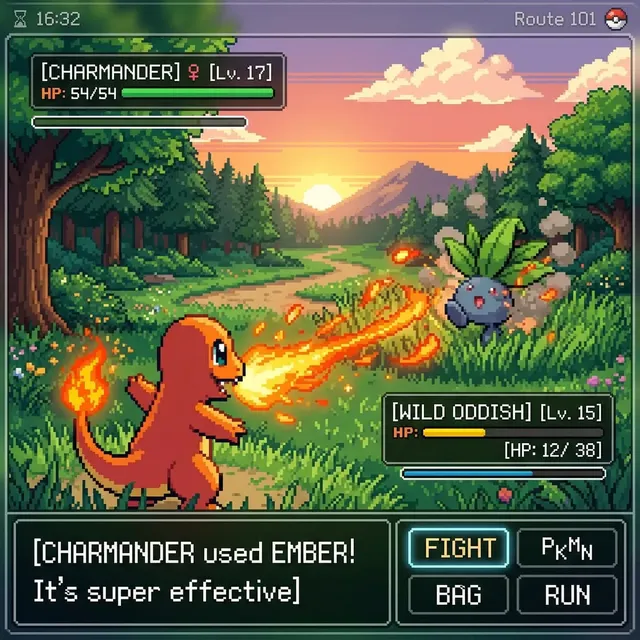
A fantasy AI photo generator turns text descriptions into fantasy-themed images. Describe a mythical creature, enchanted setting, or magical character in natural language, choose your generation settings, and the tool produces a visual result you can review and download. It lets you create fantasy artwork without drawing or 3D modeling skills.
Fantasy AI Photo Generator
Mythical creature scene
Input
A silver unicorn drinking from a glowing crystal-clear stream in an ancient forest with fireflies and bioluminescent plants
Expected output
A fantasy scene with a mythical horse figure, luminous water, forest setting with floating light particles and glowing flora
Enchanted forest landscape
Input
A winding path through a magical forest with glowing mushrooms, hanging vines with flowers, blue and purple colour palette, mist
Expected output
An enchanted forest scene with a visible path, glowing ground elements, saturated cool colours, and atmospheric mist
Fantasy character portrait
Input
An elven archer in green and gold armour with a longbow, pointed ears visible, standing on a stone bridge over a waterfall
Expected output
A fantasy character portrait with detailed armour, elven features, dramatic waterfall setting, and rich green and gold tones
Generate fantasy-themed images from text descriptions—mythical creatures, enchanted landscapes, and magical scenes brought to life through words.
Bring fantasy concepts to life
Describe magical scenes, creatures, and characters in natural language without artistic skills.
Explore different fantasy genres
Generate visuals across fantasy subgenres from high fantasy and dark fantasy to whimsical fairy-tale scenes.
No reference images needed
Describe original creatures, settings, and characters purely through text descriptions.
How It Works
1
Step 1
Describe the desired image.
2
Step 2
Choose the available generation settings.
3
Step 3
Generate, review, and download a suitable result.
Tips for better results
Follow these guidelines to get the most out of the image generation tool.
Input Constraints
- Describe the subject, setting, and mood clearly.
- Use specific visual details rather than vague terms.
- Keep prompts focused on one main scene or concept.
Practical Tips
- Start with a simple prompt and add details gradually.
- Adjust one generation setting at a time to see its effect.
- Review each result and note what you would change.
- Use descriptive colours, lighting, and texture terms.
- Try different style keywords to explore visual directions.
Privacy
- Do not upload personal or sensitive material unless you have permission to use it.
Usage Rights
- Confirm that you have the rights needed for the inputs and intended use of the result.
Prompt recipes
Copy a structure, then adjust the subject, lighting, camera, and output details for your own result.
Mythical beast in natural habitat
A majestic griffin with golden feathers and lion body perched on a cliff edge at sunrise, mountains in the distance, warm orange light, detailed feathers and fur texture
Combines a specific creature with clear environment, lighting, and texture details that guide the visual outcome toward a dramatic nature scene.
Dark fantasy castle scene
A towering gothic castle on a stormy cliff, lightning illuminating dark stone walls, twisted dead trees in the foreground, purple and grey stormy sky, ominous mood
Sets a clear dark fantasy tone with specific architectural elements, weather conditions, and color palette that create atmosphere.
Magical forest clearing
A hidden forest glade with a crystal-clear pool, glowing flowers along the water's edge, shafts of golden sunlight through the canopy, butterflies with iridescent wings, peaceful atmosphere
Focuses on light, color, and specific magical elements that create a cohesive enchanted setting without overwhelming detail.
Fantasy character in action
A fierce warrior with silver armor and flowing red cape wielding a flaming sword, mid-battle stance on a rocky battlefield, sparks and embers in the air, dramatic side lighting
Describes action, costume, weapon, and environment with specific visual cues that produce a dynamic character scene.
Underwater fantasy realm
An underwater city with coral spires and glass domes, schools of colorful fish swimming between buildings, merfolk in the foreground, rays of sunlight filtering through the water, blue and turquoise tones
Establishes a unique fantasy setting with clear structural elements, inhabitants, lighting, and color scheme for a coherent underwater world.
Best use cases
Match the workflow to the input you have and the result you need before opening the generator.
Book cover or story illustration
Input: Detailed scene description matching a key story moment with specific characters and setting
Result: A narrative-driven fantasy image that captures the mood and key elements of your story
Tool: /text-to-image with detailed prompt including character appearance, setting, and atmosphere
Character concept art for games or RPGs
Input: Character description including race, costume, weapon, pose, and personality traits
Result: A character portrait or full-body design suitable for reference or presentation
Tool: /text-to-image with focus on costume details, stance, and distinctive visual traits
Fantasy landscape for world-building
Input: Location description with terrain features, magical elements, lighting, and mood
Result: An environmental concept showing the unique features of your fantasy world
Tool: /text-to-image with emphasis on landscape composition, color palette, and atmospheric effects
Social media or blog artwork
Input: Eye-catching fantasy subject with strong visual contrast and clear focal point
Result: A shareable fantasy image that draws attention and fits your content theme
Tool: /text-to-image with clear subject, vivid colors, and simple but striking composition
Limitations to know before generating
- Generated images may not match your mental picture exactly and often require prompt refinement.
- Complex multi-character scenes or intricate architectural details may not render with full accuracy.
- Text, runes, or symbols in the image may appear as decorative marks rather than readable content.
- Consistent character appearance across multiple generations is difficult without additional reference tools.
- Review each result for visual coherence, especially in complex fantasy scenes with multiple elements.
- Ensure generated content respects intellectual property if your prompt references established fantasy works.
Creative Suite: AI Video Generator & AI Image Generator Tools
Power up your creative workflow with our AI-driven tools. Generate stunning videos, create images, and apply custom adjustments - our AI Video Generator and AI Image Generator offer a complete solution for all your creative needs.
Strictly Prohibits Adult/NSFW Content








Pricing
Choose the credit package that works best for you.
No hidden fees • Cancel anytime • Unused credits roll over
Starter
Perfect for trying out AI creation.
Credits
200 credits / month
- Up to 20 videos per month
- Up to 100 images per month
$6.99/ month$9.9930% OFF
Billed monthly
First-time subscribers get 30% off their first month, then standard price
What's included
- Credits never expire
- Standard models
- HD, Watermark-Free Downloads
- Private Generation
- Faster Generation Speed
- Ad-free experience
Basic
Perfect for light creators.
Credits
500 credits / month
- Up to 50 videos per month
- Up to 250 images per month
$13.99/ month$19.9930% OFF
Billed monthly
First-time subscribers get 30% off their first month, then standard price
What's included
- Credits never expire
- Standard models
- HD, Watermark-Free Downloads
- Private Generation
- Faster Generation Speed
- Ad-free experience
Pro
PopularBest value for creators
Credits
1,200 credits / month
- Up to 120 videos per month
- Up to 600 images per month
$39.99/ month
Billed monthly
What's included
- Credits never expire
- All models + Early access to new models
- HD, Watermark-Free Downloads
- Private Generation
- Faster Generation Speed
- Ultra HD resolution
- Ad-free experience
Ultra
For video creators and power users.
Credits
5,000 credits / month
- Up to 500 videos per month
- Up to 2,500 images per month
$99.99/ month
Billed monthly
What's included
- Credits never expire
- All models + Early access to new models
- HD, Watermark-Free Downloads
- Private Generation
- Faster Generation Speed
- Ultra HD resolution
- Ad-free experience
Free
Standard models only — upgrade to unlock premium models.
Credits
10 free credits on signup
Questions? Contact us at support@domer.io
Ready to generate your images?
Open the /text-to-image tool, describe your scene, and start creating visuals from your imagination.