
High End AI Image Generator for Polished Visuals
Use high end ai image generator to create polished visuals by writing precise prompts that name subject, lighting, and style, then reviewing and refining.
AI Image Generator
0/20000 characters
My images
Loading...

What is a high end AI image generator?
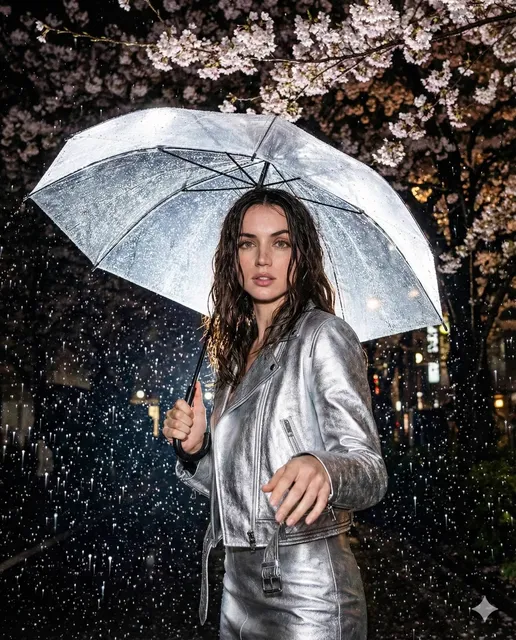
A high end AI image generator produces polished visuals from precise text descriptions. You describe the subject, lighting, composition, and style in detail, generate multiple variants, and compare them side by side to find the result that matches your brief. Quality comes from writing specific prompts, reviewing each result critically, and iterating until the image meets your standard.
High End AI Image Generator for Polished Visuals
Product hero shot
Input
A minimalist ceramic mug on a marble surface, soft morning light, shallow depth of field
Expected output
A clean, well-lit product-style image with smooth shadows and a neutral background.
Editorial portrait
Input
A studio portrait of a woman in a tailored blazer, dramatic side lighting, muted tones
Expected output
A refined portrait with controlled lighting and a professional editorial feel.
Abstract backdrop
Input
Flowing iridescent silk in deep teal and gold, macro detail, high contrast
Expected output
A vivid abstract texture that works as a design background.
Turn precise text prompts into polished visuals by describing subject, lighting, and style, then reviewing and refining until the result matches your brief.
Detailed prompts, focused output
Describe the subject, lighting, and style you want so the result stays close to your brief instead of leaving it to chance.
Iterate without starting over
Tweak your wording or settings and generate again until the image matches what you pictured.
Review before you download
Check each result against your intent and keep only the variants that earn a place in your project.
How It Works
1
Describe the image
Describe the desired image.
2
Pick your settings
Choose the available generation settings.
3
Generate and review
Generate, review, and download a suitable result.
Getting polished results
Small, specific prompt changes often improve the output more than longer descriptions.
Input Constraints
- Keep your prompt specific about subject, lighting, and style.
- Avoid requesting real people or copyrighted characters.
- Plan to generate several variants and compare them.
- Treat every result as a draft to review, not a final asset.
Practical Tips
- Name a concrete subject and setting first, then add mood.
- Mention lighting, such as soft, dramatic, or golden hour, to steer the look.
- Reference an art direction like editorial, cinematic, or minimal.
- Add composition cues if a specific aspect ratio matters to your layout.
Privacy
- Do not upload personal or sensitive material unless you have permission to use it.
Usage Rights
- Confirm that you have the rights needed for the inputs and intended use of the result.
Prompt recipes
Copy a structure, then adjust the subject, lighting, camera, and output details for your own result.
Luxury product shot with dramatic lighting
High-end perfume bottle on black marble surface, dramatic side lighting creating sharp shadows, gold accents catching light, deep black background, commercial product photography
Specifies premium materials, controlled lighting, and commercial photography style to produce a polished, high-value product image.
Editorial fashion portrait with mood lighting
Close-up portrait of a model in a black turtleneck, dramatic side lighting from the right, muted color grading, clean minimal background, editorial fashion photography
Names lighting direction, color treatment, and editorial style to create a refined portrait with professional mood and composition.
Minimalist interior scene with natural light
Modern minimalist living room with large windows, soft natural morning light, white walls, beige linen sofa, single green plant, clean and airy aesthetic, architectural photography
Describes minimal composition, natural lighting, and architectural style to produce a clean, polished interior scene suitable for design portfolios.
Abstract background with gradient and texture
Smooth gradient background from deep navy to soft pink, subtle noise texture, elegant and understated, horizontal format, suitable for text overlay
Specifies color transitions, texture, and intended use to create a refined abstract backdrop ready for design layering.
Food styling with hero lighting and composition
Gourmet plated dish on white porcelain, single spotlight from above, shallow depth of field, garnish in sharp focus, clean white background, fine dining food photography
Names lighting setup, focus area, and fine dining context to produce a polished food image with professional styling.
Atmospheric landscape with cinematic mood
Misty mountain valley at dawn, soft diffused light breaking through clouds, muted color palette, cinematic wide-angle composition, atmospheric landscape photography
Combines atmospheric elements, cinematic framing, and muted tones to create a polished, mood-driven landscape image.
Best use cases
Match the workflow to the input you have and the result you need before opening the generator.
Premium product marketing imagery
Input: Product name, luxury materials, dramatic lighting, commercial photography style
Result: A polished product image with controlled lighting and professional composition suitable for high-end marketing
Tool: Text to Image with commercial photography keywords, premium materials, and dramatic lighting
Editorial or fashion portfolio portraits
Input: Subject description, clothing style, lighting direction, mood, editorial keywords
Result: A refined portrait with professional lighting and composition suitable for portfolios or publications
Tool: Text to Image with editorial fashion photography style, lighting setup, and muted or dramatic mood
Design backgrounds and abstract textures
Input: Color palette, gradient or pattern, texture description, intended use context
Result: A polished abstract or textured background ready for layering in design projects
Tool: Text to Image with gradient, texture, and color keywords, horizontal or square format
Architectural or interior showcase images
Input: Space description, lighting type, style keywords like minimalist or modern, architectural photography
Result: A clean, polished interior or architectural image suitable for design portfolios or presentations
Tool: Text to Image with architectural photography style, natural or studio lighting, and minimalist or modern keywords
Limitations to know before generating
- Generated images are starting points; plan for editing and refinement to meet production standards.
- Polished results require multiple iterations and critical review; the first generation is rarely the final choice.
- Text rendering and fine typography are unreliable; avoid expecting readable text in generated images.
- Exact material replication and physical accuracy vary; use results as concepts rather than photorealistic representations.
- Resolution and aspect ratio depend on available settings; check options before generating and plan for upscaling if needed.
Creative Suite: AI Video Generator & AI Image Generator Tools
Power up your creative workflow with our AI-driven tools. Generate stunning videos, create images, and apply custom adjustments - our AI Video Generator and AI Image Generator offer a complete solution for all your creative needs.
Strictly Prohibits Adult/NSFW Content








Pricing
Choose the credit package that works best for you.
No hidden fees • Cancel anytime • Unused credits roll over
Starter
Perfect for trying out AI creation.
Credits
200 credits / month
- Up to 20 videos per month
- Up to 100 images per month
$6.99/ month$9.9930% OFF
Billed monthly
First-time subscribers get 30% off their first month, then standard price
What's included
- Credits never expire
- Standard models
- HD, Watermark-Free Downloads
- Private Generation
- Faster Generation Speed
- Ad-free experience
Basic
Perfect for light creators.
Credits
500 credits / month
- Up to 50 videos per month
- Up to 250 images per month
$13.99/ month$19.9930% OFF
Billed monthly
First-time subscribers get 30% off their first month, then standard price
What's included
- Credits never expire
- Standard models
- HD, Watermark-Free Downloads
- Private Generation
- Faster Generation Speed
- Ad-free experience
Pro
PopularBest value for creators
Credits
1,200 credits / month
- Up to 120 videos per month
- Up to 600 images per month
$39.99/ month
Billed monthly
What's included
- Credits never expire
- All models + Early access to new models
- HD, Watermark-Free Downloads
- Private Generation
- Faster Generation Speed
- Ultra HD resolution
- Ad-free experience
Ultra
For video creators and power users.
Credits
5,000 credits / month
- Up to 500 videos per month
- Up to 2,500 images per month
$99.99/ month
Billed monthly
What's included
- Credits never expire
- All models + Early access to new models
- HD, Watermark-Free Downloads
- Private Generation
- Faster Generation Speed
- Ultra HD resolution
- Ad-free experience
Free
Standard models only — upgrade to unlock premium models.
Credits
10 free credits on signup
Questions? Contact us at support@domer.io
Start your next polished image
Describe what you need and generate refined visuals you can review, compare, and download.