
AI 3D Image Editor: Add Depth to Photos
Use ai 3d image editor to upload an image, describe depth or 3D-style edits, review the result, and download the version that fits your project.
AI Image Generator
0/20000 characters
0 / 16
or select from
or select from(Optional)
or select from(Optional)
or select from(Optional)
or select from(Optional)
or select from(Optional)
or select from(Optional)
or select from(Optional)
or select from(Optional)
Supports PNG, JPG, WebP
My images
Loading...
How does an ai 3d image editor add depth to photos?
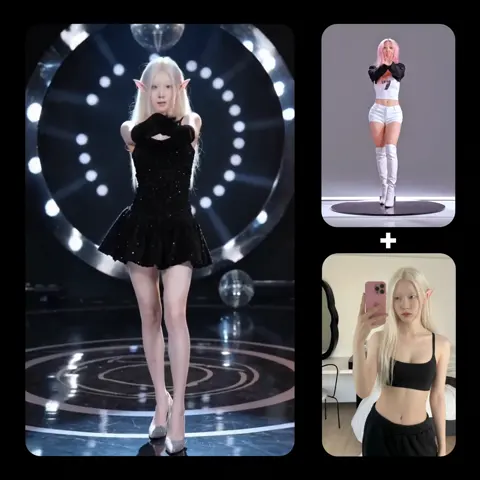
An ai 3d image editor applies depth cues, layered separation, or stylized 3D visual treatment to a flat source image. You upload an image and describe the type of dimensional look you want—subtle depth, layered scene elements, or a stylized 3D character or product rendering. The tool processes the image and creates a version with the requested dimensional treatment. Review the result to confirm it achieves the intended depth effect without losing important details before using it.
AI 3D Image Editor: Add Depth to Photos
Product with dimensional depth
Input
Upload a flat product photo, then request a dimensional look with softer shadows, visible layers, and more depth in the scene.
Expected output
A product image with a dimensional appearance and enhanced depth cues, ready to review for realism and visual appeal.
Portrait to 3D character style
Input
Upload a portrait photo, then request a stylized 3D character look with rounded forms while keeping the person recognizable.
Expected output
A stylized 3D character version of the portrait with simplified shapes, to review for likeness before using as an avatar or illustration.
Landscape with separated layers
Input
Upload a landscape photo, then request visible depth between the hills, trees, and sky layers.
Expected output
A layered landscape version with enhanced separation and depth cues, ready to compare with the original for visual effectiveness.
Transform a flat source image into a visual with dimensional appearance by adding depth cues, layered elements, or stylized 3D treatment, then review the result before use.
Add depth to flat images
Transform a standard 2D photo into a visual with dimensional appearance without shooting in 3D or using complex 3D modeling software.
Explore stylized 3D looks
Apply 3D character styling, product rendering treatments, or layered scene effects to existing photos to match specific visual branding or creative directions.
Review dimensional results
Compare the 3D-treated version with the original to confirm that the depth effect enhances the image without losing important subject details.
How It Works
1
Upload the image you want to refine
Start with an image you have the right to edit.
2
Describe the profile-picture changes you want
Keep the requested edits specific so the intended profile look is clear.
3
Generate, compare, and download
Review the output for likeness, accuracy, and the final profile crop before using it.
Requesting dimensional edits that stay clear
A clear source image and a specific description of the dimensional effect you want help you get useful results without over-processing.
Input Constraints
- Only upload images you have permission to edit and use.
- Keep the requested changes focused on the profile-picture outcome you need.
- Review the final image for likeness and context before sharing it.
Practical Tips
- Use a source image with a visible face and enough detail around the subject.
- Ask for one or two concrete changes, such as a neutral background or a square crop.
- Compare the result with the original image before choosing a version to use.
Privacy
- Do not upload personal or sensitive material unless you have permission to use it.
Usage Rights
- Confirm that you have the rights needed for the inputs and intended use of the result.
Prompt recipes
Copy a structure, then adjust the subject, lighting, camera, and output details for your own result.
Subtle product depth enhancement
Add subtle 3D depth to this product photo with enhanced shadows, visible edge separation, and a slight sense of volume, keep the overall look realistic and natural.
Enhances product presentation without making it look overly stylized, useful for ecommerce where you want to show dimension while maintaining photographic realism.
Layered landscape depth
Separate this landscape into visible depth layers with the foreground, midground, and background clearly distinguished, add atmospheric perspective and depth haze to distant elements.
Creates a stronger sense of space and scale in landscape photos, making flat scenes feel more immersive for travel or nature content.
3D character avatar style
Transform this portrait into a 3D character style with simplified rounded shapes, smooth surfaces, and cartoon-like dimensional features while keeping the person recognizable.
Creates a distinctive avatar or profile picture style that stands out on social platforms while maintaining enough likeness for recognition.
Architectural depth visualization
Add clear depth and dimensional layering to this building photo with enhanced perspective, visible planes at different depths, and stronger separation between structural elements.
Helps viewers understand the three-dimensional form of architectural subjects, useful for design portfolios or real estate presentations.
Product render style
Transform this product photo into a 3D render style with smooth surfaces, perfect edges, studio-quality depth and lighting, while maintaining the product's recognizable features.
Creates a polished, high-end product presentation that looks like professional 3D rendering without the time and cost of actual 3D modeling.
Pop-out dimensional effect
Apply a pop-out 3D effect where the main subject appears to come forward from the background, add depth separation, slight shadow beneath the subject, keep colors and details intact.
Draws attention to the main subject by creating visual depth that makes it stand out, useful for social media posts or advertising where you want immediate visual impact.
Best use cases
Match the workflow to the input you have and the result you need before opening the generator.
Enhanced product presentation
Input: Clear product photo, describe subtle depth enhancement with realistic shadows and edge separation
Result: Product image with enhanced dimensional appearance while maintaining photographic realism
Tool: Image to Image with depth and shadow enhancement
3D avatar or character creation
Input: Portrait photo, describe 3D character style with simplified shapes while keeping likeness
Result: Stylized 3D character version suitable for avatars, profiles, or illustration use
Tool: Image to Image with 3D character style transformation
Landscape depth enhancement
Input: Landscape or scene photo, describe layer separation and atmospheric depth
Result: Scene with enhanced depth perception through visible layering and atmospheric effects
Tool: Image to Image with layer separation and depth haze
Professional 3D render look
Input: Product or architectural photo, describe 3D render style with smooth surfaces and perfect lighting
Result: Image that looks like professional 3D rendering without actual 3D modeling work
Tool: Image to Image with 3D render style transformation
Limitations to know before generating
- Adding 3D depth to flat images can create artifacts or unnatural edges in complex scenes—review carefully to ensure the result looks intentional.
- Stylized 3D character transformations may change facial features or proportions in unexpected ways—always review for likeness before using as a profile picture.
- Depth effects work best on images with clear subject-background separation—busy or cluttered compositions may not produce clean dimensional results.
- The tool cannot create true 3D models or multi-angle views—it applies dimensional styling to a single flat image.
- Complex lighting or reflections in the source image may not translate well to dimensional treatments—simpler lighting usually produces cleaner results.
- AI-generated dimensional effects should be reviewed for realism and appropriateness before use in professional or commercial contexts.
Creative Suite: AI Video Generator & AI Image Generator Tools
Power up your creative workflow with our AI-driven tools. Generate stunning videos, create images, and apply custom adjustments - our AI Video Generator and AI Image Generator offer a complete solution for all your creative needs.
Strictly Prohibits Adult/NSFW Content








Pricing
Choose the credit package that works best for you.
No hidden fees • Cancel anytime • Unused credits roll over
Starter
Perfect for trying out AI creation.
Credits
200 credits / month
- Up to 20 videos per month
- Up to 100 images per month
$6.99/ month$9.9930% OFF
Billed monthly
First-time subscribers get 30% off their first month, then standard price
What's included
- Credits never expire
- Standard models
- HD, Watermark-Free Downloads
- Private Generation
- Faster Generation Speed
- Ad-free experience
Basic
Perfect for light creators.
Credits
500 credits / month
- Up to 50 videos per month
- Up to 250 images per month
$13.99/ month$19.9930% OFF
Billed monthly
First-time subscribers get 30% off their first month, then standard price
What's included
- Credits never expire
- Standard models
- HD, Watermark-Free Downloads
- Private Generation
- Faster Generation Speed
- Ad-free experience
Pro
PopularBest value for creators
Credits
1,200 credits / month
- Up to 120 videos per month
- Up to 600 images per month
$39.99/ month
Billed monthly
What's included
- Credits never expire
- All models + Early access to new models
- HD, Watermark-Free Downloads
- Private Generation
- Faster Generation Speed
- Ultra HD resolution
- Ad-free experience
Ultra
For video creators and power users.
Credits
5,000 credits / month
- Up to 500 videos per month
- Up to 2,500 images per month
$99.99/ month
Billed monthly
What's included
- Credits never expire
- All models + Early access to new models
- HD, Watermark-Free Downloads
- Private Generation
- Faster Generation Speed
- Ultra HD resolution
- Ad-free experience
Free
Standard models only — upgrade to unlock premium models.
Credits
10 free credits on signup
Questions? Contact us at support@domer.io
Turn your source image into a profile-ready version
Open Image to Image, upload an image you can edit, and review the result before you decide to use it.