

AI Hair Color Photo Editor for Realistic Shade Changes
Use ai hair color photo editor to upload a portrait, describe the hair color you want, and review the result to see how the shade looks before committing.
AI Image Generator
0/20000 characters
0 / 16
or select from
or select from(Optional)
or select from(Optional)
or select from(Optional)
or select from(Optional)
or select from(Optional)
or select from(Optional)
or select from(Optional)
or select from(Optional)
Supports PNG, JPG, WebP
My images
Loading...
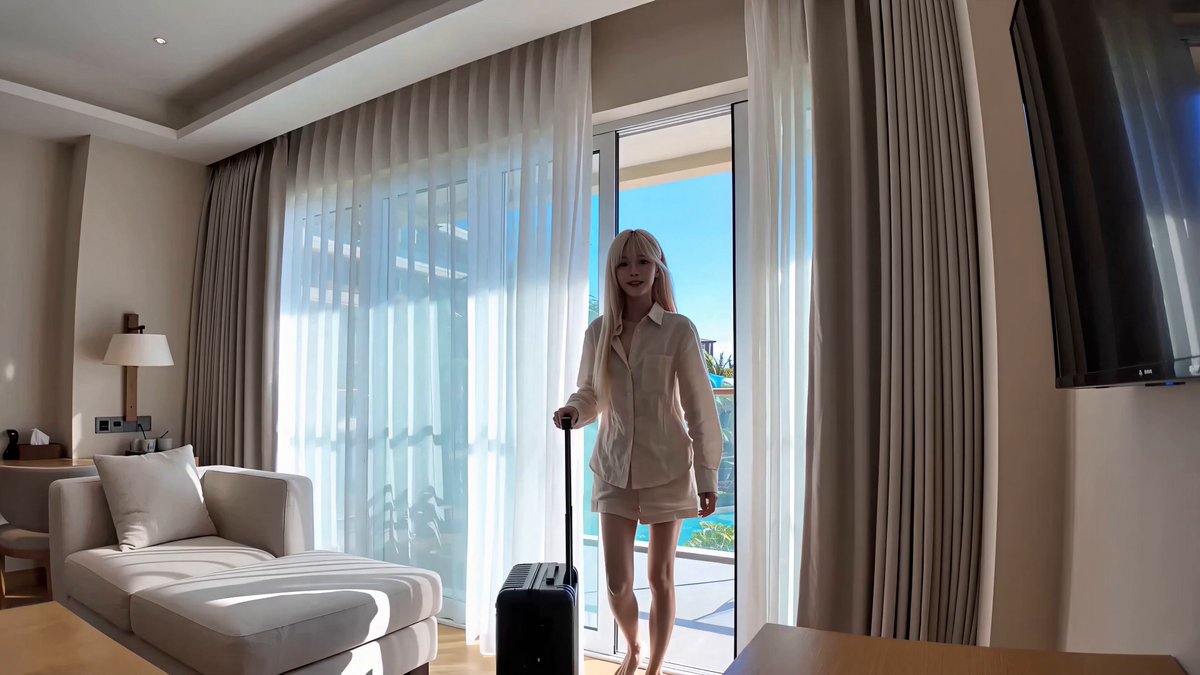
What does an AI hair color photo editor do?
An AI hair color photo editor takes a portrait you upload, applies the hair-color change you describe—such as platinum blonde, burgundy, or chestnut brown—and generates a preview version for you to review before making a salon appointment or final decision.
AI Hair Color Photo Editor for Realistic Shade Changes
Salon preview
Input
Upload a portrait with visible hair detail and request chestnut brown with natural highlights blended into the original lighting.
Expected output
A version of the portrait where the hair appears chestnut brown with highlights that follow the original lighting. Review the edited result for shade accuracy before deciding.
Creative restyle
Input
Upload a portrait and ask for a burgundy hair color while keeping the rest of the frame unchanged.
Expected output
A transformed portrait where only the hair color shifts to burgundy, retaining the original pose and shadows. Review the edited result for mood and fit before using it.
Moodboard test
Input
Upload a portrait and request platinum blonde hair, preserving the original pose and lighting.
Expected output
A variant of the portrait with platinum blonde hair that keeps the original composition. Review the edited result for contrast and style before sharing.
Preview a hair-color change on a source portrait by describing the shade you want, then review the output before deciding to use it.
Start with your own image
Use an image you have permission to edit instead of recreating the subject from a text-only description.
Direct the changes
State the framing, background, and style you want, then compare the result with the original image.
Choose before you use it
Review the edited image for likeness, context, and crop before downloading or posting it.
How It Works
1
Upload the image you want to refine
Start with an image you have the right to edit.
2
Describe the profile-picture changes you want
Keep the requested edits specific so the intended profile look is clear.
3
Generate, compare, and download
Review the output for likeness, accuracy, and the final profile crop before using it.
Making a profile-picture edit that stays clear
A clear source image and a focused edit request make it easier to judge the result.
Input Constraints
- Only upload images you have permission to edit and use.
- Keep the requested changes focused on the profile-picture outcome you need.
- Review the final image for likeness and context before sharing it.
Practical Tips
- Use a source image with a visible face and enough detail around the subject.
- Ask for one or two concrete changes, such as a neutral background or a square crop.
- Compare the result with the original image before choosing a version to use.
Privacy
- Do not upload personal or sensitive material unless you have permission to use it.
Usage Rights
- Confirm that you have the rights needed for the inputs and intended use of the result.
Prompt recipes
Copy a structure, then adjust the subject, lighting, camera, and output details for your own result.
Salon consultation preview
Upload a well-lit portrait with visible hair texture. Request a specific shade like caramel balayage or ash brown, asking the tool to preserve natural highlights and original lighting.
Helps visualize a salon color before booking, reducing the risk of dissatisfaction and making consultation conversations more concrete.
Bold color experiment
Upload a portrait and ask for a vivid shade like rose gold, electric blue, or lavender, while keeping skin tones and background unchanged.
Lets you test a bold or unconventional hair color risk-free, useful for creative portfolios, cosplay planning, or social-media experiments.
Natural shade comparison
Upload a portrait and request two variations: one with honey blonde and one with dark chocolate brown, both with natural shading.
Allows side-by-side comparison of natural shades to decide which complements your skin tone and personal style before dyeing.
Gray coverage preview
Upload a portrait showing gray roots or sections. Request a full-coverage shade like soft black or chestnut that blends with your natural color.
Visualizes how a gray-coverage dye will look, helping you choose a shade that blends naturally with your existing hair.
Seasonal color refresh
Upload a current portrait and request a warmer autumn shade like copper or auburn, or a cooler winter tone like icy platinum.
Tests seasonal color trends to see which matches your wardrobe and personal brand before committing to a temporary or permanent dye.
Best use cases
Match the workflow to the input you have and the result you need before opening the generator.
Preview a salon color before booking
Input: A well-lit portrait with visible hair texture and simple background
Result: A realistic preview of the requested hair shade with natural highlights
Tool: Image to Image
Test a bold or creative hair color
Input: A portrait with clear hair detail and neutral background
Result: A version with vivid or unconventional hair color for creative use
Tool: Image to Image
Compare natural shades side by side
Input: A portrait with even lighting and visible hair length
Result: Multiple versions with different natural shades for comparison
Tool: Image to Image
Visualize gray coverage
Input: A portrait showing gray roots or sections
Result: A preview of full-coverage dye matching natural color
Tool: Image to Image
Limitations to know before generating
- The tool applies a stylized color change rather than simulating real dye chemistry, so results are visual approximations, not exact salon matches.
- Hair texture, lighting, and original color affect accuracy; complex hairstyles or low-resolution images produce less reliable previews.
- The tool does not account for hair porosity, previous treatments, or fading, which affect real dye results.
- Generated previews should be reviewed for color accuracy and realism before making salon appointments or purchasing dye.
- The tool does not provide legal guarantees about the commercial use or distribution rights of the output; confirm rights independently.
Creative Suite: AI Video Generator & AI Image Generator Tools
Power up your creative workflow with our AI-driven tools. Generate stunning videos, create images, and apply custom adjustments - our AI Video Generator and AI Image Generator offer a complete solution for all your creative needs.
Strictly Prohibits Adult/NSFW Content








Pricing
Choose the credit package that works best for you.
No hidden fees • Cancel anytime • Unused credits roll over
Starter
Perfect for trying out AI creation.
Credits
200 credits / month
- Up to 20 videos per month
- Up to 100 images per month
$6.99/ month$9.9930% OFF
Billed monthly
First-time subscribers get 30% off their first month, then standard price
What's included
- Credits never expire
- Standard models
- HD, Watermark-Free Downloads
- Private Generation
- Faster Generation Speed
- Ad-free experience
Basic
Perfect for light creators.
Credits
500 credits / month
- Up to 50 videos per month
- Up to 250 images per month
$13.99/ month$19.9930% OFF
Billed monthly
First-time subscribers get 30% off their first month, then standard price
What's included
- Credits never expire
- Standard models
- HD, Watermark-Free Downloads
- Private Generation
- Faster Generation Speed
- Ad-free experience
Pro
PopularBest value for creators
Credits
1,200 credits / month
- Up to 120 videos per month
- Up to 600 images per month
$39.99/ month
Billed monthly
What's included
- Credits never expire
- All models + Early access to new models
- HD, Watermark-Free Downloads
- Private Generation
- Faster Generation Speed
- Ultra HD resolution
- Ad-free experience
Ultra
For video creators and power users.
Credits
5,000 credits / month
- Up to 500 videos per month
- Up to 2,500 images per month
$99.99/ month
Billed monthly
What's included
- Credits never expire
- All models + Early access to new models
- HD, Watermark-Free Downloads
- Private Generation
- Faster Generation Speed
- Ultra HD resolution
- Ad-free experience
Free
Standard models only — upgrade to unlock premium models.
Credits
10 free credits on signup
Questions? Contact us at support@domer.io
Turn your source image into a profile-ready version
Open Image to Image, upload an image you can edit, and review the result before you decide to use it.