
AI Photo Editor Creative Effects
Use ai photo editor creative effects to upload a photo, describe the creative effect you want—from subtle to surreal—and review the transformed result before.
AI Image Generator
0/20000 characters
0 / 16
or select from
or select from(Optional)
or select from(Optional)
or select from(Optional)
or select from(Optional)
or select from(Optional)
or select from(Optional)
or select from(Optional)
or select from(Optional)
Supports PNG, JPG, WebP
My images
Loading...

What are creative effects in an AI photo editor?
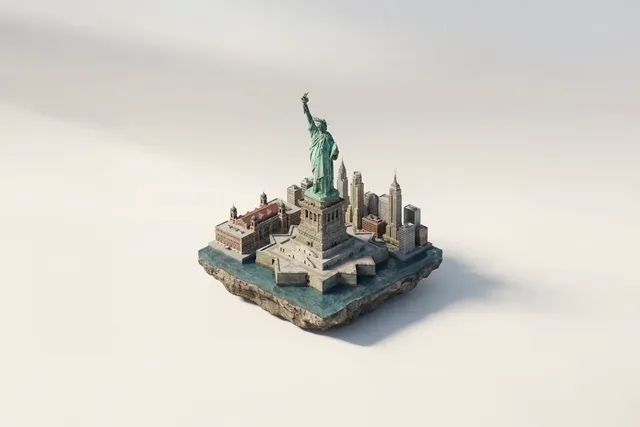
Creative effects in an AI photo editor include artistic transformations like watercolor, neon lighting, claymation style, dramatic weather, or surreal compositions. You upload a photo, describe the effect you want, and review the transformed image before deciding to use it.
AI Photo Editor Creative Effects
Watercolor portrait
Input
Upload a portrait and request a painterly watercolor version with soft textures while keeping the subject recognizable.
Expected output
A portrait with watercolor brush effects, blended colors, and artistic texture while maintaining facial features.
Neon city night
Input
Upload a street photo and request bright neon accents, stronger reflections, and a cyberpunk mood.
Expected output
The street scene with vibrant neon lights, glowing signs, and wet pavement reflections for a futuristic feel.
Claymation product
Input
Upload a sneaker photo and request a playful clay-style rendering with the same overall shape.
Expected output
A claymation-style version of the sneaker with soft rounded edges and a handcrafted texture.
Apply creative visual effects to a photo, from subtle enhancements to surreal artistic transformations.
Start with your own photo
Use an image you already have instead of building the creative effect from scratch.
Choose the effect intensity
Describe whether you want a subtle enhancement or a dramatic surreal transformation.
Review before using
Compare the effect-applied version with the original before deciding whether it works for your purpose.
How It Works
1
Upload the photo you want to transform
Start with an image you have the right to edit.
2
Describe the creative effect
Keep the requested edits specific so the intended profile look is clear.
3
Generate, review, and download
Review the output for likeness, accuracy, and the final profile crop before using it.
Applying creative effects effectively
A clear photo with a simple composition makes it easier to apply creative effects that look intentional rather than chaotic.
Input Constraints
- Only upload images you have permission to edit.
- Describe the effect style, intensity, and any features to preserve.
- Review the result to confirm the effect matches your creative intent and the subject is still recognizable if needed.
Practical Tips
- Start with a well-composed photo where the main subject is clear.
- Specify the effect type (painterly, neon, clay, dramatic weather) and intensity level.
- Compare the result with the original to decide if the effect is too subtle or too extreme.
Privacy
- Do not upload personal or sensitive material unless you have permission to use it.
Usage Rights
- Confirm that you have the rights needed for the inputs and intended use of the result.
Prompt recipes
Copy a structure, then adjust the subject, lighting, camera, and output details for your own result.
Soft watercolor portrait
Transform this portrait into a soft watercolor painting with blended colors, visible brush strokes, and the face still recognizable.
Specifies the artistic medium, color blending, texture detail, and preservation requirement for a painterly yet identifiable result.
Cyberpunk neon street
Add bright neon signs, glowing reflections on wet pavement, and a dark moody sky to this street photo for a cyberpunk look.
Describes the lighting elements, surface effects, and mood to guide a cohesive futuristic transformation.
Claymation object style
Render this product as a claymation figure with soft rounded edges, matte surface, and a handcrafted texture.
Defines the rendering style, shape treatment, surface finish, and texture to create a playful claymation effect.
Dramatic storm atmosphere
Add heavy storm clouds, lightning in the distance, and darker tones to this landscape for a dramatic weather effect.
Specifies the weather elements, lighting accent, and color grading to produce a believable dramatic mood.
Surreal double exposure
Blend this portrait with a forest scene using double exposure effect, with trees visible through the face and soft color blending.
Describes the compositing technique, overlay content, transparency, and color treatment for a surreal artistic result.
Vintage paper texture overlay
Apply a vintage paper texture with faded edges, sepia tones, and light creases to this photo for an aged look.
Defines the texture type, color grading, aging details, and framing to create a nostalgic vintage effect.
Best use cases
Match the workflow to the input you have and the result you need before opening the generator.
Artistic portrait for prints
Input: Clear portrait with good lighting and simple background
Result: Painterly or illustrated version suitable for wall art or keepsakes
Tool: Image to Image with watercolor or illustration prompt
Futuristic scene for creative projects
Input: Street or urban photo with visible architecture
Result: Neon-lit cyberpunk or sci-fi atmosphere for album covers or concept art
Tool: Image to Image with neon or futuristic prompt
Playful product rendering
Input: High-resolution product photo with clean background
Result: Claymation or toy-style version for fun marketing or social media
Tool: Image to Image with claymation or toy style prompt
Dramatic landscape mood
Input: Landscape or nature photo with sky visible
Result: Storm, sunset, or surreal weather effect for dramatic storytelling
Tool: Image to Image with weather or mood prompt
Surreal composite art
Input: Portrait or subject photo for blending
Result: Double exposure or surreal blend with second scene for creative expression
Tool: Image to Image with double exposure or surreal prompt
Limitations to know before generating
- Complex photos with many subjects or busy backgrounds may produce chaotic results when creative effects are applied.
- The tool interprets effect descriptions based on natural language, which may not always match your exact artistic vision.
- Some effects work better on certain types of photos—portraits may not suit every effect, and landscapes may not suit others.
- Results should be reviewed to confirm the effect looks intentional and the subject is still recognizable if needed.
- You are responsible for confirming you have the rights to edit and use the photo with creative effects applied.
Creative Suite: AI Video Generator & AI Image Generator Tools
Power up your creative workflow with our AI-driven tools. Generate stunning videos, create images, and apply custom adjustments - our AI Video Generator and AI Image Generator offer a complete solution for all your creative needs.
Strictly Prohibits Adult/NSFW Content








Pricing
Choose the credit package that works best for you.
No hidden fees • Cancel anytime • Unused credits roll over
Starter
Perfect for trying out AI creation.
Credits
200 credits / month
- Up to 20 videos per month
- Up to 100 images per month
$6.99/ month$9.9930% OFF
Billed monthly
First-time subscribers get 30% off their first month, then standard price
What's included
- Credits never expire
- Standard models
- HD, Watermark-Free Downloads
- Private Generation
- Faster Generation Speed
- Ad-free experience
Basic
Perfect for light creators.
Credits
500 credits / month
- Up to 50 videos per month
- Up to 250 images per month
$13.99/ month$19.9930% OFF
Billed monthly
First-time subscribers get 30% off their first month, then standard price
What's included
- Credits never expire
- Standard models
- HD, Watermark-Free Downloads
- Private Generation
- Faster Generation Speed
- Ad-free experience
Pro
PopularBest value for creators
Credits
1,200 credits / month
- Up to 120 videos per month
- Up to 600 images per month
$39.99/ month
Billed monthly
What's included
- Credits never expire
- All models + Early access to new models
- HD, Watermark-Free Downloads
- Private Generation
- Faster Generation Speed
- Ultra HD resolution
- Ad-free experience
Ultra
For video creators and power users.
Credits
5,000 credits / month
- Up to 500 videos per month
- Up to 2,500 images per month
$99.99/ month
Billed monthly
What's included
- Credits never expire
- All models + Early access to new models
- HD, Watermark-Free Downloads
- Private Generation
- Faster Generation Speed
- Ultra HD resolution
- Ad-free experience
Free
Standard models only — upgrade to unlock premium models.
Credits
10 free credits on signup
Questions? Contact us at support@domer.io
Apply creative effects to your photo
Open Image to Image, upload your image, describe the effect you want, and review the result before you use it.