
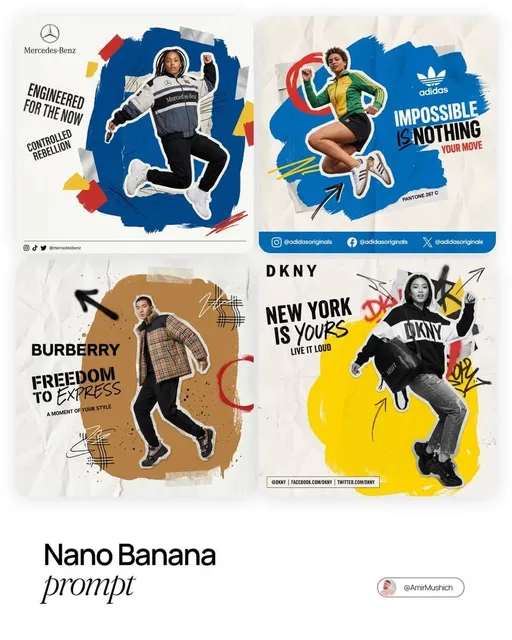
Advanced AI Logo Generator for Brand Marks
Use advanced ai logo generator to describe the icon, wordmark, palette, and mood in one prompt, then refine until you have a concept worth reviewing further.
AI Image Generator
0/20000 characters
My images
Loading...

What makes this logo generator advanced?
An advanced AI logo generator lets you write a detailed brief covering the mark style, typography, color palette, and visual mood in a focused prompt, then iterate on one element at a time until the concept matches your vision. This workflow gives you more control over the first draft and faster comparisons between design directions.
Advanced AI Logo Generator for Brand Marks
Law firm monogram
Input
A refined logo for a law firm named Hartwell & Co, monogram HC in serif letters, navy and gold, clean and formal, white background
Expected output
A formal monogram concept with serif initials, navy and gold accents, and a restrained layout suitable for stationery.
Food delivery icon
Input
A friendly logo for a food delivery app called QuickBite, a bold fork and takeout box icon, bright orange, rounded shapes
Expected output
A rounded icon concept pairing a fork silhouette with a takeout box in bright orange, with the app name in bold lettering.
Fitness brand lockup
Input
An energetic logo for a fitness studio called PulseFit, a lightning bolt with a heart pulse line, teal and charcoal, modern flat style
Expected output
A flat modern lockup combining the bolt and pulse motif in teal and charcoal, with the studio name set beside the icon.
Create refined logo concepts from detailed text descriptions
Work from a detailed brief
Describe the mark, palette, and mood in one prompt so the first concepts already reflect the direction you had in mind.
Test directions fast
Generate multiple variations and compare them side by side before spending time polishing a single idea.
Keep refining cheaply
Change one detail per round and regenerate until the concept reads the way you want, instead of redrawing from scratch.
How It Works
1
Write the brief
Describe the desired image.
2
Pick options
Choose the available generation settings.
3
Generate and save
Generate, review, and download a suitable result.
Getting more control from your prompt
Small prompt details change the character of the mark.
Input Constraints
- State the logo subject and the exact text you want shown.
- Name the style: minimal, vintage, geometric, bold, or similar.
- Keep the color palette to two or three colors for a cleaner mark.
- Specify the background, such as white or transparent-looking.
Practical Tips
- Describe the icon and the wordmark separately in the prompt.
- Use 'flat vector logo' for a simpler, scalable-looking result.
- Review small text and spacing before using the concept.
- Regenerate after one targeted change instead of a full rewrite.
Privacy
- Do not upload personal or sensitive material unless you have permission to use it.
Usage Rights
- Confirm that you have the rights needed for the inputs and intended use of the result.
Prompt recipes
Copy a structure, then adjust the subject, lighting, camera, and output details for your own result.
Tech startup wordmark
A modern logo for a cloud platform named Nimbus, lowercase sans-serif wordmark, gradient from deep blue to cyan, minimal cloud icon integrated into the N, clean white background
Specifies typography style, exact gradient colors, and a subtle integrated icon, giving the generator clear visual cues for a cohesive tech brand identity.
Vintage bakery emblem
A warm logo for a bakery called Golden Grain, circular badge with wheat stalks framing the name, hand-drawn script font, cream and brown tones, vintage stamp style
Calls out the badge shape, decorative framing elements, and period style, which helps the generator produce a mark with authentic vintage character.
Minimalist wellness icon
A calm logo for a meditation app named Stillness, simple line-art lotus flower, single sage green color, centered on white, geometric and minimal
Focuses on one symbolic element, a restrained color palette, and a clear style direction, making it easy to iterate on line weight and spacing.
Bold sports team crest
An energetic logo for a soccer club named Thunder FC, shield shape with lightning bolt and soccer ball, red and black color scheme, sharp angles, dynamic composition
Combines structural guidance (shield, angles) with symbolic elements and a high-contrast palette, producing a mark that reads boldly at any size.
Playful kids brand character
A friendly logo for a toy brand called Giggle & Co, cartoon bear face with a bowtie, bright yellow and orange, rounded shapes, cheerful expression
Describes character details, expression, and shape language, giving the generator enough personality cues to create a memorable mascot mark.
Best use cases
Match the workflow to the input you have and the result you need before opening the generator.
Starting a new brand and need logo concepts fast
Input: Detailed brief with brand name, industry, desired mood, and color direction
Result: Multiple concept drafts you can compare and refine before hiring a designer or finalizing the mark
Tool: Text to Image with style keywords like 'flat vector logo' or 'minimal badge'
Exploring different visual directions for an existing brand
Input: Fixed brand name and palette, varied style prompts such as geometric, vintage, or illustrative
Result: Side-by-side design explorations that help you decide which direction to pursue
Tool: Text to Image, generating one variant per style and comparing the results
Creating a quick mark for a side project or event
Input: Simple subject, one or two colors, clear background, and minimal style
Result: A clean, functional mark you can use immediately for social profiles or print materials
Tool: Text to Image with a focused, single-element prompt
Limitations to know before generating
- Generated marks may need manual cleanup for small text legibility and precise spacing.
- Complex compositions with multiple icons or layered text can produce unclear results at small sizes.
- The generator interprets your prompt but cannot guarantee exact font matches or trademark availability.
- Results may require rights review before commercial use, especially if the prompt references specific visual styles.
- Iteration is necessary — the first output is a starting point, not a finished logo file.
Creative Suite: AI Video Generator & AI Image Generator Tools
Power up your creative workflow with our AI-driven tools. Generate stunning videos, create images, and apply custom adjustments - our AI Video Generator and AI Image Generator offer a complete solution for all your creative needs.
Strictly Prohibits Adult/NSFW Content








Pricing
Choose the credit package that works best for you.
No hidden fees • Cancel anytime • Unused credits roll over
Starter
Perfect for trying out AI creation.
Credits
200 credits / month
- Up to 20 videos per month
- Up to 100 images per month
$6.99/ month$9.9930% OFF
Billed monthly
First-time subscribers get 30% off their first month, then standard price
What's included
- Credits never expire
- Standard models
- HD, Watermark-Free Downloads
- Private Generation
- Faster Generation Speed
- Ad-free experience
Basic
Perfect for light creators.
Credits
500 credits / month
- Up to 50 videos per month
- Up to 250 images per month
$13.99/ month$19.9930% OFF
Billed monthly
First-time subscribers get 30% off their first month, then standard price
What's included
- Credits never expire
- Standard models
- HD, Watermark-Free Downloads
- Private Generation
- Faster Generation Speed
- Ad-free experience
Pro
PopularBest value for creators
Credits
1,200 credits / month
- Up to 120 videos per month
- Up to 600 images per month
$39.99/ month
Billed monthly
What's included
- Credits never expire
- All models + Early access to new models
- HD, Watermark-Free Downloads
- Private Generation
- Faster Generation Speed
- Ultra HD resolution
- Ad-free experience
Ultra
For video creators and power users.
Credits
5,000 credits / month
- Up to 500 videos per month
- Up to 2,500 images per month
$99.99/ month
Billed monthly
What's included
- Credits never expire
- All models + Early access to new models
- HD, Watermark-Free Downloads
- Private Generation
- Faster Generation Speed
- Ultra HD resolution
- Ad-free experience
Free
Standard models only — upgrade to unlock premium models.
Credits
10 free credits on signup
Questions? Contact us at support@domer.io
Draft your next logo concept
Open the text-to-image tool, describe the mark you need, and review the generated concepts before deciding on a direction.