
Create
AI Image Generator Alibaba Product Shots
Generate product listing visuals for e-commerce. Describe your item, choose settings, and create images to review and download.
AI Image Generator
0/20000 characters
My images
Loading...
Using AI image generators for Alibaba product listings
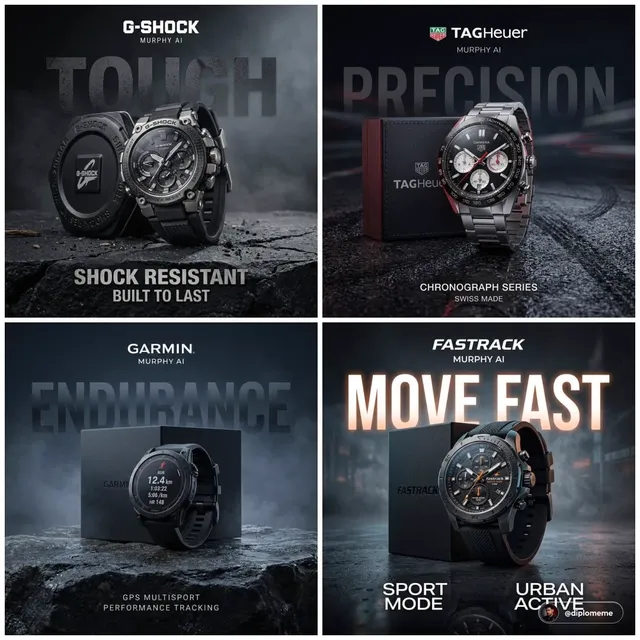
An AI image generator for Alibaba-style product shots creates e-commerce visuals from text descriptions. You describe the product, background, lighting, and angle, then generate a result to review. Effective prompts include the item type, material, color, a clean background like white or neutral, studio lighting cues, and the viewing angle—front, three-quarter, or top-down. This workflow helps visualize product concepts before photography or test different presentation styles.
AI Image Generator Alibaba Product Shots
Ceramic tea set on neutral background
Input
A minimalist ceramic tea set on a soft neutral background, soft daylight from the left, clean product-photo composition
Expected output
A clean product-style image of a ceramic tea set on a neutral background with soft daylight
Folding camping chair angled view
Input
A folding camping chair in an outdoor setting, three-quarter angle, green fabric, bright daylight, sharp product-photo look
Expected output
A bright outdoor product image of a green folding camping chair at a three-quarter angle
Leather wallet with packaging
Input
A brown leather wallet beside its cardboard packaging on a light wood surface, top-down view, soft studio light
Expected output
A top-down studio image of a leather wallet with matching packaging on light wood
Create product photography for e-commerce listings by describing the item and generation settings
Preview listing visuals before production
Describe the product and setting, then generate a visual to evaluate layout, colors, and framing.
Describe once, iterate quickly
Change the background or angle in your description and generate again until the shot fits the listing.
Simple three-step flow
Describe the item, choose the available settings, then generate, review, and download a suitable result.
How It Works
1
Describe the product shot
Describe the desired image.
2
Choose the settings
Choose the available generation settings.
3
Generate and review
Generate, review, and download a suitable result.
Prompt guidance for listing-style product images
Practical notes for describing product shots that generate cleanly.
Input Constraints
- Describe the item, its setting, and the viewing angle
- Keep lighting and background cues concrete and simple
- Do not upload personal or sensitive material unless you have permission to use it
Practical Tips
- Name the main material and color of the item
- Specify the angle, such as front, three-quarter, or top-down
- Choose a background that does not distract from the product
Privacy
- Do not upload personal or sensitive material unless you have permission to use it.
Usage Rights
- Confirm that you have the rights needed for the inputs and intended use of the result.
Prompt recipes
Copy a structure, then adjust the subject, lighting, camera, and output details for your own result.
Clean white background product shot
A stainless steel water bottle on a pure white background, front-facing view, even studio lighting, no shadows, e-commerce product photography
Specifies white background, even lighting, and front angle—classic e-commerce requirements that match Alibaba listing standards.
Lifestyle product in use context
A canvas backpack worn by a person hiking on a forest trail, side view showing pockets and straps, natural daylight, outdoor product photography
Shows the product in a real-world setting that helps buyers understand size, fit, and use case while maintaining product focus.
Three-quarter angle with detail focus
A bamboo cutting board at a three-quarter angle on a marble countertop, soft window light from the right, highlighting wood grain texture, kitchen product shot
Three-quarter angle reveals shape and depth, while material and texture cues help the generator produce detail-rich product imagery.
Flat-lay packaging display
A set of colorful silicone kitchen utensils arranged in a flat-lay grid on a light gray surface, top-down view, bright even lighting, product catalog style
Top-down flat-lay works well for sets and kits, showing all items clearly with even lighting for a catalog-ready look.
Product with scale reference
A wireless keyboard next to a smartphone and coffee cup on a wooden desk, angled view, morning light, lifestyle workspace photography
Including familiar objects like a phone or cup gives buyers a sense of scale and context, improving product comprehension.
Best use cases
Match the workflow to the input you have and the result you need before opening the generator.
Standard product listing image
Input: Product name, color, material, white or neutral background, front or three-quarter angle, studio lighting
Result: Clean product photo suitable for primary listing image
Tool: AI Image Generator with e-commerce style keywords
Lifestyle product shot
Input: Product in use context, setting description, natural lighting, person or environment included
Result: Contextual image showing product application and scale
Tool: AI Image Generator with lifestyle and outdoor/indoor cues
Product detail or texture highlight
Input: Close-up or angled view, material and texture keywords, directional lighting to show detail
Result: Image emphasizing product quality and craftsmanship
Tool: AI Image Generator with texture and close-up descriptors
Product set or kit display
Input: Multiple items arranged flat or grouped, top-down or grid layout, even lighting
Result: Catalog-style image showing all components clearly
Tool: AI Image Generator with flat-lay and catalog style terms
Limitations to know before generating
- Generated images are concept visualizations, not product photography—details may not match your exact item
- Text, logos, and fine product details may not render accurately; review carefully before using in listings
- E-commerce platforms have specific image requirements for dimensions, backgrounds, and content—verify compliance
- Products with complex geometry or mechanical parts may require multiple generation attempts to look correct
- Lighting and color accuracy can vary; consider this when representing actual product colors to buyers
Creative Suite: AI Video Generator & AI Image Generator Tools
Power up your creative workflow with our AI-driven tools. Generate stunning videos, create images, and apply custom adjustments - our AI Video Generator and AI Image Generator offer a complete solution for all your creative needs.
Strictly Prohibits Adult/NSFW Content








Pricing
Choose the credit package that works best for you.
No hidden fees • Cancel anytime • Unused credits roll over
Starter
Perfect for trying out AI creation.
Credits
200 credits / month
- Up to 20 videos per month
- Up to 100 images per month
$6.99/ month$9.9930% OFF
Billed monthly
First-time subscribers get 30% off their first month, then standard price
What's included
- Credits never expire
- Standard models
- HD, Watermark-Free Downloads
- Private Generation
- Faster Generation Speed
- Ad-free experience
Basic
Perfect for light creators.
Credits
500 credits / month
- Up to 50 videos per month
- Up to 250 images per month
$13.99/ month$19.9930% OFF
Billed monthly
First-time subscribers get 30% off their first month, then standard price
What's included
- Credits never expire
- Standard models
- HD, Watermark-Free Downloads
- Private Generation
- Faster Generation Speed
- Ad-free experience
Pro
PopularBest value for creators
Credits
1,200 credits / month
- Up to 120 videos per month
- Up to 600 images per month
$39.99/ month
Billed monthly
What's included
- Credits never expire
- All models + Early access to new models
- HD, Watermark-Free Downloads
- Private Generation
- Faster Generation Speed
- Ultra HD resolution
- Ad-free experience
Ultra
For video creators and power users.
Credits
5,000 credits / month
- Up to 500 videos per month
- Up to 2,500 images per month
$99.99/ month
Billed monthly
What's included
- Credits never expire
- All models + Early access to new models
- HD, Watermark-Free Downloads
- Private Generation
- Faster Generation Speed
- Ultra HD resolution
- Ad-free experience
Free
Standard models only — upgrade to unlock premium models.
Credits
10 free credits on signup
Questions? Contact us at support@domer.io
Visualize your next listing image
Open the image generator, describe the product shot you need, and create an image you can review and download.