
AI Image Generator for Designers
Turn briefs into visual concepts fast. Describe the style, mood, and palette, then generate and review images to guide your design work.
AI Image Generator
0/20000 characters
My images
Loading...
How do designers use an AI image generator?
Designers use an AI image generator to turn client briefs into early visual concepts, mood-board images, or scene ideas. You write a prompt describing the style and mood, generate the image, then review and refine it before moving to detailed design.
AI Image Generator for Designers
Early layout concept
Input
A hero banner for a wellness brand, soft sage and cream tones, calm negative space, minimal type suggestion
Expected output
A banner-style visual in the described palette; layout and typography are suggestions to react to, not final design.
Mood board image
Input
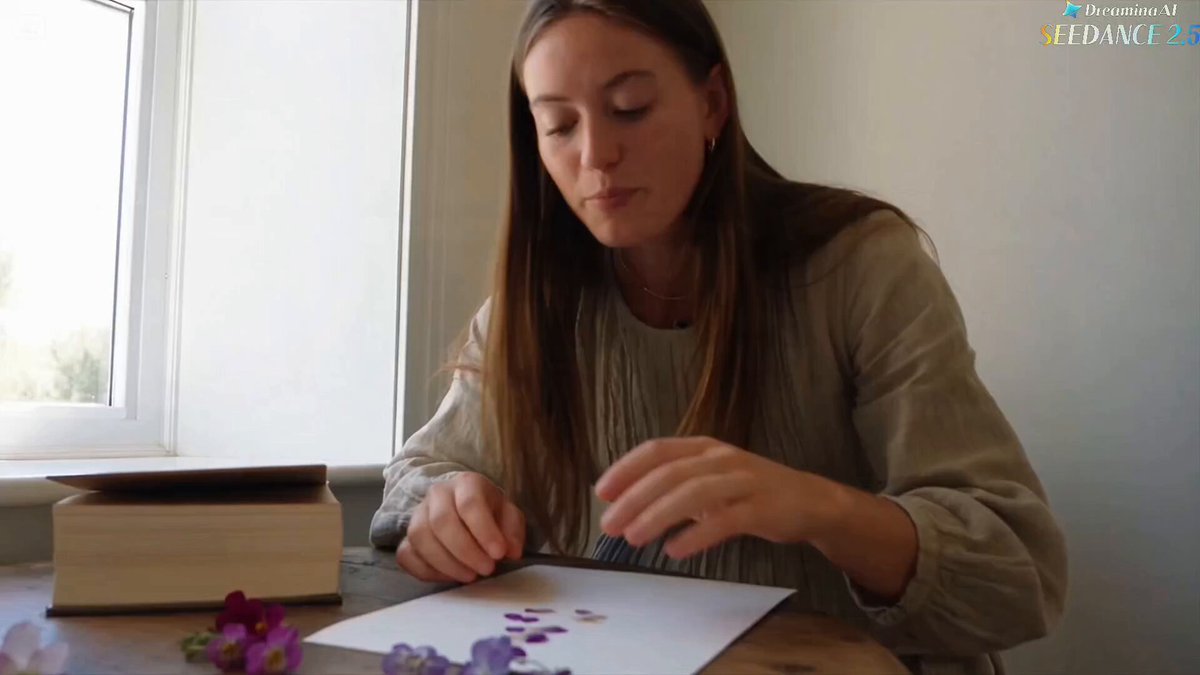
A textured beige surface with dried flowers and a ceramic vase, natural window light, warm and quiet
Expected output
A mood-board-style image matching the described palette and texture; exact object placement varies.
Packaging idea
Input
A matte paper box in dusty green with a simple botanical line illustration, soft studio shadow
Expected output
A packaging-style visual based on the description; proportions and label details are interpretations.
Turn prompt ideas into reviewable image concepts early in a design project
Faster concept rounds
Turning a brief into a reviewable visual early helps you compare directions before committing to detailed design.
Prompt-driven direction
You control palette, mood, and style through the description, so each concept follows the brief you set.
Review built into the flow
The workflow asks you to review each result before download, which fits a design review process.
How It Works
1
Describe the image
Describe the desired image.
2
Choose settings
Choose the available generation settings.
3
Generate and review
Generate, review, and download a suitable result.
Using generated visuals in design
Treat generated images as starting points to critique and refine rather than finished deliverables.
Input Constraints
- Describe the visual direction, palette, and mood
- Use only inputs you have permission to use
- Review results for accuracy and rights before client use
- Confirm rights for inputs and intended use before reuse
Practical Tips
- Write the brief as one clear sentence first
- Name the palette and mood to keep concepts consistent
- Generate a few variants before choosing a direction
- Document which prompt produced which concept
Privacy
- Do not upload personal or sensitive material unless you have permission to use it.
Usage Rights
- Confirm that you have the rights needed for the inputs and intended use of the result.
Prompt recipes
Copy a structure, then adjust the subject, lighting, camera, and output details for your own result.
Hero Banner Concept
A wide hero banner for a fintech brand, deep navy background, subtle geometric line patterns, gold accent line, clean modern feel
Specifies format, brand sector, palette, pattern style, and mood, giving you a layout concept to critique.
Mood Board Texture
A close-up of linen fabric with a sprig of eucalyptus, soft natural light, muted greens and beige, organic and calm
Focuses on texture, material, and color mood, perfect for a mood board that sets the visual direction.
Product Packaging Mockup
A simple glass bottle with a minimalist label on a marble surface, soft overhead light, clean white and rose gold palette
Describes product, surface, lighting, and palette, producing a reviewable packaging concept.
Editorial Illustration
An abstract illustration of interconnected nodes and lines, representing data flow, cool blue and teal gradient, modern digital aesthetic
Names the subject, metaphor, palette, and aesthetic, ideal for an editorial or explainer visual.
Brand Identity Element
A repeating pattern of overlapping organic shapes, soft pastel pink and lavender, hand-drawn feel, seamless tile
Describes pattern structure, palette, and style, useful for brand backgrounds or textiles.
Website Background Concept
A blurred gradient background transitioning from warm peach to soft coral, subtle noise texture, abstract and modern
Specifies gradient direction, color, texture, and mood, giving you a clean website backdrop to evaluate.
Best use cases
Match the workflow to the input you have and the result you need before opening the generator.
Need a concept visual for a client presentation
Input: Brief summary, palette, mood, and format (hero, banner, product shot)
Result: A reviewable visual that conveys the direction and helps the client choose a path
Tool: AI Image Generator with brief-focused prompt
Building a mood board for a new brand
Input: Texture, material, color palette, lighting, and organic or geometric style
Result: A set of cohesive mood-board images that define the visual language
Tool: AI Image Generator with texture and palette keywords
Exploring packaging design directions
Input: Product type, material, label style, surface, lighting, and palette
Result: Multiple packaging concepts you can compare and refine
Tool: AI Image Generator with packaging-specific prompts
Generating editorial or explainer graphics
Input: Subject metaphor, abstract or representational style, palette, and intended use
Result: An illustration or graphic that supports the editorial message
Tool: AI Image Generator with metaphor and aesthetic keywords
Limitations to know before generating
- Generated visuals are concept drafts, not production-ready assets; expect refinement.
- Typography, exact proportions, and fine details often require manual adjustment.
- Color accuracy may vary; confirm palette against your brand guide before presenting.
- Complex compositions with multiple layers or precise alignment are difficult to generate consistently.
- You remain responsible for confirming rights and reviewing results for client suitability.
Creative Suite: AI Video Generator & AI Image Generator Tools
Power up your creative workflow with our AI-driven tools. Generate stunning videos, create images, and apply custom adjustments - our AI Video Generator and AI Image Generator offer a complete solution for all your creative needs.
Strictly Prohibits Adult/NSFW Content








Pricing
Choose the credit package that works best for you.
No hidden fees • Cancel anytime • Unused credits roll over
Starter
Perfect for trying out AI creation.
Credits
200 credits / month
- Up to 20 videos per month
- Up to 100 images per month
$6.99/ month$9.9930% OFF
Billed monthly
First-time subscribers get 30% off their first month, then standard price
What's included
- Credits never expire
- Standard models
- HD, Watermark-Free Downloads
- Private Generation
- Faster Generation Speed
- Ad-free experience
Basic
Perfect for light creators.
Credits
500 credits / month
- Up to 50 videos per month
- Up to 250 images per month
$13.99/ month$19.9930% OFF
Billed monthly
First-time subscribers get 30% off their first month, then standard price
What's included
- Credits never expire
- Standard models
- HD, Watermark-Free Downloads
- Private Generation
- Faster Generation Speed
- Ad-free experience
Pro
PopularBest value for creators
Credits
1,200 credits / month
- Up to 120 videos per month
- Up to 600 images per month
$39.99/ month
Billed monthly
What's included
- Credits never expire
- All models + Early access to new models
- HD, Watermark-Free Downloads
- Private Generation
- Faster Generation Speed
- Ultra HD resolution
- Ad-free experience
Ultra
For video creators and power users.
Credits
5,000 credits / month
- Up to 500 videos per month
- Up to 2,500 images per month
$99.99/ month
Billed monthly
What's included
- Credits never expire
- All models + Early access to new models
- HD, Watermark-Free Downloads
- Private Generation
- Faster Generation Speed
- Ultra HD resolution
- Ad-free experience
Free
Standard models only — upgrade to unlock premium models.
Credits
10 free credits on signup
Questions? Contact us at support@domer.io
Turn a brief into a visual
Open the text-to-image tool, describe the concept from your brief, and work through the generation steps.