
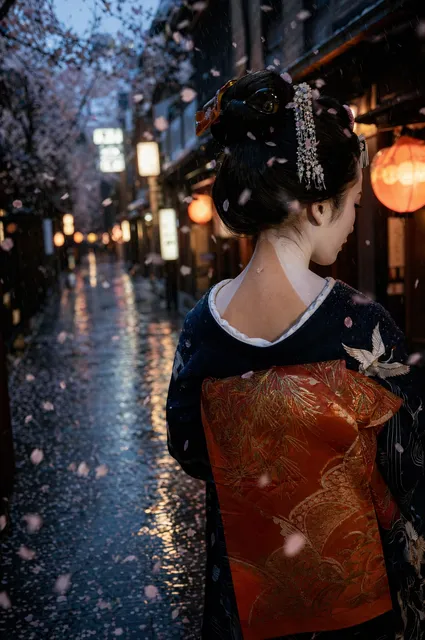
ASCII AI Art Generator
Use ascii ai art generator to create retro ASCII-style images from text. Describe a character-grid or terminal aesthetic, choose your settings, and download.
AI Image Generator
0/20000 characters
My images
Loading...
What is an ASCII AI art generator?
An ASCII AI art generator creates images that resemble ASCII art or character-grid patterns. You describe the subject along with style keywords like 'ASCII', 'monochrome', or 'character-grid', and the tool generates images with a retro terminal or pixel-inspired aesthetic.
ASCII AI Art Generator
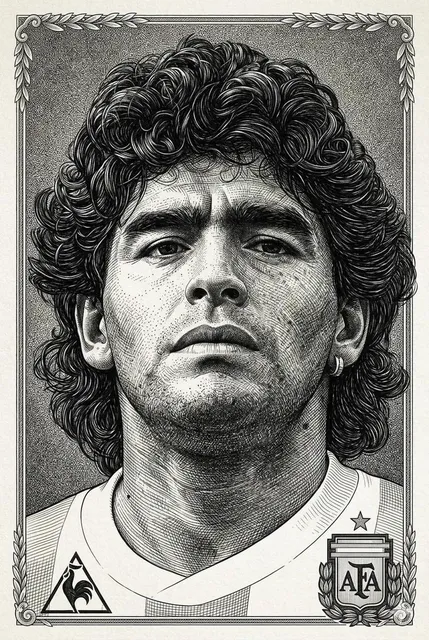
ASCII Portrait
Input
A portrait rendered as dense ASCII character patterns, monochrome, high contrast, subtle shading created by varying character density
Expected output
A monochrome portrait image that resembles ASCII character patterns with varied density for shading
Retro Terminal Scene
Input
A retro terminal-style landscape with blocky character-like shapes, green monochrome palette, grid lines, vintage computer aesthetic
Expected output
A green monochrome landscape with blocky shapes and grid lines evoking a retro terminal display
Pixel-Art Style Illustration
Input
A pixel-art castle scene with blocky towers, limited colour palette, sky with pixelated clouds, 8-bit game aesthetic
Expected output
A pixel-art castle with blocky towers, a limited colour palette, and pixelated sky details
Generate images with ASCII-art or retro character-grid aesthetics from text prompts
ASCII-Style from Text Alone
Describe the character-grid or retro aesthetic you want and get images that mimic ASCII art patterns.
Retro Computing Aesthetics
Create images with terminal-style, pixel-art, and monochrome character-grid looks without manual placement.
Unique Textured Visuals
Produce distinctive imagery that blends digital art, retro computing, and pixel-inspired aesthetics.
How It Works
1
Describe the desired image
Describe the desired image.
2
Choose the available generation settings
Choose the available generation settings.
3
Generate, review, and download a suitable result
Generate, review, and download a suitable result.
Tips for ASCII-style prompts
Use descriptive keywords that suggest character-grid, monochrome, and pixel aesthetics.
Input Constraints
- Use keywords such as ASCII, character-grid, monochrome, or pixel-art
- Describe the subject clearly so the pattern-like style is applied to it
- Specify colour palette — monochrome or limited colours work best
Practical Tips
- Add 'dense character pattern' or 'blocky shapes' for a stronger ASCII effect
- Try 'green monochrome' or 'amber tones' for a terminal-style look
- Generate multiple variations to find the best pattern density
Privacy
- Do not upload personal or sensitive material unless you have permission to use it.
Usage Rights
- Confirm that you have the rights needed for the inputs and intended use of the result.
Prompt recipes
Copy a structure, then adjust the subject, lighting, camera, and output details for your own result.
Green terminal portrait
A human face rendered in dense ASCII characters, green monochrome palette, CRT screen glow, varying character density for shadows and highlights, retro terminal aesthetic
Combines ASCII character patterns with a classic green terminal palette and CRT glow for an authentic retro computing look.
Blocky pixel cityscape
A cityscape with blocky pixel buildings, limited 8-bit color palette, grid lines visible, sky with pixelated clouds, retro video game aesthetic
Uses blocky shapes, a limited color set, and grid lines to create a clear 8-bit game visual style.
Monochrome ASCII landscape
A mountain landscape created entirely from ASCII text characters, white on black background, varying character density to show depth and texture, computer terminal art style
Focuses on character-density variation and monochrome contrast to achieve a true ASCII art appearance.
Amber-toned retro interface
A spaceship cockpit rendered in amber monochrome tones, blocky character-like shapes, grid overlay, vintage computer monitor aesthetic
Amber monochrome and blocky shapes evoke early computer displays, creating a nostalgic sci-fi terminal look.
Pixel-art character sprite
A knight character in pixel-art style, 16-bit color palette, blocky armor details, transparent background, classic RPG game sprite aesthetic
Uses pixel-art and 16-bit color references plus blocky shapes to produce a recognizable game sprite look.
Best use cases
Match the workflow to the input you have and the result you need before opening the generator.
Retro branding and design
Input: Prompts with monochrome palettes, terminal keywords, and blocky or character-based shapes
Result: Images with a retro computing aesthetic suitable for tech, gaming, or nostalgia-themed branding
Tool: Text to Image with ASCII and terminal-style keywords
Pixel art for games or content
Input: Descriptions using pixel-art, blocky, and limited-color palette keywords
Result: Pixel-style illustrations for game concepts, social media, or creative projects
Tool: Text to Image with 8-bit and pixel-art style cues
Artistic experiments with texture
Input: Exploratory prompts mixing character-grid, monochrome, and dense pattern keywords
Result: Unique textured images that blend digital art with retro computing aesthetics
Tool: Text to Image with iterative prompt refinement
Limitations to know before generating
- Generated images resemble ASCII or pixel aesthetics but are rendered as standard images, not actual ASCII text
- Character density and pattern detail may vary; fine control over individual character placement is not available
- Monochrome and limited-color palettes work best; complex color gradients may reduce the ASCII-like appearance
- Review each result for suitability, as not all subjects translate clearly to blocky or character-based styles
Creative Suite: AI Video Generator & AI Image Generator Tools
Power up your creative workflow with our AI-driven tools. Generate stunning videos, create images, and apply custom adjustments - our AI Video Generator and AI Image Generator offer a complete solution for all your creative needs.
Strictly Prohibits Adult/NSFW Content








Pricing
Choose the credit package that works best for you.
No hidden fees • Cancel anytime • Unused credits roll over
Starter
Perfect for trying out AI creation.
Credits
200 credits / month
- Up to 20 videos per month
- Up to 100 images per month
$6.99/ month$9.9930% OFF
Billed monthly
First-time subscribers get 30% off their first month, then standard price
What's included
- Credits never expire
- Standard models
- HD, Watermark-Free Downloads
- Private Generation
- Faster Generation Speed
- Ad-free experience
Basic
Perfect for light creators.
Credits
500 credits / month
- Up to 50 videos per month
- Up to 250 images per month
$13.99/ month$19.9930% OFF
Billed monthly
First-time subscribers get 30% off their first month, then standard price
What's included
- Credits never expire
- Standard models
- HD, Watermark-Free Downloads
- Private Generation
- Faster Generation Speed
- Ad-free experience
Pro
PopularBest value for creators
Credits
1,200 credits / month
- Up to 120 videos per month
- Up to 600 images per month
$39.99/ month
Billed monthly
What's included
- Credits never expire
- All models + Early access to new models
- HD, Watermark-Free Downloads
- Private Generation
- Faster Generation Speed
- Ultra HD resolution
- Ad-free experience
Ultra
For video creators and power users.
Credits
5,000 credits / month
- Up to 500 videos per month
- Up to 2,500 images per month
$99.99/ month
Billed monthly
What's included
- Credits never expire
- All models + Early access to new models
- HD, Watermark-Free Downloads
- Private Generation
- Faster Generation Speed
- Ultra HD resolution
- Ad-free experience
Free
Standard models only — upgrade to unlock premium models.
Credits
10 free credits on signup
Questions? Contact us at support@domer.io
Create retro ASCII-style art
Open the generator, describe your pixel or character-grid visual, and see what it creates.